

kotlin正则表达式识别年月日代码示例
kotlin - 正则表达式,识别年月日
<!--正则表达式日期识别,不需要处理2025.08.08的日期--> <string name="date_regex">(?:^|(?<![-\\d]))(?:(?:[2-9][0-9]{3}[-年](?:(?:0?[1-9]|1[0-2])[-月](?:0?[1-9]|[12][0-9]|3[01]))|(?:(?:0?[1-9]|1[0-2])[-月](?:0?[1-9]|[12][0-9]|3[01])))(?=(?:[日号]|$|(?![-\\d]))))[日号]?</string>结构分解
1. 向前边界检查 (?:^|(?<![-\\d]))
(?:^|(?<![-\\d]))
(?: ) - 非捕获分组
^ - 字符串开头
| - 或者
(?<![-\\d]) - 负向前瞻,确保前面不是 - 或数字
作用:确保匹配的日期要么在字符串开头,要么前面不是 - 或数字
2. 日期格式主体(分两部分)
第一部分:年月日格式
(?:[2-9][0-9]{3}[-年](?:(?:0?[1-9]|1[0-2])[-月](?:0?[1-9]|[12][0-9]|3[01]))
[2-9][0-9]{3} - 年份:2000-9999
[-年] - 分隔符:- 或 年
(?:0?[1-9]|1[0-2]) - 月份:1-12(可选前导零)
[-月] - 分隔符:- 或 月
(?:0?[1-9]|[12][0-9]|3[01]) - 日期:1-31(可选前导零)
第二部分:月日格式
|(?:(?:0?[1-9]|1[0-2])[-月](?:0?[1-9]|[12][0-9]|3[01]))
与第一部分相同,只是没有年份部分
3. 向后边界检查 (?=(?:[日号]|$|(?![-\\d])))
(?=(?:[日号]|$|(?![-\\d])))
(?= ) - 正向前瞻
[日号] - 后面是 日 或 号
$ - 或者字符串结尾
(?![-\\d]) - 或者后面不是 - 或数字
作用:确保日期后面是有效的边界
4. 可选后缀 [日号]?
[日号]?
可选的 日 或 号 后缀
package com.example.androidkotlindemo2.patternmatcher

import android.graphics.Color
import android.os.Bundle
import android.text.Spannable
import android.text.SpannableString
import android.text.style.BackgroundColorSpan
import android.text.style.ForegroundColorSpan
import android.widget.TextView
import androidx.appcompat.app.AppCompatActivity
import com.example.androidkotlindemo2.R
import com.example.androidkotlindemo2.utils.LogUtils
import java.util.regex.Pattern

/**
 * Author : wn
 * Email : maoning20080809@163.com
 * Date : 2025/10/12 10:34
 * Description : 正则表达式 - 识别日期,年月日
 */
class PatternMatcherMainActivity : AppCompatActivity(){

    var resultTextView : TextView? = null

    override fun onCreate(savedInstanceState: Bundle?) {
        super.onCreate(savedInstanceState)

        setContentView(R.layout.pattern_matcher_main)

        resultTextView = findViewById<TextView>(R.id.pattern_matcher_result)

        test()
    }

    private fun test(){
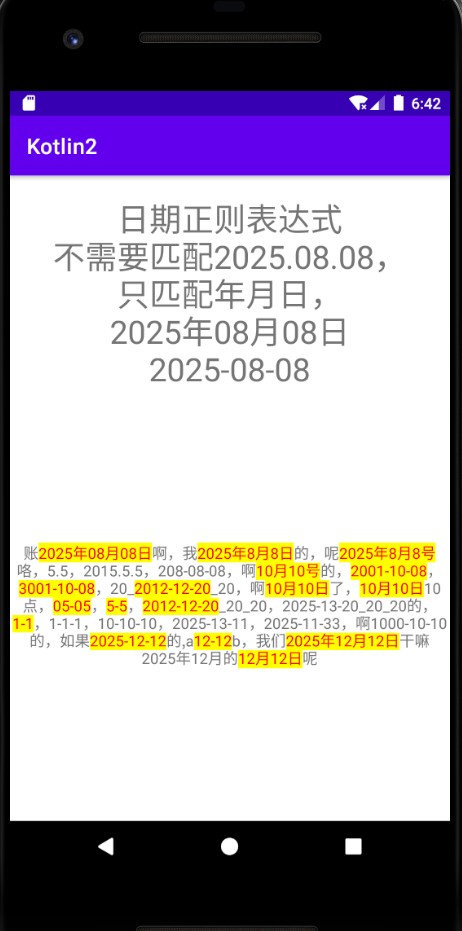
        val regexStr = resources.getString(R.string.date_regex)
        val matcherStr = "账2025年08月08日啊,我2025年8月8日的,呢2025年8月8号咯,5.5,2015.5.5,208-08-08,啊10月10号的,2001-10-08,3001-10-08,20_2012-12-20_20,啊10月10日了,10月10日10点,05-05,5-5,2012-12-20_20_20,2025-13-20_20_20的,1-1,1-1-1,10-10-10,2025-13-11,2025-11-33,啊1000-10-10的,如果2025-12-12的,a12-12b,我们2025年12月12日干嘛2025年12月的12月12日呢"

        val pattern = Pattern.compile(regexStr)
        val matcher = pattern.matcher(matcherStr)

        val spannableString = SpannableString(matcherStr)
        while (matcher.find()){
            val start = matcher.start();
            val end = matcher.end()

            //设置背景颜色高亮
            val backgroundColorSpan = BackgroundColorSpan(Color.YELLOW)
            spannableString.setSpan(backgroundColorSpan, start, end, Spannable.SPAN_EXCLUSIVE_EXCLUSIVE)

            //设置文字颜色
            val foregroundColorSpan = ForegroundColorSpan(Color.RED)
            spannableString.setSpan(foregroundColorSpan, start, end, Spannable.SPAN_EXCLUSIVE_EXCLUSIVE)

            val result = matcher.group()
            LogUtils.i("匹配到:" + result)
        }

        resultTextView?.setText(spannableString)
    }
}
pattern_matcher_main.xml布局:
<?xml version="1.0" encoding="utf-8"?>
<LinearLayout xmlns:android="http://schemas.android.com/apk/res/android"
    android:layout_width="match_parent"
    android:layout_height="match_parent"
    android:orientation="vertical">


    <TextView
        android:layout_width="match_parent"
        android:layout_height="wrap_content"
        android:gravity="center_horizontal"
        android:layout_marginTop="20dp"
        android:textSize="30sp"
        android:text="日期正则表达式\n不需要匹配2025.08.08,\n只匹配年月日,\n2025年08月08日\n2025-08-08"/>

    <TextView
        android:id="@+id/pattern_matcher_result"
        android:layout_width="match_parent"
        android:layout_height="match_parent"
        android:gravity="center"
        android:text="结果"/>


</LinearLayout>
<!--正则表达式日期识别,不需要处理2025.08.08的日期--> <string name="date_regex">(?:^|(?<![-\\d]))(?:(?:[2-9][0-9]{3}[-年](?:(?:0?[1-9]|1[0-2])[-月](?:0?[1-9]|[12][0-9]|3[01]))|(?:(?:0?[1-9]|1[0-2])[-月](?:0?[1-9]|[12][0-9]|3[01])))(?=(?:[日号]|$|(?![-\\d]))))[日号]?</string>总结
到此这篇关于kotlin正则表达式识别年月日的文章就介绍到这了,更多相关kotlin正则表达式识别年月日内容请搜索脚本之家以前的文章或继续浏览下面的相关文章希望大家以后多多支持脚本之家!
相关文章
 目前收集整理了21个常用的javaScript正则表达式,其中包括用户名、密码强度、整数、数字、电子邮件地址(Email)、手机号码、身份证号、URL地址、 IP地址、 十六进制颜色、 日期、 微信号、车牌号、中文正则等。感兴趣的朋友一起看看吧2019-04-04
iOS中使用正则表达式NSRegularExpression 来验证textfiled输入的内容
一个正则表达式(regexp)是由元字符和文字数字的文本字符,或者“文字的”(abc,123,及其他)混合组合而成的文本模式。 该类型用于匹配文本字符——并附有匹配的结果,是成功还是失败。 Regexps 主要用于规则文本匹配以及搜索和替换。2015-09-09 本文的宗旨在于教你如何理解URL的正则表达式,以达到理解正则表达式,以及能够在日后的工作中写出相对简单的正则。对js正则表达式解析url相关知识感兴趣的朋友一起学习吧2015-12-12
 去掉首位空格的方法有很多,在本文为大家介绍下使用正则表达式来完成,具体写法如下,喜欢的朋友可以参考下2013-11-11
 python语言虽然诞生很久,但是也是最近几年才火起来的。在python语言中,我们经常会用到python爬虫的正则表达式,下面小编通过本篇文章给大家介绍python爬虫正则表达式常用的符号和方法,以及具体用法,感兴趣的童鞋快来看看吧2015-10-10
 正则限制文本输入...2006-07-07
 我们经常需要获取文本框中用户输入的信息,然后通过ajax或form提交到后台,数据中难免要包含一些空格,因此我们有必要在将数据传输到后台之前,消除数据两端的空格,看一看希望可以帮助到你2013-03-03
 去掉前后位空格的方法有很多种,下面脚本之家小编给大家分享使用js正则表达式如何删除前后空格,感兴趣的朋友跟着一起学习学习吧2015-09-09
 正则表达式是用于处理字符串的强大工具,它并不是Python的一部分。这篇文章主要介绍了Python正则表达式之基础篇的相关资料,需要的朋友可以参考下2016-01-01
 在Python的正则表达式中,有一个参数为re.S。它表示“.”(不包含外侧双引号,下同)的作用扩展到整个字符串,包括“\n”。本文重点给大家介绍Python正则表达式中的re.S的作用,感兴趣的朋友一起看看吧2018-08-08
最新评论