

python中的elasticsearch_dsl查询语句转换成es查询语句详解
更新时间:2023年07月25日 09:50:39 作者:IT之一小佬
这篇文章主要介绍了python中的elasticsearch_dsl查询语句转换成es查询语句详解,ElasticSearch在实际生产里通常和LogStash,Kibana,FileBeat一起构成Elastic Stack来使用,它是这些组件里面最核心的一个,需要的朋友可以参考下
elasticsearch_dsl查询语句转换成es语句
使用代码运行效果来演示转换结果。
示例代码1:
from elasticsearch_dsl import connections, Search, Q
es = connections.create_connection(hosts=["192.168.104.49:9200"], timeout=20)
# print(es)
res = Search(using=es, index="test_index").query().query()  # 当调用.query()方法多次时,内部会使用&操作符
print(res.to_dict())
运行结果:

示例代码2:
from elasticsearch_dsl import connections, Search, Q
es = connections.create_connection(hosts=["192.168.124.49:9200"], timeout=20)
# print(es)
q = ~Q("match", title="python")
res = Search(using=es, index="test_index").query(q)
print(res.to_dict())
运行结果:

示例代码3:
from elasticsearch_dsl import connections, Search, Q
es = connections.create_connection(hosts=["192.168.124.49:9200"], timeout=20)
# print(es)
q = Q('match', name='张') & Q("match", name="北")
res = Search(using=es, index="test_index").query(q)
print(res.to_dict())
运行结果:

示例代码4:
from elasticsearch_dsl import connections, Search, Q
es = connections.create_connection(hosts=["192.168.124.49:9200"], timeout=20)
# print(es)
q = Q("bool", must=[Q("match", address="山")], should=[Q("match", gender="男"), Q("match", emplyer="AAA")], minimum_should_match=1)
res = Search(using=es, index="test_index").query(q)
print(res.to_dict())
运行结果:

示例代码5: 【分页】
from elasticsearch_dsl import connections, Search, Q
es = connections.create_connection(hosts=["192.168.124.49:9200"], timeout=20)
# print(es)
q = Q("bool", must=[Q("match", address="山")], should=[Q("match", gender="男"), Q("match", emplyer="AAA")], minimum_should_match=1)
res = Search(using=es, index="test_index").query(q)[2: 5]
print(res.to_dict())
运行结果:

示例代码6: 【聚合】
from elasticsearch_dsl import connections, Search, Q, A
es = connections.create_connection(hosts=["192.168.124.49:9200"], timeout=20)
# print(es)
q = Q("match", sex='男')
a = A("terms", field="gender")
res = Search(using=es, index="test_index").query(q)
res.aggs.bucket("gender_terms", a)
print(res.to_dict())
运行结果:

示例代码7: 【聚合】
from elasticsearch_dsl import connections, Search, Q, A
es = connections.create_connection(hosts=["192.168.124.49:9200"], timeout=20)
# print(es)
q = Q("match", sex='男')
res = Search(using=es, index="test_index").query(q)
res.aggs.bucket("per_gender", "terms", field="gender")
res.aggs["per_gender"].metric("sum_age", "sum", field="age")
res.aggs["per_gender"].bucket("terms_balance", "terms", field="balance")
res.aggs["per_gender"].bucket("terms_balance2", "terms", field="balance2")
print(res.to_dict())
运行结果:


示例代码8: 【聚合内置排序】
from elasticsearch_dsl import connections, Search, Q, A
es = connections.create_connection(hosts=["192.168.124.49:9200"], timeout=20)
# print(es)
q = Q("match", sex='男')
res = Search(using=es, index="test_index").query(q)
res.aggs.bucket("agg_age", "terms", field="age", order={"_count": "desc"})
print(res.to_dict())
运行结果:


示例代码9:
from elasticsearch_dsl import connections, Search, Q, A
es = connections.create_connection(hosts=["192.168.124.49:9200"], timeout=20)
# print(es)
q = Q("match", sex='男')
res = Search(using=es, index="test_index").query(q)
res.aggs.bucket("agg_age", "terms", field="age", order={"_count": "asc"}).metric("avg_age", "avg", field="age")
print(res.to_dict())
运行结果:


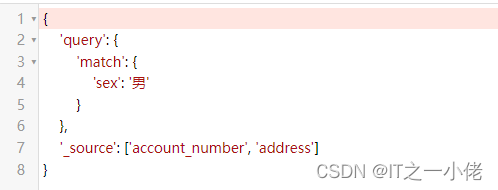
示例代码10: 【_source字段】
from elasticsearch_dsl import connections, Search, Q, A
es = connections.create_connection(hosts=["192.168.124.49:9200"], timeout=20)
# print(es)
q = Q("match", sex='男')
res = Search(using=es, index="test_index").query(q).source(['account_number', 'address'])
print(res.to_dict())
运行结果:

示例代码11:
from elasticsearch_dsl import connections, Search, Q
# 连接es
es = connections.create_connection(hosts=["192.168.124.49:9200"], timeout=20)
# print(es)
s = Search(using=es, index="account_info")
# 方式一:
# 省份为北京
q1 = Q("match", province="北京")
# 25或30岁的男性信息
q2 = Q("bool", must=[Q("terms", age=[25, 30]), Q("term", gender="男")])
# and
q = q1 & q2
res = s.query(q)
print(res.to_dict())
# for data in res:
#     print(data.to_dict())
print("共查到%d条数据" % res.count())
print("*" * 100)
# 方式二
# 省份为北京
q1 = Q("match", province="北京")
# 25或30岁的信息
# q2 = Q("bool", must=[Q("terms", age=[25, 30]), Q("term", gender="男")])
q2 = Q("term", age=25) | Q("term", age=30)
# 男性
q3 = Q("term", gender="男")
res = s.query(q1).query(q2).query(q3)  # 多次query就是& ==> and 操作
print(res.to_dict())
# for data in res:
#     print(data.to_dict())
print("共查到%d条数据" % res.count())
运行结果:


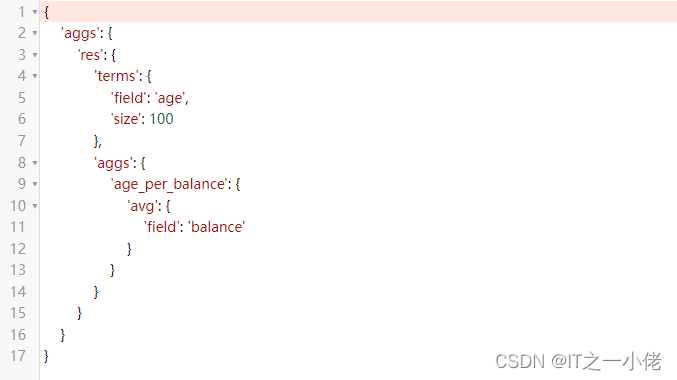
示例代码12:
from elasticsearch_dsl import connections, Search, Q, A
# 连接es
es = connections.create_connection(hosts=["192.168.124.49:9200"], timeout=20)
# print(es)
s = Search(using=es, index="account_info")
s.query()
q = A("terms", field="age", size=100).metric("age_per_balance", "avg", field="balance")
s.aggs.bucket("res", q)
print(s.to_dict())
运行结果:

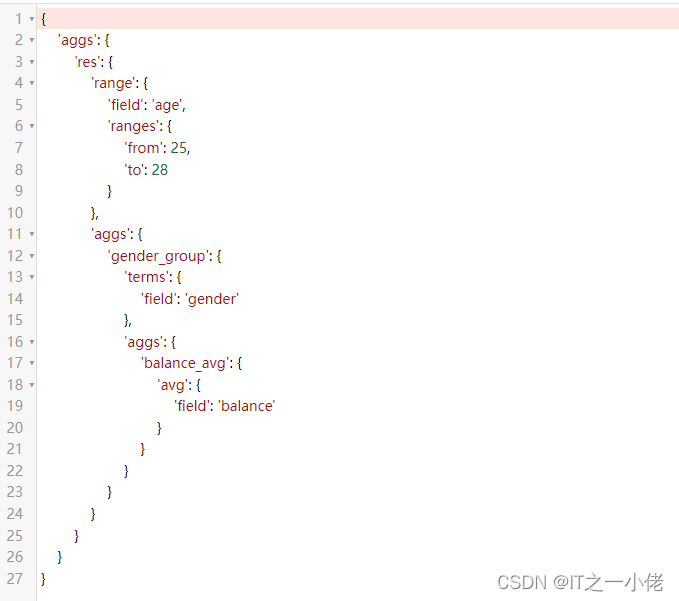
示例代码13: 【多次嵌套聚合】
from elasticsearch_dsl import connections, Search, Q, A
# 连接es
es = connections.create_connection(hosts=["192.168.124.49:9200"], timeout=20)
# print(es)
s = Search(using=es, index="account_info")
a1 = A("range", field="age", ranges={"from": 25, "to": 28})
a2 = A("terms", field="gender")
a3 = A("avg", field="balance")
s.aggs.bucket("res", a1).bucket("gender_group", a2).metric("balance_avg", a3)
print(s.to_dict())
运行结果:

示例代码14: 【使用pycharm打断点查看查询语句】
from elasticsearch_dsl import connections, Search, Q, A
# 连接es
es = connections.create_connection(hosts=["192.168.124.49:9200"], timeout=20)
# print(es)
s = Search(using=es, index="account_info")
a1 = A("range", field="age", ranges={"from": 25, "to": 28})
a2 = A("terms", field="gender")
a3 = A("avg", field="balance")
s.aggs.bucket("res", a1).bucket("gender_group", a2).metric("balance_avg", a3)
# print(s.to_dict())
# 执行并拿到返回值
response = s.execute()
# res是bucket指定的名字
for data in response.aggregations.res:
    print(data.to_dict())
运行结果:

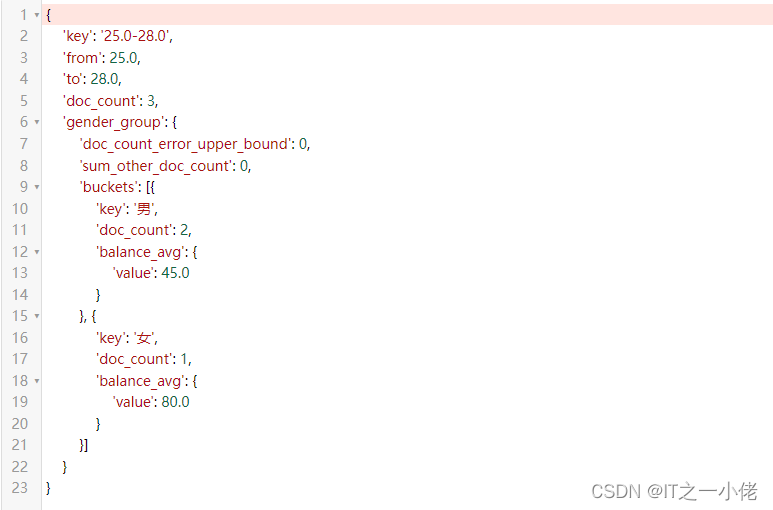
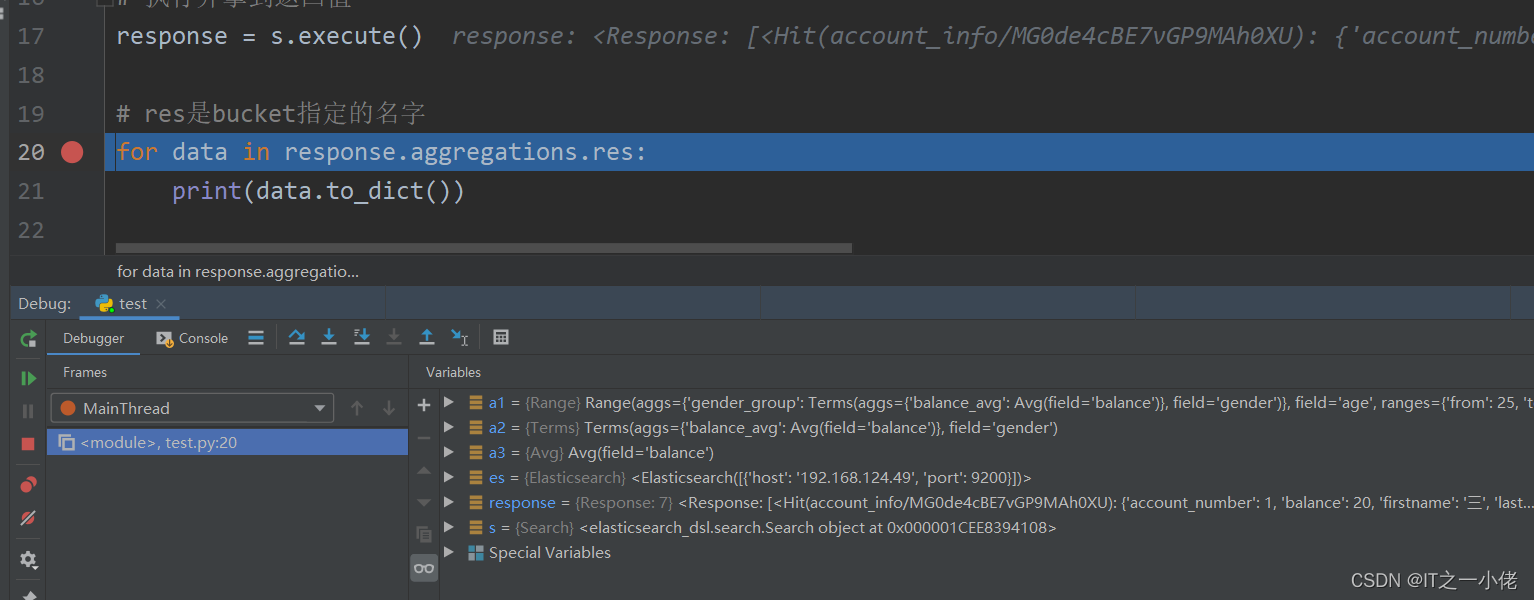

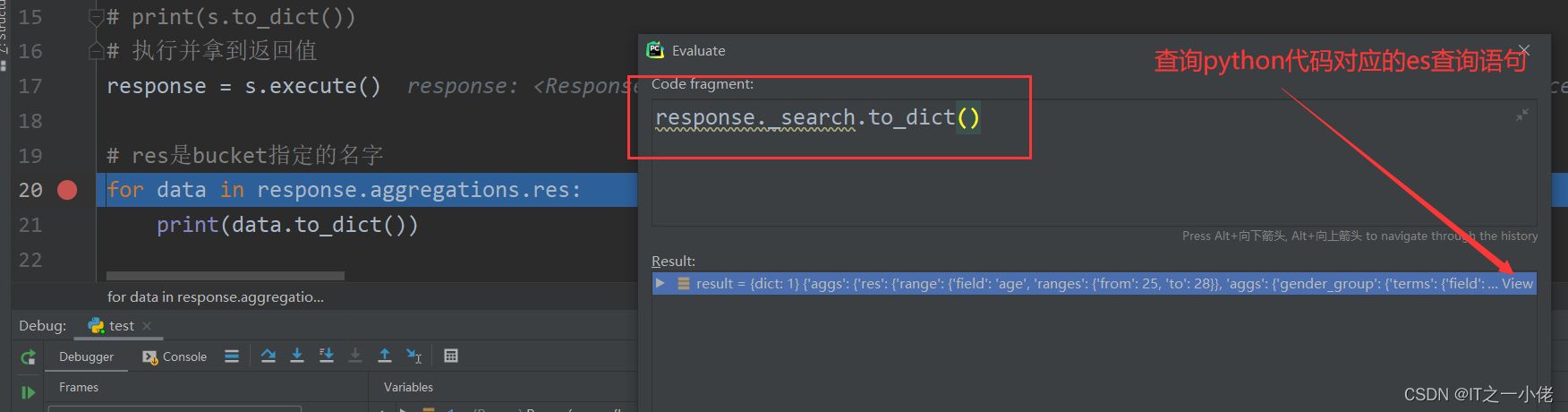

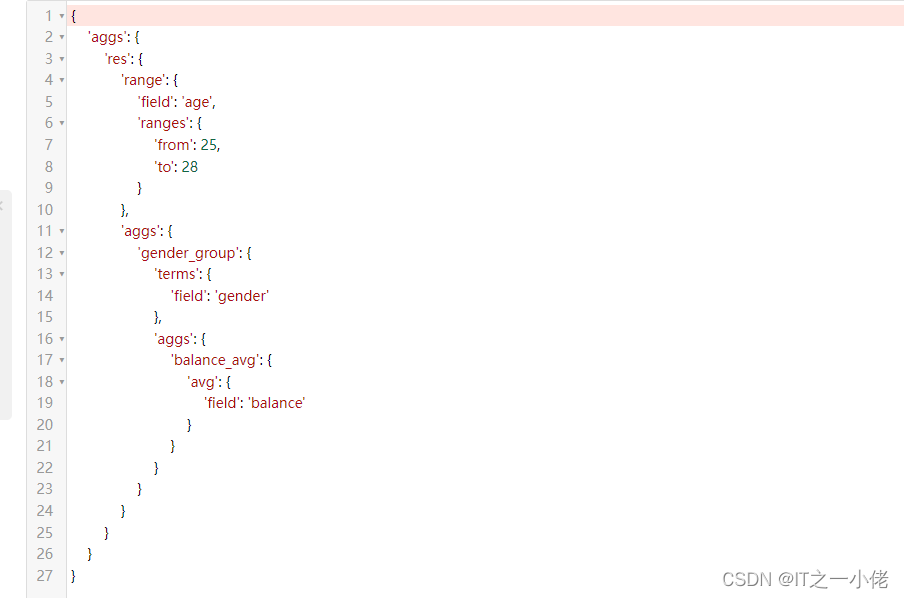
注意:即使数据库中没有数据,也可以打印出查询语句!
到此这篇关于python中的elasticsearch_dsl查询语句转换成es查询语句详解的文章就介绍到这了,更多相关python的elasticsearch_dsl转换es内容请搜索脚本之家以前的文章或继续浏览下面的相关文章希望大家以后多多支持脚本之家!
相关文章

使用Python将xmind脑图转成excel用例的实现代码(一)
这篇文章主要介绍了使用Python将xmind脑图转成excel用例的实现代码(一),本文给大家介绍的非常详细对大家的学习或工作具有一定的参考借鉴价值,需要的朋友可以参考下2020-10-10 这篇文章主要介绍了Python中的生成器和迭代器的的相关资料,文中讲解非常细致,帮助大家更好的理解和学习,感兴趣的朋友可以了解下2020-06-06
 处理字符数据是编程不可或缺的一部分。Python 提供了一组丰富的运算符、函数和方法来处理字符串。包括字符串运算符、内置函数、索引、切片和内置方法。快来学习一下吧2022-03-03
 这篇文章主要介绍了Java中关于泛型接口的使用说明,具有很好的参考价值,希望对大家有所帮助,如有错误或未考虑完全的地方,望不吝赐教2023-08-08
 这篇文章主要介绍了python面向对象多线程爬虫爬取搜狐页面的实例代码,需要的朋友可以参考下2018-05-05
Python开发SQLite3数据库相关操作详解【连接,查询,插入,更新,删除,关闭等】
这篇文章主要介绍了Python开发SQLite3数据库相关操作,结合实例形式较为详细的分析了Python操作SQLite3数据库的连接,查询,插入,更新,删除,关闭等相关操作技巧,需要的朋友可以参考下2017-07-07 这篇文章主要介绍了python批量提取图片信息并保存的实现,文中通过示例代码介绍的非常详细,对大家的学习或者工作具有一定的参考学习价值,需要的朋友们下面随着小编来一起学习学习吧2021-02-02
 本文主要介绍了Python遍历字典删除元素的五种方法,文中通过示例代码介绍的非常详细,对大家的学习或者工作具有一定的参考学习价值,需要的朋友们下面随着小编来一起学习学习吧<BR>2024-07-07
 本文主要介绍了es+flask搜索小项目实现分页+高亮的示例代码,文中通过示例代码介绍的非常详细,具有一定的参考价值,感兴趣的小伙伴们可以参考一下2022-01-01
 这篇文章主要介绍了python如何基于redis实现ip代理池,文中通过示例代码介绍的非常详细,对大家的学习或者工作具有一定的参考学习价值,需要的朋友可以参考下2020-01-01
最新评论