

Python TensorFlow 2.6获取MNIST数据的示例代码
更新时间:2024年04月09日 09:48:35 作者:深色風信子
这篇文章主要介绍了Python TensorFlow 2.6获取MNIST数据的的相关示例,文中有详细的代码示例供大家参考,对大家的学习或工作有一定的帮助,需要的朋友可以参考下
1 Python TensorFlow 2.6 获取 MNIST 数据
1.1 获取 MNIST 数据
获取 MNIST 数据
import numpy as np
import tensorflow as tf

from tensorflow.keras import datasets

print(tf.__version__)

(train_data, train_label), (test_data, test_label) = datasets.mnist.load_data()
np.savez('D:\\OneDrive\\桌面\\mnist.npz', train_data = train_data, train_label = train_label, test_data = test_data,
         test_label = test_label)
C:\ProgramData\Anaconda3\envs\tensorflow\python.exe E:/SourceCode/PyCharm/Test/study/exam.py
2.6.0

Process finished with exit code 0
1.2 检查 MNIST 数据
import matplotlib.pyplot as plt
import numpy as np

data = np.load('D:\\OneDrive\\桌面\\mnist.npz')
print(data.files)

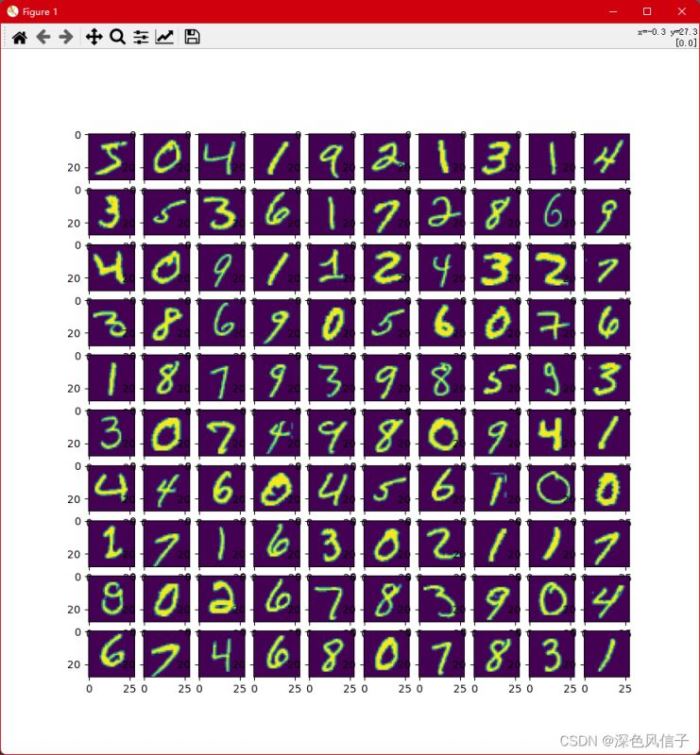
image = data['train_data'][0:100]
label = data['train_label'].reshape(-1, )
print(label)
plt.figure(figsize = (10, 10))
for i in range(100):
    print('%f, %f' % (i, label[i]))
    plt.subplot(10, 10, i + 1)
    plt.imshow(image[i])
plt.show()
2 Python 将npz数据保存为txt
import numpy as np

# 加载mnist数据
data = np.load('D:\\学习\\mnist.npz')
# 获取 训练数据
train_image = data['x_test']
train_label = data['y_test']
train_image = train_image.reshape(train_image.shape[0], -1)
train_image = train_image.astype(np.int32)
train_label = train_label.astype(np.int32)
train_label = train_label.reshape(-1, 1)
index = 0
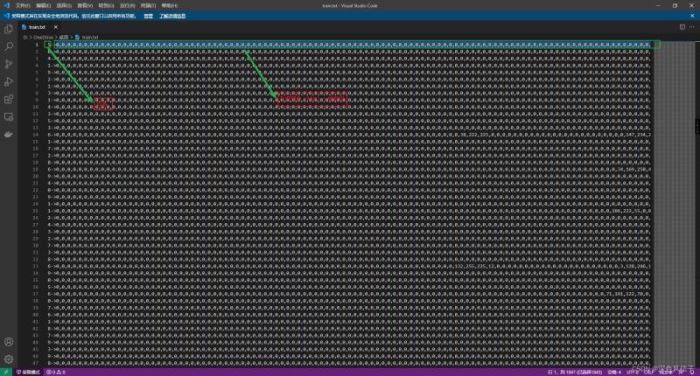
file = open('D:\\OneDrive\\桌面\\predict.txt', 'w+')
for arr in train_image:
    file.write('{0}->{1}\n'.format(train_label[index][0], ','.join(str(i) for i in arr)))
    index = index + 1
file.close()
3 Java 获取数据并使用SVM训练
package com.xu.opencv;

import java.io.BufferedReader;
import java.io.FileReader;
import java.util.Arrays;
import java.util.HashMap;
import java.util.Map;

import org.opencv.core.Core;
import org.opencv.core.CvType;
import org.opencv.core.Mat;
import org.opencv.core.TermCriteria;
import org.opencv.ml.Ml;
import org.opencv.ml.SVM;

/**
 * @author Administrator
 */
public class Train {

    static {
        System.loadLibrary(Core.NATIVE_LIBRARY_NAME);
    }

    public static void main(String[] args) throws Exception {
        predict();
    }

    public static void predict() throws Exception {
        SVM svm = SVM.load("D:\\OneDrive\\桌面\\ai.xml");
        BufferedReader reader = new BufferedReader(new FileReader("D:\\OneDrive\\桌面\\predict.txt"));
        Mat train = new Mat(6, 28 * 28, CvType.CV_32FC1);
        Mat label = new Mat(1, 6, CvType.CV_32SC1);
        Map<String, Mat> map = new HashMap<>(2);
        int index = 0;
        String line = null;
        while ((line = reader.readLine()) != null) {
            int[] data = Arrays.asList(line.split("->")[1].split(",")).stream().mapToInt(Integer::parseInt).toArray();
            for (int i = 0; i < 28 * 28; i++) {
                train.put(index, i, data[i]);
            }
            label.put(index, 0, Integer.parseInt(line.split("->")[0]));
            index++;
            if (index >= 6) {
                break;
            }
        }
        Mat response = new Mat();
        svm.predict(train, response);
        for (int i = 0; i < response.height(); i++) {
            System.out.println(response.get(i, 0)[0]);
        }
    }

    public static void train() throws Exception {
        SVM svm = SVM.create();
        svm.setC(1);
        svm.setP(0);
        svm.setNu(0);
        svm.setCoef0(0);
        svm.setGamma(1);
        svm.setDegree(0);
        svm.setType(SVM.C_SVC);
        svm.setKernel(SVM.LINEAR);
        svm.setTermCriteria(new TermCriteria(TermCriteria.EPS + TermCriteria.MAX_ITER, 1000, 0));
        Map<String, Mat> map = read("D:\\OneDrive\\桌面\\data.txt");
        svm.train(map.get("train"), Ml.ROW_SAMPLE, map.get("label"));
        svm.save("D:\\OneDrive\\桌面\\ai.xml");
    }

    public static Map<String, Mat> read(String path) throws Exception {
        BufferedReader reader = new BufferedReader(new FileReader(path));
        String line = null;
        Mat train = new Mat(60000, 28 * 28, CvType.CV_32FC1);
        Mat label = new Mat(1, 60000, CvType.CV_32SC1);
        Map<String, Mat> map = new HashMap<>(2);
        int index = 0;
        while ((line = reader.readLine()) != null) {
            int[] data = Arrays.asList(line.split("->")[1].split(",")).stream().mapToInt(Integer::parseInt).toArray();
            for (int i = 0; i < 28 * 28; i++) {
                train.put(index, i, data[i]);
            }
            label.put(index, 0, Integer.parseInt(line.split("->")[0]));
            index++;
        }
        map.put("train", train);
        map.put("label", label);
        reader.close();
        return map;
    }

}
4 Python 测试SVM准确度
9.8% 求帮助
import cv2 as cv
import numpy as np

# 加载预测数据
data = np.load('D:\\学习\\mnist.npz')
print(data.files)

# 预测数据 处理
test_image = data['x_test']
test_label = data['y_test']

test_image = test_image.reshape(test_image.shape[0], -1)
test_image = test_image.astype(np.float32)
test_label = test_label.astype(np.float32)
test_label = test_label.reshape(-1, 1)

svm = cv.ml.SVM_load('D:\\OneDrive\\桌面\\ai.xml')

predict = svm.predict(test_image)
predict = predict[1].reshape(-1, 1).astype(np.int32)
result = (predict == test_label.astype(np.int32))
print('{0}%'.format(str(result.mean() * 100)))
C:\ProgramData\Anaconda3\envs\opencv\python.exe E:/SourceCode/PyCharm/OpenCV/svm/predict.py
['x_train', 'y_train', 'x_test', 'y_test']
9.8%

Process finished with exit code 0
以上就是Python TensorFlow 2.6获取MNIST数据的示例代码的详细内容,更多关于Python TensorFlow获取MNIST的资料请关注脚本之家其它相关文章!
相关文章
 这篇文章主要介绍了Python OpenCV 基于图像边缘提取的轮廓发现函数,文中通过示例代码介绍的非常详细,对大家的学习或者工作具有一定的参考学习价值,需要的朋友们下面随着小编来一起学习学习吧2021-03-03
Python使用wxPython和PyMuPDF实现合并PDF文档
处理大量的PDF文档可能会变得复杂和耗时,但是,使用Python编程和一些强大的库,可以使这个任务变得简单而高效,下面我们就来看看Python如何使用wxPython和PyMuPDF合并PDF文档并自动复制到剪贴板吧2023-11-11 在本篇文章里小编给大家整理了关于增大python字体的方法步骤,需要的朋友们可以学习下。2020-07-07
 这篇文章主要介绍了python生成随机数、随机字符、随机字符串的方法示例,文中通过示例代码介绍的非常详细,对大家的学习或者工作具有一定的参考学习价值,需要的朋友们下面随着小编来一起学习学习吧2021-04-04
 在数据分析和数据科学领域中,Pandas 是 Python 中最常用的库之一,本文将介绍如何使用 Pandas 来读取和处理 CSV 格式的数据文件,希望对大家有所帮助2024-04-04
 NumPy 数组迭代是访问和处理数组元素的重要方法,它允许您逐个或成组地遍历数组元素,NumPy 提供了多种函数来合并数组,用于将多个数组的内容连接成一个新数组,本文给大家详细介绍了NumPy数组迭代与合并,需要的朋友可以参考下2024-05-05
 这篇文章主要介绍了Python实现的基数排序算法,简单说明了基数排序的原理并结合实例形式分析了Python实现与使用基数排序的具体操作技巧,需要的朋友可以参考下2017-11-11
 Python之所以这么流行,是因为它不仅能够应用于科技领域,还能用来做许多其他学科的研究工具,最常见的便是绘制地图,这篇文章主要给大家介绍了关于如何利用Python快速绘制海报级别地图的相关资料,需要的朋友可以参考下2021-09-09
 这篇文章主要介绍了基于python实现把图片转换成素描,文中通过示例代码介绍的非常详细,对大家的学习或者工作具有一定的参考学习价值,需要的朋友可以参考下2019-11-11
 今天小编就为大家分享一篇关于Python基础之文件读取的讲解,小编觉得内容挺不错的,现在分享给大家,具有很好的参考价值,需要的朋友一起跟随小编来看看吧2019-02-02
最新评论