

在Python中计算移动平均值的方法
前言
在这篇文章中,我们将看到如何在Python中计算移动平均值。移动平均是指总观测值集合中固定大小子集的一系列平均值。它也被称为滚动平均。
考虑n个观测值的集合,k是用于确定任何时间t的平均值的窗口的大小。然后,移动平均列表通过最初取当前窗口中存在的前k个观测值的平均值并将其存储在列表中来计算。现在,根据要确定的移动平均值的条件来扩展窗口,并且再次计算窗口中存在的元素的平均值并将其存储在列表中。这个过程一直持续到窗口到达集合的末尾。
例如:给定一个包含五个整数的列表 arr=[1,2,3,7,9],我们需要计算窗口大小为3的列表的移动平均值。我们将首先计算前3个元素的平均值,并将其存储为第一个移动平均值。然后窗口将向右移动一个位置,并再次计算窗口中存在的元素的平均值并存储在列表中。类似地,该过程将重复,直到窗口到达数组的最后一个元素。以下是对上述方法的说明:
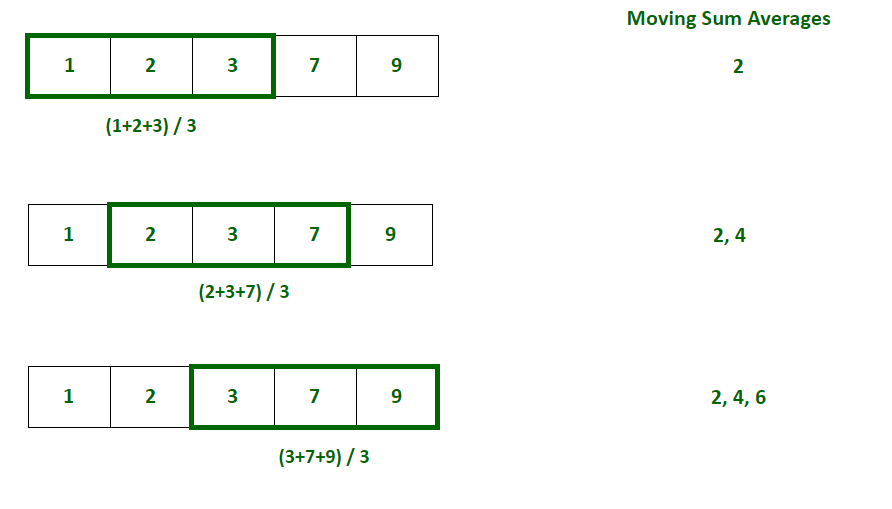
下面是实现:
# Program to calculate moving average
arr = [1, 2, 3, 7, 9]
window_size = 3

i = 0
# Initialize an empty list to store moving averages
moving_averages = []

# Loop through the array to consider
# every window of size 3
while i < len(arr) - window_size + 1:

	# Store elements from i to i+window_size
	# in list to get the current window
	window = arr[i : i + window_size]

	# Calculate the average of current window
	window_average = round(sum(window) / window_size, 2)

	# Store the average of current
	# window in moving average list
	moving_averages.append(window_average)

	# Shift window to right by one position
	i += 1

print(moving_averages)
输出
[2.0, 4.0, 6.33]
简单移动平均
SMA(Simple Moving Average)的计算方法是取当前窗口中某个时间的k个(窗口大小)观测值的加权平均值。它用于分析趋势。
公式:

其中,
- SMAj = 第j个窗口的简单移动平均值
- k =窗口大小
- ai =观测集的第i个元素
方法1:使用Numpy
Python的Numpy模块提供了一种简单的方法来计算观测数组的简单移动平均值。它提供了一个名为numpy.sum()的方法,该方法返回给定数组的元素之和。移动平均值可以通过找到窗口中存在的元素的总和并将其除以窗口大小来计算。
# Program to calculate moving average using numpy

import numpy as np

arr = [1, 2, 3, 7, 9]
window_size = 3

i = 0
# Initialize an empty list to store moving averages
moving_averages = []

# Loop through the array t o
#consider every window of size 3
while i < len(arr) - window_size + 1:

	# Calculate the average of current window
	window_average = round(np.sum(arr[
	i:i+window_size]) / window_size, 2)

	# Store the average of current
	# window in moving average list
	moving_averages.append(window_average)

	# Shift window to right by one position
	i += 1

print(moving_averages)
输出
[2.0, 4.0, 6.33]
方法2:使用Pandas
Python的Pandas模块提供了一种简单的方法来计算一系列观测值的简单移动平均值。它提供了一个名为pandas.Series.rolling(window_size)的方法,该方法返回指定大小的滚动窗口。窗口的平均值可以通过在上面获得的窗口对象上使用pandas.Series.mean()函数来计算。pandas.Series.rolling(window_size)将返回一些空序列,因为它至少需要k个(窗口大小)元素才能滚动。
# Python program to calculate
# simple moving averages using pandas
import pandas as pd

arr = [1, 2, 3, 7, 9]
window_size = 3

# Convert array of integers to pandas series
numbers_series = pd.Series(arr)

# Get the window of series
# of observations of specified window size
windows = numbers_series.rolling(window_size)

# Create a series of moving
# averages of each window
moving_averages = windows.mean()

# Convert pandas series back to list
moving_averages_list = moving_averages.tolist()

# Remove null entries from the list
final_list = moving_averages_list[window_size - 1:]

print(final_list)
输出
[2.0, 4.0, 6.33]
累积移动平均
CMA(Cumulative Moving Average)的计算方法是取计算时所有观测值的加权平均值。用于时间序列分析。
公式:

其中:
- CMAt = 时间t的累积移动平均值
- kt = 截至时间t的观测次数
- ai = 观测集的第i个元素
方法1:使用Numpy
Python的Numpy模块提供了一种简单的方法来计算观测数组的累积移动平均值。它提供了一个名为numpy.cumsum()的方法,该方法返回给定数组的元素的累积和的数组。移动平均值可以通过将元素的累积和除以窗口大小来计算。
# Program to calculate cumulative moving average
# using numpy

import numpy as np

arr = [1, 2, 3, 7, 9]

i = 1
# Initialize an empty list to store cumulative moving
# averages
moving_averages = []

# Store cumulative sums of array in cum_sum array
cum_sum = np.cumsum(arr);

# Loop through the array elements
while i <= len(arr):

	# Calculate the cumulative average by dividing
	# cumulative sum by number of elements till
	# that position
	window_average = round(cum_sum[i-1] / i, 2)

	# Store the cumulative average of
	# current window in moving average list
	moving_averages.append(window_average)

	# Shift window to right by one position
	i += 1

print(moving_averages)
输出
[1.0, 1.5, 2.0, 3.25, 4.4]
方法2:使用Pandas
Python的Pandas模块提供了一种简单的方法来计算一系列观测值的累积移动平均值。它提供了一个名为pandas.Series.expanding()的方法,该方法返回一个窗口,该窗口覆盖了截至时间t的所有观察结果。窗口的平均值可以通过使用pandas.Series.mean()函数在上面获得的窗口对象上计算。
# Python program to calculate
# cumulative moving averages using pandas
import pandas as pd

arr = [1, 2, 3, 7, 9]
window_size = 3

# Convert array of integers to pandas series
numbers_series = pd.Series(arr)

# Get the window of series of
# observations till the current time
windows = numbers_series.expanding()

# Create a series of moving averages of each window
moving_averages = windows.mean()

# Convert pandas series back to list
moving_averages_list = moving_averages.tolist()

print(moving_averages_list)
输出
[1.0, 1.5, 2.0, 3.25, 4.4]
指数移动平均
EMA(Exponential Moving Average)是通过每次取观测值的加权平均值来计算的。观察值的权重随时间呈指数下降。它用于分析最近的变化。
公式:

其中:
- EMAt = 时间t的指数移动平均
- α = 观察权重随时间的降低程度
- at = 在时间t的观察
# Program to calculate exponential
# moving average using formula

import numpy as np

arr = [1, 2, 3, 7, 9]
x=0.5 # smoothening factor

i = 1
# Initialize an empty list to
# store exponential moving averages
moving_averages = []

# Insert first exponential average in the list
moving_averages.append(arr[0])

# Loop through the array elements
while i < len(arr):

	# Calculate the exponential
	# average by using the formula
	window_average = round((x*arr[i])+
						(1-x)*moving_averages[-1], 2)

	# Store the cumulative average
	# of current window in moving average list
	moving_averages.append(window_average)

	# Shift window to right by one position
	i += 1

print(moving_averages)
输出
[1, 1.5, 2.25, 4.62, 6.81]
方法1:使用Pandas
Python的Pandas模块提供了一种简单的方法来计算一系列观测值的指数移动平均值。它提供了一种称为pandas.Series.ewm.mean()的方法,用于计算给定观测值的指数移动平均值。
pandas.Series.ewm()接受一个称为平滑因子的参数,即观察值的权重随时间减少的程度。平滑因子的值始终介于0和1之间。
# Python program to
# calculate exponential moving averages
import pandas as pd

arr = [1, 2, 3, 7, 9]

# Convert array of integers to pandas series
numbers_series = pd.Series(arr)

# Get the moving averages of series
# of observations till the current time
moving_averages = round(numbers_series.ewm(
alpha=0.5, adjust=False).mean(), 2)

# Convert pandas series back to list
moving_averages_list = moving_averages.tolist()

print(moving_averages_list)
输出
[1.0, 1.5, 2.25, 4.62, 6.81]
应用场景
- 时间序列分析:它用于平滑短期变化并突出长期观察,如趋势和周期。
- 金融分析:它用于股票市场的财务分析,如计算股票价格,回报和分析市场趋势。
- 环境工程:它用于分析环境条件,考虑各种因素,如污染物的浓度等。
- 计算机性能分析:它通过计算平均CPU利用率、平均进程队列长度等指标来分析计算机性能。
到此这篇关于在Python中计算移动平均值的方法的文章就介绍到这了,更多相关Python计算移动平均值内容请搜索脚本之家以前的文章或继续浏览下面的相关文章希望大家以后多多支持脚本之家!
相关文章
 这篇文章主要介绍了基于python实现Pycharm断点调试,在我们写程序的时候,很容易遇到各种各样的bug,然后编译器提示程序出错的地方。很多时候可以通过提示的信息修改程序,但是有时我们想得到更多的信息,这个时候就需要进行断点调试,下面我们就一起来学习ycharm断点调试2022-02-02
 这篇文章主要为大家详细介绍了python实现双色球随机选号,文中示例代码介绍的非常详细,具有一定的参考价值,感兴趣的小伙伴们可以参考一下2020-01-01
 模板匹配是指在当前图像A内寻找与图像B最相似的部分,本文详细的介绍了OpenCV-Python模板匹配人眼的实例,感兴趣的可以了解一下2021-06-06
Python实现对字典分别按键(key)和值(value)进行排序的方法分析
这篇文章主要介绍了Python实现对字典分别按键(key)和值(value)进行排序的方法,结合实例形式分析了Python基于sorted函数及operator库进行字典排序的相关操作技巧,需要的朋友可以参考下2018-12-12 由于工作需要,客户需要将多个excel文件合并成一个excel中,下面这篇文章主要给大家介绍了关于使用Python快速进行Excel合并的几种场景,文中通过代码介绍的非常详细,需要的朋友可以参考下2023-10-10
 这篇文章主要介绍了Python 面向切面编程 AOP 及装饰器,AOP,就是面向切面编程,简单的说,就是动态地将代码切入到类的指定方法、指定位置上的编程思想就是面向切面的编程,更多相关资需要的小伙伴可以参考下面文章内容2022-05-05
 这篇文章主要介绍了Flask框架各种常见装饰器,结合实例形式简单分析了flask框架各种常见装饰器的功能、用法及相关操作注意事项,需要的朋友可以参考下2018-07-07
 这篇文章主要给大家分享的是4款Python 自动数据分析神器,我给大家分享 4 款常用的EDA工具,它们可以自动产出统计数据和图表,为我们节省大量时间,需要的朋友可以参考一下2022-03-03
 这篇文章主要介绍了Python实现处理管道的方法,实例分析了Python实现管道调用子程序的技巧,需要的朋友可以参考下2015-06-06
解决pytorch model代码内tensor device不一致的问题
这篇文章主要介绍了pytorch model代码内tensor device不一致的问题,本文给大家分享完美解决方案,对pytorch tensor device不一致问题解决方案感兴趣的朋友跟随小编一起看看吧2023-07-07
最新评论