

Python制作一个系统信息采集工具
更新时间:2024年12月18日 10:04:48 作者:PieroPc
这篇文章主要为大家详细介绍了如何使用Python编写一个系统信息采集工具,好为重装系统做准备,感兴趣的小伙伴可以跟随小编一起学习一下
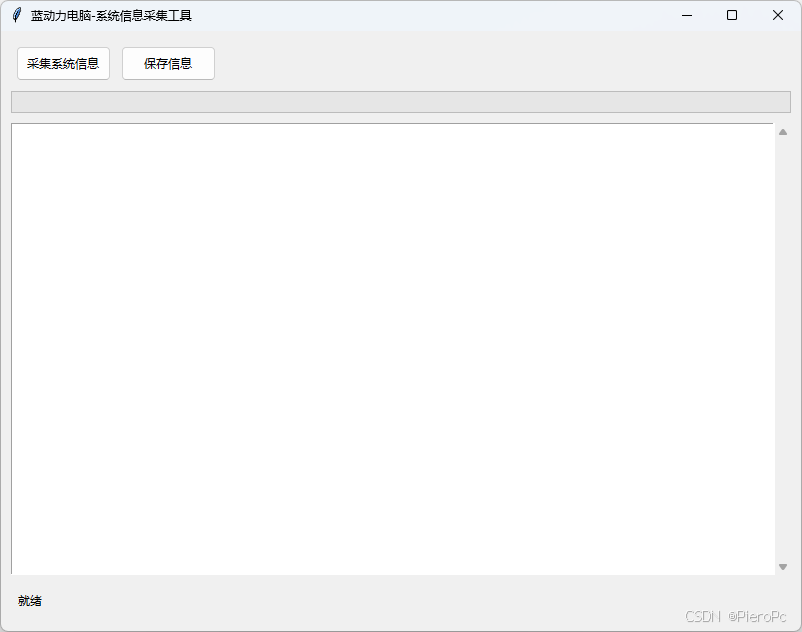
图样
原码
# 系统信息采集工具
# 2024-12-16
# 作者:Hoye
# 版本:1.0
# 功能:采集系统信息并保存到文件
# 使用方法:
# 1. 运行程序
# 2. 点击“采集系统信息”按钮
# 3. 等待信息采集完成
# 4. 选择保存位置
# 5. 点击“保存信息”按钮


import win32print
import socket
import subprocess
import win32com.shell.shell as shell
import win32com.shell.shellcon as shellcon
import wmi
from datetime import date
import tkinter as tk
from tkinter import ttk, messagebox, scrolledtext, filedialog
from threading import Thread
import os

class SystemInfoApp:
    def __init__(self, root):
        self.root = root
        self.root.title("蓝动力电脑-系统信息采集工具")
        self.root.geometry("800x600")

        # 设置整体样式
        style = ttk.Style()
        style.configure('TButton', padding=5)
        style.configure('TLabel', padding=5)

        self.create_widgets()

    def create_widgets(self):
        # 创建主框架
        main_frame = ttk.Frame(self.root, padding="10")
        main_frame.grid(row=0, column=0, sticky=(tk.W, tk.E, tk.N, tk.S))

        # 创建按钮框架
        button_frame = ttk.Frame(main_frame)
        button_frame.grid(row=0, column=0, pady=5, sticky=tk.W)

        # 采集按钮
        self.collect_btn = ttk.Button(
            button_frame,
            text="采集系统信息",
            command=self.start_collection
        )
        self.collect_btn.grid(row=0, column=0, padx=5)

        # 保存按钮
        self.save_btn = ttk.Button(
            button_frame,
            text="保存信息",
            command=self.save_info
        )
        self.save_btn.grid(row=0, column=1, padx=5)

        # 进度条
        self.progress = ttk.Progressbar(
            main_frame,
            orient=tk.HORIZONTAL,
            length=300,
            mode='determinate'
        )
        self.progress.grid(row=1, column=0, pady=5, sticky=tk.EW)

        # 信息显示区域
        self.info_text = scrolledtext.ScrolledText(
            main_frame,
            width=80,
            height=30,
            wrap=tk.WORD
        )
        self.info_text.grid(row=2, column=0, pady=5, sticky=(tk.W, tk.E, tk.N, tk.S))

        # 状态标签
        self.status_label = ttk.Label(main_frame, text="就绪")
        self.status_label.grid(row=3, column=0, pady=5, sticky=tk.W)

        # 设置列和行的权重
        self.root.columnconfigure(0, weight=1)
        self.root.rowconfigure(0, weight=1)
        main_frame.columnconfigure(0, weight=1)
        main_frame.rowconfigure(2, weight=1)

    def get_basic_info(self):
        """获取基本系统信息"""
        info = []
        self.update_status("正在获取基本系统信息...")
        computer_name = socket.gethostname()
        try:
            s = socket.socket(socket.AF_INET, socket.SOCK_DGRAM)
            s.connect(("8.8.8.8", 80))
            ip_address = s.getsockname()[0]
            s.close()
        except Exception as e:
            ip_address = "无法获取IP地址"

        info.extend([
            "=== 基本系统信息 ===",
            f"计算机名: {computer_name}",
            f"IP 地址: {ip_address}",
            ""
        ])
        return info

    def get_printer_info(self):
        """获取打印机信息"""
        self.update_status("正在获取打印机信息...")
        try:
            printers = win32print.EnumPrinters(win32print.PRINTER_ENUM_LOCAL, None, 1)
            info = ["=== 打印机信息 ==="]
            info.extend([f"打印机名称: {printer[2]}" for printer in printers])
            info.append("")
            return info
        except Exception:
            return ["=== 打印机信息 ===", "无法获取打印机信息", ""]

    def get_hardware_info(self):
        """获取硬件信息"""
        self.update_status("正在获取硬件信息...")
        try:
            c = wmi.WMI()
            info = []

            # 计算机系统信息
            info.append("=== 计算机系统信息 ===")
            for computer in c.Win32_ComputerSystem():
                info.extend([
                    f"计算机名称: {computer.Name}",
                    f"制造商: {computer.Manufacturer}",
                    f"型号: {computer.Model}",
                    ""
                ])

            # CPU信息
            info.append("=== CPU信息 ===")
            for processor in c.Win32_Processor():
                info.extend([
                    f"CPU型号: {processor.Name}",
                    f"CPU ID: {processor.ProcessorId}",
                    f"CPU核心数: {processor.NumberOfCores}",
                    f"CPU线程数: {processor.NumberOfLogicalProcessors}",
                    ""
                ])

            # 硬盘信息
            info.append("=== 硬盘信息 ===")
            for disk in c.Win32_DiskDrive():
                size_gb = round(int(disk.Size or 0) / (1024**3), 2)
                info.extend([
                    f"硬盘型号: {disk.Model}",
                    f"硬盘序列号: {disk.SerialNumber}",
                    f"硬盘容量: {size_gb}GB",
                    ""
                ])

            return info
        except Exception as e:
            return ["=== 硬件信息 ===", f"获取硬件信息出错: {str(e)}", ""]

    def get_folder_paths(self):
        """获取重要文件夹路径"""
        self.update_status("正在获取系统文件夹路径...")
        try:
            desktop = shell.SHGetFolderPath(0, shellcon.CSIDL_DESKTOP, 0, 0)
            documents = shell.SHGetFolderPath(0, shellcon.CSIDL_PERSONAL, 0, 0)
            info = [
                "=== 系统文件夹路径 ===",
                f"桌面位置: {desktop}",
                f"我的文档位置: {documents}",
                ""
            ]
            return info
        except Exception as e:
            return ["=== 系统文件夹路径 ===", "无法获取文件夹路径", str(e), ""]

    def get_network_shares(self):
        """获取网络共享信息"""
        self.update_status("正在获取网络共享信息...")
        try:
            output = subprocess.check_output("net share", shell=True, text=True)
            info = [
                "=== 网络共享信息 ===",
                output,
                ""
            ]
            return info
        except subprocess.CalledProcessError as e:
            return ["=== 网络共享信息 ===", f"获取网络共享信息出错: {str(e)}", ""]

    def collect_info(self):
        """收集所有系统信息"""
        self.progress["value"] = 0
        self.info_text.delete(1.0, tk.END)

        all_info = []

        # 获取基本信息
        all_info.extend(self.get_basic_info())
        self.progress["value"] = 20

        # 获取文件夹路径
        all_info.extend(self.get_folder_paths())
        self.progress["value"] = 35

        # 获取打印机信息
        all_info.extend(self.get_printer_info())
        self.progress["value"] = 50

        # 获取硬件信息
        all_info.extend(self.get_hardware_info())
        self.progress["value"] = 75

        # 获取网络共享信息
        all_info.extend(self.get_network_shares())
        self.progress["value"] = 100

        # 显示信息
        self.info_text.insert(tk.END, "\n".join(all_info))
        self.update_status("信息采集完成")

    def start_collection(self):
        """在新线程中启动信息收集"""
        self.collect_btn["state"] = "disabled"
        Thread(target=self.collect_info, daemon=True).start()
        self.collect_btn["state"] = "normal"

    def save_info(self):
        """保存信息到文件"""
        if not self.info_text.get(1.0, tk.END).strip():
            messagebox.showwarning("警告", "没有可保存的信息,请先采集系统信息")
            return

        try:
            date_str = date.today().strftime("%Y-%m-%d")
            computer_name = socket.gethostname()

            # 默认文件名
            default_filename = f"{computer_name}_info_{date_str}.txt"

            # 创建保存选项按钮框架
            save_window = tk.Toplevel(self.root)
            save_window.title("选择保存位置")
            save_window.geometry("300x200")
            save_window.transient(self.root)  # 设置为主窗口的子窗口

            def save_to_network():
                try:
                    network_path = f"\\\\bpc\\temp_g\\{default_filename}"
                    with open(network_path, "w", encoding="utf-8") as f:
                        f.write(self.info_text.get(1.0, tk.END))
                    messagebox.showinfo("成功", f"信息已保存到网络位置:\n{network_path}")
                    save_window.destroy()
                except Exception as e:
                    messagebox.showerror("错误", f"保存到网络位置失败:\n{str(e)}")

            def save_to_local():
                initial_dir = os.path.expanduser("~\\Documents")  # 默认打开我的文档
                filename = filedialog.asksaveasfilename(
                    parent=save_window,
                    initialdir=initial_dir,
                    initialfile=default_filename,
                    defaultextension=".txt",
                    filetypes=[("文本文件", "*.txt"), ("所有文件", "*.*")]
                )
                if filename:
                    try:
                        with open(filename, "w", encoding="utf-8") as f:
                            f.write(self.info_text.get(1.0, tk.END))
                        messagebox.showinfo("成功", f"信息已保存到:\n{filename}")
                        save_window.destroy()
                    except Exception as e:
                        messagebox.showerror("错误", f"保存文件时出错:\n{str(e)}")

            def save_to_d_drive():
                try:
                    # 确保D盘存在
                    if not os.path.exists("D:\\"):
                        messagebox.showerror("错误", "未找到D盘")
                        return

                    # 在D盘根目录创建文件
                    d_drive_path = f"D:\\{default_filename}"
                    with open(d_drive_path, "w", encoding="utf-8") as f:
                        f.write(self.info_text.get(1.0, tk.END))
                    messagebox.showinfo("成功", f"信息已保存到:\n{d_drive_path}")
                    save_window.destroy()
                except Exception as e:
                    messagebox.showerror("错误", f"保存到D盘失败:\n{str(e)}")

            # 创建保存选项按钮
            ttk.Label(
                save_window,
                text="请选择保存位置:",
                padding=10
            ).pack()

            ttk.Button(
                save_window,
                text="保存到网络位置(\\\\bpc\\temp_g)",
                command=save_to_network,
                padding=5
            ).pack(pady=5, padx=10, fill=tk.X)

            ttk.Button(
                save_window,
                text="保存到D盘",
                command=save_to_d_drive,
                padding=5
            ).pack(pady=5, padx=10, fill=tk.X)

            ttk.Button(
                save_window,
                text="保存到本地位置",
                command=save_to_local,
                padding=5
            ).pack(pady=5, padx=10, fill=tk.X)

            # 居中显示窗口
            save_window.update_idletasks()
            width = save_window.winfo_width()
            height = save_window.winfo_height()
            x = (save_window.winfo_screenwidth() // 2) - (width // 2)
            y = (save_window.winfo_screenheight() // 2) - (height // 2)
            save_window.geometry(f'{width}x{height}+{x}+{y}')

            # 模态对话框
            save_window.grab_set()
            save_window.focus_set()

        except Exception as e:
            messagebox.showerror("错误", f"创建保存对话框时出错:\n{str(e)}")

    def update_status(self, message):
        """更新状态栏消息"""
        self.status_label["text"] = message
        self.root.update()

def main():
    root = tk.Tk()
    app = SystemInfoApp(root)
    root.mainloop()

if __name__ == "__main__":
    main()
打包 exe
pip install pyinstaller
version_info.txt
# UTF-8
#
# For more details about fixed file info 'ffi' see:
# http://msdn.microsoft.com/en-us/library/ms646997.aspx
VSVersionInfo(
  ffi=FixedFileInfo(
    # filevers和prodvers应该始终是包含4个项的元组
    filevers=(1, 0, 0, 0),
    prodvers=(1, 0, 0, 0),
    # 包含一个位掩码,指定文件的有效信息
    mask=0x3f,
    # 包含一个位掩码,指定布尔属性的文件
    flags=0x0,
    # 操作系统
    OS=0x40004,
    # 文件类型
    fileType=0x1,
    # 文件子类型
    subtype=0x0,
    # 创建日期
    date=(0, 0)
    ),
  kids=[
    StringFileInfo(
      [
      StringTable(
        '080404b0',
        [StringStruct('CompanyName', '蓝动力电脑'),
        StringStruct('FileDescription', '系统信息采集工具'),
        StringStruct('FileVersion', '1.0.0'),
        StringStruct('InternalName', 'SystemInfoCollector'),
        StringStruct('LegalCopyright', 'Copyright (C) 2024 Hoye'),
        StringStruct('OriginalFilename', 'SystemInfoCollector.exe'),
        StringStruct('ProductName', '系统信息采集工具'),
        StringStruct('ProductVersion', '1.0.0')])
      ]),
    VarFileInfo([VarStruct('Translation', [2052, 1200])])
    ]
)
build.py
import PyInstaller.__main__
import os

# 确保当前工作目录正确
current_dir = os.path.dirname(os.path.abspath(__file__))
os.chdir(current_dir)

PyInstaller.__main__.run([
    '7_系统信息采集工具.py',
    '--name=SystemInfoCollector',
    '--windowed',
    # '--icon=app.ico',  # 如果您有图标文件的话
    '--version-file=version_info.txt',
    '--clean',
    '--noconfirm',
    '--uac-admin',  # 添加管理员权限
    '--onefile',    # 打包成单一文件
    f'--workpath={os.path.join(current_dir, "build")}',
    f'--distpath={os.path.join(current_dir, "dist")}',
    f'--specpath={current_dir}'
])
python build.py
到此这篇关于Python制作一个系统信息采集工具的文章就介绍到这了,更多相关Python系统信息采集内容请搜索脚本之家以前的文章或继续浏览下面的相关文章希望大家以后多多支持脚本之家!
相关文章

Python实现读取SQLServer数据并插入到MongoDB数据库的方法示例
这篇文章主要介绍了Python实现读取SQLServer数据并插入到MongoDB数据库的方法,涉及Python同时进行SQLServer与MongoDB数据库的连接、查询、读取、写入等相关操作实现技巧,需要的朋友可以参考下2018-06-06 Numpy的操作对象是一个ndarray,所以在使用这个库进行计算的时候需要将数据进行转化,这篇文章主要介绍了Python数据清洗工具之Numpy的基本操作,需要的朋友可以参考下2021-04-04
使用jupyter notebook直接打开.md格式的文件
这篇文章主要介绍了使用jupyter notebook直接打开.md格式的文件,具有很好的参考价值,希望对大家有所帮助。一起跟随小编过来看看吧2020-04-04 本文主要介绍了python导入其它py文件的实现步骤,文中通过示例代码介绍的非常详细,对大家的学习或者工作具有一定的参考学习价值,需要的朋友们下面随着小编来一起学习学习吧2024-02-02
 python里的super().__init__()有什么作用?很多同学没有弄清楚。super()用来调用父类(基类)的方法,__init__()是类的构造方法,感兴趣的小伙伴可以参考阅读本文2023-03-03
 在本篇文章里小编给大家整理了关于python动态规划算法实例内容,有需要的朋友们可以参考学习下。2020-11-11
 这篇文章主要为大家详细介绍了python实现批量命名照片,文中示例代码介绍的非常详细,具有一定的参考价值,感兴趣的小伙伴们可以参考一下2020-06-06
Python中用psycopg2模块操作PostgreSQL方法
python可以操作多种数据库,本篇文章给大家介绍了用psycopg2模块操作PostgreSQL方法,一起来学习下。2017-11-11 这篇文章主要介绍了python多线程并发测试过程,具有很好的参考价值,希望对大家有所帮助,如有错误或未考虑完全的地方,望不吝赐教2025-05-05
 这篇文章主要介绍了python动态加载技术解析,说简单点就是,如果开发者发现自己的代码有bug,那么他可以在不关闭原来代码的基础之上,动态替换模块替换方法一般用reload来完成,需要的朋友可以参考下2023-07-07
最新评论