

使用Python实现在Word中添加或删除超链接
更新时间:2025年01月23日 15:59:01 作者:Eiceblue
在Word文档中,超链接是一种将文本或图像连接到其他文档、网页或同一文档中不同部分的功能,本文将为大家介绍一下Python如何实现在Word中添加或删除超链接,需要的可以参考下
在Word文档中,超链接是一种将文本或图像连接到其他文档、网页或同一文档中不同部分的功能。通过添加超链接,用户可以轻松地导航到相关信息,从而增强文档的互动性和可读性。本文将介绍如何使用Python在Word中添加超链接、或删除Word文档中的超链接。
要实现通过Python操作Word文档,我们需要安装 Spire.Doc for Python 库。该库的pip安装命令如下:
pip install Spire.Doc
Python 在Word中添加超链接
Spire.Doc for Python 库提供了 AppendHyperlink() 方法来添加超链接,其中三个参数:
• link – 代表超链接地址
• text – 代表显示文本 (也可传入picture来为图片添加超链接)
• type – 代表超链接类型 (包括网页链接WebLink、邮件链接EMailLink、书签链接Bookmark、文件链接FileLink)
示例代码如下:
from spire.doc import *
from spire.doc.common import *

# 创建Word文档
doc = Document()

# 添加一节
section = doc.AddSection()

# 添加一个段落
paragraph = section.AddParagraph()

# 添加一个简单网页链接
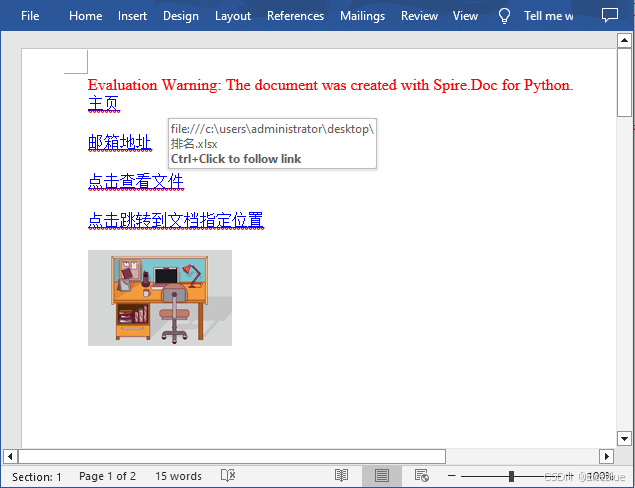
paragraph.AppendHyperlink("https://ABCD.com/", "主页", HyperlinkType.WebLink)

# 添加换行符
paragraph.AppendBreak(BreakType.LineBreak)
paragraph.AppendBreak(BreakType.LineBreak)

# 添加一个邮箱链接
paragraph.AppendHyperlink("mailto:support@e-iceblue.com", "邮箱地址", HyperlinkType.EMailLink)

# 添加换行符
paragraph.AppendBreak(BreakType.LineBreak)
paragraph.AppendBreak(BreakType.LineBreak)

# 添加一个文档链接
filePath = "C:\\Users\\Administrator\\Desktop\\排名.xlsx"
paragraph.AppendHyperlink(filePath, "点击查看文件", HyperlinkType.FileLink)

# 添加换行符
paragraph.AppendBreak(BreakType.LineBreak)
paragraph.AppendBreak(BreakType.LineBreak)

# 添加一个新节并创建书签
section2 = doc.AddSection()
bookmarkParagrapg = section2.AddParagraph()
bookmarkParagrapg.AppendText("添加一个新段落")
start = bookmarkParagrapg.AppendBookmarkStart("书签")
bookmarkParagrapg.Items.Insert(0, start)
bookmarkParagrapg.AppendBookmarkEnd("书签")

# 链接到书签
paragraph.AppendHyperlink("书签", "点击跳转到文档指定位置", HyperlinkType.Bookmark)

# 添加换行符
paragraph.AppendBreak(BreakType.LineBreak)
paragraph.AppendBreak(BreakType.LineBreak)

# 添加一个图片超链接
image = "C:\\Users\\Administrator\\Desktop\\work1.jpg"
picture = paragraph.AppendPicture(image)
paragraph.AppendHyperlink("https://ABCD.com/", picture, HyperlinkType.WebLink)

# 保存文档
doc.SaveToFile("Word超链接.docx", FileFormat.Docx2019);
doc.Dispose()
生成文档:
Python 删除Word中的超链接
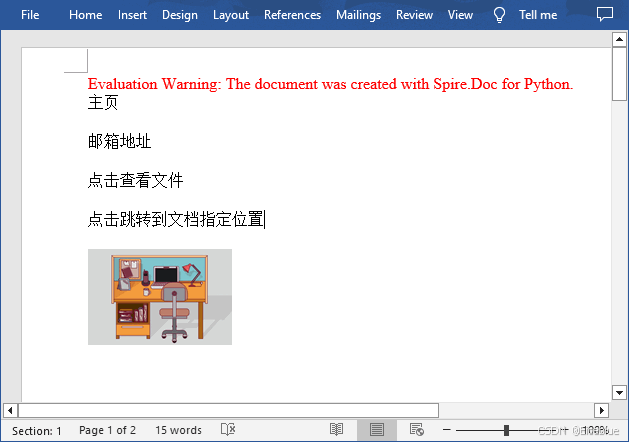
要删除 Word 文档中的所有超链接,先用到了自定义方法 FindAllHyperlinks() 来查找文档中的所有超链接,然后再通过自定义方法 FlattenHyperlinks() 来扁平化超链接。
示例代码如下:
from spire.doc import *
from spire.doc.common import *

# 查找文档中的所有超链接
def FindAllHyperlinks(document):
    hyperlinks = []
    for i in range(document.Sections.Count):
        section = document.Sections.get_Item(i)
        for j in range(section.Body.ChildObjects.Count):
            sec = section.Body.ChildObjects.get_Item(j)
            if sec.DocumentObjectType == DocumentObjectType.Paragraph:
                for k in range((sec if isinstance(sec, Paragraph) else None).ChildObjects.Count):
                    para = (sec if isinstance(sec, Paragraph)
                            else None).ChildObjects.get_Item(k)
                    if para.DocumentObjectType == DocumentObjectType.Field:
                        field = para if isinstance(para, Field) else None
                        if field.Type == FieldType.FieldHyperlink:
                            hyperlinks.append(field)
    return hyperlinks

# 扁平化超链接域
def FlattenHyperlinks(field):
    ownerParaIndex = field.OwnerParagraph.OwnerTextBody.ChildObjects.IndexOf(
        field.OwnerParagraph)
    fieldIndex = field.OwnerParagraph.ChildObjects.IndexOf(field)
    sepOwnerPara = field.Separator.OwnerParagraph
    sepOwnerParaIndex = field.Separator.OwnerParagraph.OwnerTextBody.ChildObjects.IndexOf(
        field.Separator.OwnerParagraph)
    sepIndex = field.Separator.OwnerParagraph.ChildObjects.IndexOf(
        field.Separator)
    endIndex = field.End.OwnerParagraph.ChildObjects.IndexOf(field.End)
    endOwnerParaIndex = field.End.OwnerParagraph.OwnerTextBody.ChildObjects.IndexOf(
        field.End.OwnerParagraph)

    FormatFieldResultText(field.Separator.OwnerParagraph.OwnerTextBody,
                           sepOwnerParaIndex, endOwnerParaIndex, sepIndex, endIndex)

    field.End.OwnerParagraph.ChildObjects.RemoveAt(endIndex)

    for i in range(sepOwnerParaIndex, ownerParaIndex - 1, -1):
        if i == sepOwnerParaIndex and i == ownerParaIndex:
            for j in range(sepIndex, fieldIndex - 1, -1):
                field.OwnerParagraph.ChildObjects.RemoveAt(j)

        elif i == ownerParaIndex:
            for j in range(field.OwnerParagraph.ChildObjects.Count - 1, fieldIndex - 1, -1):
                field.OwnerParagraph.ChildObjects.RemoveAt(j)

        elif i == sepOwnerParaIndex:
            for j in range(sepIndex, -1, -1):
                sepOwnerPara.ChildObjects.RemoveAt(j)
        else:
            field.OwnerParagraph.OwnerTextBody.ChildObjects.RemoveAt(i)

# 将域转换为文本范围并清除文本格式
def FormatFieldResultText(ownerBody, sepOwnerParaIndex, endOwnerParaIndex, sepIndex, endIndex):
    for i in range(sepOwnerParaIndex, endOwnerParaIndex + 1):
        para = ownerBody.ChildObjects[i] if isinstance(
            ownerBody.ChildObjects[i], Paragraph) else None
        if i == sepOwnerParaIndex and i == endOwnerParaIndex:
            for j in range(sepIndex + 1, endIndex):
               if isinstance(para.ChildObjects[j], TextRange):
                 FormatText(para.ChildObjects[j])

        elif i == sepOwnerParaIndex:
            for j in range(sepIndex + 1, para.ChildObjects.Count):
                if isinstance(para.ChildObjects[j], TextRange):
                  FormatText(para.ChildObjects[j])
        elif i == endOwnerParaIndex:
            for j in range(0, endIndex):
               if isinstance(para.ChildObjects[j], TextRange):
                 FormatText(para.ChildObjects[j])
        else:
            for j, unusedItem in enumerate(para.ChildObjects):
                if isinstance(para.ChildObjects[j], TextRange):
                  FormatText(para.ChildObjects[j])

# 设置文本样式
def FormatText(tr):
    tr.CharacterFormat.TextColor = Color.get_Black()
    tr.CharacterFormat.UnderlineStyle = UnderlineStyle.none

# 加载Word文档
doc = Document()
doc.LoadFromFile("Word超链接.docx")

# 获取所有超链接
hyperlinks = FindAllHyperlinks(doc)

# 扁平化超链接
for i in range(len(hyperlinks) - 1, -1, -1):
    FlattenHyperlinks(hyperlinks[i])

# 保存文件
doc.SaveToFile("删除超链接.docx", FileFormat.Docx)
doc.Close()
生成文件:
到此这篇关于使用Python实现在Word中添加或删除超链接的文章就介绍到这了,更多相关Python Word添加或删除超链接内容请搜索脚本之家以前的文章或继续浏览下面的相关文章希望大家以后多多支持脚本之家!
相关文章
 这篇文章主要给大家介绍了关于Python中 enum 模块的相关资料,文中通过示例代码介绍的非常详细,对大家学习或者使用python具有一定的参考学习价值,需要的朋友们下面随着小编来一起学习学习吧2019-01-01
 缩进错误是Python中最常见的错误之一,它会使我们的代码难以理解,并且难以调试,下面就来介绍一下,具有一定的参考价值,感兴趣的额可以了解一下2025-05-05
python subprocess 杀掉全部派生的子进程方法
下面小编就为大家带来一篇python subprocess 杀掉全部派生的子进程方法。小编觉得挺不错的,现在就分享给大家,也给大家做个参考。一起跟随小编过来看看吧2017-01-01 大家好,本篇文章主要讲的是用Python实现给Word文档盖章,感兴趣的同学赶快来看一看吧,对你有帮助的话记得收藏一下2022-02-02
 这篇文章主要介绍了Python中使用ElementTree解析XML示例,本文同时讲解了XML基本概念介绍、XML几种解析方法和ElementTree解析实例,需要的朋友可以参考下2015-06-06
 这篇文章主要介绍了python logging模块的使用,帮助大家更好的理解和使用python,感兴趣的朋友可以了解下2020-10-10
python图像处理基本操作总结(PIL库、Matplotlib及Numpy)
这篇文章主要给大家介绍了关于python图像处理基本操作的相关资料,主要利用的是PIL库、Matplotlib及Numpy等处理方法,需要的朋友可以参考下2021-06-06 这篇文章主要介绍了Django单元测试工具test client使用详解,文中通过示例代码介绍的非常详细,对大家的学习或者工作具有一定的参考学习价值,需要的朋友可以参考下2019-08-08
 Spyder是一个用于科学计算的使用Python编程语言的集成开发环境(IDE),它结合了综合开发工具的高级编辑、分析、调试等功能,需要的朋友可以参考下2023-05-05
 这篇文章主要为大家详细介绍了python实现数据写入excel表格,具有一定的参考价值,感兴趣的小伙伴们可以参考一下2018-03-03
最新评论