

基于Python schedule的任务调度详解
更新时间:2025年02月08日 08:38:15 作者:小龙在山东
schedule 是Python的第三方任务调度库,可以用来做定时任务,这篇文章主要为大家介绍了Python利用schedule进行任务调度的相关操作,需要的可以了解下
schedule 是Python的第三方任务调度库,可以用来做定时任务,API简单易用,可以按照秒,分,小时,日期或者自定义事件执行时间,不需要额外的流程,非常轻量级,没有外部依赖,兼容Python 3.7、3.8、3.9、3.10和3.11。
安装
$ pip install schedule
每隔一段时间执行一次
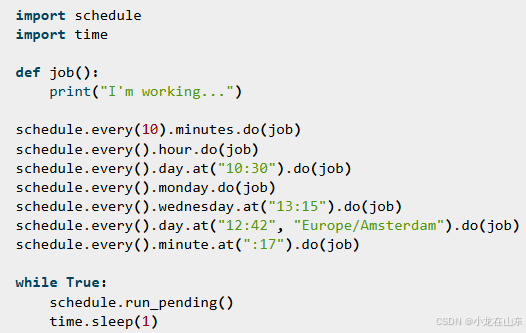
import schedule
import time

def job():
    print("I'm working...")

# Run job every 3 second/minute/hour/day/week,
# Starting 3 second/minute/hour/day/week from now
schedule.every(3).seconds.do(job)
schedule.every(3).minutes.do(job)
schedule.every(3).hours.do(job)
schedule.every(3).days.do(job)
schedule.every(3).weeks.do(job)

# Run job every minute at the 23rd second
schedule.every().minute.at(":23").do(job)

# Run job every hour at the 42nd minute
schedule.every().hour.at(":42").do(job)

# Run jobs every 5th hour, 20 minutes and 30 seconds in.
# If current time is 02:00, first execution is at 06:20:30
schedule.every(5).hours.at("20:30").do(job)

# Run job every day at specific HH:MM and next HH:MM:SS
schedule.every().day.at("10:30").do(job)
schedule.every().day.at("10:30:42").do(job)
schedule.every().day.at("12:42", "Europe/Amsterdam").do(job)

# Run job on a specific day of the week
schedule.every().monday.do(job)
schedule.every().wednesday.at("13:15").do(job)
schedule.every().minute.at(":17").do(job)

while True:
    schedule.run_pending()
    time.sleep(1)
用装饰器执行
用@repeat装饰器来设置执行参数。
from schedule import every, repeat, run_pending
import time

@repeat(every(10).minutes)
def job():
    print("I am a scheduled job")

while True:
    run_pending()
    time.sleep(1)
给任务传递参数
do()可以传递额外的参数给任务。
import schedule

def greet(name):
    print('Hello', name)

schedule.every(2).seconds.do(greet, name='Alice')
schedule.every(4).seconds.do(greet, name='Bob')

from schedule import every, repeat

@repeat(every().second, "World")
@repeat(every().day, "Mars")
def hello(planet):
    print("Hello", planet)
取消任务
import schedule

def some_task():
    print('Hello world')

job = schedule.every().day.at('22:30').do(some_task)
schedule.cancel_job(job)
schedule.cancel_job(job)取消任务。
执行一次任务
启动任务后,调用schedule.CancelJob取消任务,就只执行一次任务。
import schedule
import time

def job_that_executes_once():
    # Do some work that only needs to happen once...
    return schedule.CancelJob

schedule.every().day.at('22:30').do(job_that_executes_once)

while True:
    schedule.run_pending()
    time.sleep(1)
获取所有的任务
schedule.get_jobs()获取所有任务。
import schedule

def hello():
    print('Hello world')

schedule.every().second.do(hello)

all_jobs = schedule.get_jobs()
取消所有任务
schedule.clear()取消所有任务。
import schedule

def greet(name):
    print('Hello {}'.format(name))

schedule.every().second.do(greet)

schedule.clear()
获取指定任务
通过tag设置标签,schedule.get_jobs('friend')来获取指定标签的任务。
import schedule

def greet(name):
    print('Hello {}'.format(name))

schedule.every().day.do(greet, 'Andrea').tag('daily-tasks', 'friend')
schedule.every().hour.do(greet, 'John').tag('hourly-tasks', 'friend')
schedule.every().hour.do(greet, 'Monica').tag('hourly-tasks', 'customer')
schedule.every().day.do(greet, 'Derek').tag('daily-tasks', 'guest')

friends = schedule.get_jobs('friend')
取消指定任务
import schedule

def greet(name):
    print('Hello {}'.format(name))

schedule.every().day.do(greet, 'Andrea').tag('daily-tasks', 'friend')
schedule.every().hour.do(greet, 'John').tag('hourly-tasks', 'friend')
schedule.every().hour.do(greet, 'Monica').tag('hourly-tasks', 'customer')
schedule.every().day.do(greet, 'Derek').tag('daily-tasks', 'guest')

schedule.clear('daily-tasks')
指定区间运行任务
def my_job():
    print('Foo')

# Run every 5 to 10 seconds.
schedule.every(5).to(10).seconds.do(my_job)
执行任务直到指定时间(超时)
import schedule
from datetime import datetime, timedelta, time

def job():
    print('Boo')

# run job until a 18:30 today
schedule.every(1).hours.until("18:30").do(job)

# run job until a 2030-01-01 18:33 today
schedule.every(1).hours.until("2030-01-01 18:33").do(job)

# Schedule a job to run for the next 8 hours
schedule.every(1).hours.until(timedelta(hours=8)).do(job)

# Run my_job until today 11:33:42
schedule.every(1).hours.until(time(11, 33, 42)).do(job)

# run job until a specific datetime
schedule.every(1).hours.until(datetime(2020, 5, 17, 11, 36, 20)).do(job)
执行到下一个任务
schedule.idle_seconds()用来获取下一个任务计划执行的秒数。如果没有任务了,返回None。
import schedule
import time

def job():
    print('Hello')

schedule.every(5).seconds.do(job)

while 1:
    n = schedule.idle_seconds()
    if n is None:
        # no more jobs
        break
    elif n > 0:
        # sleep exactly the right amount of time
        time.sleep(n)
    schedule.run_pending()
立即运行
import schedule

def job_1():
    print('Foo')

def job_2():
    print('Bar')

schedule.every().monday.at("12:40").do(job_1)
schedule.every().tuesday.at("16:40").do(job_2)

schedule.run_all()

# Add the delay_seconds argument to run the jobs with a number
# of seconds delay in between.
schedule.run_all(delay_seconds=10)
schedule.run_all()会让任务忽略计划,立即执行。schedule.run_all(delay_seconds=10)让任务恢复执行。
后台执行
import threading
import time

import schedule


def run_continuously(interval=1):
    """Continuously run, while executing pending jobs at each
    elapsed time interval.
    @return cease_continuous_run: threading. Event which can
    be set to cease continuous run. Please note that it is
    *intended behavior that run_continuously() does not run
    missed jobs*. For example, if you've registered a job that
    should run every minute and you set a continuous run
    interval of one hour then your job won't be run 60 times
    at each interval but only once.
    """
    cease_continuous_run = threading.Event()

    class ScheduleThread(threading.Thread):
        @classmethod
        def run(cls):
            while not cease_continuous_run.is_set():
                schedule.run_pending()
                time.sleep(interval)

    continuous_thread = ScheduleThread()
    continuous_thread.start()
    return cease_continuous_run


def background_job():
    print('Hello from the background thread')


schedule.every().second.do(background_job)

# Start the background thread
stop_run_continuously = run_continuously()

# Do some other things...
time.sleep(10)

# Stop the background thread
stop_run_continuously.set()
并行执行
import threading
import time
import schedule

def job():
    print("I'm running on thread %s" % threading.current_thread())

def run_threaded(job_func):
    job_thread = threading.Thread(target=job_func)
    job_thread.start()

schedule.every(10).seconds.do(run_threaded, job)
schedule.every(10).seconds.do(run_threaded, job)
schedule.every(10).seconds.do(run_threaded, job)
schedule.every(10).seconds.do(run_threaded, job)
schedule.every(10).seconds.do(run_threaded, job)


while 1:
    schedule.run_pending()
    time.sleep(1)
这里每个任务都启动一个线程来并行执行。
import time
import threading
import schedule
import queue

def job():
    print("I'm working")


def worker_main():
    while 1:
        job_func = jobqueue.get()
        job_func()
        jobqueue.task_done()

jobqueue = queue.Queue()

schedule.every(10).seconds.do(jobqueue.put, job)
schedule.every(10).seconds.do(jobqueue.put, job)
schedule.every(10).seconds.do(jobqueue.put, job)
schedule.every(10).seconds.do(jobqueue.put, job)
schedule.every(10).seconds.do(jobqueue.put, job)

worker_thread = threading.Thread(target=worker_main)
worker_thread.start()

while 1:
    schedule.run_pending()
    time.sleep(1)
这里用到用了一个任务队列来严格执行线程数。
设置时区
# Pass a timezone as a string
schedule.every().day.at("12:42", "Europe/Amsterdam").do(job)

# Pass an pytz timezone object
from pytz import timezone
schedule.every().friday.at("12:42", timezone("Africa/Lagos")).do(job)
以上就是基于Python schedule的任务调度详解的详细内容,更多关于Python schedule任务调度的资料请关注脚本之家其它相关文章!
相关文章
 最近ChatGPT大火,在3.5版本后开放了接口API,所以很多人开始进行实操,这里我就用python来为大家实现一下,如何调用API并提问返回文章的说明2023-03-03
 这篇文章主要介绍了Django如何简单快速实现PUT、DELETE方法,文中通过示例代码介绍的非常详细,对大家的学习或者工作具有一定的参考学习价值,需要的朋友可以参考下2019-07-07
 今天带大家复习python框架的相关知识,文中对flask作了非常详细的介绍,对正在学习python的小伙伴们有很好的帮助,需要的朋友可以参考下2021-05-05
 这篇文章主要为大家介绍了Python面向对象封装案例基础教程,有需要的朋友可以借鉴参考下,希望能够有所帮助,祝大家多多进步,早日升职加薪2023-06-06
 这篇文章主要为大家介绍了pandas探索你的数据实现可视化示例详解,有需要的朋友可以借鉴参考下,希望能够有所帮助,祝大家多多进步,早日升职加薪2023-10-10
 当我们在注册一个网页时,有的网页会让必须要短信验证、邮箱验证,才可以进行账号的注册,下面这篇文章主要给大家介绍了关于用Python实现短信验证码发送的相关资料,需要的朋友可以参考下2022-12-12
 这篇文章主要介绍了Python中的文档测试模块,代码基于Python2.x版本,需要的朋友可以参考下2015-04-04
 这篇文章主要介绍了python flask之模板继承方式,具有很好的参考价值,希望对大家有所帮助。如有错误或未考虑完全的地方,望不吝赐教2023-03-03
 Python提供了许多操作Excel的模块,能够让我们从繁琐的工作中腾出双手。本文主要为大家介绍的是openpyxl模块,它的功能相对与其他模块更为齐全,感兴趣的小伙伴快来学习一下吧2021-12-12
 这篇文章主要为大家详细介绍了python多线程分块读取文件,具有一定的参考价值,感兴趣的小伙伴们可以参考一下2019-08-08
最新评论