

Python实现批量获取文件夹内文件名并重命名
更新时间:2025年02月09日 09:10:31 作者:一晌小贪欢
这篇文章主要为大家详细介绍了Python如何批量获取文件夹内文件名及重命名文件,文中的示例代码讲解详细,感兴趣的小伙伴可以跟随小编一起学习一下
1、背景介绍
有时候我们经常需要将批量的文件进行重命名,比如:
- ① 批量在文件名【前面】加上 自定义字符
- ② 批量在文件名【后面】加上 自定义字符
- ③ 批量在【替换】文件名中的字符
- ④ 批量去除 空格
- ⑤ 结果可以选择复制文件 或者 移动 文件
2、库的安装
| 库 | 用途 | 安装 |
|---|---|---|
| PyQt5 | 界面设计 | pip install PyQt5 -i https://pypi.tuna.tsinghua.edu.cn/simple/ |
| shutil | 文件移动 | 内置库无需安装 |
| os | 文件移动 | 内置库无需安装 |
3、核心代码
复制 或 移动
shutil.move(old_file, new_file)  # 移动文件
shutil.copy2(old_file, new_file)  # 复制文件
4、完整代码
# -*- coding: UTF-8 -*-
'''
@Project :测试
@File    :文件重命名.py
@IDE     :PyCharm
@Author  :一晌小贪欢(278865463@qq.com)
@Date    :2025/2/7 下午8:02
'''


import os
import shutil
from PyQt5.QtWidgets import QApplication, QWidget, QLabel, QLineEdit, QVBoxLayout, QHBoxLayout, QPushButton, QFileDialog, QCheckBox, QFormLayout, QSpinBox, QGroupBox, QDialogButtonBox, QRadioButton, QButtonGroup


def copy_or_move_files(folder_path, new_folder_path, prefix="", suffix="", replace_chars=None, add_index=False, remove_spaces=False, move_files=False):
    # 检查源文件夹是否存在
    if not os.path.exists(folder_path):
        raise FileNotFoundError(f"Folder '{folder_path}' does not exist.")

    # 检查目标文件夹是否存在,不存在则创建
    if not os.path.exists(new_folder_path):
        os.makedirs(new_folder_path)
    index = 0
    # 遍历文件夹内所有文件
    for filename in os.listdir(folder_path):
        # 构造完整文件路径
        old_file = os.path.join(folder_path, filename)

        # 判断是否为文件(排除文件夹)
        if os.path.isfile(old_file):
            # 分割文件名和扩展名
            name_only, extension = os.path.splitext(filename)

            # 生成新文件名
            new_name = name_only
            if prefix:
                new_name = prefix + new_name
            if suffix:
                new_name = new_name + suffix
            if replace_chars:
                old_char, new_char = replace_chars
                new_name = new_name.replace(old_char, new_char)

            if remove_spaces:
                new_name = new_name.replace(" ", "")  # 去除空格

            if add_index:
                index += 1
                name_only, extension = os.path.splitext(filename)  # 分离原始文件名和扩展名
                new_name_base = prefix + name_only + suffix  # 生成基础的新文件名
                new_name = f"{index}{new_name_base}{extension}"  # 在文件名最前面添加索引
            # 重新组合文件名和扩展名
            new_name = new_name + extension

            new_file = os.path.join(new_folder_path, new_name)

            # 根据用户选择执行复制或移动操作
            if move_files:
                shutil.move(old_file, new_file)  # 移动文件
                print(f"Moved '{filename}' to '{new_name}'")
            else:
                shutil.copy2(old_file, new_file)  # 复制文件
                print(f"Copied '{filename}' to '{new_name}'")


class FileCopyApp(QWidget):
    def __init__(self):
        super().__init__()

        self.setWindowTitle("文件重命名—复制版")
        self.setGeometry(900, 500, 600, 300)

        # Initialize UI components
        self.init_ui()

    def init_ui(self):
        # Create layout
        layout = QVBoxLayout()

        # Source Folder
        self.folder_label = QLabel("源文件:")
        self.folder_line_edit = QLineEdit()
        self.browse_button = QPushButton("浏览")
        self.browse_button.clicked.connect(self.browse_folder)

        # Destination Folder
        self.new_folder_label = QLabel("保存文件夹:")
        self.new_folder_line_edit = QLineEdit()
        self.new_folder_button = QPushButton("浏览")
        self.new_folder_button.clicked.connect(self.browse_new_folder)

        # Prefix, Suffix, Char Replacement
        self.prefix_label = QLabel("头部添加:")
        self.prefix_line_edit = QLineEdit()

        self.suffix_label = QLabel("尾部添加:")
        self.suffix_line_edit = QLineEdit()

        self.old_char_label = QLabel("原字符:")
        self.old_char_line_edit = QLineEdit()
        self.new_char_label = QLabel("替换字符:")
        self.new_char_line_edit = QLineEdit()

        # Index and Space Removal
        self.add_index_check_box = QCheckBox("重复名称添加索引")
        self.remove_spaces_check_box = QCheckBox("去除文件名中的空格")

        # Copy or Move Radio Buttons
        self.copy_radio = QRadioButton("复制")
        self.move_radio = QRadioButton("移动")
        self.copy_radio.setChecked(True)  # 默认选择复制
        self.action_group = QButtonGroup()
        self.action_group.addButton(self.copy_radio)
        self.action_group.addButton(self.move_radio)

        # Start Button
        self.start_button = QPushButton("开始")
        self.start_button.clicked.connect(self.start_copy_or_move)

        # Arrange components
        folder_layout = QHBoxLayout()
        folder_layout.addWidget(self.folder_label)
        folder_layout.addWidget(self.folder_line_edit)
        folder_layout.addWidget(self.browse_button)

        new_folder_layout = QHBoxLayout()
        new_folder_layout.addWidget(self.new_folder_label)
        new_folder_layout.addWidget(self.new_folder_line_edit)
        new_folder_layout.addWidget(self.new_folder_button)

        replace_layout = QFormLayout()
        replace_layout.addRow(self.prefix_label, self.prefix_line_edit)
        replace_layout.addRow(self.suffix_label, self.suffix_line_edit)
        replace_layout.addRow(self.old_char_label, self.old_char_line_edit)
        replace_layout.addRow(self.new_char_label, self.new_char_line_edit)

        options_layout = QVBoxLayout()
        options_layout.addWidget(self.add_index_check_box)
        options_layout.addWidget(self.remove_spaces_check_box)

        # Copy or Move Layout
        action_layout = QHBoxLayout()
        action_layout.addWidget(self.copy_radio)
        action_layout.addWidget(self.move_radio)

        # Layout adjustments
        layout.addLayout(folder_layout)
        layout.addLayout(new_folder_layout)
        layout.addLayout(replace_layout)
        layout.addLayout(options_layout)
        layout.addLayout(action_layout)
        layout.addWidget(self.start_button)

        # Set main layout
        self.setLayout(layout)

    def browse_folder(self):
        folder_path = QFileDialog.getExistingDirectory(self, "选择源文件夹")
        if folder_path:
            self.folder_line_edit.setText(folder_path)

    def browse_new_folder(self):
        new_folder_path = QFileDialog.getExistingDirectory(self, "选择保存文件夹")
        if new_folder_path:
            self.new_folder_line_edit.setText(new_folder_path)

    def start_copy_or_move(self):
        folder_path = self.folder_line_edit.text()
        new_folder_path = self.new_folder_line_edit.text()
        prefix = self.prefix_line_edit.text()
        suffix = self.suffix_line_edit.text()
        replace_chars = (
            self.old_char_line_edit.text(), self.new_char_line_edit.text()) if self.old_char_line_edit.text() and self.new_char_line_edit.text() else None
        add_index = self.add_index_check_box.isChecked()
        remove_spaces = self.remove_spaces_check_box.isChecked()
        move_files = self.move_radio.isChecked()  # 判断用户选择的是复制还是移动
        copy_or_move_files(folder_path, new_folder_path, prefix, suffix, replace_chars, add_index, remove_spaces, move_files)


if __name__ == '__main__':
    import sys
    app = QApplication(sys.argv)
    window = FileCopyApp()
    window.show()
    sys.exit(app.exec_())
5、效果图
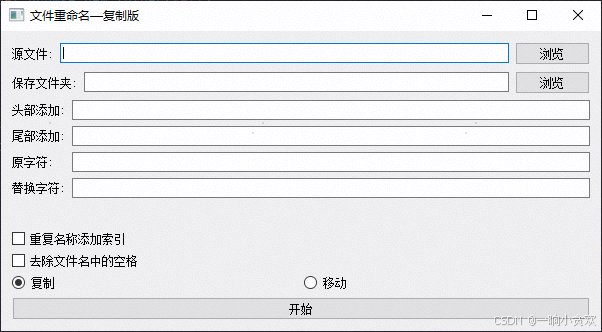
到此这篇关于Python实现批量获取文件夹内文件名并重命名的文章就介绍到这了,更多相关Python文件重命名内容请搜索脚本之家以前的文章或继续浏览下面的相关文章希望大家以后多多支持脚本之家!
相关文章
 这篇文章主要介绍了尝试使用Python多线程抓取代理服务器IP地址的示例,尽管有GIL的存在使得Python并不能真正实现多线程并行,需要的朋友可以参考下2015-11-11
 这篇文章主要介绍了python实现ip代理池功能,结合实例形式分析了Python IP代理池的实现原理及相关操作技巧,需要的朋友可以参考下2019-07-07
 本文主要介绍了Python3列表删除的三种方式实现,文中通过示例代码介绍的非常详细,对大家的学习或者工作具有一定的参考学习价值,需要的朋友们下面随着小编来一起学习学习吧2022-08-08
解决pip安装第三方库,但PyCharm中却无法识别的问题for mac
这篇文章主要介绍了解决pip安装第三方库,但PyCharm中却无法识别的问题for mac,具有很好的参考价值,希望对大家有所帮助,如有错误或未考虑完全的地方,望不吝赐教2024-09-09 这篇文章主要介绍了Python的函数嵌套的使用方法,有需要的朋友可以参考一下2014-01-01
 这篇文章主要介绍了python开发中module模块用法,以实例形式较为详细的分析了Python中模块的功能、定义及相关使用技巧,具有一定参考借鉴价值,需要的朋友可以参考下2015-11-11
 这篇文章主要介绍了Python中的len()函数,包括其基础用法、适用范围、常见使用场景以及在第三方库(如NumPy和pandas)中的应用,文中通过代码介绍的非常详细,需要的朋友可以参考下2025-03-03
 今天小编就为大家分享一篇tensorflow 实现数据类型转换,具有很好的参考价值,希望对大家有所帮助。一起跟随小编过来看看吧2020-02-02
 本文给大家分享的是一则使用Python实现下载网易云音乐中高清MV的代码,本人新手,没有做特别的功能,仅仅是直接循环了MV的id,小伙伴们可以自己扩展下。2015-03-03
使用PyInstaller将Python程序文件转换为可执行程序文件
与py2exe一样,PyInstaller程序也可以将Python的.py程序文件转换为.exe,并且还有Linux的版本,下面我们就来详细看一下如何使用PyInstaller将Python程序文件转换为可执行程序文件2016-07-07
最新评论