

基于Python编写个自用的内存清理工具
更新时间:2025年02月17日 08:43:27 作者:mosquito_lover1
自己电脑经常内存飙升却不知道是什么进程引起的,但是按传统办法点开任务管理器去排个序来查看太发麻了,所以本文就来用Python编写一个内存清理工具吧
开发背景
自己电脑经常内存飙升却不知道是什么进程引起的,按传统办法是要点开任务管理器去排个序来查看下,有时还要点开文件位置再确认一下,觉得麻烦。 于是干脆用Python写一个,很实用!
功能特点
内存清理信息:清理前和清理后的内存使用总和。
进程列表:显示所有进程的 PID、名称、内存使用和文件位置。点击列名可以对该列进行排序。
功能按钮:清理内存”:清理内存并更新内存使用信息。“刷新进程列表”:重新加载进程列表并更新内存使用信息。“结束进程”:弹出确认对话框,用户确认后结束选中的进程。“导出进程列表”:将当前进程列表导出为 CSV 文件。
新进程提醒:如果有新进程启动,会弹窗显示进程的名称、PID 和文件位置。
工具截图
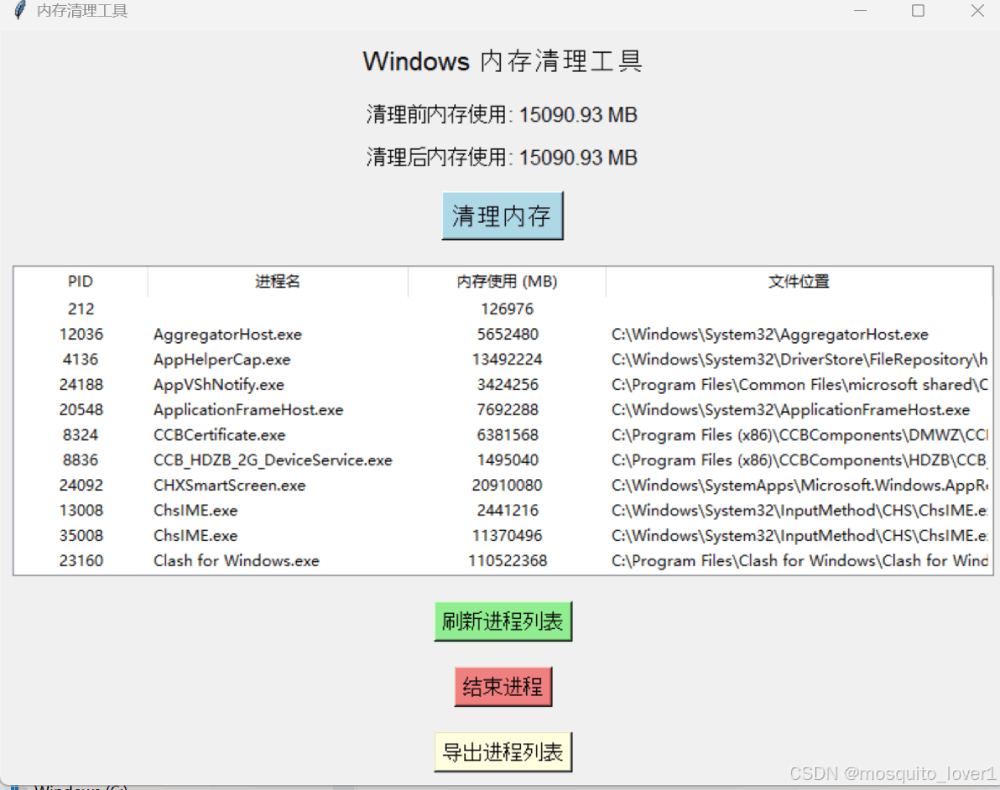
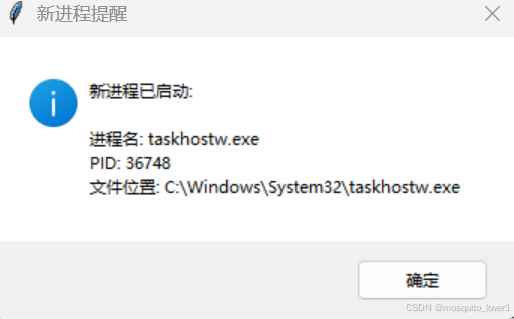
完整代码
import os
import psutil
import ctypes
import sys
import tkinter as tk
from tkinter import ttk, messagebox, filedialog
import csv
import time
import threading

# 检查并提升管理员权限
def run_as_admin():
    if sys.platform != 'win32':
        return False

    try:
        if ctypes.windll.shell32.IsUserAnAdmin():
            return True
    except:
        pass

    ctypes.windll.shell32.ShellExecuteW(None, "runas", sys.executable, " ".join(sys.argv), None, 1)
    sys.exit()

# 获取所有进程信息
def get_processes():
    processes = []
    for proc in psutil.process_iter(['pid', 'name', 'memory_info', 'exe']):
        try:
            processes.append((proc.info['pid'], proc.info['name'], proc.info['memory_info'].rss, proc.info['exe']))
        except (psutil.NoSuchProcess, psutil.AccessDenied, psutil.ZombieProcess):
            continue
    return processes

# 计算所有进程的内存使用总和
def get_total_memory_usage():
    total_memory = 0
    for proc in psutil.process_iter(['memory_info']):
        try:
            total_memory += proc.info['memory_info'].rss
        except (psutil.NoSuchProcess, psutil.AccessDenied, psutil.ZombieProcess):
            continue
    return total_memory

# 结束选中的进程
def kill_process():
    selected_item = process_tree.selection()
    if not selected_item:
        messagebox.showwarning("警告", "请选择一个进程!")
        return

    pid = int(process_tree.item(selected_item, 'values')[0])
    process_name = process_tree.item(selected_item, 'values')[1]

    # 确认对话框
    confirm = messagebox.askyesno("确认", f"确定要结束进程 {process_name} (PID: {pid}) 吗?")
    if not confirm:
        return

    try:
        process = psutil.Process(pid)
        process.terminate()
        messagebox.showinfo("成功", f"进程 {process_name} (PID: {pid}) 已结束!")
        refresh_processes()
    except Exception as e:
        messagebox.showerror("错误", f"结束进程时出错: {e}")

# 刷新进程列表
def refresh_processes():
    for row in process_tree.get_children():
        process_tree.delete(row)
    processes = get_processes()
    for proc in processes:
        process_tree.insert("", "end", values=proc)

    # 更新内存使用信息
    update_memory_usage()

# 更新内存使用信息
def update_memory_usage():
    total_memory = get_total_memory_usage()
    memory_before.set(f"清理前内存使用: {total_memory / 1024 / 1024:.2f} MB")
    memory_after.set(f"清理后内存使用: {total_memory / 1024 / 1024:.2f} MB")

# 内存清理功能
def clear_memory():
    try:
        # 获取清理前的内存使用总和
        before_memory = get_total_memory_usage()

        # 释放未使用的内存
        ctypes.windll.psapi.EmptyWorkingSet(ctypes.c_ulong(-1))

        # 获取清理后的内存使用总和
        after_memory = get_total_memory_usage()

        # 更新界面显示
        memory_before.set(f"清理前内存使用: {before_memory / 1024 / 1024:.2f} MB")
        memory_after.set(f"清理后内存使用: {after_memory / 1024 / 1024:.2f} MB")
        messagebox.showinfo("成功", "内存清理完成!")
    except Exception as e:
        messagebox.showerror("错误", f"清理内存时出错: {e}")

# 导出进程列表为 CSV 文件
def export_processes():
    file_path = filedialog.asksaveasfilename(
        defaultextension=".csv",
        filetypes=[("CSV 文件", "*.csv"), ("所有文件", "*.*")],
        title="保存进程列表"
    )
    if not file_path:
        return

    try:
        with open(file_path, mode="w", newline="", encoding="utf-8") as file:
            writer = csv.writer(file)
            # 写入表头
            writer.writerow(["PID", "进程名", "内存使用 (MB)", "文件位置"])
            # 写入进程数据
            for row in process_tree.get_children():
                values = process_tree.item(row, 'values')
                writer.writerow(values)
        messagebox.showinfo("成功", f"进程列表已导出到 {file_path}")
    except Exception as e:
        messagebox.showerror("错误", f"导出进程列表时出错: {e}")

# 排序函数
def treeview_sort_column(tv, col, reverse):
    l = [(tv.set(k, col), k) for k in tv.get_children('')]
    try:
        l.sort(key=lambda t: int(t[0]) if col == "memory" else t[0], reverse=reverse)
    except ValueError:
        l.sort(reverse=reverse)

    for index, (val, k) in enumerate(l):
        tv.move(k, '', index)

    tv.heading(col, command=lambda: treeview_sort_column(tv, col, not reverse))

# 监控新进程
def monitor_new_processes():
    global previous_processes

    while True:
        current_processes = get_processes()
        current_pids = {proc[0] for proc in current_processes}
        previous_pids = {proc[0] for proc in previous_processes}

        # 检查新进程
        new_pids = current_pids - previous_pids
        if new_pids:
            for proc in current_processes:
                if proc[0] in new_pids:
                    messagebox.showinfo(
                        "新进程提醒",
                        f"新进程已启动:\n\n"
                        f"进程名: {proc[1]}\n"
                        f"PID: {proc[0]}\n"
                        f"文件位置: {proc[3]}"
                    )

        previous_processes = current_processes
        time.sleep(5)  # 每 5 秒检查一次

# 创建主窗口
def create_gui():
    global memory_before, memory_after, process_tree, previous_processes

    root = tk.Tk()
    root.title("内存清理工具")
    root.geometry("800x600")

    # 初始化进程列表
    previous_processes = get_processes()

    # 启动新进程监控线程
    monitor_thread = threading.Thread(target=monitor_new_processes, daemon=True)
    monitor_thread.start()

    # 标题
    title_label = tk.Label(root, text="Windows 内存清理工具", font=("Arial", 16))
    title_label.pack(pady=10)

    # 内存信息显示
    memory_before = tk.StringVar()
    memory_after = tk.StringVar()

    memory_before.set("清理前内存使用: N/A")
    memory_after.set("清理后内存使用: N/A")

    before_label = tk.Label(root, textvariable=memory_before, font=("Arial", 12))
    before_label.pack(pady=5)

    after_label = tk.Label(root, textvariable=memory_after, font=("Arial", 12))
    after_label.pack(pady=5)

    # 清理内存按钮
    clear_button = tk.Button(root, text="清理内存", command=clear_memory, font=("Arial", 14), bg="lightblue")
    clear_button.pack(pady=10)

    # 进程列表
    process_frame = tk.Frame(root)
    process_frame.pack(fill="both", expand=True, padx=10, pady=10)

    columns = ("pid", "name", "memory", "exe")
    process_tree = ttk.Treeview(process_frame, columns=columns, show="headings")
    process_tree.heading("pid", text="PID", command=lambda: treeview_sort_column(process_tree, "pid", False))
    process_tree.heading("name", text="进程名", command=lambda: treeview_sort_column(process_tree, "name", False))
    process_tree.heading("memory", text="内存使用 (MB)", command=lambda: treeview_sort_column(process_tree, "memory", False))
    process_tree.heading("exe", text="文件位置", command=lambda: treeview_sort_column(process_tree, "exe", False))

    process_tree.column("pid", width=100, anchor="center")
    process_tree.column("name", width=200, anchor="w")
    process_tree.column("memory", width=150, anchor="center")
    process_tree.column("exe", width=300, anchor="w")

    process_tree.pack(fill="both", expand=True)

    # 刷新进程列表按钮
    refresh_button = tk.Button(root, text="刷新进程列表", command=refresh_processes, font=("Arial", 12), bg="lightgreen")
    refresh_button.pack(pady=10)

    # 结束进程按钮
    kill_button = tk.Button(root, text="结束进程", command=kill_process, font=("Arial", 12), bg="lightcoral")
    kill_button.pack(pady=10)

    # 导出进程列表按钮
    export_button = tk.Button(root, text="导出进程列表", command=export_processes, font=("Arial", 12), bg="lightyellow")
    export_button.pack(pady=10)

    # 初始化进程列表和内存使用信息
    refresh_processes()

    root.mainloop()

if __name__ == "__main__":
    run_as_admin()
    create_gui()
代码说明
1.monitor_new_processes:
这是一个后台线程函数,每 5 秒检查一次系统进程列表。
如果发现新进程,弹窗显示进程的名称、PID 和文件位置。
2.get_processes:
获取所有进程的信息,包括 PID、名称、内存使用和文件位置。
3.previous_processes:
用于存储上一次检查时的进程列表,以便与新进程列表进行比较。
4.threading.Thread:
使用线程运行 monitor_new_processes,避免阻塞主界面。
到此这篇关于基于Python编写个自用的内存清理工具的文章就介绍到这了,更多相关Python内存清理内容请搜索脚本之家以前的文章或继续浏览下面的相关文章希望大家以后多多支持脚本之家!
相关文章
 这篇文章主要介绍了Python中线程编程之threading模块的使用详解,由于GIL的存在,线程一直是Python编程中的焦点问题,需要的朋友可以参考下2015-06-06
Python实现的多项式拟合功能示例【基于matplotlib】
这篇文章主要介绍了Python实现的多项式拟合功能,结合实例形式分析了Python基于matplotlib模块进行数值运算与图形绘制相关操作技巧,需要的朋友可以参考下2018-05-05 今天小编就为大家分享一篇利用python循环创建多个文件的方法,具有很好的参考价值,希望对大家有所帮助。一起跟随小编过来看看吧2018-10-10
 今天小编就为大家分享一篇Python+OpenCV感兴趣区域ROI提取方法,具有很好的参考价值,希望对大家有所帮助。一起跟随小编过来看看吧2019-01-01
 本文主要介绍了python使用opencv进行人脸识别的相关资料。具有很好的参考价值。下面跟着小编一起来看下吧2017-04-04
 本篇文章介绍了我在开发过程中遇到的一个问题,以及解决该问题的过程及思路,通读本篇对大家的学习或工作具有一定的价值,需要的朋友可以参考下2021-09-09
 在Python中,类属性和实例属性是面向对象编程的核心概念之一,它们允许存储和管理对象的数据,并影响对象的行为,本篇文章中,会学习到类属性和实例属性的概念、区别以及如何在Python中使用它们,同时提供大量的示例代码来更好地理解它们的作用和用法,需要的朋友可以参考下2023-11-11
 在人工智能快速发展的今天,jieba中文分词已经成为每个AI从业者必须掌握的核心技能,本文将深入讲解自然语言处理中的jieba中文分词技术,希望对大家有所帮助2026-05-05
Python matplotlib画图与中文设置操作实例分析
这篇文章主要介绍了Python matplotlib画图与中文设置操作,结合实例形式分析了Python使用matplotlib进行图形绘制及中文设置相关操作技巧,需要的朋友可以参考下2019-04-04 在本篇内容里小编给大家整理的是关于用python写爬虫是否简单的相关内容文章,需要的朋友们可以学习下。2020-07-07
最新评论