

使用Python快速实现链接转word文档
更新时间:2025年02月20日 15:39:39 作者:嘿嘿潶黑黑
这篇文章主要为大家详细介绍了如何使用Python快速实现链接转word文档功能,文中的示例代码讲解详细,感兴趣的小伙伴可以跟随小编一起学习一下
演示
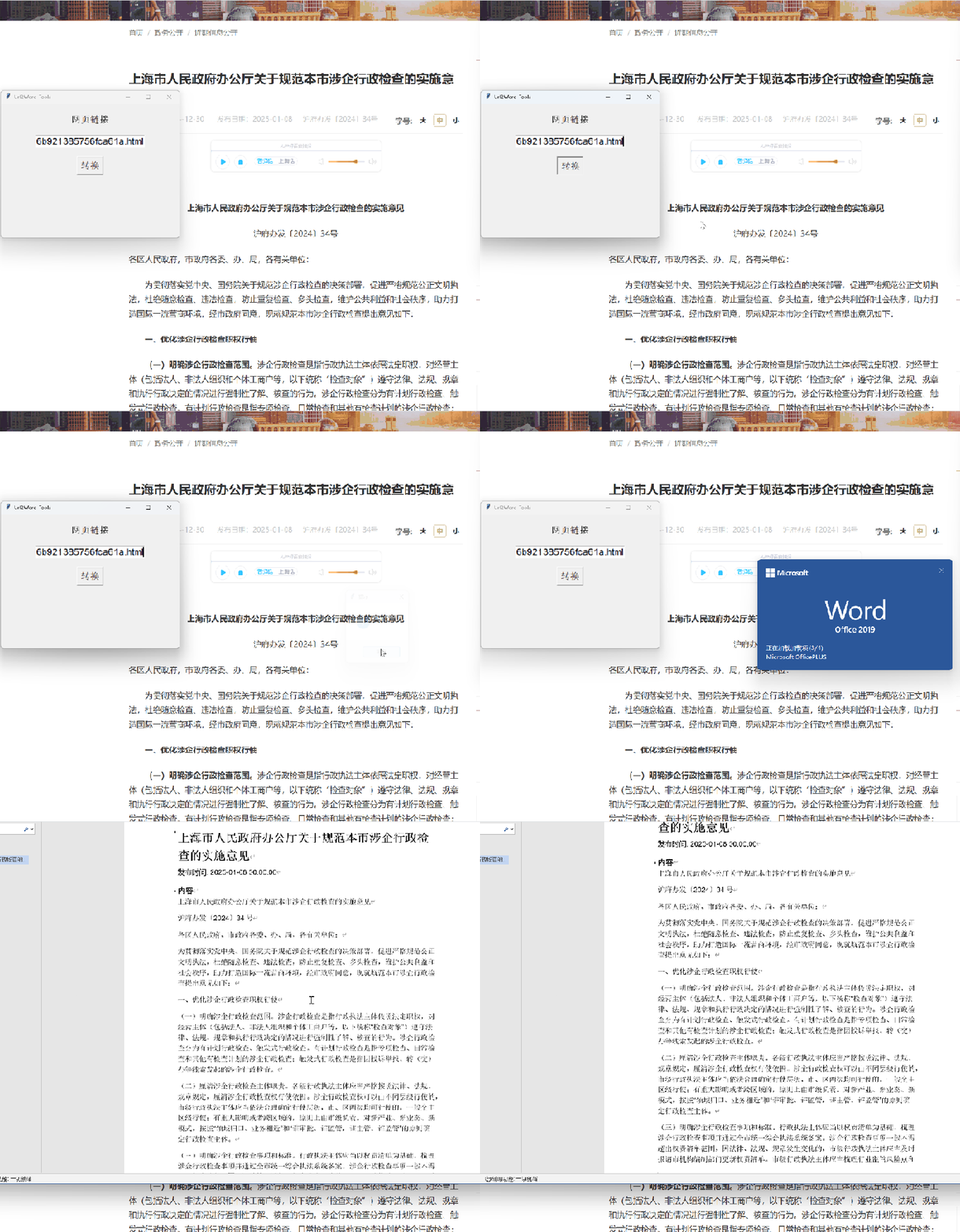
代码展示
from newspaper import Article
from docx import Document
from docx.shared import Pt, RGBColor
from docx.enum.style import WD_STYLE_TYPE
from docx.oxml.ns import qn

# tkinter GUI
import tkinter as tk
from tkinter import messagebox


def init_window():
    root = tk.Tk()
    root.title("Url2Word-Tools")
    root.geometry("400x300")

    url_label = tk.Label(root, text="网页链接", font=("Arial", 16))
    url_label.pack(pady=20)

    global url_input
    url_input = tk.StringVar()
    url_input = tk.Entry(root, textvariable=url_input, font=("Arial", 16))
    url_input.pack(padx=20)

    button = tk.Button(root, text="转换", command=on_click, font=("Arial", 16))
    button.pack(pady=20)

    # 运行主循环
    root.mainloop()

def fetch_article_content(url):
    """
    使用 newspaper3k 获取指定URL页面的文章内容。

    :param url: 要抓取的网页URL
    :return: 文章的元数据和正文内容
    """
    try:
        # 创建Article对象
        article = Article(url, language='zh')  # 设置语言为中文

        # 下载并解析文章
        article.download()
        article.parse()

        # 提取文章信息
        article_info = {
            'title': article.title,
            'authors': article.authors,
            'publish_date': article.publish_date,
            'text': article.text,
            'top_image': article.top_image,
            'images': list(article.images),
            'html': article.html
        }

        return article_info
    except Exception as e:
        print(f"Error fetching {url}: {e}")
        return None

def create_style(document, name, font_size=12, font_name='Arial', color=RGBColor(0, 0, 0)):
    """
    创建一个自定义样式。

    :param document: 当前文档对象
    :param name: 样式名称
    :param font_size: 字体大小 (默认12)
    :param font_name: 字体名称 (默认Arial)
    :param color: 字体颜色 (默认黑色)
    :return: 新创建的样式
    """
    style = document.styles.add_style(name, WD_STYLE_TYPE.PARAGRAPH)
    font = style.font
    font.name = font_name
    font.size = Pt(font_size)
    font.color.rgb = color
    return style

def set_run_style(run, font_size=12, font_name='Arial', color=RGBColor(0, 0, 0)):
    run.font.name = font_name
    run._element.rPr.rFonts.set(qn('w:eastAsia'), font_name)
    run.font.size = Pt(font_size)
    run.font.color.rgb = color

def save_to_word(article_info, output_path):
    """
    将文章信息保存为Word文档。

    :param article_info: 包含文章信息的字典
    :param output_path: 输出Word文档的路径
    """
    document = Document()

    # 创建一个自定义样式
    normal_style = create_style(document, 'CustomNormalStyle')

    # 添加标题
    heading = document.add_heading(article_info['title'], level=1)
    for run in heading.runs:
        # run.font.color.rgb = RGBColor(0, 0, 0)  # 确保标题是黑色
        set_run_style(run, font_size=20)

    # 添加作者
    if article_info['authors']:
        authors_str = ', '.join(article_info['authors'].encode('utf-8').decode('utf-8'))
        document.add_paragraph(f"作者: {authors_str}", style=normal_style)

    # 添加发布日期
    if article_info['publish_date']:
        document.add_paragraph(f"发布时间: {article_info['publish_date']}".encode('utf-8').decode('utf-8'), style=normal_style)

    # 添加正文
    document.add_heading('内容', level=2).runs[0].font.color.rgb = RGBColor(0, 0, 0)
    paragraphs = article_info['text'].split('\n')
    for paragraph in paragraphs:
        if paragraph.strip():  # 忽略空行
            clean_paragraph = paragraph.encode('utf-8').decode('utf-8')
            p = document.add_paragraph(style=normal_style)
            run = p.add_run(clean_paragraph)
            set_run_style(run)

    # 保存文档
    document.save(output_path)
    print(f"Document saved to {output_path}")
    messagebox.showinfo('提示','转换成功')

def on_click():
    url = url_input.get()
    print(url)
    article_info = fetch_article_content(f'{url}')
    if article_info:
            # print("Title:", article_info['title'])
            # print("Authors:", article_info['authors'])
            # print("Publish Date:", article_info['publish_date'])
            # print("Text:\n", article_info['text'])
            # print("Top Image:", article_info['top_image'])
            # print("Images:", article_info['images'])

            output_path = f"./{article_info['title']}.docx"
            save_to_word(article_info, output_path)

if __name__ == "__main__":
    init_window()
最后
这里提供了打包好的 exe 供大家免费使用,GitHub 仓库地址如下:python_tools
到此这篇关于使用Python快速实现链接转word文档的文章就介绍到这了,更多相关Python链接转word内容请搜索脚本之家以前的文章或继续浏览下面的相关文章希望大家以后多多支持脚本之家!
相关文章
![浅谈Python]程序的分支结构](//img.jbzj.com/images/xgimg/bcimg0.png) 这篇文章主要介绍了浅谈Python]程序的分支结构,语句块是 if 条件满足后执行的一个或多个语句序列,语句块中语句通过与 if 所在行形成缩进表达包含关系,需要的朋友可以参考下2023-04-04
这篇文章主要介绍了浅谈Python]程序的分支结构,语句块是 if 条件满足后执行的一个或多个语句序列,语句块中语句通过与 if 所在行形成缩进表达包含关系,需要的朋友可以参考下2023-04-04
Python subprocess.Popen 实时输出 stdout的解决方法(正确管道写法)
这篇文章主要介绍了Python subprocess.Popen实时输出stdout正确管道写法,本文给大家介绍的非常详细,对大家的学习或工作具有一定的参考借鉴价值,需要的朋友可以参考下2023-07-07 这篇文章主要介绍了Python读取csv文件实例解析,文中通过示例代码介绍的非常详细,对大家的学习或者工作具有一定的参考学习价值,需要的朋友可以参考下2019-12-12
 本文梳理了Python字符串处理方法,涵盖基础切片、split/partition分割、正则匹配及结构化数据解析(如BeautifulSoup、json库),并提供场景选择建议与注意事项,感兴趣的朋友跟随小编一起看看吧2025-08-08
 本文主要介绍了conda管理Python虚拟环境的实现,主要包括使用conda工具创建、查看和删除Python虚拟环境,具有一定的参考价值,感兴趣的可以了解一下2024-01-01
 今天小编就为大家分享一篇python 实现将多条曲线画在一幅图上的方法,具有很好的参考价值,希望对大家有所帮助。一起跟随小编过来看看吧2019-07-07
 这篇文章主要介绍了Python内置类型性能分析过程实例,文中通过示例代码介绍的非常详细,对大家的学习或者工作具有一定的参考学习价值,需要的朋友可以参考下2020-01-01
Django1.9 加载通过ImageField上传的图片方法
今天小编就为大家分享一篇Django1.9 加载通过ImageField上传的图片方法,具有很好的参考价值,希望对大家有所帮助。一起跟随小编过来看看吧2018-05-05 这篇文章主要为大家详细介绍了Python实现朴素贝叶斯算法,具有一定的参考价值,感兴趣的小伙伴们可以参考一下2018-11-11
 这篇文章主要介绍了python with提前退出遇到的坑与解决方法,需要的朋友参考下吧2018-01-01
![浅谈Python]程序的分支结构](http://img.jbzj.com/images/xgimg/bcimg0.png)
最新评论