

Python调用ollama本地大模型进行批量识别PDF
现在市场上有很多PDF文件的识别,转化,等等。有些业务可能需要总结摘要和关键词等等一系列的操作。然而随着AI的兴起,本地大模型的部署,这些成为一种很方便的方法,接下来我将为各位介绍我所使用的方法。
本篇文章旨在自动化处理 PDF 文档,提取并清理文本数据,然后使用一种大型模型生成摘要和关键词。最后,处理结果会被整理并输出到 Excel 文件中,便于后续分析和查看。
人工智能(AI)是一种模拟人类智能的科技,它已经在现代科技中得到广泛应用,并且是未来发展的重点领域之一。人工智能应用领域多样,包括机器学习和数据分析、自然语言处理、机器视觉、自动化和机器人等。未来发展趋势包括深度学习和神经网络、增强学习、多模态融合和泛用人工智能。总体而言,人工智能的应用将继续扩大,并在不同领域带来更多的创新和进步。(废话~~~)
首先我们需要下载两个库PyPDF2以及ollama库。(通过ollama部署好本地大模型:qwen2:14b或者其他大模型,这里部署步骤不再赘述,已经有很成熟的步骤)方便调用~~终端输入如下指令。
pip install PyPDF2
pip install ollama
PyPDF2是一个用于合并、分割、提取文本和元数据等PDF文件操作的Python库。它建立在PDFMiner库的基础上,提供了更高级别的功能和易用性。ollama库是一个用于机器学习和深度学习的Python库。它提供了一系列功能强大的工具和函数,用于数据处理、模型构建、特征工程、模型选择和评估等任务。两者的结合则成为了如今的成果。话不多说,直接上代码。
首先,在我们进行批量处理PDF文件时,先要了解如何处理单个PDF,然后再进行实现批量PDF的处理实现,如下是如何处理单个PDF,并设有异常处理,在处理PDF时存在部分乱码,可能是包含有图片格式的问题,故此设置了清洗文本,只保留了可以打印的字符,在提交给大模型进行回答时不受影响,个人没有进行未清洗测试。
def clean_text(text):
    text = re.sub(r'[^\x20-\x7E]+', '', text)  # 只保留可打印的 ASCII 字符
    return re.sub(r'\s+', ' ', text).strip()
def process_pdf(pdf_path, output_path):
    try:
        with open(pdf_path, "rb") as file:
            reader = PyPDF2.PdfReader(file)
            with open(output_path, "w", encoding='utf-8') as output_file:
                for page in reader.pages:
                    text = page.extract_text()
                    if text:  # 检查是否成功提取文本
                        clean_text_result = clean_text(text)  # 清理文本
                        output_file.write(clean_text_result + "\n")  # 写入文件
                    else:
                        output_file.write("未提取到有效文本\n")
    except FileNotFoundError:
        print(f"文件未找到: {pdf_path}")
        return False
    except PyPDF2.errors.PdfReadError:
        print(f"无法读取PDF文件: {pdf_path}")
        return False
    except Exception as e:
        print(f"处理PDF文件时发生错误: {pdf_path}, 错误信息: {e}")
        return False
    return True
接下来是定义超时处理异常类,在后面进行测试时发现,部分PDF通过这里无法执行,就会一直卡着,增加超时处理,更方便后续进程的实现。
# 定义超时处理异常类
class TimeoutException(Exception):
    pass

# 定义带超时功能的线程类
class TimeoutThread(threading.Thread):
    """
    允许超时处理的线程类。
    """
    def __init__(self, target, args=(), kwargs={}):
        threading.Thread.__init__(self)
        self.target = target
        self.args = args
        self.kwargs = kwargs
        self.result = None
        self.exception = None

    def run(self):
        try:
            self.result = self.target(*self.args, **self.kwargs)
        except Exception as e:
            self.exception = e

    def join(self, timeout=None):
        super(TimeoutThread, self).join(timeout)
        if self.is_alive():
            raise TimeoutException("处理超时")
        if self.exception:
            raise self.exception
        return self.result
这段是处理指定文件夹中的所有PDF文件,并读取PDF识别后的txt文件中的文章信息,提交给本地大模型,我这里使用的qwen2.5:14b,总体上来说,qwen2.5还是好用的,并将结果保存到EXCEL中。至于替换信息是因为,qwen2.5给到的返回信息也是需要清理的。
def process_folder(folder_path, output_folder, excel_path):
    """
    处理指定文件夹中的所有PDF文件,并将结果保存到Excel文件中。
    """
    if not os.path.exists(output_folder):
        os.makedirs(output_folder)

    pdf_files = glob.glob(os.path.join(folder_path, "*.pdf"))
    results = []
    total_files = len(pdf_files)
    processed_files = 0
    errors = []
    unprocessed_files = []

    for pdf_file in pdf_files:
        base_name = os.path.basename(pdf_file).replace(".pdf", ".txt")
        output_path = os.path.join(output_folder, base_name)
        success = process_pdf(pdf_file, output_path)

        if not success:
            errors.append(pdf_file)
            continue

        with open(output_path, "r", encoding='utf-8') as file:
            content = file.read()

        try:
            # 使用线程实现超时处理
            def process_model():
                title = base_name.split(".txt")[0]
                res = ollama.chat(model='qwen2.5:14b', stream=False, messages=[{"role": "user", "content": f"{content}总结成摘要和关键词"}], options={"temperature": 0})
                summary = res['message']['content'].split('### 摘要\n\n')[1].split('\n\n### 关键词')[0]
                keywords = res['message']['content'].split('### 关键词\n\n')[1].split('\n- ')[1:]
                keywords = '、'.join(keywords)
                results.append({"文件名": title, "摘要": summary, "关键词": keywords})
                print(res)

            timeout_thread = TimeoutThread(target=process_model)
            timeout_thread.start()
            timeout_thread.join(timeout=30)

        except TimeoutException:
            print(f"处理大模型时超时: {pdf_file}")
            errors.append(pdf_file)
        except Exception as e:
            print(f"处理大模型时发生错误: {pdf_file}, 错误信息: {e}")
            errors.append(pdf_file)

        processed_files += 1
        print(f"进度: {processed_files}/{total_files} 文件已处理")

        # 每次处理完一个文件后保存Excel文件
        write_to_excel(results, excel_path)

    # 记录未处理的文件
    unprocessed_files = pdf_files[processed_files:]

    return results, errors, unprocessed_files
返回的信息如图所示,所以我们需要进一步处理。

最后我们将总结出来的关键词,文章摘要,以及对应的PDF标题写入EXCEL中。
def write_to_excel(results, excel_path):
    df = pd.DataFrame(results)
    df.to_excel(excel_path, index=False)
最后加上我们的主函数,完整代码如下:
import PyPDF2
import re
import ollama
import os
import glob
import pandas as pd
import threading
import time

# 定义函数来去除特殊空格和非法字符
def clean_text(text):
    # 移除特定的非法字符
    text = re.sub(r'[^\x20-\x7E]+', '', text)  # 只保留可打印的 ASCII 字符
    # 替换多个空格
    return re.sub(r'\s+', ' ', text).strip()

# 定义函数来处理单个PDF文件
def process_pdf(pdf_path, output_path):
    """
    处理单个PDF文件,提取文本并输出到指定路径。
    """
    try:
        with open(pdf_path, "rb") as file:
            reader = PyPDF2.PdfReader(file)
            with open(output_path, "w", encoding='utf-8') as output_file:
                for page in reader.pages:
                    text = page.extract_text()
                    if text:  # 检查是否成功提取文本
                        clean_text_result = clean_text(text)  # 清理文本
                        output_file.write(clean_text_result + "\n")  # 写入文件
                    else:
                        output_file.write("未提取到有效文本\n")
    except FileNotFoundError:
        print(f"文件未找到: {pdf_path}")
        return False
    except PyPDF2.errors.PdfReadError:
        print(f"无法读取PDF文件: {pdf_path}")
        return False
    except Exception as e:
        print(f"处理PDF文件时发生错误: {pdf_path}, 错误信息: {e}")
        return False
    return True

# 定义超时处理异常类
class TimeoutException(Exception):
    pass

# 定义带超时功能的线程类
class TimeoutThread(threading.Thread):
    """
    允许超时处理的线程类。
    """
    def __init__(self, target, args=(), kwargs={}):
        threading.Thread.__init__(self)
        self.target = target
        self.args = args
        self.kwargs = kwargs
        self.result = None
        self.exception = None

    def run(self):
        try:
            self.result = self.target(*self.args, **self.kwargs)
        except Exception as e:
            self.exception = e

    def join(self, timeout=None):
        super(TimeoutThread, self).join(timeout)
        if self.is_alive():
            raise TimeoutException("处理超时")
        if self.exception:
            raise self.exception
        return self.result

# 定义函数来处理文件夹中的所有PDF文件
def process_folder(folder_path, output_folder, excel_path):
    """
    处理指定文件夹中的所有PDF文件,并将结果保存到Excel文件中。
    """
    if not os.path.exists(output_folder):
        os.makedirs(output_folder)

    pdf_files = glob.glob(os.path.join(folder_path, "*.pdf"))
    results = []
    total_files = len(pdf_files)
    processed_files = 0
    errors = []
    unprocessed_files = []

    for pdf_file in pdf_files:
        base_name = os.path.basename(pdf_file).replace(".pdf", ".txt")
        output_path = os.path.join(output_folder, base_name)
        success = process_pdf(pdf_file, output_path)

        if not success:
            errors.append(pdf_file)
            continue

        with open(output_path, "r", encoding='utf-8') as file:
            content = file.read()

        try:
            # 使用线程实现超时处理
            def process_model():
                title = base_name.split(".txt")[0]
                res = ollama.chat(model='qwen2.5:14b', stream=False, messages=[{"role": "user", "content": f"{content}总结成摘要和关键词"}], options={"temperature": 0})
                summary = res['message']['content'].split('### 摘要\n\n')[1].split('\n\n### 关键词')[0]
                keywords = res['message']['content'].split('### 关键词\n\n')[1].split('\n- ')[1:]
                keywords = '、'.join(keywords)
                results.append({"文件名": title, "摘要": summary, "关键词": keywords})
                print(res)

            timeout_thread = TimeoutThread(target=process_model)
            timeout_thread.start()
            timeout_thread.join(timeout=30)

        except TimeoutException:
            print(f"处理大模型时超时: {pdf_file}")
            errors.append(pdf_file)
        except Exception as e:
            print(f"处理大模型时发生错误: {pdf_file}, 错误信息: {e}")
            errors.append(pdf_file)

        processed_files += 1
        print(f"进度: {processed_files}/{total_files} 文件已处理")

        # 每次处理完一个文件后保存Excel文件
        write_to_excel(results, excel_path)

    # 记录未处理的文件
    unprocessed_files = pdf_files[processed_files:]

    return results, errors, unprocessed_files

# 定义函数来将结果写入Excel文件
def write_to_excel(results, excel_path):
    """
    将处理结果写入指定的Excel文件。
    """
    df = pd.DataFrame(results)
    df.to_excel(excel_path, index=False)

# 主程序
if __name__ == "__main__":
    a = input("PDF文件夹路径:")
    b = input("TXT文件输出路径:")
    c = input("EXCEl文件输出路径:")
    folder_path = fr"{a}"  # 文件夹路径
    output_folder = fr"{b}"  # TXT文件输出路径
    excel_path = fr"{c}\results.xlsx"  # Excel文件输出路径

    results, errors, unprocessed_files = process_folder(folder_path, output_folder, excel_path)
    print(f"所有PDF文件已处理完毕,结果已保存到 {excel_path}")
    if errors:
        print("以下PDF文件处理失败:")
        for error in errors:
            print(error)
    if unprocessed_files:
        print("以下PDF文件未处理:")
        for unprocessed in unprocessed_files:
            print(unprocessed)
附输出结果以及EXCEL表。
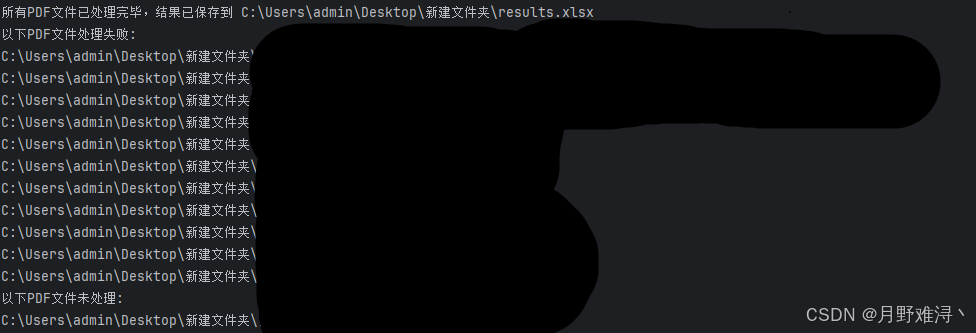
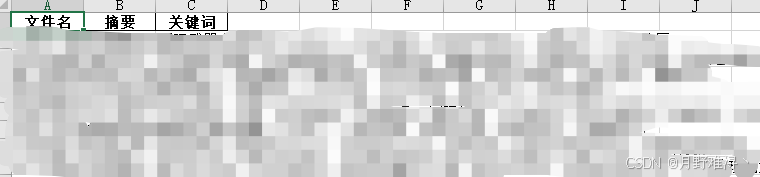
实测56,成功45,失败9,总体来说70-80的成功率,但也大大降低的工作量。
以上就是Python调用ollama本地大模型进行批量识别PDF的详细内容,更多关于Python ollama识别PDF的资料请关注脚本之家其它相关文章!
相关文章

python实现sm2和sm4国密(国家商用密码)算法的示例
这篇文章主要介绍了python实现sm2和sm4国密(国家商用密码)算法的示例,帮助大家使用python加密文件,感兴趣的朋友可以了解下2020-09-09 日常工作中,我们常常需要处理加密的 PDF 文件,本文我们主要来看看如何使用Python进行PDF加密解密全攻略操作,包括判断加密状态,验证密码与安全操作等,希望对大家有所帮助2025-07-07
 这篇文章主要介绍了Python列表的索引与切片,索引用来对单个成员(元素)进行访问,切片则是对一定范围内的成员(元素)进行访问。下文相关自来需要的小伙伴可以参考一下2022-04-04
 在本篇文章里小编给大家整理的是一篇关于python中用Scrapy实现定时爬虫的实例讲解内容,有兴趣的朋友们可以学习下。2021-01-01
 这篇文章主要介绍了详解Python中的正则表达式的用法,正则表达式在各个编程语言的学习当中都是基础知识,文中给出了Python2代码的示例,需要的朋友可以参考下2015-04-04
 这篇文章主要介绍了Python综合应用名片管理系统,结合具体案例形式详细分析了Python名片管理系统相关步骤、原理、实现方法与操作注意事项,需要的朋友可以参考下2020-01-01
 在本篇文章里小编给大家整理的是一篇关于python中Matplotlib绘制直线的实例代码内容,有兴趣的朋友们可以跟着学习下。2021-07-07
 VsCode是一款开源的编辑器,拥有强大的功能,。由于拥有各种各样的插件,这就使得VsCode可以做到的事情更多了。在使用的过程中,也是有很多技巧的,掌握一些技巧对于后期写代码也会轻松很多2021-09-09
 Base64是一种任意二进制到文本字符串的编码方法,常用于在URL、Cookie、网页中传输少量二进制数据,Base64是一种用64个字符来表示任意二进制数据的方法,这篇文章主要介绍了python中base64编码,需要的朋友可以参考下2022-12-12
 这篇文章主要介绍了python 实现表情识别的示例代码,帮助大家更好的理解和学习python,感兴趣的朋友可以了解下2020-11-11
最新评论