

利用Python实现添加或读取Excel公式
更新时间:2025年03月19日 14:53:46 作者:Eiceblue
Excel公式是数据处理的核心工具,从简单的加减运算到复杂的逻辑判断,掌握基础语法是高效工作的起点,下面我们就来看看如何使用Python进行Excel公式的添加与读取吧
Excel公式是数据处理的核心工具。从简单的加减运算到复杂的逻辑判断,掌握基础语法是高效工作的起点。例如使用SUM函数快速求和,或通过IF函数实现条件判断。通过公式计算数据能减少人工计算的错误率。本文将介绍如何通过Python在Excel中添加各种公式/函数、或者读取Excel中的公式。
Python Excel 库安装
要在Python应用程序中操作Excel文档,需要用到Spire.XLS for Python库。可以直接使用以下pip命令安装:
pip install Spire.XLS
Python 在 Excel 中添加公式/函数
Spire.XLS for Python 提供的 Worksheet.Range[].Formula 属性可用于为 Excel 工作表中的特定单元格添加公式。支持添加多种常见公式如 SUM、AVERAGE、COUNT、IF等,此外还支持日期和时间公式、数学和三角函数等。
步骤如下:
- 创建一个Excel工作簿。
- 通过 Workbook.Worksheets[sheetIndex] 属性获取指定工作表。
- 通过 Worksheet.Range[rowIndex, columnIndex].Text 和 Worksheet.Range[rowIndex, columnIndex].NumberValue 属性在指定单元格中添加文本和数字数据。
- 通过 Worksheet.Range[rowIndex, columnIndex].Formula 属性在指定单元格中添加公式。
- 保存结果文件。
Python代码:
from spire.xls import *
from spire.xls.common import *

# 创建工作簿
workbook = Workbook()

# 获取第一张工作表
sheet = workbook.Worksheets[0]

# 定义两个变量
currentRow = 1
currentFormula = ""

# 在单元格中添加文本并设置单元格样式
sheet.Range[currentRow, 1].Text = "测试数据:"
sheet.Range[currentRow, 1].Style.Font.IsBold = True
sheet.Range[currentRow, 1].Style.FillPattern = ExcelPatternType.Solid
sheet.Range[currentRow, 1].Style.KnownColor = ExcelColors.LightGreen1
sheet.Range[currentRow, 1].Style.Borders[BordersLineType.EdgeBottom].LineStyle = LineStyleType.Medium
currentRow += 1

# 在单元格中添加数据
sheet.Range[currentRow, 1].NumberValue = 7.3
sheet.Range[currentRow, 2].NumberValue = 5
sheet.Range[currentRow, 3].NumberValue = 8.2
sheet.Range[currentRow, 4].NumberValue = 4
sheet.Range[currentRow, 5].NumberValue = 3
sheet.Range[currentRow, 6].NumberValue = 11.3
currentRow += 2

# 在单元格中添加文本并设置单元格样式
sheet.Range[currentRow, 1].Text = "公式"
sheet.Range[currentRow, 2].Text = "计算结果"
sheet.Range[currentRow, 1, currentRow, 2].Style.Font.IsBold = True
sheet.Range[currentRow, 1, currentRow, 2].Style.KnownColor = ExcelColors.LightGreen1
sheet.Range[currentRow, 1, currentRow, 2].Style.FillPattern = ExcelPatternType.Solid
sheet.Range[currentRow, 1, currentRow, 2].Style.Borders[BordersLineType.EdgeBottom].LineStyle = LineStyleType.Medium
currentRow += 1

# 添加表达式
currentFormula = "=1+2+3+4+5-6-7+8-9"
sheet.Range[currentRow, 1].Text = "'" + currentFormula
sheet.Range[currentRow, 2].Formula = currentFormula
currentRow += 1

currentFormula = "=33*3/4-2+10"
sheet.Range[currentRow, 1].Text = "'" + currentFormula
sheet.Range[currentRow, 2].Formula = currentFormula
currentRow += 1

# 添加单元格引用
currentFormula = "=Sheet1!$B$2"
sheet.Range[currentRow, 1].Text = "'" + currentFormula
sheet.Range[currentRow, 2].Formula = currentFormula
currentRow += 1

# 添加AVERAGE函数,用于计算一组数值的平均值
currentFormula = "=AVERAGE(Sheet1!$D$2:F$2)"
sheet.Range[currentRow, 1].Text = "'" + currentFormula
sheet.Range[currentRow, 2].Formula = currentFormula
currentRow += 1

# 添加SUM函数,对一组数值进行求和计算
currentFormula = "=SUM(18,29)"
sheet.Range[currentRow, 1].Text = "'" + currentFormula
sheet.Range[currentRow, 2].Formula = currentFormula
currentRow += 1

# 添加IF函数,用于根据指定的条件进行判断,并返回不同的结果
currentFormula = "=IF(4,2,2)"
sheet.Range[currentRow, 1].Text = "'" + currentFormula
sheet.Range[currentRow, 2].Formula = currentFormula
currentRow += 1

# 添加COUNT计数,用于统计包含数字的单元格个数
currentFormula = "=COUNT(3,5,8,10,2,34)"
sheet.Range[currentRow, 1].Text = "'" + currentFormula
sheet.Range[currentRow, 2].Formula = currentFormula
currentRow += 1

# 添加SUBTOTAL函数,用于在数据列表或数据库中进行分类汇总
currentFormula = "=SUBTOTAL(3,Sheet1!A2:F2)"
sheet.Range[currentRow, 1].Text = "'" + currentFormula
sheet.Range[currentRow, 2].Formula = currentFormula
currentRow += 1

# 添加NOW函数,用于返回当前的日期
currentFormula = "=NOW()"
sheet.Range[currentRow, 1].Text = "'" + currentFormula
sheet.Range[currentRow, 2].Formula = currentFormula
sheet.Range[currentRow, 2].Style.NumberFormat = "yyyy-MM-DD"
currentRow += 1

# 添加SECOND函数,用于从时间值中提取秒数
currentFormula = "=SECOND(0.503)"
sheet.Range[currentRow, 1].Text = "'" + currentFormula
sheet.Range[currentRow, 2].Formula = currentFormula
currentRow += 1

# 添加MINUTE函数,用于从时间值里提取分钟数
currentFormula = "=MINUTE(0.78125)"
sheet.Range[currentRow, 1].Text = "'" + currentFormula
sheet.Range[currentRow, 2].Formula = currentFormula
currentRow += 1

# 添加MONTH函数,用于从日期值中提取月份信息
currentFormula = "=MONTH(9)"
sheet.Range[currentRow, 1].Text = "'" + currentFormula
sheet.Range[currentRow, 2].Formula = currentFormula
currentRow += 1

# 添加DAY函数,用于从日期值中提取出具体的日信息
currentFormula = "=DAY(10)"
sheet.Range[currentRow, 1].Text = "'" + currentFormula
sheet.Range[currentRow, 2].Formula = currentFormula
currentRow += 1

# 添加TIME函数,通过分别指定小时、分钟和秒来创建一个标准的时间格式
currentFormula = "=TIME(4,5,7)"
sheet.Range[currentRow, 1].Text = "'" + currentFormula
sheet.Range[currentRow, 2].Formula = currentFormula
currentRow += 1

# 添加DATE函数,用于根据指定的年、月、日构建一个日期。
currentFormula = "=DATE(6,4,2)"
sheet.Range[currentRow, 1].Text = "'" + currentFormula
sheet.Range[currentRow, 2].Formula = currentFormula
currentRow += 1

# 添加RAND函数,用于生成一个大于等于 0 且小于 1 的随机小数
currentFormula = "=RAND()"
sheet.Range[currentRow, 1].Text = "'" + currentFormula
sheet.Range[currentRow, 2].Formula = currentFormula
currentRow += 1

# 添加HOUR函数,用于从时间值中提取小时数
currentFormula = "=HOUR(0.5)"
sheet.Range[currentRow, 1].Text = "'" + currentFormula
sheet.Range[currentRow, 2].Formula = currentFormula
currentRow += 1

# 添加MOD函数,用于返回两数相除的余数
currentFormula = "=MOD(5,3)"
sheet.Range[currentRow, 1].Text = "'" + currentFormula
sheet.Range[currentRow, 2].Formula = currentFormula
currentRow += 1

# 添加WEEKDAY函数,用于返回某个日期对应的星期数
currentFormula = "=WEEKDAY(3)"
sheet.Range[currentRow, 1].Text = "'" + currentFormula
sheet.Range[currentRow, 2].Formula = currentFormula
currentRow += 1

# 添加YEAR函数,用于从给定的日期中提取出对应的年份
currentFormula = "=YEAR(23)"
sheet.Range[currentRow, 1].Text = "'" + currentFormula
sheet.Range[currentRow, 2].Formula = currentFormula
currentRow += 1

# 添加NOT函数,用于对给定的逻辑值取反
currentFormula = "=NOT(true)"
sheet.Range[currentRow, 1].Text = "'" + currentFormula
sheet.Range[currentRow, 2].Formula = currentFormula
currentRow += 1

# 添加OR函数,用于对多个条件进行逻辑或运算(当给定的条件中至少有一个为 TRUE 时,函数就会返回 TRUE;只有当所有条件都为 FALSE 时,函数才会返回 FALSE。)
currentFormula = "=OR(true)"
sheet.Range[currentRow, 1].Text = "'" + currentFormula
sheet.Range[currentRow, 2].Formula = currentFormula
currentRow += 1

# 添加AND函数,用于对多个条件进行逻辑与运算(只有当所有指定的条件都为 TRUE 时,AND 函数才会返回 TRUE;只要有一个条件为 FALSE,函数就会返回 FALSE。)
currentFormula = "=AND(TRUE)"
sheet.Range[currentRow, 1].Text = "'" + currentFormula
sheet.Range[currentRow, 2].Formula = currentFormula
currentRow += 1

# 添加VALUE函数,用于将文本形式的数字转换为数值类型
currentFormula = "=VALUE(30)"
sheet.Range[currentRow, 1].Text = "'" + currentFormula
sheet.Range[currentRow, 2].Formula = currentFormula
currentRow += 1

# 添加LEN函数,用于返回文本字符串中的字符个数
currentFormula = "=LEN(\"world\")"
sheet.Range[currentRow, 1].Text = "'" + currentFormula
sheet.Range[currentRow, 2].Formula = currentFormula
currentRow += 1

# 添加MID函数,用于从一个文本字符串中指定的起始位置开始,提取指定长度的字符
currentFormula = "=MID(\"world\",4,2)"
sheet.Range[currentRow, 1].Text = "'" + currentFormula
sheet.Range[currentRow, 2].Formula = currentFormula
currentRow += 1

# 添加ROUND函数,用于按指定的位数对数值进行四舍五入
currentFormula = "=ROUND(7,3)"
sheet.Range[currentRow, 1].Text = "'" + currentFormula
sheet.Range[currentRow, 2].Formula = currentFormula
currentRow += 1

# 添加SIGN函数,用于判断一个数值的正负性,并返回其符号对应的数值
currentFormula = "=SIGN(4)"
sheet.Range[currentRow, 1].Text = "'" + currentFormula
sheet.Range[currentRow, 2].Formula = currentFormula
currentRow += 1

# 添加INT函数,用于将一个数值向下取整为最接近的整数,也就是去除数值的小数部分,返回不大于该数值的最大整数。
currentFormula = "=INT(200)"
sheet.Range[currentRow, 1].Text = "'" + currentFormula
sheet.Range[currentRow, 2].Formula = currentFormula
currentRow += 1

# 添加ABS函数,用于返回一个数的绝对值,也就是将该数的负号去除,只保留其数值大小,不考虑其正负性。
currentFormula = "=ABS(-1.21)"
sheet.Range[currentRow, 1].Text = "'" + currentFormula
sheet.Range[currentRow, 2].Formula = currentFormula
currentRow += 1

# 添加LN函数,用于计算一个数的自然对数。
currentFormula = "=LN(15)"
sheet.Range[currentRow, 1].Text = "'" + currentFormula
sheet.Range[currentRow, 2].Formula = currentFormula
currentRow += 1

# 添加EXP函数,用于计算自然常数 e(约等于 2.71828)的指定次幂
currentFormula = "=EXP(20)"
sheet.Range[currentRow, 1].Text = "'" + currentFormula
sheet.Range[currentRow, 2].Formula = currentFormula
currentRow += 1

# 添加SQRT函数,用于计算一个数的算术平方根
currentFormula = "=SQRT(40)"
sheet.Range[currentRow, 1].Text = "'" + currentFormula
sheet.Range[currentRow, 2].Formula = currentFormula
currentRow += 1

# 添加PI函数,返回数学常数 π(圆周率)的近似值
currentFormula = "=PI()"
sheet.Range[currentRow, 1].Text = "'" + currentFormula
sheet.Range[currentRow, 2].Formula = currentFormula
currentRow += 1

# 添加COS函数,用于计算一个角度的余弦值
currentFormula = "=COS(9)"
sheet.Range[currentRow, 1].Text = "'" + currentFormula
sheet.Range[currentRow, 2].Formula = currentFormula
currentRow += 1

# 添加SIN函数,用于计算给定角度的正弦值
currentFormula = "=SIN(45)"
sheet.Range[currentRow, 1].Text = "'" + currentFormula
sheet.Range[currentRow, 2].Formula = currentFormula
currentRow += 1

# 添加MAX函数,用于返回一组数值中的最大值
currentFormula = "=MAX(10,30)"
sheet.Range[currentRow, 1].Text = "'" + currentFormula
sheet.Range[currentRow, 2].Formula = currentFormula
currentRow += 1

# 添加MIN函数,用于返回一组数值中的最小值
currentFormula = "=MIN(5,7)"
sheet.Range[currentRow, 1].Text = "'" + currentFormula
sheet.Range[currentRow, 2].Formula = currentFormula
currentRow += 1

# 设置列宽
sheet.SetColumnWidth(1, 32)
sheet.SetColumnWidth(2, 16)
sheet.SetColumnWidth(3, 16)

# 应用样式
style = workbook.Styles.Add("Style")
style.HorizontalAlignment = HorizontalAlignType.Left
sheet.ApplyStyle(style)

# 保存生成文档
workbook.SaveToFile("Excel公式.xlsx", ExcelVersion.Version2016)
workbook.Dispose()
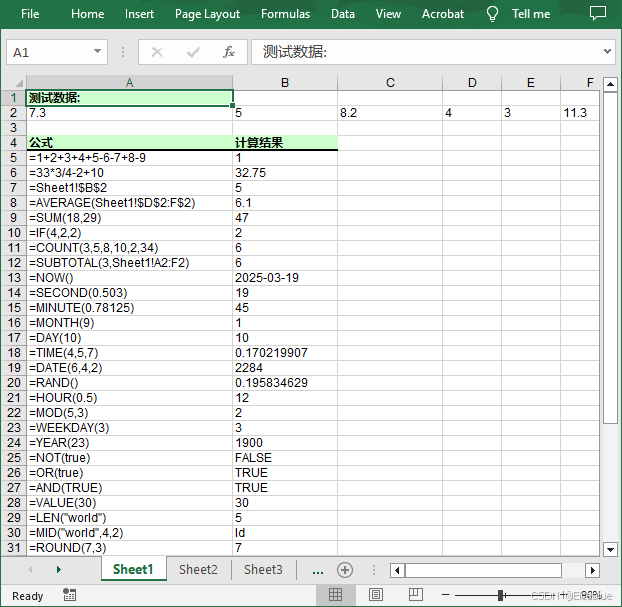
生成结果:
Python 读取 Excel 中的公式/函数
我们可以遍历工作表中的所有单元格,然后通过 Cell.HasFormula 属性找到包含公式的单元格,再使用 CellRange.Formula 属性获取单元格的公式。
步骤如下:
- 加载 Excel 文件。
- 通过 Workbook.Worksheets[sheetIndex] 属性获取指定工作表。
- 通过 Workheet.AllocatedRange 属性获取工作表的使用范围。
- 创建一个空列表。
- 遍历使用范围内的所有单元格。
- 通过 Cell.HasFormula 属性查找包含公式的单元格。
- 使用 CellRange.RangeAddressLocal 和 CellRange.Formula 属性获取单元格的名称和公式。
- 将读取内容添加到列表中,然后写入txt文本文件。
Python代码:
from spire.xls import *
from spire.xls.common import *

# 加载Excel文档
workbook = Workbook()
workbook.LoadFromFile("Excel公式.xlsx")

# 获取第一张工作表
sheet = workbook.Worksheets[0]

# 获取工作表的使用范围
usedRange = sheet.AllocatedRange

# 创建列表
list = []

# 遍历工作表使用范围内的单元格
for cell in usedRange:
    # 检查单元格是否有公式
    if(cell.HasFormula):
        # 获取单元格名称
        cellName = cell.RangeAddressLocal
        # 获取公式
        formula = cell.Formula
        # 将单元格名称和公式添加到列表中
        list.append(cellName + " 公式为: " + formula)

# 导入txt文本文件
with open("读取公式.txt", "w", encoding = "utf-8") as text_file:
    for item in list:
        text_file.write(item + "\n")

workbook.Dispose()
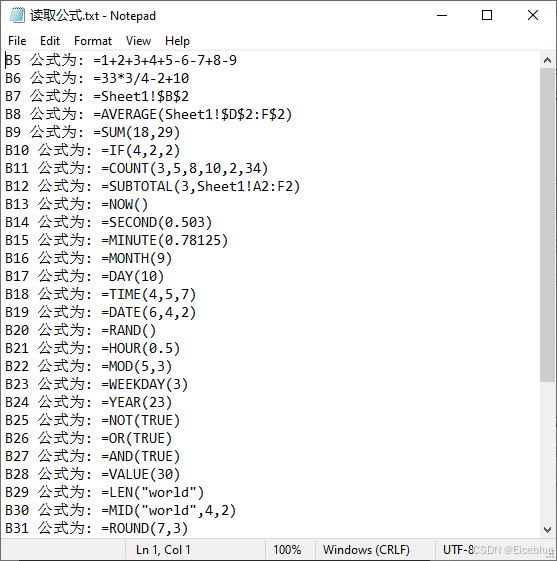
读取结果:
以上就是利用Python实现添加或读取Excel公式的详细内容,更多关于Python Excel公式的资料请关注脚本之家其它相关文章!
相关文章
 这篇文章主要介绍了Python使用xlrd实现读取合并单元格,文中通过示例代码介绍的非常详细,对大家的学习或者工作具有一定的参考学习价值,需要的朋友可以参考下2020-07-07
 借助于Python中的python-jenkins模块,我们可以轻松地编写脚本来连接到Jenkins服务器,并执行各种操作,如创建、删除、构建Jobs等,这种自动化的方式不仅提高了效率,还使得CI/CD流程更加灵活和可控,本文介绍如何使用Python操作Jenkins的相关资料,需要的朋友可以参考下2024-05-05
 这篇文章主要介绍了详解Python调用系统命令的六种方法,文中通过示例代码介绍的非常详细,对大家的学习或者工作具有一定的参考学习价值,需要的朋友们下面随着小编来一起学习学习吧2021-01-01
 这篇文章主要给大家介绍了关于Python占用的内存优化教程,文中通过示例代码介绍的非常详细,对大家学习或者使用Python具有一定的参考学习价值,需要的朋友们下面来一起学习学习吧2019-07-07
 这篇文章主要介绍了python单向循环链表原理与实现方法,结合实例形式详细分析了Python单向循环链表概念、原理、定义及使用方法,需要的朋友可以参考下2019-12-12
Numpy中array数组对象的储存方式(n,1)和(n,)的区别
本文主要介绍了Numpy中array数组对象的储存方式(n,1)和(n,)的区别,文中通过示例代码介绍的非常详细,对大家的学习或者工作具有一定的参考学习价值,需要的朋友们下面随着小编来一起学习学习吧2023-04-04 今天小编就为大家分享一篇python画蝴蝶曲线图的实例,具有很好的参考价值,希望对大家有所帮助。一起跟随小编过来看看吧2019-11-11
 在本篇内容里小编给大家整理的是关于Python计算矩阵的和积的实例详解内容,需要的朋友们参考下。2020-09-09
 这篇文章主要为大家详细介绍了python实现二分查找算法,具有一定的参考价值,感兴趣的小伙伴们可以参考一下2017-09-09
 这篇文章主要介绍了快速查找Python安装路径方法,文中通过示例代码介绍的非常详细,对大家的学习或者工作具有一定的参考学习价值,需要的朋友们下面随着小编来一起学习学习吧2020-02-02
最新评论