

基于PyQt5实现的Windows定时关机工具
更新时间:2025年04月14日 15:27:57 作者:创客白泽
在日常使用电脑的过程中,我们经常会遇到需要定时关机的场景,虽然 Windows 自带 shutdown 命令可以定时关机,但操作方式较为繁琐,缺乏可视化界面,因此,本篇文章将带大家实现一个基于 PyQt5 的 Windows 定时关机工具,需要的朋友可以参考下
概述
在日常使用电脑的过程中,我们经常会遇到需要定时关机的场景,比如:
- 夜间下载文件,想让电脑在任务完成后自动关机。
- 长时间运行的程序,需要在某个时间点关闭系统。
- 限制电脑使用时间,避免长时间占用资源。
虽然 Windows 自带 shutdown 命令可以定时关机,但操作方式较为繁琐,缺乏可视化界面。因此,本篇文章将带大家实现一个基于 PyQt5 的 Windows 定时关机工具,支持定时或延时关机、重启、注销,并提供系统托盘功能,方便随时管理关机任务。
功能介绍
本工具主要具备以下功能:
定时关机 —— 设定具体时间,到点自动关机。
延时关机 —— 设置倒计时,倒计时结束后自动关机。
重启 & 注销 —— 除关机外,还可执行系统重启和注销操作。
取消操作 —— 关机前可随时取消,避免误操作。
系统托盘支持 —— 运行后最小化到系统托盘,不影响日常操作。
人性化提示 —— 关机前弹出提醒,避免突发关机。
代码实现
1. 安装依赖
在运行代码之前,我们需要先安装 PyQt5 库:
pip install PyQt5 pyqt5-tools
2. 代码编写
以下是完整的代码实现:
import sys
import os
import time
from PyQt5.QtWidgets import QApplication, QWidget, QLabel, QPushButton, QVBoxLayout, QTimeEdit, QSystemTrayIcon, QMenu, QAction
from PyQt5.QtGui import QIcon
from PyQt5.QtCore import QTimer, QTime

class ShutdownApp(QWidget):
    def __init__(self):
        super().__init__()
        self.initUI()

    def initUI(self):
        self.setWindowTitle('Windows 定时关机工具')
        self.setGeometry(600, 300, 300, 200)

        self.label = QLabel('请选择关机时间:', self)
        self.timeEdit = QTimeEdit(self)
        self.timeEdit.setDisplayFormat("HH:mm")

        self.startButton = QPushButton('设置关机', self)
        self.startButton.clicked.connect(self.scheduleShutdown)

        self.cancelButton = QPushButton('取消关机', self)
        self.cancelButton.clicked.connect(self.cancelShutdown)

        layout = QVBoxLayout()
        layout.addWidget(self.label)
        layout.addWidget(self.timeEdit)
        layout.addWidget(self.startButton)
        layout.addWidget(self.cancelButton)

        self.setLayout(layout)

        # 托盘功能
        self.trayIcon = QSystemTrayIcon(QIcon("icon.png"), self)
        trayMenu = QMenu()
        exitAction = QAction("退出", self)
        exitAction.triggered.connect(self.close)
        trayMenu.addAction(exitAction)
        self.trayIcon.setContextMenu(trayMenu)
        self.trayIcon.show()

    def scheduleShutdown(self):
        shutdown_time = self.timeEdit.time()
        current_time = QTime.currentTime()
        seconds = current_time.secsTo(shutdown_time)

        if seconds <= 0:
            self.label.setText("请选择一个未来的时间!")
            return

        self.label.setText(f"关机已设置,将在 {shutdown_time.toString()} 执行")
        os.system(f'shutdown -s -t {seconds}')

    def cancelShutdown(self):
        os.system('shutdown -a')
        self.label.setText("关机已取消!")

if __name__ == '__main__':
    app = QApplication(sys.argv)
    ex = ShutdownApp()
    ex.show()
    sys.exit(app.exec_())
功能使用
1. 运行软件
python shutdown_tool.py
2. 设置定时关机
- 选择时间
- 点击 “设置关机”
- 程序将计算剩余时间,并执行关机命令
3. 取消关机
- 如果想取消定时关机,点击 “取消关机” 按钮
- 也可以手动在命令行执行:
shutdown -a
4. 系统托盘
- 运行后可最小化到托盘
- 右键点击托盘图标可 退出应用
技术要点解析
关机命令
Windows 提供 shutdown 命令来执行关机任务:
- 定时关机:
shutdown -s -t 秒数
- 取消关机:
shutdown -a
计算关机时间
我们使用 QTime 计算当前时间到设定时间的 秒数,避免时间计算错误:
seconds = current_time.secsTo(shutdown_time)
托盘图标支持
使用 QSystemTrayIcon 实现最小化到托盘:
self.trayIcon = QSystemTrayIcon(QIcon("icon.png"), self)
这样即使窗口关闭,应用仍能在后台运行。
运行效果
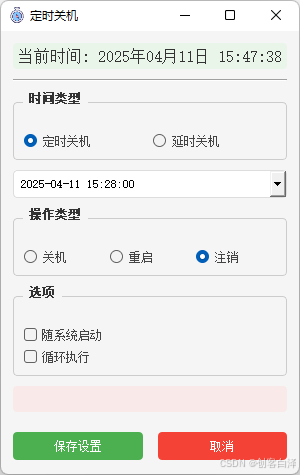

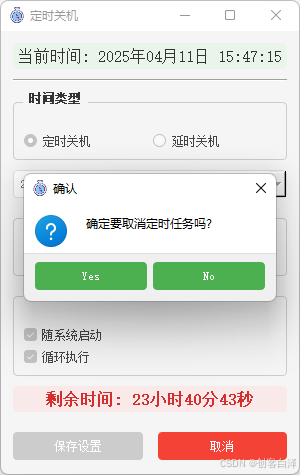
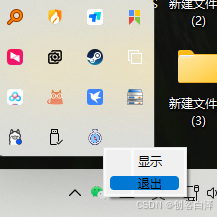
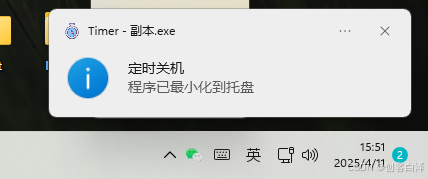
相关源码
import os
import sys
import time
import configparser
import win32api
import win32con
from datetime import datetime, timedelta
from PyQt5.QtWidgets import (QApplication, QMainWindow, QWidget, QVBoxLayout, QHBoxLayout,
                            QGroupBox, QRadioButton, QDateTimeEdit, QLabel, QPushButton,
                            QCheckBox, QSystemTrayIcon, QMenu, QMessageBox, QSpacerItem,
                            QSizePolicy, QFrame)
from PyQt5.QtCore import Qt, QTimer, QDateTime, QTime, QSize, QSharedMemory
from PyQt5.QtGui import QIcon, QFont, QPalette, QColor

def resource_path(relative_path):
    """ 获取资源的绝对路径,适用于开发环境和PyInstaller单文件模式 """
    if hasattr(sys, '_MEIPASS'):
        # PyInstaller创建的临时文件夹
        return os.path.join(sys._MEIPASS, relative_path)
    return os.path.join(os.path.abspath('.'), relative_path)

class ShutdownApp(QMainWindow):
    def __init__(self):
        super().__init__()
        self.task_running = False
        self.config_file = os.path.join(os.getenv('APPDATA'), 'shutdown_config.ini')
        self.first_show = True  # 用于跟踪是否是第一次显示

        self.setup_ui_style()
        self.init_ui()
        self.load_config()

        # 系统托盘
        self.tray_icon = QSystemTrayIcon(self)
        self.tray_icon.setIcon(QIcon(resource_path("icon.ico")))
        self.tray_icon.setToolTip("定时关机")
        self.tray_icon.activated.connect(self.tray_icon_activated)

        # 托盘菜单
        self.tray_menu = QMenu()
        self.show_action = self.tray_menu.addAction("显示")
        self.exit_action = self.tray_menu.addAction("退出")
        self.show_action.triggered.connect(self.show_normal)
        self.exit_action.triggered.connect(self.confirm_exit)
        self.tray_icon.setContextMenu(self.tray_menu)
        self.tray_icon.show()  # 确保托盘图标显示

        # 显示当前时间
        self.timer = QTimer(self)
        self.timer.timeout.connect(self.update_current_time)
        self.timer.start(1000)

        # 剩余时间计时器
        self.countdown_timer = QTimer(self)
        self.countdown_timer.timeout.connect(self.update_remaining_time)

    def setup_ui_style(self):
        """设置全局UI样式"""
        self.setStyleSheet("""
            QMainWindow {
                background-color: #f5f5f5;
            }
            QGroupBox {
                border: 1px solid #ccc;
                border-radius: 4px;
                margin-top: 10px;
                padding-top: 15px;
                font-weight: bold;
                color: #333;
            }
            QGroupBox::title {
                subcontrol-origin: margin;
                left: 10px;
                padding: 0 3px;
            }
            QRadioButton, QCheckBox {
                color: #444;
            }
            QPushButton {
                background-color: #4CAF50;
                color: white;
                border: none;
                padding: 8px 16px;
                border-radius: 4px;
                min-width: 80px;
            }
            QPushButton:hover {
                background-color: #45a049;
            }
            QPushButton:disabled {
                background-color: #cccccc;
            }
            QPushButton#cancel_btn {
                background-color: #f44336;
            }
            QPushButton#cancel_btn:hover {
                background-color: #d32f2f;
            }
            QDateTimeEdit {
                padding: 5px;
                border: 1px solid #ddd;
                border-radius: 4px;
            }
            QLabel#current_time_label {
                font-size: 16px;
                color: #333;
                padding: 5px;
                background-color: #e9f5e9;
                border-radius: 4px;
            }
            QLabel#remaining_time_label {
                font-size: 16px;
                color: #d32f2f;
                font-weight: bold;
                padding: 5px;
                background-color: #f9e9e9;
                border-radius: 4px;
            }
        """)

    def init_ui(self):
        self.setWindowTitle("定时关机")
        self.setWindowIcon(QIcon(resource_path("icon.ico")))
        self.resize(300, 440)

        # 主窗口布局
        main_widget = QWidget()
        self.setCentralWidget(main_widget)
        layout = QVBoxLayout(main_widget)
        layout.setContentsMargins(12, 12, 12, 12)
        layout.setSpacing(10)

        # 当前时间显示
        self.current_time_label = QLabel()
        self.current_time_label.setAlignment(Qt.AlignCenter)
        self.current_time_label.setObjectName("current_time_label")
        layout.addWidget(self.current_time_label)

        # 添加分隔线
        line = QFrame()
        line.setFrameShape(QFrame.HLine)
        line.setFrameShadow(QFrame.Sunken)
        layout.addWidget(line)

        # 定时/延时选择
        time_type_group = QGroupBox("时间类型")
        time_type_layout = QHBoxLayout()
        time_type_layout.setContentsMargins(10, 15, 10, 10)

        self.fixed_time_radio = QRadioButton("定时关机")
        self.delay_time_radio = QRadioButton("延时关机")
        self.fixed_time_radio.setChecked(True)

        time_type_layout.addWidget(self.fixed_time_radio)
        time_type_layout.addWidget(self.delay_time_radio)
        time_type_group.setLayout(time_type_layout)
        layout.addWidget(time_type_group)

        # 定时时间选择
        self.fixed_datetime = QDateTimeEdit()
        self.fixed_datetime.setDisplayFormat("yyyy-MM-dd HH:mm:ss")
        self.fixed_datetime.setDateTime(QDateTime.currentDateTime())
        self.fixed_datetime.setCalendarPopup(True)
        layout.addWidget(self.fixed_datetime)

        # 延时时间选择
        self.delay_datetime = QDateTimeEdit()
        self.delay_datetime.setDisplayFormat("HH:mm:ss")
        self.delay_datetime.setTime(QTime(0, 0, 0))
        self.delay_datetime.setVisible(False)
        layout.addWidget(self.delay_datetime)

        # 连接信号
        self.fixed_time_radio.toggled.connect(self.on_time_type_changed)

        # 操作类型
        action_group = QGroupBox("操作类型")
        action_layout = QHBoxLayout()
        action_layout.setContentsMargins(10, 15, 10, 10)

        self.shutdown_radio = QRadioButton("关机")
        self.restart_radio = QRadioButton("重启")
        self.logoff_radio = QRadioButton("注销")
        self.shutdown_radio.setChecked(True)

        action_layout.addWidget(self.shutdown_radio)
        action_layout.addWidget(self.restart_radio)
        action_layout.addWidget(self.logoff_radio)
        action_group.setLayout(action_layout)
        layout.addWidget(action_group)

        # 选项
        options_group = QGroupBox("选项")
        options_layout = QVBoxLayout()
        options_layout.setContentsMargins(10, 15, 10, 10)

        self.auto_start_check = QCheckBox("随系统启动")
        self.loop_exec_check = QCheckBox("循环执行")

        options_layout.addWidget(self.auto_start_check)
        options_layout.addWidget(self.loop_exec_check)
        options_group.setLayout(options_layout)
        layout.addWidget(options_group)

        # 剩余时间显示
        self.remaining_time_label = QLabel()
        self.remaining_time_label.setAlignment(Qt.AlignCenter)
        self.remaining_time_label.setObjectName("remaining_time_label")
        layout.addWidget(self.remaining_time_label)

        # 按钮布局
        button_layout = QHBoxLayout()
        button_layout.setContentsMargins(0, 10, 0, 0)
        button_layout.setSpacing(15)

        self.save_btn = QPushButton("保存设置")
        self.cancel_btn = QPushButton("取消")
        self.cancel_btn.setObjectName("cancel_btn")
        self.cancel_btn.setEnabled(False)

        self.save_btn.clicked.connect(self.save_config)
        self.cancel_btn.clicked.connect(self.cancel_task)

        button_layout.addWidget(self.save_btn)
        button_layout.addWidget(self.cancel_btn)
        layout.addLayout(button_layout)

        # 添加弹簧使布局更紧凑
        layout.addSpacerItem(QSpacerItem(20, 10, QSizePolicy.Minimum, QSizePolicy.Expanding))

    def on_time_type_changed(self, checked):
        self.fixed_datetime.setVisible(checked)
        self.delay_datetime.setVisible(not checked)

    def update_current_time(self):
        current_time = datetime.now().strftime("%Y年%m月%d日 %H:%M:%S")
        self.current_time_label.setText(f"当前时间: {current_time}")

    def save_config(self):
        config = configparser.ConfigParser()
        config['task'] = {
            'time_type': 'fixed' if self.fixed_time_radio.isChecked() else 'delay',
            'time': self.fixed_datetime.dateTime().toString("HHmmss") if self.fixed_time_radio.isChecked() else self.delay_datetime.time().toString("HHmmss"),
            'execute_type': 'shutdown' if self.shutdown_radio.isChecked() else 'restart' if self.restart_radio.isChecked() else 'logoff',
            'auto_start': '1' if self.auto_start_check.isChecked() else '0',
            'task_circ': '1' if self.loop_exec_check.isChecked() else '0'
        }

        with open(self.config_file, 'w') as f:
            config.write(f)

        self.set_auto_start(self.auto_start_check.isChecked())
        self.cancel_btn.setEnabled(True)  # 保存后启用取消按钮
        self.start_task()

    def load_config(self):
        if not os.path.exists(self.config_file):
            return

        config = configparser.ConfigParser()
        config.read(self.config_file)

        if 'task' in config:
            task_config = config['task']

            # 时间类型
            if task_config.get('time_type', 'fixed') == 'fixed':
                self.fixed_time_radio.setChecked(True)
                time_str = task_config.get('time', '000000')
                qtime = QTime.fromString(time_str, "HHmmss")
                current_date = QDateTime.currentDateTime()
                self.fixed_datetime.setDateTime(QDateTime(current_date.date(), qtime))
            else:
                self.delay_time_radio.setChecked(True)
                time_str = task_config.get('time', '000000')
                qtime = QTime.fromString(time_str, "HHmmss")
                self.delay_datetime.setTime(qtime)

            # 操作类型
            execute_type = task_config.get('execute_type', 'shutdown')
            if execute_type == 'shutdown':
                self.shutdown_radio.setChecked(True)
            elif execute_type == 'restart':
                self.restart_radio.setChecked(True)
            else:
                self.logoff_radio.setChecked(True)

            # 选项
            self.auto_start_check.setChecked(task_config.get('auto_start', '0') == '1')
            self.loop_exec_check.setChecked(task_config.get('task_circ', '0') == '1')

            if self.loop_exec_check.isChecked():
                self.cancel_btn.setEnabled(True)
                self.start_task()

    def set_auto_start(self, enable):
        key = win32con.HKEY_CURRENT_USER
        sub_key = r"Software\Microsoft\Windows\CurrentVersion\Run"

        try:
            reg_key = win32api.RegOpenKey(key, sub_key, 0, win32con.KEY_ALL_ACCESS)
            if enable:
                win32api.RegSetValueEx(reg_key, "定时关机", 0, win32con.REG_SZ, sys.executable)
            else:
                try:
                    win32api.RegDeleteValue(reg_key, "定时关机")
                except:
                    pass
            win32api.RegCloseKey(reg_key)
        except Exception as e:
            QMessageBox.warning(self, "警告", f"设置自启动失败: {str(e)}")

    def start_task(self):
        if self.task_running:
            return

        self.task_running = True
        self.toggle_components(True)

        if self.fixed_time_radio.isChecked():
            target_time = self.fixed_datetime.dateTime().toPyDateTime()
            now = datetime.now()

            if target_time < now:
                target_time += timedelta(days=1)

            self.target_time = target_time
        else:
            delay = self.delay_datetime.time()
            self.target_time = datetime.now() + timedelta(
                hours=delay.hour(),
                minutes=delay.minute(),
                seconds=delay.second()
            )

        self.countdown_timer.start(1000)
        self.update_remaining_time()

    def update_remaining_time(self):
        now = datetime.now()
        remaining = self.target_time - now

        if remaining.total_seconds() <= 0:
            self.execute_action()
            if self.loop_exec_check.isChecked():
                self.start_task()
            else:
                self.cancel_task()
            return

        hours, remainder = divmod(int(remaining.total_seconds()), 3600)
        minutes, seconds = divmod(remainder, 60)
        remaining_str = f"{hours}小时{minutes}分{seconds}秒"
        self.remaining_time_label.setText(f"剩余时间: {remaining_str}")

        # 更新托盘提示
        self.tray_icon.setToolTip(f"定时关机\n剩余时间: {remaining_str}")

    def execute_action(self):
        if self.shutdown_radio.isChecked():
            os.system("shutdown -s -t 0")
        elif self.restart_radio.isChecked():
            os.system("shutdown -r -t 0")
        else:
            os.system("shutdown -l")

    def cancel_task(self):
        """取消定时任务"""
        if not self.task_running:
            QMessageBox.warning(self, "警告", "没有正在运行的任务")
            return

        reply = QMessageBox.question(
            self,
            "确认",
            "确定要取消定时任务吗?",
            QMessageBox.Yes | QMessageBox.No
        )

        if reply == QMessageBox.Yes:
            self.task_running = False
            self.countdown_timer.stop()
            self.remaining_time_label.setText("")
            self.tray_icon.setToolTip("定时关机")
            self.toggle_components(False)
            self.cancel_btn.setEnabled(False)

            # 显示取消成功的提示
            QMessageBox.information(self, "提示", "定时任务已取消", QMessageBox.Ok)

    def toggle_components(self, disabled):
        self.fixed_time_radio.setDisabled(disabled)
        self.delay_time_radio.setDisabled(disabled)
        self.fixed_datetime.setDisabled(disabled)
        self.delay_datetime.setDisabled(disabled)
        self.shutdown_radio.setDisabled(disabled)
        self.restart_radio.setDisabled(disabled)
        self.logoff_radio.setDisabled(disabled)
        self.auto_start_check.setDisabled(disabled)
        self.loop_exec_check.setDisabled(disabled)
        self.save_btn.setDisabled(disabled)

    def tray_icon_activated(self, reason):
        if reason == QSystemTrayIcon.DoubleClick:
            self.show_normal()

    def show_normal(self):
        self.show()
        self.setWindowState(self.windowState() & ~Qt.WindowMinimized)
        self.activateWindow()
        self.raise_()

    def closeEvent(self, event):
        """重写关闭事件,改为最小化到托盘"""
        if self.isVisible():
            self.hide()
            self.tray_icon.show()  # 确保托盘图标显示
            if not self.first_show:  # 第一次启动时不显示消息
                self.tray_icon.showMessage(
                    "定时关机",
                    "程序已最小化到托盘",
                    QSystemTrayIcon.Information,
                    2000
                )
            self.first_show = False
            event.ignore()
        else:
            # 真正退出程序
            self.tray_icon.hide()
            event.accept()

    def confirm_exit(self):
        reply = QMessageBox.question(self, '确认', '是否退出?',
                                    QMessageBox.Yes | QMessageBox.No, QMessageBox.No)
        if reply == QMessageBox.Yes:
            self.tray_icon.hide()
            QApplication.quit()

def main():
    # 防止重复运行
    shared = QSharedMemory("定时关机")
    if not shared.create(512, QSharedMemory.ReadWrite):
        QMessageBox.warning(None, "警告", "程序已经在运行!")
        sys.exit(0)

    # 设置高DPI支持
    QApplication.setAttribute(Qt.AA_EnableHighDpiScaling)

    app = QApplication(sys.argv)
    window = ShutdownApp()

    # 如果配置了随系统启动且循环执行,则不显示窗口
    config_file = os.path.join(os.getenv('APPDATA'), 'shutdown_config.ini')
    if os.path.exists(config_file):
        config = configparser.ConfigParser()
        config.read(config_file)

        if 'task' in config and config['task'].get('auto_start', '0') == '1':
            if config['task'].get('task_circ', '0') == '1':
                window.showMinimized()
            else:
                window.show()
        else:
            window.show()
    else:
        window.show()

    sys.exit(app.exec_())

if __name__ == '__main__':
    main()
总结与优化方向
优点
界面简洁,操作方便
系统托盘支持,后台静默运行
支持定时 & 倒计时模式,满足不同需求
可优化方向
支持多任务管理(同时设置多个定时任务)
增加日志记录(记录每次关机任务)
增加任务进度条(倒计时可视化显示)
如果你对这个工具感兴趣,可以尝试优化它,让它变得更加智能!
以上就是基于PyQt5实现的Windows定时关机工具的详细内容,更多关于PyQt5 Windows定时关机的资料请关注脚本之家其它相关文章!
相关文章
 这篇文章主要介绍了python3 hdf5文件 遍历代码,具有很好的参考价值,希望对大家有所帮助。如有错误或未考虑完全的地方,望不吝赐教2021-05-05
 这篇文章主要介绍了python批量提取图片信息并保存的实现,文中通过示例代码介绍的非常详细,对大家的学习或者工作具有一定的参考学习价值,需要的朋友们下面随着小编来一起学习学习吧2021-02-02
 大家都知道在自然语言处理过程中,全角、半角的的不一致会导致信息抽取不一致,因此需要统一。这篇文章通过示例代码给大家详细的介绍了Python实现全角半角字符互转的方法,有需要的朋友们可以参考借鉴,下面跟着小编一起学习学习吧。2016-11-11
Flask和Django框架中自定义模型类的表名、父类相关问题分析
这篇文章主要介绍了Flask和Django框架中自定义模型类的表名、父类相关问题,结合实例形式对比分析了Flask框架与Django框架表名定义方式的不同之处,并简单描述了框架的父类继承问题,需要的朋友可以参考下2018-07-07 requests是一个很实用的Python HTTP客户端库,爬虫和测试服务器响应数据时经常会用到,requests是Python语言的第三方的库,专门用于发送HTTP请求,使用起来比urllib简洁很多,这篇文章主要介绍requests的基础用法2023-04-04
 graphviz是一个用于创建和操作图形的 Python 库,本文主要介绍了Python中模块graphviz使用入门,具有一定的参考价值,感兴趣的可以了解一下2025-05-05
 在开发跨平台应用时,动态获取用户桌面路径是提升用户体验的关键技术,本文将系统讲解如何通过Python实现这一功能,并提供跨平台兼容的解决方案,需要的朋友可以参考下2025-11-11
 今天小编就为大家分享一篇pytorch中的transforms模块实例详解,具有很好的参考价值,希望对大家有所帮助。一起跟随小编过来看看吧2019-12-12
 在本篇内容里小编给大家整理了一篇关于python中_del_还原数据的方法,有兴趣的朋友们可以学习下。2020-12-12
 在Python中,math 和 decimal 模块是处理数学运算的重要工具,本文将深入探讨这两个模块的基础知识,并通过实际的代码示例演示它们的用法,希望对大家有所帮助2024-02-02
最新评论