

Python实现文件下载的方法汇总与适用场景介绍
更新时间:2025年05月06日 08:21:25 作者:Python_trys
在Python开发中,文件下载是常见需求,本文将全面介绍10种Python下载文件的方法,每种方法都配有完整代码示例和适用场景分析,大家可以根据需要进行选择
在Python开发中,文件下载是常见需求。本文将全面介绍10种Python下载文件的方法,涵盖标准库、第三方库以及高级技巧,每种方法都配有完整代码示例和适用场景分析。
1. 使用urllib.request(Python标准库)
适用场景:简单下载需求,无需额外安装库
import urllib.request

url = "https://example.com/file.zip"
filename = "downloaded_file.zip"

urllib.request.urlretrieve(url, filename)
print(f"文件已保存为: {filename}")

# 进阶:添加请求头
headers = {"User-Agent": "Mozilla/5.0"}
req = urllib.request.Request(url, headers=headers)
with urllib.request.urlopen(req) as response:
    with open(filename, 'wb') as f:
        f.write(response.read())
2. 使用requests库(最常用)
适用场景:需要更友好API和高级功能
import requests

url = "https://example.com/large_file.iso"
filename = "large_file.iso"

# 简单下载
response = requests.get(url)
with open(filename, 'wb') as f:
    f.write(response.content)

# 流式下载大文件
with requests.get(url, stream=True) as r:
    r.raise_for_status()
    with open(filename, 'wb') as f:
        for chunk in r.iter_content(chunk_size=8192):
            f.write(chunk)
3. 使用wget库
适用场景:模拟Linux wget命令行为
import wget

url = "https://example.com/image.jpg"
filename = wget.download(url)
print(f"\n下载完成: {filename}")

# 指定保存路径
wget.download(url, out="/path/to/save/image.jpg")
4. 使用http.client(底层HTTP客户端)
适用场景:需要底层控制或学习HTTP协议
import http.client

conn = http.client.HTTPSConnection("example.com")
conn.request("GET", "/file.pdf")
response = conn.getresponse()

with open("document.pdf", 'wb') as f:
    f.write(response.read())

conn.close()
5. 使用aiohttp(异步下载)
适用场景:高性能异步下载,I/O密集型任务
import aiohttp
import asyncio

async def download_file(url, filename):
    async with aiohttp.ClientSession() as session:
        async with session.get(url) as response:
            with open(filename, 'wb') as f:
                while True:
                    chunk = await response.content.read(8192)
                    if not chunk:
                        break
                    f.write(chunk)
    print(f"异步下载完成: {filename}")

urls = [
    ("https://example.com/file1.zip", "file1.zip"),
    ("https://example.com/file2.zip", "file2.zip")
]

async def main():
    tasks = [download_file(url, name) for url, name in urls]
    await asyncio.gather(*tasks)

asyncio.run(main())
6. 使用pycurl(libcurl绑定)
适用场景:需要C级别性能或复杂传输选项
import pycurl
from io import BytesIO

buffer = BytesIO()
c = pycurl.Curl()
c.setopt(c.URL, "https://example.com/data.json")
c.setopt(c.WRITEDATA, buffer)
c.perform()
c.close()

body = buffer.getvalue()
with open("data.json", 'wb') as f:
    f.write(body)
7. 使用urllib3(requests底层库)
适用场景:需要比requests更底层的控制
import urllib3

http = urllib3.PoolManager()
url = "https://example.com/video.mp4"
response = http.request("GET", url, preload_content=False)

with open("video.mp4", 'wb') as f:
    for chunk in response.stream(1024):
        f.write(chunk)

response.release_conn()
8. 使用socket原始下载(仅限高级用户)
适用场景:学习网络原理或特殊协议需求
import socket
def download_via_socket(url, port=80, filename="output.bin"):
# 解析URL(简化版,实际应使用urllib.parse)
host = url.split('/')[2]
path = '/' + '/'.join(url.split('/')[3:])
s = socket.socket(socket.AF_INET, socket.SOCK_STREAM)
s.connect((host, port))
request = f"GET {path} HTTP/1.1\r\nHost: {host}\r\n\r\n"
s.send(request.encode())
with open(filename, 'wb') as f:
while True:
data = s.recv(1024)
if not data:
break
f.write(data)
s.close()
download_via_socket("http://example.com/file")9. 使用multiprocessing多进程下载
适用场景:CPU密集型下载任务(如需要解压/加密)
import requests
from multiprocessing import Pool

def download(args):
    url, filename = args
    response = requests.get(url, stream=True)
    with open(filename, 'wb') as f:
        for chunk in response.iter_content(8192):
            f.write(chunk)
    return filename

urls = [
    ("https://example.com/file1.zip", "file1.zip"),
    ("https://example.com/file2.zip", "file2.zip")
]

with Pool(4) as p:  # 4个进程
    results = p.map(download, urls)
    print(f"下载完成: {results}")
10. 使用scrapy(网页爬虫下载)
适用场景:需要从网页中批量下载资源
import scrapy
from scrapy.crawler import CrawlerProcess

class FileDownloadSpider(scrapy.Spider):
    name = "filedownload"
    start_urls = ["https://example.com/downloads"]

    def parse(self, response):
        for href in response.css('a.download-link::attr(href)').getall():
            yield scrapy.Request(
                response.urljoin(href),
                callback=self.save_file
            )

    def save_file(self, response):
        path = response.url.split('/')[-1]
        with open(path, 'wb') as f:
            f.write(response.body)
        self.log(f"保存文件: {path}")

process = CrawlerProcess()
process.crawl(FileDownloadSpider)
process.start()
高级技巧:断点续传实现
import requests
import os

def download_with_resume(url, filename):
    headers = {}
    if os.path.exists(filename):
        downloaded = os.path.getsize(filename)
        headers = {'Range': f'bytes={downloaded}-'}

    with requests.get(url, headers=headers, stream=True) as r:
        mode = 'ab' if headers else 'wb'
        with open(filename, mode) as f:
            for chunk in r.iter_content(chunk_size=8192):
                f.write(chunk)

download_with_resume("https://example.com/large_file.iso", "large_file.iso")
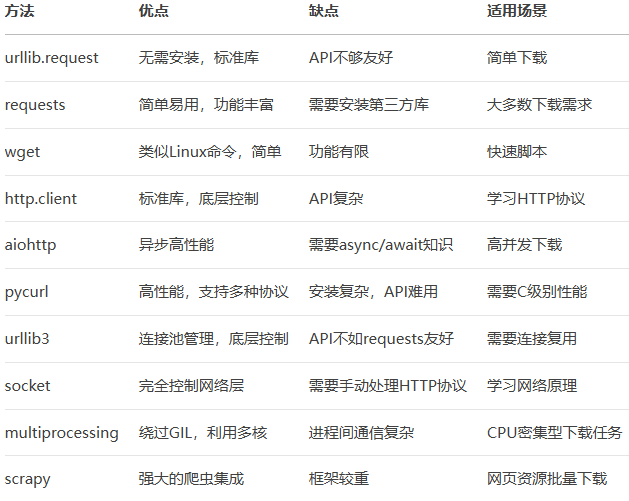
方法对比与选择指南
安全注意事项
验证HTTPS证书:
# requests示例(默认验证证书)
requests.get("https://example.com", verify=True)
限制下载大小防止DoS攻击:
max_size = 1024 * 1024 * 100  # 100MB
response = requests.get(url, stream=True)
downloaded = 0
with open(filename, 'wb') as f:
    for chunk in response.iter_content(8192):
        downloaded += len(chunk)
        if downloaded > max_size:
            raise ValueError("文件超过最大限制")
        f.write(chunk)
清理文件名防止路径遍历:
import re
def sanitize_filename(filename):
    return re.sub(r'[\\/*?:"<>|]', "", filename)
总结
本文介绍了Python下载文件的10种方法,从标准库到第三方库,从同步到异步,涵盖了各种应用场景。选择哪种方法取决于你的具体需求:
简单需求:urllib.request或requests
高性能需求:aiohttp或pycurl
特殊场景:multiprocessing或scrapy
到此这篇关于Python实现文件下载的方法汇总与适用场景介绍的文章就介绍到这了,更多相关Python文件下载内容请搜索脚本之家以前的文章或继续浏览下面的相关文章希望大家以后多多支持脚本之家!
相关文章
 这篇文章主要介绍了Python连续赋值需要注意的一些问题,具有很好的参考价值,希望对大家有所帮助。如有错误或未考虑完全的地方,望不吝赐教2021-06-06
 这篇文章主要介绍了python实现中文转换url编码的方法,结合实例形式分析了Python针对中文的gbk与utf-8编码转换的相关技巧,具有一定参考借鉴价值,需要的朋友可以参考下2016-06-06
 Python唯二的难题运行速度和源代码反编译,一直是被众多语言所诟病,下面这篇文章主要给大家介绍了关于如何将python项目打包成exe与安装包的相关资料,需要的朋友可以参考下2021-11-11
使用Spire.XLS for Python高效读取Excel数据的代码实现
在数据驱动的时代,Python已成为数据处理领域的瑞士军刀,然而,当我们面对最常见的数据载体——Excel文件时,如何高效、准确地从中提取所需信息,却常常成为许多开发者和数据分析师的痛点,本文给大家介绍了如何使用Spire.XLS for Python高效读取Excel数据2025-09-09 这篇文章主要为大家详细介绍了python实现人机对战的五子棋游戏,文中示例代码介绍的非常详细,具有一定的参考价值,感兴趣的小伙伴们可以参考一下2022-04-04
 本文主要介绍了Python为什么要保留显式的self,文中通过示例代码介绍的非常详细,对大家的学习或者工作具有一定的参考学习价值,需要的朋友们下面随着小编来一起学习学习吧2022-06-06
 TransBigData是一个为交通时空大数据处理、分析和可视化而开发的Python包。本文就来用它实现个人手机定位分析,感兴趣的小伙伴可以了解一下2023-04-04
 uv是由Astral公司开发的一款Rust编写的Python包管理器和环境管理器,它的主要目标是提供比现有工具快10-100倍的性能,同时保持简单直观的用户体验,这篇文章主要介绍了使用uv快速创建和管理Python虚拟环境最常用的入门流程,需要的朋友可以参考下2026-01-01
 这篇文章主要介绍了matplotlib基础绘图命令之bar的使用方法,文中通过示例代码介绍的非常详细,对大家的学习或者工作具有一定的参考学习价值,需要的朋友们下面随着小编来一起学习学习吧2020-08-08
Python两个内置函数 locals 和globals(学习笔记)
这篇文章主要介绍了Python两个内置函数 locals 和globals(学习笔记),需要的朋友可以参考下2016-08-08
最新评论