

3种Python查看神经网络结构的方法小结
1. 网络结构代码
import torch
import torch.nn as nn


# 定义Actor-Critic模型
class ActorCritic(nn.Module):
    def __init__(self, state_dim, action_dim):
        super(ActorCritic, self).__init__()
        self.actor = nn.Sequential(
            # 全连接层,输入维度为 state_dim,输出维度为 256
            nn.Linear(state_dim, 64),
            nn.ReLU(),
            nn.Linear(64, action_dim),
            # Softmax 函数,将输出转换为概率分布,dim=-1 表示在最后一个维度上应用 Softmax
            nn.Softmax(dim=-1)

        )
        self.critic = nn.Sequential(
            nn.Linear(state_dim, 64),
            nn.ReLU(),
            nn.Linear(64, 1)
        )

    def forward(self, state):
        policy = self.actor(state)
        value = self.critic(state)
        return policy, value


# 参数设置
state_dim = 1
action_dim = 2

model = ActorCritic(state_dim, action_dim)
2. 查看结构
2.1 直接打印模型
print(model)
输出:
ActorCritic(
(actor): Sequential(
(0): Linear(in_features=1, out_features=64, bias=True)
(1): ReLU()
(2): Linear(in_features=64, out_features=2, bias=True)
(3): Softmax(dim=-1)
)
(critic): Sequential(
(0): Linear(in_features=1, out_features=64, bias=True)
(1): ReLU()
(2): Linear(in_features=64, out_features=1, bias=True)
)
)
2.2 可视化网络结构(需要安装 torchviz 包)
安装 torchsummary 包:
$ pip install torchsummary
python 代码:
from torchviz import make_dot

# 创建一个虚拟输入
x = torch.randn(1, state_dim)
# 生成计算图
dot = make_dot(model(x), params=dict(model.named_parameters()))
dot.render("actor_critic_model", format="png")  # 保存为PNG图片
输出 actor_critic_model
digraph {
graph [size="12,12"]
node [align=left fontname=monospace fontsize=10 height=0.2 ranksep=0.1 shape=box style=filled]
140281544075344 [label="
(1, 2)" fillcolor=darkolivegreen1]
140281544213744 [label=SoftmaxBackward0]
140281544213840 -> 140281544213744
140281544213840 [label=AddmmBackward0]
140281544213600 -> 140281544213840
140285722327344 [label="actor.2.bias
(2)" fillcolor=lightblue]
140285722327344 -> 140281544213600
140281544213600 [label=AccumulateGrad]
140281544214032 -> 140281544213840
140281544214032 [label=ReluBackward0]
140281544213984 -> 140281544214032
140281544213984 [label=AddmmBackward0]
140281544214176 -> 140281544213984
140285722327024 [label="actor.0.bias
(64)" fillcolor=lightblue]
140285722327024 -> 140281544214176
140281544214176 [label=AccumulateGrad]
140281544214224 -> 140281544213984
140281544214224 [label=TBackward0]
140281543934832 -> 140281544214224
140285722327264 [label="actor.0.weight
(64, 1)" fillcolor=lightblue]
140285722327264 -> 140281543934832
140281543934832 [label=AccumulateGrad]
140281544213648 -> 140281544213840
140281544213648 [label=TBackward0]
140281544214080 -> 140281544213648
140285722327184 [label="actor.2.weight
(2, 64)" fillcolor=lightblue]
140285722327184 -> 140281544214080
140281544214080 [label=AccumulateGrad]
140281544213744 -> 140281544075344
140285722328704 [label="
(1, 1)" fillcolor=darkolivegreen1]
140281544213888 [label=AddmmBackward0]
140281544214368 -> 140281544213888
140285722328064 [label="critic.2.bias
(1)" fillcolor=lightblue]
140285722328064 -> 140281544214368
140281544214368 [label=AccumulateGrad]
140281544214128 -> 140281544213888
140281544214128 [label=ReluBackward0]
140281544214464 -> 140281544214128
140281544214464 [label=AddmmBackward0]
140281544214512 -> 140281544214464
140285722327424 [label="critic.0.bias
(64)" fillcolor=lightblue]
140285722327424 -> 140281544214512
140281544214512 [label=AccumulateGrad]
140281544214560 -> 140281544214464
140281544214560 [label=TBackward0]
140281544214704 -> 140281544214560
140285722327504 [label="critic.0.weight
(64, 1)" fillcolor=lightblue]
140285722327504 -> 140281544214704
140281544214704 [label=AccumulateGrad]
140281544213696 -> 140281544213888
140281544213696 [label=TBackward0]
140281544214272 -> 140281544213696
140285722327584 [label="critic.2.weight
(1, 64)" fillcolor=lightblue]
140285722327584 -> 140281544214272
140281544214272 [label=AccumulateGrad]
140281544213888 -> 140285722328704
}
输出模型图片:
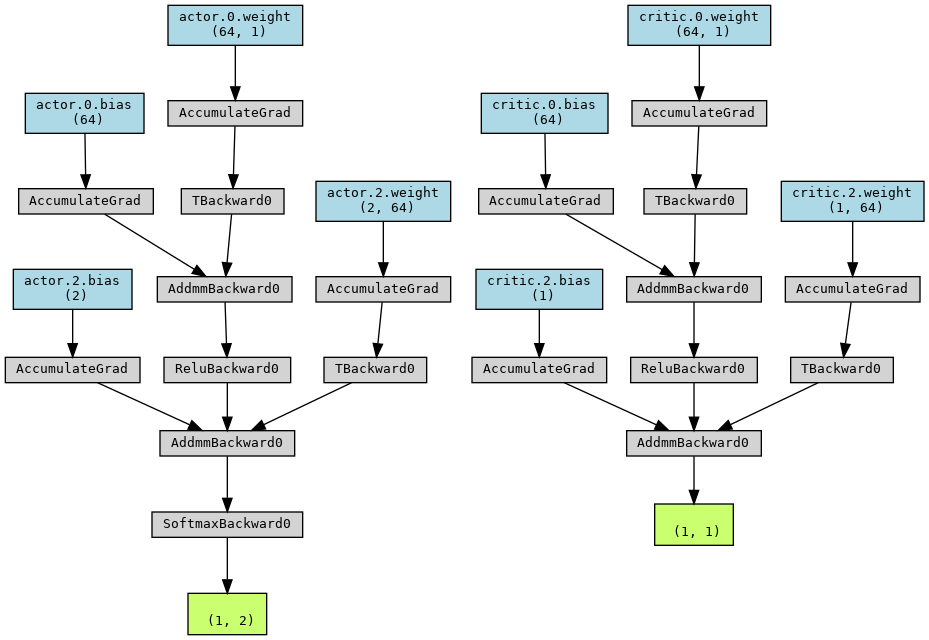
2.3 使用 summary 方法(需要安装 torchsummary 包)
安装 torchsummary 包:
pip install torchsummary
代码:
from torchsummary import summary

device = torch.device("cuda:0" if torch.cuda.is_available() else "cpu")
print(device)
model = model.to(device)
summary(model, input_size=(state_dim,))

#查看模型参数
print("查看模型参数:")
for name, param in model.named_parameters():
    print(f"Layer: {name} | Size: {param.size()} | Values: {param[:2]}...")
输出:
cuda:0
----------------------------------------------------------------
Layer (type) Output Shape Param #
================================================================
Linear-1 [-1, 64] 128
ReLU-2 [-1, 64] 0
Linear-3 [-1, 2] 130
Softmax-4 [-1, 2] 0
Linear-5 [-1, 64] 128
ReLU-6 [-1, 64] 0
Linear-7 [-1, 1] 65
================================================================
Total params: 451
Trainable params: 451
Non-trainable params: 0
----------------------------------------------------------------
Input size (MB): 0.00
Forward/backward pass size (MB): 0.00
Params size (MB): 0.00
Estimated Total Size (MB): 0.00
----------------------------------------------------------------
查看模型参数:
Layer: actor.0.weight | Size: torch.Size([64, 1]) | Values: tensor([[ 0.7747],
[-0.0440]], device='cuda:0', grad_fn=<SliceBackward0>)...
Layer: actor.0.bias | Size: torch.Size([64]) | Values: tensor([ 0.5995, -0.2155], device='cuda:0', grad_fn=<SliceBackward0>)...
Layer: actor.2.weight | Size: torch.Size([2, 64]) | Values: tensor([[ 0.0373, 0.0851, 0.1000, 0.1060, 0.0387, 0.0479, 0.0127, 0.0696,
0.0388, 0.0033, 0.1173, -0.1195, -0.0830, 0.0186, 0.0063, -0.0863,
-0.0353, 0.0782, -0.0558, 0.0011, -0.0533, 0.1241, 0.0120, -0.0906,
-0.0551, -0.0673, -0.1070, 0.0402, -0.0662, 0.0596, -0.0811, 0.0457,
0.0349, 0.0564, -0.0155, -0.0404, 0.0843, -0.0978, 0.0459, 0.1097,
-0.0858, 0.0736, -0.0067, -0.0756, -0.0363, -0.0525, -0.0426, -0.1087,
-0.0611, 0.0420, -0.1038, 0.0402, 0.0065, -0.1217, -0.0467, 0.0383,
-0.0217, 0.0283, 0.0800, 0.0228, 0.0415, -0.0473, -0.0199, -0.0436],
[-0.1118, -0.0806, -0.0700, -0.0224, 0.0335, -0.0087, 0.0265, -0.1196,
-0.0907, -0.0360, 0.0621, -0.0471, -0.0939, -0.0912, -0.1061, 0.1051,
-0.0592, -0.0757, 0.0758, -0.1082, -0.0317, 0.1208, -0.0279, -0.0693,
0.0920, -0.0318, -0.0476, 0.0236, -0.0761, 0.0591, 0.0862, -0.0712,
0.0156, -0.1073, 0.1133, 0.0039, -0.0191, 0.0605, -0.0686, -0.1202,
0.0962, 0.0581, 0.1145, 0.0741, -0.0993, -0.0987, 0.0939, 0.1006,
0.0773, -0.0756, -0.1096, 0.0156, -0.0599, 0.0857, 0.1005, -0.0618,
0.0474, 0.0066, -0.0531, -0.0479, 0.1136, 0.0356, 0.1169, -0.0023]],
device='cuda:0', grad_fn=<SliceBackward0>)...
Layer: actor.2.bias | Size: torch.Size([2]) | Values: tensor([-0.0039, 0.0937], device='cuda:0', grad_fn=<SliceBackward0>)...
Layer: critic.0.weight | Size: torch.Size([64, 1]) | Values: tensor([[0.5799],
[0.0473]], device='cuda:0', grad_fn=<SliceBackward0>)...
Layer: critic.0.bias | Size: torch.Size([64]) | Values: tensor([ 0.6507, -0.6974], device='cuda:0', grad_fn=<SliceBackward0>)...
Layer: critic.2.weight | Size: torch.Size([1, 64]) | Values: tensor([[ 0.0738, -0.0370, -0.1010, -0.0333, -0.0595, -0.0172, 0.0928, 0.0815,
0.1221, -0.0842, 0.0511, 0.0452, -0.0386, -0.0503, -0.0964, 0.0370,
-0.0341, -0.0693, -0.0845, 0.0424, -0.0491, -0.0439, -0.0443, 0.0203,
0.0960, -0.1178, -0.0836, -0.0144, -0.0576, -0.0851, 0.0461, 0.1160,
0.0120, 0.1180, 0.0255, 0.1047, -0.0398, 0.0786, 0.1143, 0.0806,
0.1125, 0.0267, 0.0534, -0.0318, 0.1125, -0.0727, 0.1169, 0.0120,
-0.0178, -0.0845, 0.0069, 0.0194, 0.1188, 0.0481, 0.1077, -0.0840,
0.1013, 0.0586, -0.0857, -0.0974, -0.0630, 0.0359, -0.0080, -0.0926]],
device='cuda:0', grad_fn=<SliceBackward0>)...
Layer: critic.2.bias | Size: torch.Size([1]) | Values: tensor([0.0621], device='cuda:0', grad_fn=<SliceBackward0>)...
到此这篇关于3种Python查看神经网络结构的方法小结的文章就介绍到这了,更多相关Python查看神经网络结构内容请搜索脚本之家以前的文章或继续浏览下面的相关文章希望大家以后多多支持脚本之家!
相关文章
 这篇文章主要为大家详细介绍了python实现dijkstra最短路由算法,文中示例代码介绍的非常详细,具有一定的参考价值,感兴趣的小伙伴们可以参考一下2019-01-01
 这篇文章主要介绍了在VS Code上搭建Python开发环境的方法,需要的朋友可以参考下2018-04-04
 大家好,我们知道软件运行过程中一般会在指定位置生成临时文件,这些资源不要轻易删除,可能是过程文件,定时清理是必要的,今天给大家分享一款工具:tempfile,喜欢本文点赞支持,欢迎收藏学习2021-11-11
 这篇文章主要介绍了Python设计模式之外观模式,结合实例形式详细分析了外观模式的概念、原理、用法及相关操作注意事项,需要的朋友可以参考下2019-01-01
 这篇文章主要介绍了Python统计时间内的并发数代码实例,文中通过示例代码介绍的非常详细,对大家的学习或者工作具有一定的参考学习价值,需要的朋友可以参考下2019-12-12
 今天小编就为大家分享一篇python中seaborn包常用图形使用详解,具有很好的参考价值,希望对大家有所帮助。一起跟随小编过来看看吧2019-11-11
 本篇文章主要介绍了itchat实现微信好友头像拼接图的示例代码,具有一定的参考价值,有兴趣的可以了解一下2017-08-08
 这篇文章主要介绍了Windows下实现pytorch环境搭建,文中通过示例代码介绍的非常详细,对大家的学习或者工作具有一定的参考学习价值,需要的朋友们下面随着小编来一起学习学习吧2021-04-04
Python中ArcPy栅格裁剪栅格(批量对齐栅格图像范围并统一行数与列数)
本文介绍基于Python中ArcPy模块,实现基于栅格图像批量裁剪栅格图像,同时对齐各个栅格图像的空间范围,统一其各自行数与列数的方法,本文通过实例代码给大家介绍的非常详细,需要的朋友可以参考下2023-02-02 这篇文章收集了一些对开发者非常有帮助的,最好的10款Python IDE,包括Vim,Eclipse with PyDev,Sublime Text,PyCharm等知明Python开发工具2018-09-09
最新评论