

基于PyQt6开发Windows时间校时同步工具
更新时间:2025年05月14日 11:23:49 作者:创客白泽
在现代计算机应用中,准确的时间同步至关重要,无论是金融交易、日志记录还是分布式系统协同,毫秒级的时间误差都可能导致严重问题,所以本文介绍了基于PyQt6的Windows时间校时同步工具开发全攻略,需要的朋友可以参考下
一、概述:时间同步的重要性与工具价值
在现代计算机应用中,准确的时间同步至关重要。无论是金融交易、日志记录还是分布式系统协同,毫秒级的时间误差都可能导致严重问题。Windows系统虽然内置了时间同步功能,但存在以下痛点:
- 同步频率不可控(默认每周一次)
- 服务器选择有限
- 缺乏可视化操作界面
- 无法实时查看同步状态
本文介绍的Windows智能校时工具通过PyQt6实现了以下突破:
- 多NTP服务器智能选择
- 可配置的自动同步周期
- 直观的图形化界面
- 实时状态监控
- 服务器连通性测试
二、功能全景图
2.1 核心功能矩阵
| 功能模块 | 实现方式 | 技术亮点 |
|---|---|---|
| 时间显示 | QTimer实时刷新 | 多线程避免UI阻塞 |
| NTP同步 | ntplib+win32api | 双保险机制(NTP+HTTP备用) |
| 自动同步 | QTimer定时触发 | 智能间隔配置(1-1440分钟) |
| 服务器测试 | 多线程并行测试 | 延迟毫秒级统计 |
2.2 特色功能详解
- 智能降级策略:当NTP协议同步失败时,自动切换HTTP API备用方案
- 跨线程通信:通过PyQt信号槽机制实现线程安全的状态更新
- 系统级集成:调用win32api直接修改系统时间(需管理员权限)
三、效果展示
3.1 主界面布局

- 顶部:大字号时间日期显示
- 中部:NTP服务器配置区
- 底部:操作按钮与状态栏
3.2 服务器测试对话框
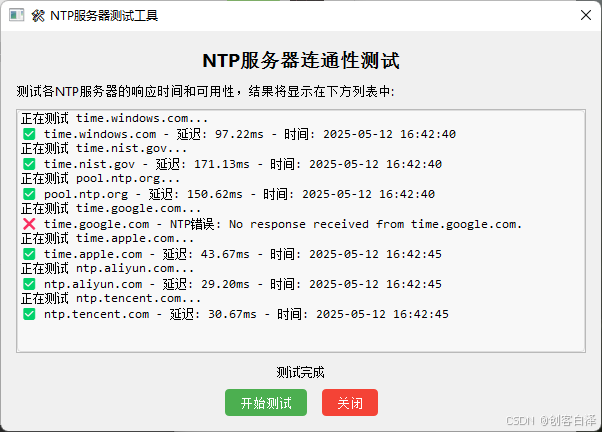
- 可视化服务器响应延迟
- 成功/失败状态直观标识
四、实现步骤详解
4.1 环境准备
pip install pyqt6 ntplib requests pywin32
4.2 核心类结构
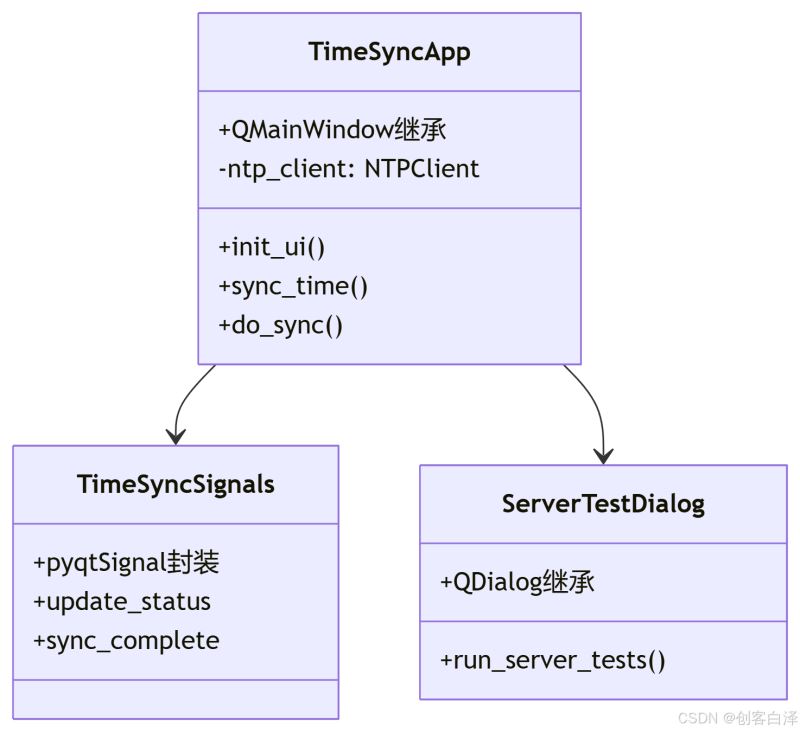
4.3 关键实现步骤
- 时间获取双保险机制
def do_sync(self):
    try:
        # 首选NTP协议
        response = self.ntp_client.request(ntp_server, version=3, timeout=5)
        ...
    except ntplib.NTPException:
        # 备用HTTP方案
        ntp_time = self.get_time_from_http()
- 线程安全的UI更新
class TimeSyncSignals(QObject):
    update_status = pyqtSignal(str)  # 状态更新信号
    sync_complete = pyqtSignal(bool, str, str)  # 完成信号

# 子线程通过信号触发主线程UI更新
self.signals.update_status.emit("正在同步...")
五、代码深度解析
5.1 NTP时间转换关键代码
# 获取NTP响应并转换时区
response = self.ntp_client.request(server, version=3, timeout=5)
ntp_time = datetime.datetime.fromtimestamp(response.tx_time)  # 本地时间
utc_time = datetime.datetime.utcfromtimestamp(response.tx_time)  # UTC时间

# 设置系统时间(必须使用UTC)
win32api.SetSystemTime(
    utc_time.year, utc_time.month, utc_time.isoweekday() % 7,
    utc_time.day, utc_time.hour, utc_time.minute,
    utc_time.second, int(utc_time.microsecond / 1000)
)
5.2 自定义事件处理
class ServerTestEvent(QEvent):
    def __init__(self, text):
        super().__init__(QEvent.Type.User)
        self.text = text

# 在子线程中安全更新UI
def add_result(self, text):
    QApplication.instance().postEvent(self, ServerTestEvent(text))

def customEvent(self, event):
    if isinstance(event, ServerTestEvent):
        self.result_list.addItem(event.text)
5.3 样式美化技巧
/* 按钮渐变效果 */
QPushButton {
    background: qlineargradient(x1:0, y1:0, x2:1, y2:1,
        stop:0 #4CAF50, stop:1 #45a049);
    border-radius: 4px;
    color: white;
}

/* 列表项悬停效果 */
QListWidget::item:hover {
    background: #e0e0e0;
}
六、源码下载与使用说明
6.1 完整源码
import sys
import datetime
import threading
import requests
import ntplib
import win32api
from PyQt6.QtWidgets import (QApplication, QMainWindow, QWidget, QVBoxLayout, QHBoxLayout,
                            QLabel, QComboBox, QPushButton, QSpinBox, QCheckBox,
                            QListWidget, QMessageBox, QGroupBox, QScrollArea, QDialog)
from PyQt6.QtCore import Qt, QTimer, QDateTime, QObject, pyqtSignal, QEvent
from PyQt6.QtGui import QFont, QIcon

class TimeSyncSignals(QObject):
    update_status = pyqtSignal(str)
    sync_complete = pyqtSignal(bool, str, str)

class TimeSyncApp(QMainWindow):
    def __init__(self):
        super().__init__()
        self.setWindowTitle("🕒 Windows 自动校时工具")
        self.setGeometry(100, 100, 650, 500)

        # 初始化变量
        self.sync_in_progress = False
        self.auto_sync_timer = QTimer()
        self.auto_sync_timer.timeout.connect(self.sync_time)
        self.signals = TimeSyncSignals()

        # 连接信号槽
        self.signals.update_status.connect(self.update_status_bar)
        self.signals.sync_complete.connect(self.handle_sync_result)

        # 创建主界面
        self.init_ui()

        # 启动时间更新定时器
        self.time_update_timer = QTimer()
        self.time_update_timer.timeout.connect(self.update_current_time)
        self.time_update_timer.start(1000)

        # 初始化NTP客户端
        self.ntp_client = ntplib.NTPClient()

    def init_ui(self):
        # 主窗口布局
        central_widget = QWidget()
        self.setCentralWidget(central_widget)
        main_layout = QVBoxLayout(central_widget)
        main_layout.setSpacing(15)
        main_layout.setContentsMargins(20, 20, 20, 20)

        # 标题
        title_label = QLabel("🕒 Windows 自动校时工具")
        title_font = QFont("Segoe UI", 18, QFont.Weight.Bold)
        title_label.setFont(title_font)
        title_label.setStyleSheet("color: #4CAF50;")
        title_label.setAlignment(Qt.AlignmentFlag.AlignCenter)
        main_layout.addWidget(title_label)

        # 当前时间显示
        time_group = QGroupBox("🕰️ 当前系统时间")
        time_group.setStyleSheet("QGroupBox { font-weight: bold; }")
        time_layout = QVBoxLayout(time_group)

        self.current_time_label = QLabel()
        time_font = QFont("Segoe UI", 24)
        self.current_time_label.setFont(time_font)
        self.current_time_label.setStyleSheet("color: #2196F3;")
        self.current_time_label.setAlignment(Qt.AlignmentFlag.AlignCenter)
        time_layout.addWidget(self.current_time_label)

        self.current_date_label = QLabel()
        date_font = QFont("Segoe UI", 12)
        self.current_date_label.setFont(date_font)
        self.current_date_label.setAlignment(Qt.AlignmentFlag.AlignCenter)
        time_layout.addWidget(self.current_date_label)

        main_layout.addWidget(time_group)

        # 同步选项
        sync_group = QGroupBox("⚙️ 同步选项")
        sync_group.setStyleSheet("QGroupBox { font-weight: bold; }")
        sync_layout = QVBoxLayout(sync_group)

        # NTP服务器选择
        ntp_layout = QHBoxLayout()
        ntp_label = QLabel("NTP 服务器:")
        ntp_label.setFont(QFont("Segoe UI", 10))

        self.ntp_combo = QComboBox()
        self.ntp_combo.addItems([
            "time.windows.com",
            "time.nist.gov",
            "pool.ntp.org",
            "time.google.com",
            "time.apple.com",
            "ntp.aliyun.com",
            "ntp.tencent.com"
        ])
        self.ntp_combo.setCurrentIndex(0)
        self.ntp_combo.setFont(QFont("Segoe UI", 10))

        ntp_layout.addWidget(ntp_label)
        ntp_layout.addWidget(self.ntp_combo)
        sync_layout.addLayout(ntp_layout)

        # 同步间隔
        interval_layout = QHBoxLayout()
        interval_label = QLabel("自动同步间隔 (分钟):")
        interval_label.setFont(QFont("Segoe UI", 10))

        self.interval_spin = QSpinBox()
        self.interval_spin.setRange(1, 1440)
        self.interval_spin.setValue(60)
        self.interval_spin.setFont(QFont("Segoe UI", 10))

        interval_layout.addWidget(interval_label)
        interval_layout.addWidget(self.interval_spin)
        sync_layout.addLayout(interval_layout)

        # 自动同步开关
        self.auto_sync_check = QCheckBox("启用自动同步 🔄")
        self.auto_sync_check.setFont(QFont("Segoe UI", 10))
        self.auto_sync_check.stateChanged.connect(self.toggle_auto_sync)
        sync_layout.addWidget(self.auto_sync_check)

        main_layout.addWidget(sync_group)

        # 按钮区域
        button_layout = QHBoxLayout()

        self.sync_button = QPushButton("立即同步时间 ⚡")
        self.sync_button.setFont(QFont("Segoe UI", 10, QFont.Weight.Bold))
        self.sync_button.setStyleSheet("background-color: #4CAF50; color: white;")
        self.sync_button.clicked.connect(self.sync_time)
        button_layout.addWidget(self.sync_button)

        self.server_test_button = QPushButton("测试服务器 🛠️")
        self.server_test_button.setFont(QFont("Segoe UI", 10))
        self.server_test_button.clicked.connect(self.show_server_test_dialog)
        button_layout.addWidget(self.server_test_button)

        main_layout.addLayout(button_layout)

        # 状态栏
        self.status_bar = self.statusBar()
        self.status_bar.setFont(QFont("Segoe UI", 9))
        self.status_bar.showMessage("🟢 就绪")

        # 初始化当前时间显示
        self.update_current_time()

    def update_current_time(self):
        now = QDateTime.currentDateTime()
        self.current_time_label.setText(now.toString("HH:mm:ss"))
        self.current_date_label.setText(now.toString("yyyy-MM-dd dddd"))

    def toggle_auto_sync(self, state):
        if state == Qt.CheckState.Checked.value:
            minutes = self.interval_spin.value()
            self.auto_sync_timer.start(minutes * 60000)  # 转换为毫秒
            self.status_bar.showMessage(f"🔄 自动同步已启用,每 {minutes} 分钟同步一次")
        else:
            self.auto_sync_timer.stop()
            self.status_bar.showMessage("⏸️ 自动同步已禁用")

    def sync_time(self):
        if self.sync_in_progress:
            return

        self.sync_in_progress = True
        self.sync_button.setEnabled(False)
        self.signals.update_status.emit("🔄 正在同步时间...")

        # 在新线程中执行同步操作
        sync_thread = threading.Thread(target=self.do_sync, daemon=True)
        sync_thread.start()

    def do_sync(self):
        ntp_server = self.ntp_combo.currentText()

        try:
            # 使用NTP协议获取时间
            response = self.ntp_client.request(ntp_server, version=3, timeout=5)

            # 将NTP时间转换为本地时间
            ntp_time = datetime.datetime.fromtimestamp(response.tx_time)
            utc_time = datetime.datetime.utcfromtimestamp(response.tx_time)

            print(f"从NTP服务器获取的时间 (UTC): {utc_time}")
            print(f"转换为本地时间: {ntp_time}")

            # 设置系统时间 (需要UTC时间)
            win32api.SetSystemTime(
                utc_time.year, utc_time.month, utc_time.isoweekday() % 7,
                utc_time.day, utc_time.hour, utc_time.minute,
                utc_time.second, int(utc_time.microsecond / 1000)
            )

            # 获取设置后的系统时间
            new_time = datetime.datetime.now()
            print(f"设置后的系统时间: {new_time}")

            # 通过信号发送结果
            self.signals.sync_complete.emit(
                True,
                f"✅ 时间同步成功! 服务器: {ntp_server}",
                f"时间已成功同步到 {ntp_server}\nNTP时间 (UTC): {utc_time}\n本地时间: {ntp_time}\n设置后系统时间: {new_time}"
            )

        except ntplib.NTPException as e:
            # NTP失败,尝试备用方法
            try:
                self.signals.update_status.emit("⚠️ NTP同步失败,尝试备用方法...")
                ntp_time = self.get_time_from_http()

                if ntp_time:
                    utc_time = ntp_time.astimezone(datetime.timezone.utc).replace(tzinfo=None)
                    print(f"从HTTP获取的时间 (本地): {ntp_time}")
                    print(f"转换为UTC时间: {utc_time}")

                    win32api.SetSystemTime(
                        utc_time.year, utc_time.month, utc_time.isoweekday() % 7,
                        utc_time.day, utc_time.hour, utc_time.minute,
                        utc_time.second, int(utc_time.microsecond / 1000)
                    )

                    new_time = datetime.datetime.now()
                    print(f"设置后的系统时间: {new_time}")

                    self.signals.sync_complete.emit(
                        True,
                        "✅ 时间同步成功! (备用方法)",
                        f"时间已通过备用方法同步\nHTTP时间: {ntp_time}\nUTC时间: {utc_time}\n设置后系统时间: {new_time}"
                    )
                else:
                    raise Exception("所有同步方法均失败")

            except Exception as e:
                error_msg = f"❌ 同步失败: {str(e)}"
                print(error_msg)
                self.signals.sync_complete.emit(
                    False,
                    error_msg,
                    f"时间同步失败:\n{str(e)}"
                )

        finally:
            self.sync_in_progress = False
            self.sync_button.setEnabled(True)

    def get_time_from_http(self):
        try:
            # 尝试使用世界时间API
            response = requests.get("http://worldtimeapi.org/api/timezone/Etc/UTC", timeout=5)
            data = response.json()
            utc_time = datetime.datetime.fromisoformat(data["datetime"])
            return utc_time.astimezone()  # 转换为本地时区
        except:
            try:
                # 尝试使用阿里云API
                response = requests.get("http://api.m.taobao.com/rest/api3.do?api=mtop.common.getTimestamp", timeout=5)
                data = response.json()
                timestamp = int(data["data"]["t"]) / 1000
                return datetime.datetime.fromtimestamp(timestamp)
            except:
                return None

    def update_status_bar(self, message):
        self.status_bar.showMessage(message)

    def handle_sync_result(self, success, status_msg, detail_msg):
        self.status_bar.showMessage(status_msg)
        if success:
            QMessageBox.information(self, "成功", detail_msg)
        else:
            QMessageBox.critical(self, "错误", detail_msg)

    def show_server_test_dialog(self):
        self.test_dialog = ServerTestDialog(self)
        self.test_dialog.show()

class ServerTestDialog(QDialog):
    def __init__(self, parent=None):
        super().__init__(parent)
        self.setWindowTitle("🛠️ NTP服务器测试工具")
        self.setWindowModality(Qt.WindowModality.NonModal)
        self.setMinimumSize(600, 400)

        self.ntp_client = ntplib.NTPClient()
        self.test_in_progress = False

        self.init_ui()

    def init_ui(self):
        layout = QVBoxLayout(self)
        layout.setContentsMargins(15, 15, 15, 15)
        layout.setSpacing(10)

        # 标题
        title_label = QLabel("NTP服务器连通性测试")
        title_label.setFont(QFont("Segoe UI", 14, QFont.Weight.Bold))
        title_label.setAlignment(Qt.AlignmentFlag.AlignCenter)
        layout.addWidget(title_label)

        # 说明
        info_label = QLabel("测试各NTP服务器的响应时间和可用性,结果将显示在下方列表中:")
        info_label.setFont(QFont("Segoe UI", 10))
        info_label.setWordWrap(True)
        layout.addWidget(info_label)

        # 结果列表
        self.result_list = QListWidget()
        self.result_list.setFont(QFont("Consolas", 9))
        self.result_list.setStyleSheet("""
            QListWidget {
                background-color: #f8f8f8;
                border: 1px solid #ddd;
                border-radius: 4px;
            }
        """)

        scroll_area = QScrollArea()
        scroll_area.setWidgetResizable(True)
        scroll_area.setWidget(self.result_list)
        layout.addWidget(scroll_area, 1)

        # 进度标签
        self.progress_label = QLabel("准备开始测试...")
        self.progress_label.setFont(QFont("Segoe UI", 9))
        self.progress_label.setAlignment(Qt.AlignmentFlag.AlignCenter)
        layout.addWidget(self.progress_label)

        # 按钮区域
        button_layout = QHBoxLayout()
        button_layout.setSpacing(15)

        self.test_button = QPushButton("开始测试")
        self.test_button.setFont(QFont("Segoe UI", 10))
        self.test_button.setStyleSheet("""
            QPushButton {
                background-color: #4CAF50;
                color: white;
                padding: 5px 15px;
                border: none;
                border-radius: 4px;
            }
            QPushButton:disabled {
                background-color: #cccccc;
            }
        """)
        self.test_button.clicked.connect(self.start_test)

        close_button = QPushButton("关闭")
        close_button.setFont(QFont("Segoe UI", 10))
        close_button.setStyleSheet("""
            QPushButton {
                background-color: #f44336;
                color: white;
                padding: 5px 15px;
                border: none;
                border-radius: 4px;
            }
        """)
        close_button.clicked.connect(self.close)

        button_layout.addStretch(1)
        button_layout.addWidget(self.test_button)
        button_layout.addWidget(close_button)
        button_layout.addStretch(1)
        layout.addLayout(button_layout)

    def start_test(self):
        if self.test_in_progress:
            return

        self.test_in_progress = True
        self.test_button.setEnabled(False)
        self.result_list.clear()
        self.progress_label.setText("测试进行中...")

        servers = [
            "time.windows.com",
            "time.nist.gov",
            "pool.ntp.org",
            "time.google.com",
            "time.apple.com",
            "ntp.aliyun.com",
            "ntp.tencent.com"
        ]

        print("\n" + "="*50)
        print("Starting NTP server connectivity test...")
        print("="*50)

        test_thread = threading.Thread(target=self.run_server_tests, args=(servers,), daemon=True)
        test_thread.start()

    def run_server_tests(self, servers):
        for server in servers:
            self.add_result(f"正在测试 {server}...")
            print(f"\nTesting server: {server}")

            try:
                start_time = datetime.datetime.now()
                response = self.ntp_client.request(server, version=3, timeout=5)
                end_time = datetime.datetime.now()

                latency = (end_time - start_time).total_seconds() * 1000  # 毫秒
                ntp_time = datetime.datetime.fromtimestamp(response.tx_time)

                result_text = (f"✅ {server} - 延迟: {latency:.2f}ms - "
                             f"时间: {ntp_time.strftime('%Y-%m-%d %H:%M:%S')}")

                print(f"Server {server} test successful")
                print(f"  Latency: {latency:.2f}ms")
                print(f"  NTP Time: {ntp_time}")
                self.add_result(result_text)

            except ntplib.NTPException as e:
                error_text = f"❌ {server} - NTP错误: {str(e)}"
                print(f"Server {server} test failed (NTP error): {str(e)}")
                self.add_result(error_text)

            except Exception as e:
                error_text = f"❌ {server} - 错误: {str(e)}"
                print(f"Server {server} test failed (General error): {str(e)}")
                self.add_result(error_text)

        print("\n" + "="*50)
        print("NTP server testing completed")
        print("="*50 + "\n")
        self.test_complete()

    def add_result(self, text):
        # 使用QMetaObject.invokeMethod确保线程安全
        QApplication.instance().postEvent(self, ServerTestEvent(text))

    def test_complete(self):
        QApplication.instance().postEvent(self, ServerTestCompleteEvent())

    def customEvent(self, event):
        if isinstance(event, ServerTestEvent):
            self.result_list.addItem(event.text)
            self.result_list.scrollToBottom()
        elif isinstance(event, ServerTestCompleteEvent):
            self.test_in_progress = False
            self.test_button.setEnabled(True)
            self.progress_label.setText("测试完成")
            print("All server tests completed")

class ServerTestEvent(QEvent):
    def __init__(self, text):
        super().__init__(QEvent.Type.User)
        self.text = text

class ServerTestCompleteEvent(QEvent):
    def __init__(self):
        super().__init__(QEvent.Type.User + 1)

if __name__ == "__main__":
    app = QApplication(sys.argv)

    # 设置应用程序样式
    app.setStyle("Fusion")

    # 设置全局字体
    font = QFont("Segoe UI", 10)
    app.setFont(font)

    window = TimeSyncApp()
    window.show()
    sys.exit(app.exec())
6.2 运行要求
- Windows 7及以上系统
- Python 3.8+
- 管理员权限(修改系统时间需要)
6.3 编译为EXE
pyinstaller --onefile --windowed --icon=time.ico timesync.py
七、总结与拓展方向
7.1 项目亮点
- 采用PyQt6现代GUI框架,界面美观
- 双时间源冗余设计,可靠性高
- 完整的异常处理机制
- 符合Windows系统规范的时间设置
7.2 优化建议
- 增加本地时间服务器配置
- 实现时间偏差历史记录
- 添加UTC/GMT时区切换
- 支持Linux/MacOS跨平台
时间同步看似简单,实则涉及操作系统底层、网络协议、多线程编程等多个技术领域。本项目的价值不仅在于实用工具开发,更是PyQt6高级应用的典型案例。建议读者在此基础上深入探索Windows系统API和NTP协议的高级用法。
以上就是基于PyQt6开发Windows时间校时同步工具的详细内容,更多关于PyQt6 Windows时间校时的资料请关注脚本之家其它相关文章!
相关文章
 今天小编就为大家分享一篇浅谈Python 列表字典赋值的陷阱,具有很好的参考价值,希望对大家有所帮助。一起跟随小编过来看看吧2019-01-01
 这篇文章主要给大家介绍了关于python中remove的一些坑,文中通过示例代码介绍的非常详细,对大家的学习或者工作具有一定的参考学习价值,需要的朋友们下面随着小编来一起学习学习吧2021-01-01
 最近工作中需要几个脚本运行其他程序,几乎像一个Windows批处理文件,这篇文章主要给大家介绍了关于如何利用python实现windows的批处理及文件夹操作的相关资料,文中通过实例代码介绍的非常详细,需要的朋友可以参考下2022-01-01
 这篇文章主要为大家详细介绍了基于Python实现一个专业的密码强度检测器,可以用于评估密码的安全性和强度,感兴趣的小伙伴可以跟随小编一起学习一下2025-12-12
python搭建服务器实现两个Android客户端间收发消息
这篇文章主要为大家详细介绍了python搭建服务器实现两个Android客户端间收发消息,具有一定的参考价值,感兴趣的小伙伴们可以参考一下2018-04-04 下面小编就为大家带来一篇解决Python 遍历字典时删除元素报异常的问题。小编觉得挺不错的,现在就分享给大家,也给大家做个参考。一起跟随小编过来看看吧2016-09-09
 本文主要介绍了Python中列出目录中的文件的五种方法小结,文中通过示例代码介绍的非常详细,对大家的学习或者工作具有一定的参考学习价值,需要的朋友们下面随着小编来一起学习学习吧2023-02-02
Python与xlwings黄金组合处理Excel各种数据和自动化任务
这篇文章主要为大家介绍了Python与xlwings黄金组合处理Excel各种数据和自动化任务示例详解,有需要的朋友可以借鉴参考下,希望能够有所帮助,祝大家多多进步,早日升职加薪<BR>2023-12-12 这篇文章主要为大家详细介绍了Python如何结合Pytest打造自动化测试体系,文中的示例代码讲解详细,感兴趣的小伙伴可以跟随小编一起学习一下2026-03-03
 今天小编就为大家分享一篇用python处理MS Word的实例讲解,具有很好的参考价值,希望对大家有所帮助。一起跟随小编过来看看吧2018-05-05
最新评论