

Python实现获取网页信息并解析
更新时间:2025年05月22日 10:50:58 作者:KevinQ
这篇文章主要为大家详细介绍了如何使用Python实现获取网页信息并解析功能,文中的示例代码讲解详细,感兴趣的小伙伴可以跟随小编一起学习一下
Python爬虫用到的两个主要的库是:bs4和request,request用于发起请求,而bs4用于网页元素解析。
以阮一峰老师的博客为例,每周最喜欢的是科学爱好者周刊中的“言论”不分,以 科技爱好者周刊(第 253 期)为例,让我们来看看能不能将言论部分提取出来。
import requests
from bs4 import BeautifulSoup

url = "http://www.ruanyifeng.com/blog/2023/05/weekly-issue-253.html"
response = requests.get(url)
soup = BeautifulSoup(response.content, "html.parser")
first_tag = soup.find("h2", string="言论")
next_sibling = first_tag.find_next_sibling()
content1 = ""
while next_sibling.name != "h2":
    content1 += str(next_sibling.get_text())
    # content1 += str(next_sibling)
    content1 += "\n\n"
    next_sibling = next_sibling.find_next_sibling()
print(content1)
执行结果:
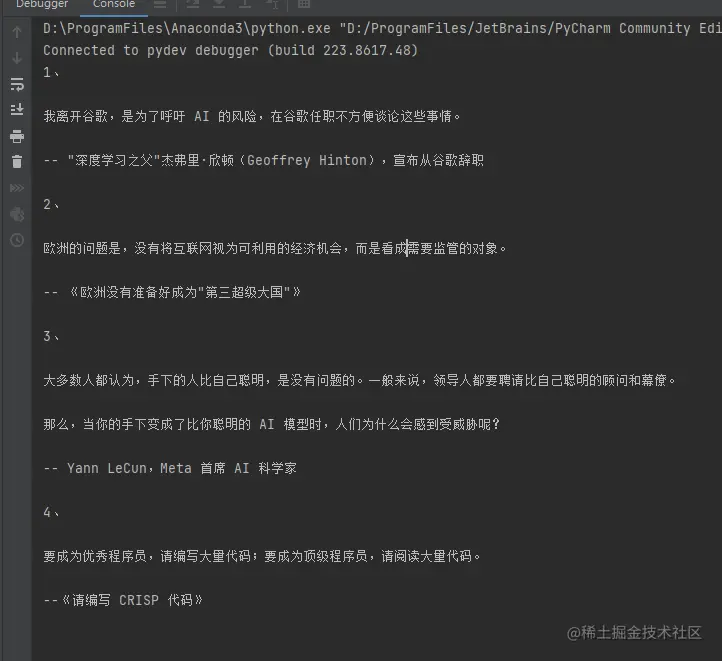
用到的重要函数是查找某个tag,获取某个tag的下一个tag函数:
find与find_all
函数定义如下:
def find(self, name=None, attrs={}, recursive=True, text=None,
         **kwargs):
    """Look in the children of this PageElement and find the first
    PageElement that matches the given criteria.
    All find_* methods take a common set of arguments. See the online    documentation for detailed explanations.
    :param name: A filter on tag name.    :param attrs: A dictionary of filters on attribute values.    :param recursive: If this is True, find() will perform a        recursive search of this PageElement's children. Otherwise,        only the direct children will be considered.    :param limit: Stop looking after finding this many results.    :kwargs: A dictionary of filters on attribute values.    :return: A PageElement.
    :rtype: bs4.element.PageElement
    """
    r = None
    l = self.find_all(name, attrs, recursive, text, 1, **kwargs)
    if l:
        r = l[0]
    return r
def find_all(self, name=None, attrs={}, recursive=True, text=None,
             limit=None, **kwargs):
    """Look in the children of this PageElement and find all
    PageElements that match the given criteria.
    All find_* methods take a common set of arguments. See the online    documentation for detailed explanations.
    :param name: A filter on tag name.    :param attrs: A dictionary of filters on attribute values.    :param recursive: If this is True, find_all() will perform a        recursive search of this PageElement's children. Otherwise,        only the direct children will be considered.    :param limit: Stop looking after finding this many results.    :kwargs: A dictionary of filters on attribute values.    :return: A ResultSet of PageElements.
    :rtype: bs4.element.ResultSet
    """
    generator = self.descendants
    if not recursive:
        generator = self.children
    return self._find_all(name, attrs, text, limit, generator, **kwargs)
find 返回的是一个元素,find_all返回的是一个列表,举例说明比较清晰。
允许传入的参数包括:
1.字符串:tag的名称,如h2, p, b, a等等分别表示查找<h2>, <p>, <b>, <a>等标签。 如:
soup.find_all('b')
# [<b>这里加粗</b>]
2.正则表达式
# 导入包
import re
for tag in soup.find_all(re.compile("^b")):
    print(tag.name)
# 结果会找出 body, b等b开头的标签
.3列表:与列表中任一元素匹配的内容返回
soup.find_all(["a", "b"])
# 输出: [<b>加粗</b>,
#  <a class="ddd" href="http://xxx" rel="external nofollow" >xxx</a> ]
4.True: 返回所有非字符串节点。
5.方法:传入的方法接受唯一参数:元素,并返回True或者False,若元素计算的值为True,则返回。
# 判断一个tag有class属性,但是没有id属性
def has_class_but_no_id(tag):
    return tag.has_attr('class') and not tag.has_attr('id')
# 使用方式
soup.find_all(has_class_but_no_id)
6.对元素指定判断函数:
# 查找所有href标签不是https的a标签
def not_https(href):
        return href and not re.compile("https").search(href)
soup.find_all(href=not_https)
通过上述第5种和第6种方法,可以构造很复杂的tag过滤函数,从而实现过滤目的。
其他相关搜索函数如下:
find_next_sibling 返回后面的第一个同级tag节点 find_previous_sibling 返回前面的第一个同级tag节点 find_next 后面第一个tag节点 find_previous 前面第一个tag节点
更多内容可以在bs4官方文档中查看。
到此这篇关于Python实现获取网页信息并解析的文章就介绍到这了,更多相关Python获取网页信息内容请搜索脚本之家以前的文章或继续浏览下面的相关文章希望大家以后多多支持脚本之家!
相关文章
 这篇文章主要介绍了Python 如何访问外围作用域中的变量的相关资料,需要的朋友可以参考下2016-09-09
 这篇文章主要为大家详细介绍了树莓派实现移动拍照,具有一定的参考价值,感兴趣的小伙伴们可以参考一下2019-06-06
 项目中需要在Linux上运行自己写的python脚本,特此记录一下操作流程,整个流程比较简单,下面这篇文章主要给大家介绍了关于在Ubuntu系统中运行python代码的几个步骤,需要的朋友可以参考下2023-12-12
如何使用python wasmtime调用rust生成的wasm库
这篇文章主要介绍了如何使用python wasmtime调用rust生成的wasm库,使用python wasmtime来访问rust库的便捷方法,步骤极其简练,可以在生产环境中使用,需要的朋友可以参考下2023-01-01 这篇文章主要介绍了解决python中的print函数自动换行的问题,具有很好的参考价值,希望对大家有所帮助,如有错误或未考虑完全的地方,望不吝赐教2024-02-02
 这篇文章主要为大家介绍了Python的type函数结果,具有一定的参考价值,感兴趣的小伙伴们可以参考一下,希望能够给你带来帮助2022-01-01
 这篇文章主要介绍了python标准库os库的函数介绍,需要的朋友可以参考下2020-02-02
 这篇文章主要介绍了Python如何实现一个简单的抽奖刮刮卡,文中讲解非常细致,代码帮助大家更好的理解和学习,感兴趣的朋友可以了解下2020-07-07
Python文档转换之Markdown转Word的高效实战指南
本文将深入探讨如何利用Python的强大能力,结合一个高效的文档处理库,实现Markdown到Word文档的自动化转换,文中的示例代码讲解详细,感兴趣的小伙伴可以了解下2026-01-01 在学习HOG特征的时候,发现一片英文文章讲得浅显易懂。因此翻译在这里学习,感兴趣的朋友快来看看吧2022-03-03
最新评论