

使用Python实现获取屏幕像素颜色值
更新时间:2025年06月08日 11:35:21 作者:蜡笔小电芯
这篇文章主要为大家详细介绍了如何使用Python实现获取屏幕像素颜色值,文中的示例代码讲解详细,感兴趣的小伙伴可以跟随小编一起学习一下
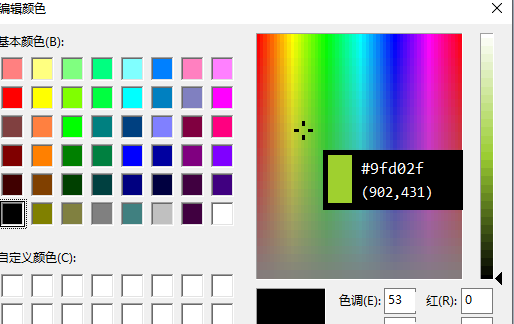
一、一个小工具,按住F10键,颜色值会跟着显示。
完整代码
import tkinter as tk
import pyautogui
import keyboard

class ColorViewer:
    def __init__(self):
        self.root = tk.Tk()
        self.root.overrideredirect(True)  # 无边框
        self.root.wm_attributes("-topmost", 1)  # 最前
        self.root.configure(bg="black")
        self.root.geometry("140x60")

        self.color_frame = tk.Frame(self.root, width=24, height=48, bg="white")
        self.color_frame.place(x=5, y=5)

        self.hex_label = tk.Label(self.root, text="#------", font=("Consolas", 13), bg="black", fg="white")
        self.hex_label.place(x=35, y=5)

        self.coord_label = tk.Label(self.root, text="(0000,0000)", font=("Consolas", 11), bg="black", fg="white")
        self.coord_label.place(x=35, y=30)

        self.update_loop()

        self.root.withdraw()  # 初始隐藏
        self.root.mainloop()

    def update_loop(self):
        if keyboard.is_pressed("F10"):
            x, y = pyautogui.position()
            r, g, b = pyautogui.screenshot(region=(x, y, 1, 1)).getpixel((0, 0))
            hex_color = "#{:02x}{:02x}{:02x}".format(r, g, b)

            self.color_frame.configure(bg=hex_color)
            self.hex_label.configure(text=hex_color)
            self.coord_label.configure(text=f"({x},{y})")

            # 自动移动窗口,避免遮挡鼠标
            screen_w = self.root.winfo_screenwidth()
            screen_h = self.root.winfo_screenheight()
            win_w, win_h = 140, 60
            offset = 20

            pos_x = x + offset
            pos_y = y + offset
            if pos_x + win_w > screen_w:
                pos_x = x - win_w - offset
            if pos_y + win_h > screen_h:
                pos_y = y - win_h - offset

            self.root.geometry(f"{win_w}x{win_h}+{pos_x}+{pos_y}")
            self.root.deiconify()
        else:
            self.root.withdraw()

        self.root.after(30, self.update_loop)  # 循环检查

if __name__ == "__main__":
    ColorViewer()
二、样式示例
三、方法补充
python获取像素颜色
使用image模块中的getpixel函数获得像素值。
GetPixel函数检索指定坐标点的像素的RGB颜色值。
函数原型:COLORREF GetPixel(HDC hdc, int nXPos, int nYPos)
参数:
hdc:设备环境句柄。
nXPos:指定要检查的像素点的逻辑X轴坐标。
nYPos:指定要检查的像素点的逻辑Y轴坐标。
示例:
import Image
import sys
im = Image.open(sys.argv[1])
width = im.size[0]
height = im.size[1]
print "/* width:%d */"%(width)
print "/* height:%d */"%(height)
count = 0
for h in range(0, height):
for w in range(0, width):
pixel = im.getpixel((w, h))
for i in range(0,3):
count = (count+1)%16
if (count == 0):
print "0x%02x,/n"%(pixel[i]),
else:
print "0x%02x,"%(pixel[i]),
Python获取屏幕指定坐标处像素颜色
import ctypes
from ctypes import wintypes
from typing import Sequence, Generator


user32 = ctypes.windll.user32
gdi32 = ctypes.windll.gdi32

# 定义类型
HWND = wintypes.HWND
HDC = wintypes.HDC
HBITMAP = wintypes.HBITMAP


class BITMAPINFOHEADER(ctypes.Structure):
    _fields_ = [
        ("biSize", wintypes.DWORD),
        ("biWidth", wintypes.LONG),
        ("biHeight", wintypes.LONG),
        ("biPlanes", wintypes.WORD),
        ("biBitCount", wintypes.WORD),
        ("biCompression", wintypes.DWORD),
        ("biSizeImage", wintypes.DWORD),
        ("biXPelsPerMeter", wintypes.LONG),
        ("biYPelsPerMeter", wintypes.LONG),
        ("biClrUsed", wintypes.DWORD),
        ("biClrImportant", wintypes.DWORD)
    ]

class BITMAPINFO(ctypes.Structure):
    _fields_ = [
        ("bmiHeader", BITMAPINFOHEADER),
        ("bmiColors", wintypes.DWORD * 3)
    ]


def get_pixel_color(coords: Sequence[tuple[int, int]], hwnd: HWND) -> Generator[tuple[int, int, int], None, None]:
    rect = wintypes.RECT()
    user32.GetClientRect(hwnd, ctypes.byref(rect))
    width = rect.right - rect.left
    height = rect.bottom - rect.top

    # 创建内存设备上下文
    hdc_src = user32.GetDC(hwnd)
    hdc_dst = gdi32.CreateCompatibleDC(hdc_src)
    bmp = gdi32.CreateCompatibleBitmap(hdc_src, width, height)
    gdi32.SelectObject(hdc_dst, bmp)

    # 使用 BitBlt 复制窗口内容到内存设备上下文
    gdi32.BitBlt(hdc_dst, 0, 0, width, height, hdc_src, 0, 0, 0x00CC0020)  # SRCCOPY

    # 获取位图信息
    bmi = BITMAPINFO()
    bmi.bmiHeader.biSize = ctypes.sizeof(BITMAPINFOHEADER)
    bmi.bmiHeader.biWidth = width
    bmi.bmiHeader.biHeight = -height  # 负值表示自底向上
    bmi.bmiHeader.biPlanes = 1
    bmi.bmiHeader.biBitCount = 32
    bmi.bmiHeader.biCompression = 0

    # 创建缓冲区并获取位图数据
    buffer = ctypes.create_string_buffer(width * height * 4)
    gdi32.GetDIBits(hdc_dst, bmp, 0, height, buffer, ctypes.byref(bmi), 0)

    # 释放资源
    gdi32.DeleteObject(bmp)
    gdi32.DeleteDC(hdc_dst)
    user32.ReleaseDC(hwnd, hdc_src)

    # 遍历指定坐标并返回像素颜色
    for x, y in coords:
        if 0 <= x < width and 0 <= y < height:
            offset = (y * width + x) * 4
            color = buffer[offset:offset + 4]
            yield color[2], color[1], color[0]  # BGR -> RGB
        else:
            yield (0, 0, 0)
到此这篇关于使用Python实现获取屏幕像素颜色值的文章就介绍到这了,更多相关Python获取屏幕像素颜色值内容请搜索脚本之家以前的文章或继续浏览下面的相关文章希望大家以后多多支持脚本之家!
相关文章
 这篇文章主要给大家介绍了关于利用Python如何写一个基于MD5的文件监听程序的相关资料,文中通过示例代码介绍的非常详细,对大家的学习或者使用python具有一定的参考学习价值,需要的朋友们下面来一起学习学习吧2019-03-03
 在本篇文章里小编给各位整理的是关于python数据类型可变不可变知识点总结,需要的朋友们可以学习下。2020-03-03
 psutil 是一个跨平台的库,用于获取进程和系统运行状态的信息,这篇文章主要为大家详细介绍了python如何调用psutil模块实现获取计算机相关信息,有需要的小伙伴可以了解下2023-11-11
 在本篇内容里小编给大家分享的是一篇关于python3获取控制台输入的数据的具体实例内容,需要的朋友们可以学习下。2020-08-08
 python中的逻辑运算符有两种返回值,python运算符除了能操作bool类型表达式,还能操作其他所有类型的表达式,这篇文章主要给大家介绍了关于python中and和or逻辑运算符用法的相关资料,需要的朋友可以参考下2022-01-01
 agg函数是一个非常强大的工具,用于对数据进行分组聚合操作,它可以沿指定轴(行或列)应用一个或多个聚合函数,常用于统计汇总分析,感兴趣的可以了解一下2025-05-05
python print()函数的end参数和sep参数的用法说明
这篇文章主要介绍了python print()函数的end参数和sep参数的用法说明,具有很好的参考价值,希望对大家有所帮助。如有错误或未考虑完全的地方,望不吝赐教2021-05-05 这里我们来以实例讲解Python的函数闭包使用中应注意的问题,主要针对闭包后新生成的变量来不及初始化而导致找不到变量的错误出现,需要的朋友可以参考下2016-06-06
 这篇文章主要介绍了详解Python requests 超时和重试的方法,小编觉得挺不错的,现在分享给大家,也给大家做个参考。一起跟随小编过来看看吧2018-12-12
python pyinstaller打包exe报错的解决方法
这篇文章主要给大家介绍了关于python pyinstaller打包exe报错的解决方法,文中通过示例代码介绍的非常详细,对大家的学习或者使用python具有一定的参考学习价值,需要的朋友们下面来一起学习学习吧2019-11-11
最新评论