

Python Excel操作之将ISBN转条形码
更新时间:2025年06月22日 09:35:11 作者:晨曦之光Wing
这篇文章主要为大家详细介绍了Python Excel操作中如何将ISBN转条形码功能,文中的示例代码讲解详细,感兴趣的小伙伴可以跟随小编一起学习一下
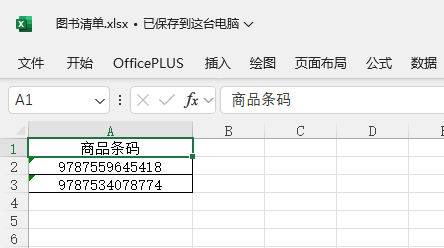
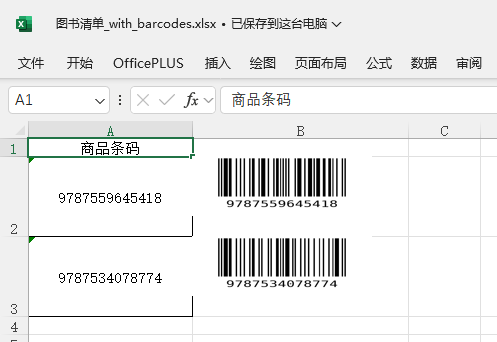
一、效果
原始文件:
输出文件:
二、代码
import os
import logging
from openpyxl import load_workbook
from openpyxl.drawing.image import Image as ExcelImage
from barcode import EAN13
from barcode.writer import ImageWriter

logging.basicConfig(level=logging.INFO, format='%(asctime)s - %(levelname)s - %(message)s')


def delete_files(directory):
    file_list = os.listdir(directory)
    for file in file_list:
        file_path = os.path.join(directory, file)
        if os.path.isfile(file_path):
            os.remove(file_path)


def generate_barcode_image_with_text(barcode_str, output_path_without_ext):
    # Generate barcode image without text
    ean = EAN13(barcode_str, writer=ImageWriter())
    saved_path = ean.save(output_path_without_ext)

    return saved_path


def insert_barcodes_to_excel(excel_file, ISBNCol, imgCol):
    logging.info("开始处理")

    if not os.path.exists('barcode_temp'):
        os.makedirs('barcode_temp')

    wb = load_workbook(excel_file)
    ws = wb.active
    logging.info(f"加载工作表: {ws.title}")

    img_height_in_points = 45  # 你设置的图片高度,单位是磅,1磅约等于1.33像素

    for row in range(2, ws.max_row + 1):
        barcode_cell = ws.cell(row=row, column=ISBNCol)
        barcode_str = str(barcode_cell.value).strip()
        if not barcode_str or len(barcode_str) != 13 or not barcode_str.isdigit():
            logging.warning(f"第{row}行条码格式不正确,跳过: {barcode_str}")
            continue

        img_path_no_ext = os.path.join('barcode_temp', f'barcode_{barcode_str}')
        try:
            img_path = generate_barcode_image_with_text(barcode_str, img_path_no_ext)
        except Exception as e:
            logging.error(f"生成条码失败,行{row},条码{barcode_str},错误: {e}")
            continue

        img_for_excel = ExcelImage(img_path)
        img_for_excel.width = 180
        img_for_excel.height = 60

        img_cell = f'{imgCol}{row}'

        # # 设置列宽
        ws.column_dimensions[imgCol].width = img_for_excel.width * 0.15
        # # 设置行高
        ws.row_dimensions[row].height = img_for_excel.height

        ws.add_image(img_for_excel, img_cell)

        # 调整当前行高,避免图片重叠
        current_height = ws.row_dimensions[row].height
        if current_height is None or current_height < img_height_in_points:
            ws.row_dimensions[row].height = img_height_in_points

        # logging.info(f"插入条码图片到 {img_cell} 并调整行高")

    new_file = os.path.splitext(excel_file)[0] + '_with_barcodes.xlsx'
    try:
        wb.save(new_file)
        logging.info(f"保存新文件: {new_file}")
    except PermissionError:
        logging.error(f"保存文件失败,可能文件被打开: {new_file}")

    if os.path.exists('barcode_temp'):
        logging.info("删除临时文件")
        delete_files('barcode_temp')

    logging.info("完成处理!")


if __name__ == "__main__":
    excel_path = 'D:\\temp\\图书清单.xlsx'
    insert_barcodes_to_excel(excel_path, 1, "B")
三、说明
1、insert_barcodes_to_excel参数1:原始Excel表格文件绝对路径。
2、insert_barcodes_to_excel参数2:ISBN所在列,数字格式。例如:ISBN在A列则输入1,在B列则输入2。
3、insert_barcodes_to_excel参数3:生成的条形码需要放在第几列,大写字母格式。例如:需要放在第二列则输入B,第三列则输入C。
到此这篇关于Python Excel操作之将ISBN转条形码的文章就介绍到这了,更多相关Python ISBN转条形码内容请搜索脚本之家以前的文章或继续浏览下面的相关文章希望大家以后多多支持脚本之家!
相关文章

python查找特定名称文件并按序号、文件名分行打印输出的方法
这篇文章主要介绍了python查找特定名称文件并按序号、文件名分行打印输出的方法,本文给大家介绍的非常详细,对大家的学习或工作具有一定的参考借鉴价值,需要的朋友可以参考下2020-04-04 这篇文章主要介绍了Python 实现黑客帝国中的字符雨的示例代码,文中通过示例代码介绍的非常详细,对大家的学习或者工作具有一定的参考学习价值,需要的朋友们下面随着小编来一起学习学习吧2020-02-02
使用python+requests+pytest实现接口自动化
这篇文章主要介绍了使用python+requests+pytest实现接口自动化,在当前互联网产品迭代频繁的背景下,回归测试的时间越来越少,但接口自动化测试因其实现简单、维护成本低,容易提高覆盖率等特点,越来越受重视,需要的朋友可以参考下2023-08-08
Python Opencv提取图片中某种颜色组成的图形的方法
这篇文章主要介绍了Python Opencv提取图片中某种颜色组成的图形的方法,文中通过示例代码介绍的非常详细,对大家的学习或者工作具有一定的参考学习价值,需要的朋友们下面随着小编来一起学习学习吧2019-09-09 在Python的探索之旅中,dir()函数就像一把万能的钥匙,能瞬间揭示对象的内部结构,下面小编就和大家详细介绍一下Python使用dir函数实现快速定位模块的具体方法和常见问题解决2026-06-06
 这篇文章主要介绍了Python lxml模块的基本使用方法,结合实例形式分析了Python安装与使用lxml模块常见操作技巧与相关注意事项,需要的朋友可以参考下2019-12-12
 数据分列在数据处理中很常见,数据分列一般指的都是字符串分割,本文主要介绍了pandas数据分列实现分割符号&固定宽度,具有一定的参考价值,感兴趣的可以了解一下2024-04-04
 这篇文章主要介绍了python使用opencv实现马赛克效果,结合实例形式分析了Python使用cv2模块操作图片实现马赛克效果的相关技巧,需要的朋友可以参考下2019-09-09
 经常杂乱无章的文件夹会让我们找不到所想要的文件,所以本文小编特意为大家介绍了如何制作一个可视化GUI界面,通过输入路径一键点击实现文件分门别类的归档,希望对大家有所帮助<BR>2024-01-01
 这篇文章主要介绍了python matplotlib库直方图绘制详解,文中通过示例代码介绍的非常详细,对大家的学习或者工作具有一定的参考学习价值,需要的朋友可以参考下2019-08-08
最新评论