

python实现发消息提醒功能的常见方法
之前一直以为 python 发消息,必须依赖第三方库,比如 plyer。
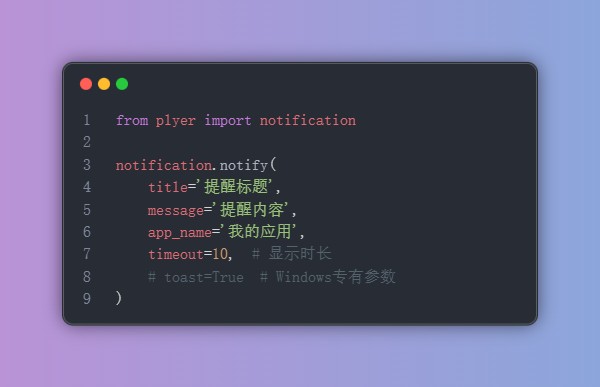
今天使用AI编写消息提醒功能,才发现还可以这样玩的。
import subprocess

ps_script = f'''
            Add-Type -AssemblyName System.Windows.Forms
            $global:balloon = New-Object System.Windows.Forms.NotifyIcon
            $path = (Get-Process -Id $pid).Path
            $balloon.Icon = [System.Drawing.Icon]::ExtractAssociatedIcon($path)
            $balloon.BalloonTipIcon = [System.Windows.Forms.ToolTipIcon]::Info
            $balloon.BalloonTipText = '提醒内容'
            $balloon.BalloonTipTitle = '提醒标题'
            $balloon.Visible = $true
            $balloon.ShowBalloonTip(10000)
            Start-Sleep -Seconds 10
            $balloon.Dispose()
            '''

# 执行PowerShell脚本
result = subprocess.run(
    ['powershell', '-Command', ps_script],
    capture_output=True,
    text=True,
    timeout=15
)
python 通过调用 powershell 脚本来让 powershell 发送消息,好巧妙啊。
相应的,也可以在 MacOS 和 Linux 环境这样发消息。
def _show_macos_notification(self, title, message):
    """在macOS系统显示通知"""
    try:
        script = f'display notification "{message}" with title "{title}"'
        subprocess.run(['osascript', '-e', script], timeout=5)
    except Exception as e:
        print(f"显示macOS通知失败: {e}")

def _show_linux_notification(self, title, message):
    """在Linux系统显示通知"""
    try:
        subprocess.run([
            'notify-send',
            title,
            message
        ], timeout=5)
    except Exception as e:
        print(f"显示Linux通知失败: {e}")
再配合上一个环境识别的 API —— platform.system(),完全不依赖第三方,真完美!
知识扩展
用Python实现消息提醒的方式不少,从简单的桌面弹窗到跨平台的即时通讯(IM)软件推送,各有各的适用场景。
我的建议是,日常使用可以优先选择统一通知库(如Apprise)来提高效率;而工作中,直接使用平台的官方API往往是更稳定、长久的选择。
桌面通知(Windows / macOS / Linux)
日常开发或本地测试用很方便,适合脚本运行完成、报错等场景。跨平台推荐用 Plyer,仅在Win10/11上可考虑 win10toast。提示:务必从官网获取证书和详细操作指南,勿使用不明来源的库。
示例:使用 Plyer(跨平台)
from plyer import notification
notification.notify(
    title="任务完成",
    message="数据处理已完成!",
    timeout=5  # 通知显示时长(秒)
)
示例:使用 win10toast(仅 Windows)
from win10toast import ToastNotifier
toaster = ToastNotifier()
toaster.show_toast("提醒", "该休息一下啦", duration=10)
电子邮件通知
通过 SMTP 发送邮件,适合不需要即时回复的场景,推荐用于系统告警、日志等。
import smtplib
from email.message import EmailMessage
msg = EmailMessage()
msg['Subject'] = '报告生成完毕'
msg['From'] = 'sender@example.com'
msg['To'] = 'receiver@example.com'
msg.set_content('您的月度报告已生成,请查收附件。')
# 以 Gmail 为例,使用 SMTP 发送
with smtplib.SMTP_SSL('smtp.gmail.com', 465) as server:
    server.login('your_email@gmail.com', 'your_password')
    server.send_message(msg)
手机短信通知
配合 Twilio 等服务商 API,适合验证码、重要警报等必须保证接收的场景。
from twilio.rest import Client
account_sid = 'your_account_sid'
auth_token = 'your_auth_token'
client = Client(account_sid, auth_token)
message = client.messages.create(
    body='服务器负载过高,请检查!',
    from_='+1234567890', # Twilio 提供的号码
    to='+0987654321'     # 你的手机号
)
即时通讯机器人(IM)
国内最常用的是钉钉/飞书/企业微信,国外多用 Slack/Telegram,适合团队协作和反馈。
示例:钉钉群机器人
import requests, json
webhook_url = 'https://oapi.dingtalk.com/robot/send?access_token=xxx'
data = {"msgtype": "text", "text": {"content": "构建失败,请检查日志!"}}
requests.post(webhook_url, json=data)
统一通知库:Apprise
如果你厌倦了为每个平台写不同代码,Apprise 可以让你一套代码通吃几乎所有平台。
安装与使用
import apprise
ap = apprise.Apprise()
# 一行代码接入一个平台,支持 70+ 服务
ap.add('telegram://bot_token/chat_id')
ap.add('mailto://user:pass@gmail.com')
ap.add('dingtalk://access_token?secret=xxx')
ap.add('slack://token_a/token_b/token_c')
# 一键群发
ap.notify(title='系统通知', body='所有服务运行正常')
命令行用法
apprise -t "磁盘告警" -b "根分区使用率超过90%" "mailto://user:pass@gmail.com"
进阶:NotifyAll还有像notifyall这样的替代库,提供了条件发送、延迟发送等高级功能:
import notifyall
n = notifyall.Notify()
n.add("telegram://bot_token/chat_id")
n.notify_if(cpu_usage > 90, "CPU负载过高!")
n.notify_repeat("这是一个提醒", times=3, interval=300)
到此这篇关于python实现发消息提醒功能的常见方法的文章就介绍到这了,更多相关python消息提醒内容请搜索脚本之家以前的文章或继续浏览下面的相关文章希望大家以后多多支持脚本之家!
相关文章
 这篇文章主要介绍了Python实现计算对象的内存大小,结合实例形式分析了Python使用sys.getsizeof与递归算法计算对象占用内存的相关操作技巧,需要的朋友可以参考下2019-07-07
 这篇文章主要介绍了python中的布隆过滤器用法及原理详解,布隆过滤器是一种概率空间高效的数据结构,它与hashmap非常相似,用于检索一个元素是否在一个集合中。它在检索元素是否存在时,能很好地取舍空间使用率与误报比例,需要的朋友可以参考下2023-07-07
 这篇文章主要介绍了在不同电脑之间传输Python项目时遇到的路径问题,并提供了解决方法,文中通过图文介绍的非常详细,需要的朋友可以参考下2025-01-01
 常在河边走,哪能不湿鞋,网上获取的各种文件后缀真真假假,甚至一不小心就会中招,所以本文就来用Python编写一个判断真实文件类型工具吧2025-01-01
 Python检查数据中的正/负数是一种常见的数据处理操作,可以通过编写代码来实现,下面这篇文章主要给大家介绍了关于如何利用Python统计正数和负数的个数的相关资料,需要的朋友可以参考下2024-05-05
 tqdm是一个用于在Python中添加进度条的库,它可以很容易地集成到while循环中,这篇文章主要介绍了python循环打印进度条,需要的朋友可以参考下2023-05-05
 Eclipse的安装是很容易的。Eclipse是基于java的一个应用程序,因此需要一个java的运行环境(JRE)才行。(我这里主要介绍windows下的安装)2013-03-03
 这篇文章主要介绍了Python 玩转图像格式转换方式,具有很好的参考价值,希望对大家有所帮助。一起跟随小编过来看看吧2021-03-03
深入理解Python __init_subclass__的使用
本文主要介绍了Python __init_subclass__的使用,文中通过示例代码介绍的非常详细,对大家的学习或者工作具有一定的参考学习价值,需要的朋友们下面随着小编来一起学习学习吧2026-05-05 逗号分隔值(Comma-Separated Values,CSV,也称为字符分隔值,分隔字符也可以不是逗号),新这篇文章主要给大家介绍了关于python基础教程之csv格式文件的写入与读取的相关资料,需要的朋友可以参考下2022-03-03
最新评论