

Python中一个函数返回多个值的实现方法
引言
在Python编程中,我们经常遇到需要从一个函数中返回多个值的情况。虽然许多编程语言只允许函数返回单个值,但Python提供了多种优雅的方式来解决这个问题。本文将详细介绍Python中函数返回多个值的各种实现方法,并通过丰富的代码示例来帮助你深入理解这些概念。
为什么需要返回多个值?
在实际开发中,我们经常会遇到这样的场景:
- 需要同时返回计算结果和状态信息
- 要返回一组相关的数据
- 希望函数能够提供更多的上下文信息
让我们先看一个简单的例子来说明这个问题的重要性:
def divide_with_remainder(dividend, divisor):
    """计算除法并返回商和余数"""
    if divisor == 0:
        return None, None  # 错误情况下的处理

    quotient = dividend // divisor
    remainder = dividend % divisor
    return quotient, remainder

# 使用示例
result_quotient, result_remainder = divide_with_remainder(17, 5)
print(f"17 ÷ 5 = {result_quotient} 余 {result_remainder}")
# 输出: 17 ÷ 5 = 3 余 2
这个例子展示了为什么我们需要返回多个值:不仅要得到计算的结果,还要获得完整的数学信息。
方法一:使用元组(tuple)返回多个值
元组是Python中最常用的返回多个值的方式。当你在函数中使用逗号分隔多个值时,Python会自动将它们打包成一个元组。
基本用法
def get_name_age():
    """返回姓名和年龄"""
    name = "Alice"
    age = 25
    return name, age  # 自动打包成元组

# 调用函数
person_name, person_age = get_name_age()
print(f"姓名: {person_name}, 年龄: {person_age}")
# 输出: 姓名: Alice, 年龄: 25

# 或者接收整个元组
result = get_name_age()
print(result)  # 输出: ('Alice', 25)
print(type(result))  # 输出: <class 'tuple'>
解包操作详解
Python的解包操作非常强大,支持多种方式:
def calculate_stats(numbers):
    """计算数字列表的基本统计信息"""
    if not numbers:
        return None, None, None

    total = sum(numbers)
    count = len(numbers)
    average = total / count

    return total, count, average

# 多种解包方式
numbers = [10, 20, 30, 40, 50]

# 方式1: 完全解包
total_sum, count, avg = calculate_stats(numbers)
print(f"总和: {total_sum}, 数量: {count}, 平均值: {avg}")

# 方式2: 部分解包(Python 3.x)
first, *rest = calculate_stats(numbers)
print(f"第一个值: {first}, 其他值: {rest}")

# 方式3: 忽略某些值
total_sum, _, avg = calculate_stats(numbers)
print(f"总和: {total_sum}, 平均值: {avg}")

# 方式4: 接收整个元组
stats = calculate_stats(numbers)
print(f"统计信息: {stats}")
实际应用示例
让我们看一个更实用的例子:
import datetime

def analyze_user_data(user_info):
    """
    分析用户数据并返回多个指标
    返回: (活跃度等级, 注册天数, 是否为VIP)
    """
    registration_date = user_info.get('registration_date')
    login_count = user_info.get('login_count', 0)
    is_vip = user_info.get('is_vip', False)

    # 计算注册天数
    if registration_date:
        days_registered = (datetime.date.today() - registration_date).days
    else:
        days_registered = 0

    # 根据登录次数确定活跃度等级
    if login_count > 100:
        activity_level = "高"
    elif login_count > 50:
        activity_level = "中"
    else:
        activity_level = "低"

    return activity_level, days_registered, is_vip

# 使用示例
user = {
    'registration_date': datetime.date(2023, 1, 1),
    'login_count': 75,
    'is_vip': True
}

level, days, vip_status = analyze_user_data(user)
print(f"用户活跃度: {level}")
print(f"注册天数: {days}")
print(f"VIP状态: {vip_status}")
方法二:使用列表(list)返回多个值
虽然不常见,但我们也可以使用列表来返回多个值:
def get_coordinates():
    """返回坐标点"""
    x = 10
    y = 20
    z = 30
    return [x, y, z]  # 使用列表

# 使用示例
coordinates = get_coordinates()
print(f"X坐标: {coordinates[0]}")
print(f"Y坐标: {coordinates[1]}")
print(f"Z坐标: {coordinates[2]}")

# 也可以解包
x, y, z = get_coordinates()
print(f"坐标: ({x}, {y}, {z})")
使用列表的优势是可以动态调整大小,但在大多数情况下,元组是更好的选择,因为它不可变且性能更好。
方法三:使用字典(dict)返回多个值
当返回的值有明确含义时,使用字典可以让代码更加清晰易读:
def get_weather_info(city):
    """获取城市天气信息"""
    # 模拟API调用
    weather_data = {
        'temperature': 25,
        'humidity': 60,
        'pressure': 1013,
        'condition': '晴朗'
    }

    return weather_data

# 使用示例
weather = get_weather_info("北京")
print(f"温度: {weather['temperature']}°C")
print(f"湿度: {weather['humidity']}%")
print(f"气压: {weather['pressure']}hPa")
print(f"天气状况: {weather['condition']}")

# 更优雅的访问方式
temp = weather.get('temperature', '未知')
humid = weather.get('humidity', '未知')
print(f"温度: {temp}°C, 湿度: {humid}%")
字典与命名元组的结合使用
我们可以创建更结构化的返回值:
from collections import namedtuple

# 定义命名元组
WeatherInfo = namedtuple('WeatherInfo', ['temperature', 'humidity', 'pressure', 'condition'])

def get_structured_weather(city):
    """获取结构化天气信息"""
    # 模拟数据
    data = WeatherInfo(
        temperature=25,
        humidity=60,
        pressure=1013,
        condition='晴朗'
    )
    return data

# 使用示例
weather = get_structured_weather("上海")
print(f"温度: {weather.temperature}°C")
print(f"湿度: {weather.humidity}%")
print(f"气压: {weather.pressure}hPa")
print(f"天气: {weather.condition}")

# 仍然可以像普通元组一样使用
temp, humid, press, cond = weather
print(f"解包后: {temp}°C, {humid}%, {press}hPa, {cond}")
方法四:使用命名元组(namedtuple)
命名元组结合了元组和字典的优点,既保持了元组的轻量级特性,又提供了有意义的字段名称:
from collections import namedtuple

# 定义不同类型的数据结构
Point = namedtuple('Point', ['x', 'y'])
Person = namedtuple('Person', ['name', 'age', 'email'])
DatabaseResult = namedtuple('DatabaseResult', ['success', 'data', 'error_message'])

def create_point(x, y):
    """创建一个点"""
    return Point(x=x, y=y)

def validate_person(name, age, email):
    """验证人员信息"""
    if not name or age < 0 or not email:
        return DatabaseResult(success=False, data=None, error_message="无效的输入")

    person = Person(name=name, age=age, email=email)
    return DatabaseResult(success=True, data=person, error_message=None)

# 使用示例
point = create_point(10, 20)
print(f"点坐标: ({point.x}, {point.y})")

result = validate_person("Bob", 30, "bob@example.com")
if result.success:
    print(f"验证成功: {result.data.name}, {result.data.age}岁")
else:
    print(f"验证失败: {result.error_message}")
方法五:使用数据类(dataclass)
Python 3.7引入了数据类,这是另一种优雅的解决方案:
from dataclasses import dataclass
from typing import Optional

@dataclass
class CalculationResult:
    """计算结果数据类"""
    success: bool
    value: float
    message: str = ""
    details: Optional[dict] = None

def safe_divide(a, b):
    """安全除法运算"""
    if b == 0:
        return CalculationResult(
            success=False,
            value=0.0,
            message="除数不能为零",
            details={'dividend': a, 'divisor': b}
        )

    result = a / b
    return CalculationResult(
        success=True,
        value=result,
        message=f"{a} ÷ {b} = {result}",
        details={'dividend': a, 'divisor': b, 'quotient': result}
    )

# 使用示例
calc_result = safe_divide(10, 2)
if calc_result.success:
    print(f"计算成功: {calc_result.message}")
    print(f"详细信息: {calc_result.details}")

calc_result2 = safe_divide(10, 0)
if not calc_result2.success:
    print(f"计算失败: {calc_result2.message}")
    print(f"错误详情: {calc_result2.details}")
方法六:使用生成器(generator)
对于大量数据或需要延迟计算的场景,生成器是一个很好的选择:
def fibonacci_sequence(n):
    """生成斐波那契数列的前n项"""
    a, b = 0, 1
    for _ in range(n):
        yield a
        a, b = b, a + b

def process_data_stream(data_list):
    """处理数据流并返回多个统计值"""
    processed_count = 0
    total_sum = 0
    max_value = float('-inf')

    for item in data_list:
        processed_count += 1
        total_sum += item
        max_value = max(max_value, item)

        # 逐步返回中间结果
        yield {
            'processed_count': processed_count,
            'current_sum': total_sum,
            'max_so_far': max_value
        }

# 使用示例
data = [1, 5, 3, 9, 2, 7, 4]
print("处理进度:")
for step_result in process_data_stream(data):
    print(f"已处理{step_result['processed_count']}项, "
          f"当前总和:{step_result['current_sum']}, "
          f"最大值:{step_result['max_so_far']}")

# 获取最终结果
final_results = list(process_data_stream(data))
last_result = final_results[-1]
print(f"\n最终结果: {last_result}")
错误处理和异常情况
在返回多个值时,正确处理错误非常重要:
def robust_calculation(a, b):
    """
    稳健的计算函数,返回计算结果和状态信息
    返回: (success, result, error_message)
    """
    try:
        # 执行可能出错的操作
        if not isinstance(a, (int, float)) or not isinstance(b, (int, float)):
            raise TypeError("参数必须是数字")

        if b == 0:
            raise ZeroDivisionError("除数不能为零")

        result = a / b
        return True, result, None

    except (TypeError, ZeroDivisionError) as e:
        return False, None, str(e)
    except Exception as e:
        return False, None, f"未知错误: {str(e)}"

# 使用示例
success, result, error = robust_calculation(10, 2)
if success:
    print(f"计算结果: {result}")
else:
    print(f"计算失败: {error}")

success, result, error = robust_calculation(10, 0)
if success:
    print(f"计算结果: {result}")
else:
    print(f"计算失败: {error}")
性能比较和最佳实践
让我们通过一些测试来看看不同方法的性能差异:
import time
from collections import namedtuple
from dataclasses import dataclass

# 定义不同的返回类型
PointTuple = namedtuple('PointTuple', ['x', 'y', 'z'])
@dataclass
class PointDataClass:
    x: float
    y: float
    z: float

def return_tuple():
    """返回元组"""
    return (1.0, 2.0, 3.0)

def return_namedtuple():
    """返回命名元组"""
    return PointTuple(1.0, 2.0, 3.0)

def return_dict():
    """返回字典"""
    return {'x': 1.0, 'y': 2.0, 'z': 3.0}

def return_dataclass():
    """返回数据类"""
    return PointDataClass(1.0, 2.0, 3.0)

def return_list():
    """返回列表"""
    return [1.0, 2.0, 3.0]

# 性能测试函数
def performance_test(func, iterations=1000000):
    """测试函数性能"""
    start_time = time.time()
    for _ in range(iterations):
        result = func()
    end_time = time.time()
    return end_time - start_time

# 运行性能测试
functions = [
    ('元组', return_tuple),
    ('命名元组', return_namedtuple),
    ('字典', return_dict),
    ('数据类', return_dataclass),
    ('列表', return_list)
]

print("性能测试结果 (100万次调用):")
print("-" * 40)
for name, func in functions:
    elapsed_time = performance_test(func)
    print(f"{name:8}: {elapsed_time:.4f} 秒")
实际应用场景
让我们看看一些实际的应用场景:
数据库查询结果处理
def query_user_profile(user_id):
    """
    查询用户资料
    返回: (用户对象, 是否存在, 错误信息)
    """
    # 模拟数据库查询
    users_db = {
        1: {'name': 'Alice', 'email': 'alice@example.com', 'age': 25},
        2: {'name': 'Bob', 'email': 'bob@example.com', 'age': 30}
    }

    try:
        user_data = users_db.get(user_id)
        if user_data:
            return user_data, True, None
        else:
            return None, False, "用户不存在"
    except Exception as e:
        return None, False, f"查询错误: {str(e)}"

# 使用示例
user, exists, error = query_user_profile(1)
if exists:
    print(f"找到用户: {user['name']}")
elif error:
    print(f"查询失败: {error}")
else:
    print("用户不存在")
文件处理和状态报告
import os

def process_file(file_path):
    """
    处理文件并返回处理结果
    返回: (处理成功, 文件大小, 行数, 错误信息)
    """
    try:
        # 检查文件是否存在
        if not os.path.exists(file_path):
            return False, 0, 0, "文件不存在"

        # 获取文件大小
        file_size = os.path.getsize(file_path)

        # 统计行数
        line_count = 0
        with open(file_path, 'r', encoding='utf-8') as f:
            for line in f:
                line_count += 1

        return True, file_size, line_count, None

    except PermissionError:
        return False, 0, 0, "没有权限访问文件"
    except UnicodeDecodeError:
        return False, 0, 0, "文件编码错误"
    except Exception as e:
        return False, 0, 0, f"处理文件时出错: {str(e)}"

# 创建测试文件
test_content = """第一行
第二行
第三行
第四行"""

with open('test.txt', 'w', encoding='utf-8') as f:
    f.write(test_content)

# 使用示例
success, size, lines, error = process_file('test.txt')
if success:
    print(f"文件处理成功!")
    print(f"文件大小: {size} 字节")
    print(f"行数: {lines}")
else:
    print(f"文件处理失败: {error}")

# 清理测试文件
os.remove('test.txt')
API响应处理
import json
from typing import Tuple, Dict, Any, Optional

def parse_api_response(response_text: str) -> Tuple[bool, Optional[Dict], str]:
    """
    解析API响应
    返回: (解析成功, 数据, 错误信息)
    """
    try:
        data = json.loads(response_text)

        # 检查API响应格式
        if 'status' not in data:
            return False, None, "响应缺少status字段"

        if data['status'] != 'success':
            error_msg = data.get('message', 'API调用失败')
            return False, None, error_msg

        return True, data.get('data'), "解析成功"

    except json.JSONDecodeError as e:
        return False, None, f"JSON解析错误: {str(e)}"
    except Exception as e:
        return False, None, f"未知错误: {str(e)}"

# 使用示例
# 成功响应
success_response = '{"status": "success", "data": {"user_id": 123, "username": "john"}}'
success, data, message = parse_api_response(success_response)
if success:
    print(f"API调用成功: {data}")
else:
    print(f"API调用失败: {message}")

# 失败响应
error_response = '{"status": "error", "message": "用户未找到"}'
success, data, message = parse_api_response(error_response)
if success:
    print(f"API调用成功: {data}")
else:
    print(f"API调用失败: {message}")

# 错误JSON
invalid_response = '{"status": "success", "data": }'  # 语法错误
success, data, message = parse_api_response(invalid_response)
if success:
    print(f"API调用成功: {data}")
else:
    print(f"API调用失败: {message}")
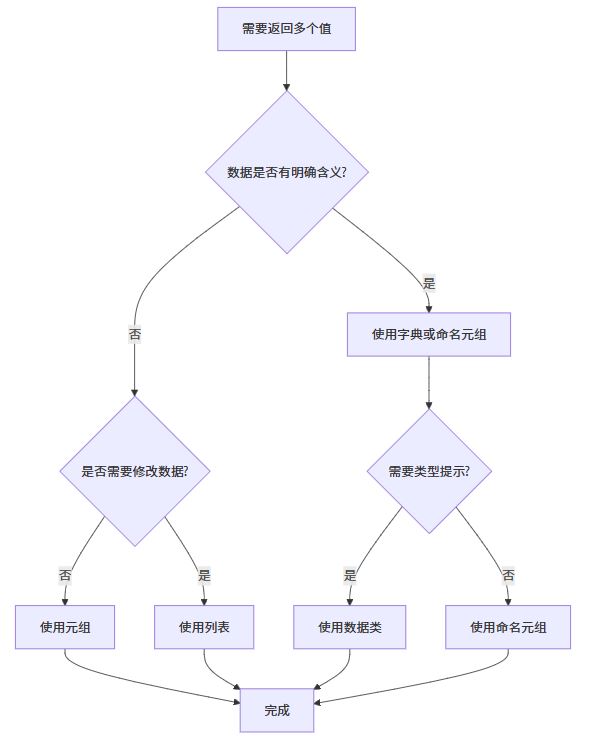
流程图展示不同方法的选择决策
高级技巧和模式
使用装饰器增强返回值
from functools import wraps
from typing import Callable, Any

def add_metadata(func: Callable) -> Callable:
    """装饰器:为函数返回值添加元数据"""
    @wraps(func)
    def wrapper(*args, **kwargs):
        result = func(*args, **kwargs)
        metadata = {
            'function_name': func.__name__,
            'arguments': {'args': args, 'kwargs': kwargs},
            'timestamp': __import__('time').time()
        }
        return result, metadata
    return wrapper

@add_metadata
def calculate_area(length, width):
    """计算矩形面积"""
    return length * width

# 使用示例
area, meta = calculate_area(10, 5)
print(f"面积: {area}")
print(f"调用函数: {meta['function_name']}")
print(f"参数: {meta['arguments']}")
print(f"时间戳: {meta['timestamp']}")
上下文管理器与多值返回
class DatabaseConnection:
    """模拟数据库连接"""
    def __init__(self):
        self.connected = False
        self.connection_id = None

    def connect(self):
        """连接数据库"""
        self.connected = True
        self.connection_id = id(self)
        return self.connected, self.connection_id, "连接成功"

    def disconnect(self):
        """断开连接"""
        self.connected = False
        return self.connected, "断开连接成功"

    def execute_query(self, sql):
        """执行查询"""
        if not self.connected:
            return None, False, "未连接到数据库"

        # 模拟查询结果
        result = f"查询结果: {sql}"
        return result, True, "查询成功"

# 使用示例
db = DatabaseConnection()

# 连接数据库
connected, conn_id, msg = db.connect()
print(f"连接状态: {connected}, ID: {conn_id}, 消息: {msg}")

# 执行查询
result, success, message = db.execute_query("SELECT * FROM users")
if success:
    print(f"查询结果: {result}")
else:
    print(f"查询失败: {message}")

# 断开连接
disconnected, msg = db.disconnect()
print(f"断开状态: {disconnected}, 消息: {msg}")
异步函数中的多值返回
import asyncio
from typing import Tuple

async def fetch_user_data(user_id: int) -> Tuple[bool, dict, str]:
    """异步获取用户数据"""
    try:
        # 模拟网络请求延迟
        await asyncio.sleep(1)

        # 模拟用户数据
        user_data = {
            'id': user_id,
            'name': f'User_{user_id}',
            'email': f'user{user_id}@example.com'
        }

        return True, user_data, "获取成功"

    except Exception as e:
        return False, {}, f"获取失败: {str(e)}"

async def main():
    """主函数"""
    print("开始获取用户数据...")

    # 同时获取多个用户数据
    tasks = [
        fetch_user_data(1),
        fetch_user_data(2),
        fetch_user_data(3)
    ]

    results = await asyncio.gather(*tasks)

    for i, (success, data, message) in enumerate(results, 1):
        if success:
            print(f"用户{i}: {data['name']} - {message}")
        else:
            print(f"用户{i}: {message}")

# 运行异步函数
# asyncio.run(main())
最佳实践建议
1. 选择合适的返回类型
根据具体需求选择最适合的返回方式:
# 对于简单、固定数量的值,使用元组
def get_coordinates():
    return 10, 20, 30

# 对于有明确含义的值,使用命名元组或数据类
from collections import namedtuple
UserStats = namedtuple('UserStats', ['login_count', 'last_login', 'is_active'])

def get_user_stats(user_id):
    # ... 处理逻辑
    return UserStats(login_count=100, last_login='2023-01-01', is_active=True)

# 对于复杂或动态的数据结构,使用字典
def get_detailed_report():
    return {
        'summary': '报告摘要',
        'details': [...],
        'metadata': {...}
    }
2. 保持一致性
在同一项目中保持返回值格式的一致性:
# 好的做法:所有数据库相关函数都返回相同格式
def find_user_by_id(user_id):
    """返回: (用户对象, 是否找到, 错误信息)"""
    pass

def find_user_by_email(email):
    """返回: (用户对象, 是否找到, 错误信息)"""
    pass

def update_user(user_id, data):
    """返回: (更新后的用户, 更新成功, 错误信息)"""
    pass
3. 提供清晰的文档
def complex_calculation(input_data):
    """
    执行复杂计算

    Args:
        input_data (dict): 输入数据

    Returns:
        tuple: 包含以下元素的元组:
            - bool: 计算是否成功
            - float: 计算结果
            - str: 状态消息
            - dict: 详细信息

    Example:
        >>> success, result, message, details = complex_calculation(data)
        >>> if success:
        ...     print(f"结果: {result}")
    """
    # 实现逻辑
    pass
总结
Python提供了多种优雅的方式来让函数返回多个值,每种方法都有其适用的场景:
- 元组 - 最常用、最简单的方式,适合返回少量、固定的值
- 列表 - 当需要动态数组时使用,但不如元组高效
- 字典 - 当返回值有明确含义时使用,代码可读性好
- 命名元组 - 结合了元组和字典的优点,推荐用于结构化数据
- 数据类 - Python 3.7+的新特性,提供了类型安全和良好的IDE支持
- 生成器 - 适用于大数据集或需要延迟计算的场景
选择哪种方法主要取决于:
- 数据的数量和复杂度
- 是否需要修改返回的数据
- 代码的可读性和维护性要求
- 性能考虑
记住,无论选择哪种方法,都要确保:
- 函数的行为是一致和可预测的
- 返回值的含义要清晰明了
- 提供充分的文档说明
- 正确处理错误和异常情况
通过合理运用这些技术,你可以写出更加优雅、高效的Python代码!
以上就是Python中一个函数返回多个值的实现方法的详细内容,更多关于Python一个函数返回多个值的资料请关注脚本之家其它相关文章!
相关文章
 下面小编就为大家带来一篇python 截取 取出一部分的字符串方法。小编觉得挺不错的,现在就分享给大家,也给大家做个参考。一起跟随小编过来看看吧2017-03-03
 在当今互联网时代,IP地址定位已成为网络安全、用户行为分析、广告投放等领域的核心基础能力,本文将从基础代码出发,利用Python逐步构建一个生产级的IP地理位置查询服务,需要的朋友可以参考下2026-04-04
 这篇文章主要介绍了MNIST数据集转化为二维图片的实现示例,文中通过示例代码介绍的非常详细,对大家的学习或者工作具有一定的参考学习价值,需要的朋友们下面随着小编来一起学习学习吧2020-01-01
 读取文件是一个常用的功能,那么如何用python 读取一个大于10G 的文件,需要的朋友们下面随着小编来一起学习学习吧2021-05-05
 这篇文章主要介绍了python实现动态创建类的方法,结合实例形式分析了Python动态创建类的原理、实现方法及相关操作技巧,需要的朋友可以参考下2019-06-06
 本文给大家分享python持久化存储文件操作方法,给大家讲解存储文件的重要性,指针的基本概念及关闭文件的方法,介绍文件的创建和删除技巧,感兴趣的朋友一起看看吧2021-06-06
 这篇文章主要介绍了pytorch掉坑记录:model.eval的作用说明,具有很好的参考价值,希望对大家有所帮助。一起跟随小编过来看看吧2020-06-06
 这篇文章主要介绍了Python进程池基本概念,当创建的子进程数量不多时,可以直接利用多处理进程中的进程动态形成需要的进程,下文关于Python线程池的概念做详细介绍,需要的小伙伴可以参考一下2022-03-03
使用Python中的Argparse实现将列表作为命令行参数传递
Argparse 是一个 Python 库,用于以用户友好的方式解析命令行参数,本文我们将讨论如何使用 Python 中的 Argparse 库将列表作为命令行参数传递,感兴趣的可以了解下2023-08-08 Python是最常用的编程语言,这种语言就是一种可以快速开发应用的解释型语言,有些用户不知道该怎么在Python编程里计算圆的面积,现在就给大家具体解释一下,下面这篇文章主要给大家介绍了关于python基础编程小实例之计算圆的面积的相关资料,需要的朋友可以参考下2023-03-03
最新评论