

MinIO分布式文件存储(从入门到飞翔)
MinIO简介与核心优势
MinIO是一款高性能的分布式对象存储系统,专为云原生环境设计,兼容Amazon S3协议。其核心优势在于轻量级、易部署、高可用以及可扩展性。无论是单机测试环境,还是多节点分布式集群,MinIO都能通过**纠删码(Erasure Coding)**技术实现数据冗余与高容错性,确保数据持久化。对于开发者而言,MinIO可作为私有云存储、大数据分析存储层或静态资源托管服务的理想选择。
0、前言
对象存储是一种数据存储架构,设计用于管理和处理大量非结构化数据。与传统的文件存储和块存储不同,对象存储通过将数据分解为离散的、独立的单元或“对象”来存储每个对象包含数据本身、相关的元数据和一个唯一的标识符。
对象存储对比:
存储方式
优点
缺点
服务器磁盘
开发便捷,成本低
扩展困难
分布式文件系统
容易实现扩容
复杂度高
第三方存储
开发简单,功能强大,免维护
收费
1、分布式文件系统
分布式文件系统(Distributed File System, DFS)是一种文件系统,它使文件可以跨越多个服务器或存储设备存储和访问。DFS 通过网络将多个存储资源组合成一个统一的文件系统,使用户和应用程序可以像访问本地文件一样透明地访问远程文件。
分布式文件系统的关键特性:
- 透明性:用户和应用程序可以像访问本地文件一样访问远程文件,感受不到底层的复杂性。
- 高可用性:通过复制和冗余机制,确保即使某些节点或硬件发生故障,数据仍然可用。
- 可扩展性:能够处理随着数据量和用户数增加而增长的需求。
- 容错性:通过数据冗余和错误检测机制,保证系统能继续运行,即使发生部分硬件或网络故障。
- 性能:通过分布式架构,能够有效地处理大量并发访问请求。
2、MinIO 介绍
MinIO 是一个高性能的分布式对象存储系统,兼容 Amazon S3 云存储服务,Min10基于Apache License v2.0开源协议的对象存储服务,可以做为云存储的解决方案用来保存海量的图片,视频,文档。它专为大规模存储基础设施设计,能够高效地存储海量非结构化数据,如图片、视频、日志文件等。MinIO 提供了一组简单的 API,用户可以方便地进行数据存储和管理。

MinIO 的关键特性
兼容性:
- 完全兼容 Amazon S3 API,使用户可以使用现有的 S3 客户端和工具。
高性能:
- 设计为高性能对象存储系统,能够支持每秒数十GB的数据吞吐量。
可扩展性:
- 支持横向扩展,允许用户通过添加更多的存储节点来扩展存储容量和性能。
简易部署:
- 提供简单的安装和配置过程,可以在几分钟内启动和运行。
数据保护:
- 通过纠删码(Erasure Coding)和位衰减(Bit Rot)保护机制确保数据完整性和持久性。
多租户支持:
- 支持多用户和多租户环境,提供隔离和权限管理。
Kubernetes 集成:
- 提供原生的 Kubernetes Operator,方便在 Kubernetes 集群中部署和管理 MinIO。
3、 MinIO安装(docker)
如果你有 Docker 环境,可以通过以下命令快速拉取并运行 MinIO 容器:
拉取镜像
docker pull minio/minio
创建容器
docker run -p 9000:9000 --name minio -d --restart=always -e "MINIO_ACCESS_KEY=minio" -e "MINIO_SECRET_KEY=minio123" -v /home/data:/data -v /home/config:/root/.minio minio/minio server /data
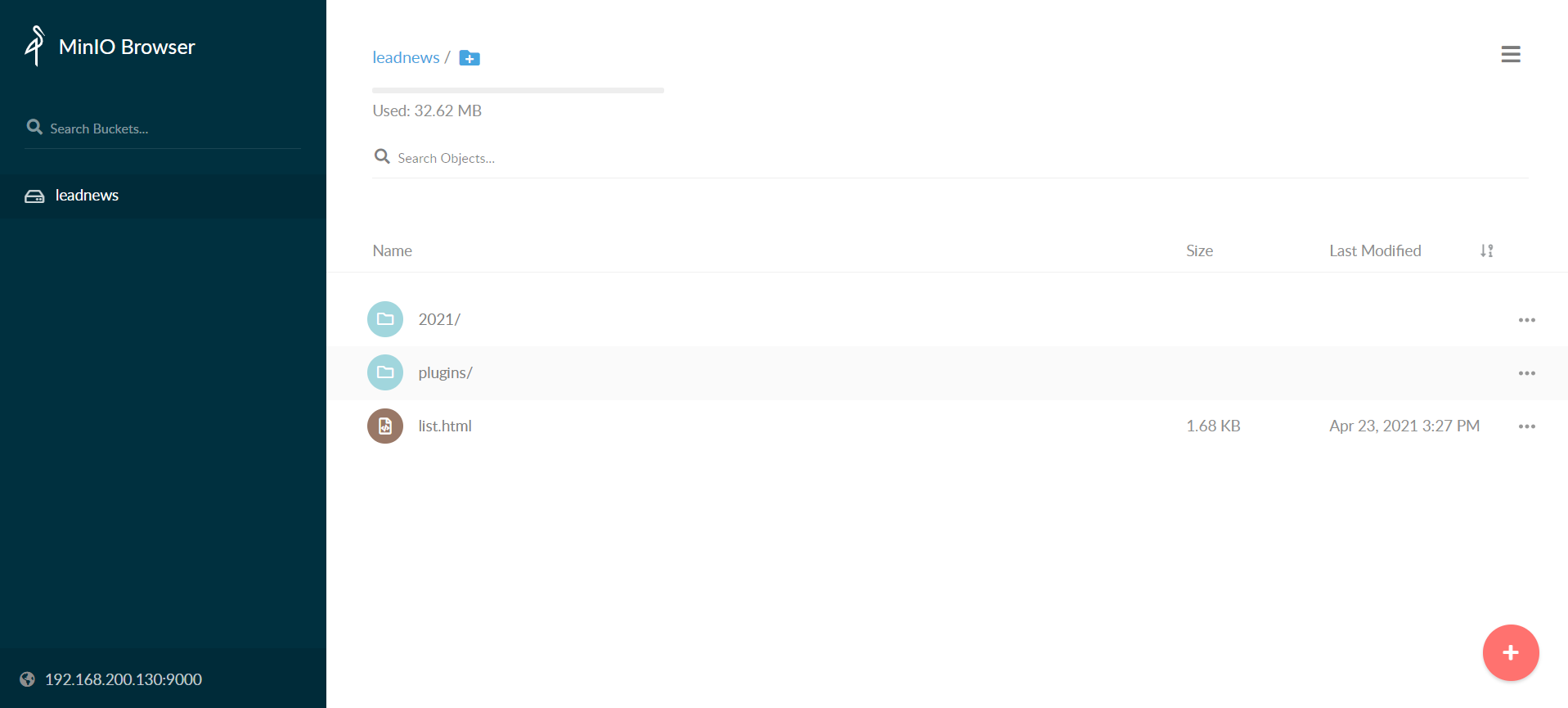
访问minio系统:
http://<your_server_ip>:9000
如:http://192.168.200.130:9000
4、基本概念
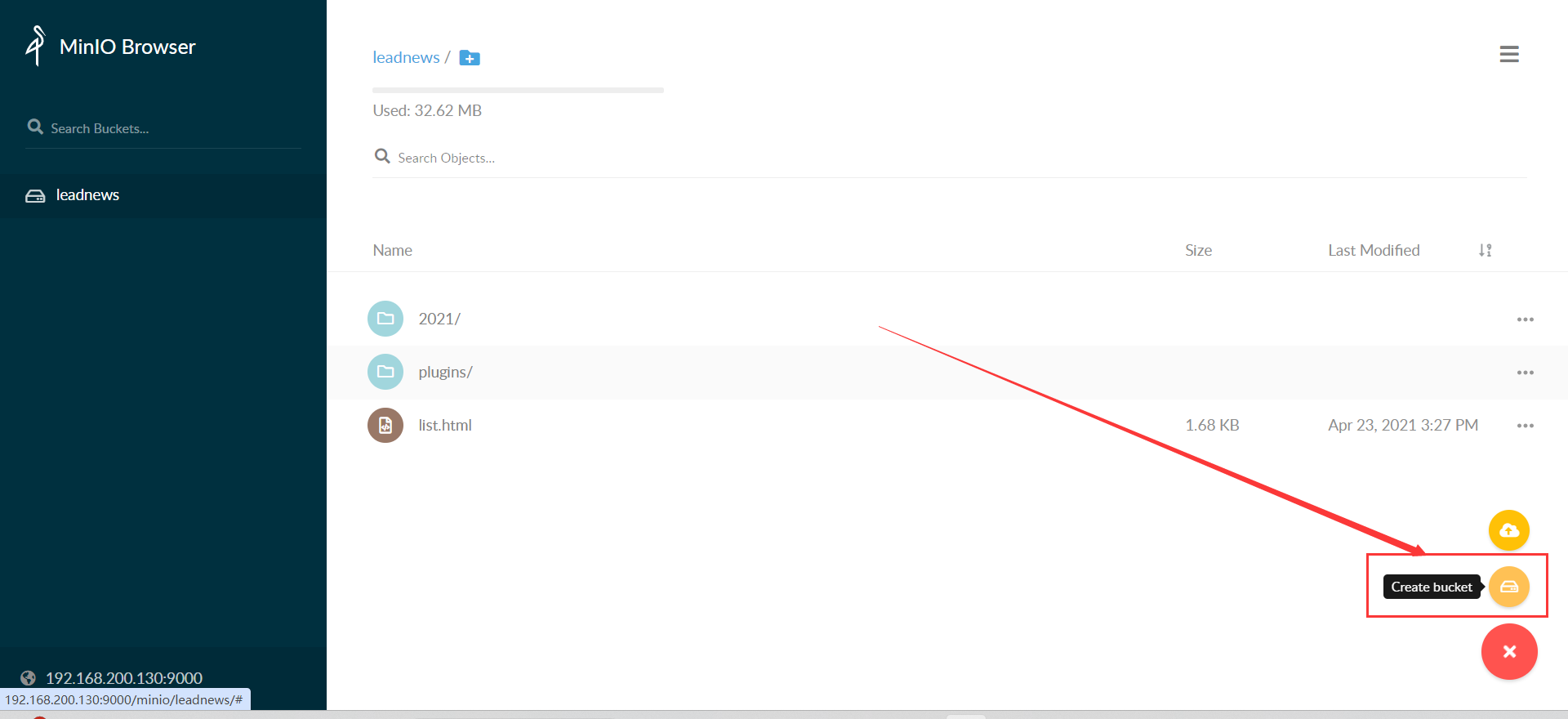
- bucket – 类比于文件系统的目录
- Object – 类比文件系统的文件
- Keys – 类比文件名
5、通过代码上传文件到MinIO
新建项目,导入pom文件
    <dependencies>
        <dependency>
            <groupId>io.minio</groupId>
            <artifactId>minio</artifactId>
            <version>7.1.0</version>
        </dependency>
        <dependency>
            <groupId>org.springframework.boot</groupId>
            <artifactId>spring-boot-starter-web</artifactId>
        </dependency>
        <dependency>
            <groupId>org.springframework.boot</groupId>
            <artifactId>spring-boot-starter-test</artifactId>
        </dependency>
        <dependency>
            <groupId>com.heima</groupId>
            <artifactId>heima-file-starter</artifactId>
            <version>1.0-SNAPSHOT</version>
        </dependency>
    </dependencies>
创建test测试文件
package com.heima.minio.test;
import com.heima.file.service.FileStorageService;
import io.minio.MinioClient;
import io.minio.PutObjectArgs;
import org.junit.Test;
import org.springframework.beans.factory.annotation.Autowired;
import org.springframework.boot.test.context.SpringBootTest;
import java.io.FileInputStream;
import java.io.FileNotFoundException;
public class MinIOTest {
    public static void main(String[] args) {
        FileInputStream fileInputStream = null;
        try {
            fileInputStream =  new FileInputStream("E:\list.html");;
            //1.创建minio链接客户端
            MinioClient minioClient = MinioClient.builder().credentials("minio", "minio123").endpoint("http://192.168.200.130:9000").build();
            //2.上传
            PutObjectArgs putObjectArgs = PutObjectArgs.builder()
                    .object("list.html")//文件名
                    .contentType("text/html")//文件类型
                    .bucket("leadnews")//桶名词  与minio创建的名词一致
                    .stream(fileInputStream, fileInputStream.available(), -1) //文件流
                    .build();
            minioClient.putObject(putObjectArgs);
            System.out.println("http://192.168.200.130:9000/leadnews/list.html");
        } catch (Exception ex) {
            ex.printStackTrace();
        }
    }
}
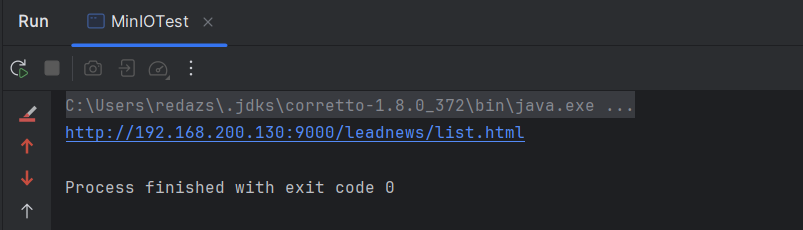
上传文件,点击控制台连接即可访问list.html文件
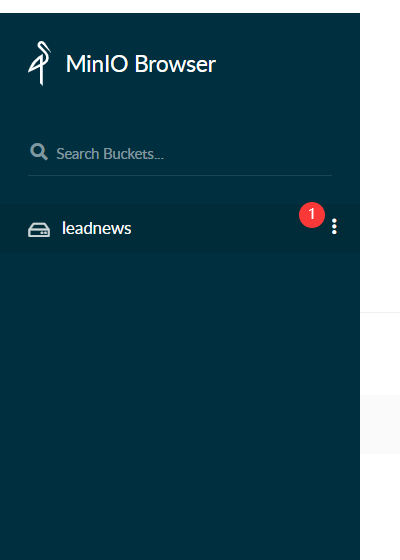
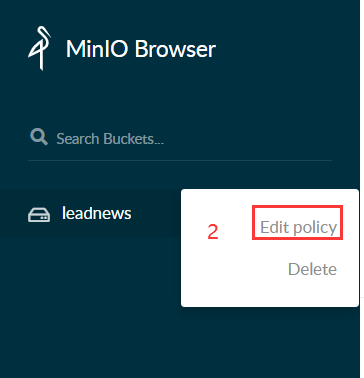
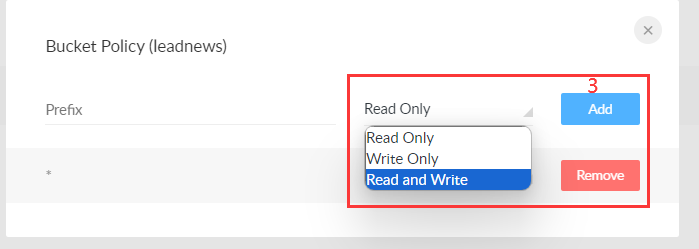
若不能访问,在minio控制系统中,打开访问权限
6、封装MinIO为starter
在项目中封装:
导入依赖
<dependency>
    <groupId>org.springframework.boot</groupId>
    <artifactId>spring-boot-autoconfigure</artifactId>
</dependency>
<dependency>
    <groupId>io.minio</groupId>
    <artifactId>minio</artifactId>
    <version>7.1.0</version>
</dependency>
<dependency>
    <groupId>org.springframework.boot</groupId>
    <artifactId>spring-boot-starter</artifactId>
</dependency>
<dependency>
    <groupId>org.springframework.boot</groupId>
    <artifactId>spring-boot-configuration-processor</artifactId>
    <optional>true</optional>
</dependency>
<dependency>
    <groupId>org.springframework.boot</groupId>
    <artifactId>spring-boot-starter-actuator</artifactId>
</dependency>
添加minio配置文件
package com.heima.file.config;
import com.heima.file.service.FileStorageService;
import io.minio.MinioClient;
import lombok.Data;
import org.springframework.beans.factory.annotation.Autowired;
import org.springframework.boot.autoconfigure.condition.ConditionalOnClass;
import org.springframework.boot.context.properties.EnableConfigurationProperties;
import org.springframework.context.annotation.Bean;
import org.springframework.context.annotation.Configuration;
@Data
@Configuration
@EnableConfigurationProperties({MinIOConfigProperties.class})
//当引入FileStorageService接口时
@ConditionalOnClass(FileStorageService.class)
public class MinIOConfig {
    @Autowired
    private MinIOConfigProperties minIOConfigProperties;
    @Bean
    public MinioClient buildMinioClient() {
        return MinioClient
                .builder()
                .credentials(minIOConfigProperties.getAccessKey(), minIOConfigProperties.getSecretKey())
                .endpoint(minIOConfigProperties.getEndpoint())
                .build();
    }
}
在spring管理的bean中注入MinIOFileStorageService(在spring.factories中)
org.springframework.boot.autoconfigure.EnableAutoConfiguration=
com.heima.file.service.impl.MinIOFileStorageService
MinIOFileStorageService文件详情(大概就实现了对于文件资源上传的操作)
package com.heima.file.service.impl;
import com.heima.file.config.MinIOConfig;
import com.heima.file.config.MinIOConfigProperties;
import com.heima.file.service.FileStorageService;
import io.minio.GetObjectArgs;
import io.minio.MinioClient;
import io.minio.PutObjectArgs;
import io.minio.RemoveObjectArgs;
import lombok.extern.slf4j.Slf4j;
import org.springframework.beans.factory.annotation.Autowired;
import org.springframework.boot.context.properties.EnableConfigurationProperties;
import org.springframework.context.annotation.Import;
import org.springframework.util.StringUtils;
import java.io.ByteArrayOutputStream;
import java.io.IOException;
import java.io.InputStream;
import java.text.SimpleDateFormat;
import java.util.Date;
@Slf4j
@EnableConfigurationProperties(MinIOConfigProperties.class)
@Import(MinIOConfig.class)
public class MinIOFileStorageService implements FileStorageService {
    @Autowired
    private MinioClient minioClient;
    @Autowired
    private MinIOConfigProperties minIOConfigProperties;
    private final static String separator = "/";
    /**
     * @param dirPath
     * @param filename  yyyy/mm/dd/file.jpg
     * @return
     */
    public String builderFilePath(String dirPath,String filename) {
        StringBuilder stringBuilder = new StringBuilder(50);
        if(!StringUtils.isEmpty(dirPath)){
            stringBuilder.append(dirPath).append(separator);
        }
        SimpleDateFormat sdf = new SimpleDateFormat("yyyy/MM/dd");
        String todayStr = sdf.format(new Date());
        stringBuilder.append(todayStr).append(separator);
        stringBuilder.append(filename);
        return stringBuilder.toString();
    }
    /**
     *  上传图片文件
     * @param prefix  文件前缀
     * @param filename  文件名
     * @param inputStream 文件流
     * @return  文件全路径
     */
    @Override
    public String uploadImgFile(String prefix, String filename,InputStream inputStream) {
        String filePath = builderFilePath(prefix, filename);
        try {
            PutObjectArgs putObjectArgs = PutObjectArgs.builder()
                    .object(filePath)
                    .contentType("image/jpg")
                    .bucket(minIOConfigProperties.getBucket()).stream(inputStream,inputStream.available(),-1)
                    .build();
            minioClient.putObject(putObjectArgs);
            StringBuilder urlPath = new StringBuilder(minIOConfigProperties.getReadPath());
            urlPath.append(separator+minIOConfigProperties.getBucket());
            urlPath.append(separator);
            urlPath.append(filePath);
            return urlPath.toString();
        }catch (Exception ex){
            log.error("minio put file error.",ex);
            throw new RuntimeException("上传文件失败");
        }
    }
    /**
     *  上传html文件
     * @param prefix  文件前缀
     * @param filename   文件名
     * @param inputStream  文件流
     * @return  文件全路径
     */
    @Override
    public String uploadHtmlFile(String prefix, String filename,InputStream inputStream) {
        String filePath = builderFilePath(prefix, filename);
        try {
            PutObjectArgs putObjectArgs = PutObjectArgs.builder()
                    .object(filePath)
                    .contentType("text/html")
                    .bucket(minIOConfigProperties.getBucket()).stream(inputStream,inputStream.available(),-1)
                    .build();
            minioClient.putObject(putObjectArgs);
            StringBuilder urlPath = new StringBuilder(minIOConfigProperties.getReadPath());
            urlPath.append(separator+minIOConfigProperties.getBucket());
            urlPath.append(separator);
            urlPath.append(filePath);
            return urlPath.toString();
        }catch (Exception ex){
            log.error("minio put file error.",ex);
            ex.printStackTrace();
            throw new RuntimeException("上传文件失败");
        }
    }
    /**
     * 删除文件
     * @param pathUrl  文件全路径
     */
    @Override
    public void delete(String pathUrl) {
        String key = pathUrl.replace(minIOConfigProperties.getEndpoint()+"/","");
        int index = key.indexOf(separator);
        String bucket = key.substring(0,index);
        String filePath = key.substring(index+1);
        // 删除Objects
        RemoveObjectArgs removeObjectArgs = RemoveObjectArgs.builder().bucket(bucket).object(filePath).build();
        try {
            minioClient.removeObject(removeObjectArgs);
        } catch (Exception e) {
            log.error("minio remove file error.  pathUrl:{}",pathUrl);
            e.printStackTrace();
        }
    }
    /**
     * 下载文件
     * @param pathUrl  文件全路径
     * @return  文件流
     *
     */
    @Override
    public byte[] downLoadFile(String pathUrl)  {
        String key = pathUrl.replace(minIOConfigProperties.getEndpoint()+"/","");
        int index = key.indexOf(separator);
        String bucket = key.substring(0,index);
        String filePath = key.substring(index+1);
        InputStream inputStream = null;
        try {
            inputStream = minioClient.getObject(GetObjectArgs.builder().bucket(minIOConfigProperties.getBucket()).object(filePath).build());
        } catch (Exception e) {
            log.error("minio down file error.  pathUrl:{}",pathUrl);
            e.printStackTrace();
        }
        ByteArrayOutputStream byteArrayOutputStream = new ByteArrayOutputStream();
        byte[] buff = new byte[100];
        int rc = 0;
        while (true) {
            try {
                if (!((rc = inputStream.read(buff, 0, 100)) > 0)) break;
            } catch (IOException e) {
                e.printStackTrace();
            }
            byteArrayOutputStream.write(buff, 0, rc);
        }
        return byteArrayOutputStream.toByteArray();
    }
}
具体模块下载:
7、在其他项目中集成封装好的模块
在第5步创建的项目中进行测试使用:
导入文件管理依赖(自己封装好的,第6步的模块)
    <dependency>
        <groupId>com.heima</groupId>
        <artifactId>heima-file-starter</artifactId>
        <version>1.0-SNAPSHOT</version>
    </dependency>
添加minio配置文件(application.yml文件中)
minio:
  accessKey: minio
  secretKey: minio123
  bucket: leadnews
  endpoint: http://192.168.200.130:9000
  readPath: http://192.168.200.130:9000
在spring管理的bean中注入FileStorageService
package com.heima.minio.test;
import com.heima.file.service.FileStorageService;
import io.minio.MinioClient;
import io.minio.PutObjectArgs;
import org.junit.Test;
import org.springframework.beans.factory.annotation.Autowired;
import org.springframework.boot.test.context.SpringBootTest;
import java.io.FileInputStream;
import java.io.FileNotFoundException;
@SpringBootTest( classes = MinIOApplication.class)
@RunWith(SpringRunner.class)
public class MinIOTest {
    public static void main(String[] args) {
    @Autowired
    private FileStorageService fileStorageService;
    @Test
    public void testUpdateImgFile() {
        try {
            FileInputStream fileInputStream = new FileInputStream("E:\test.jpg");
            String filePath = fileStorageService.uploadImgFile("", "test.jpg", fileInputStream);
            System.out.println(filePath);
        } catch (FileNotFoundException e) {
            e.printStackTrace();
        }
    }
}
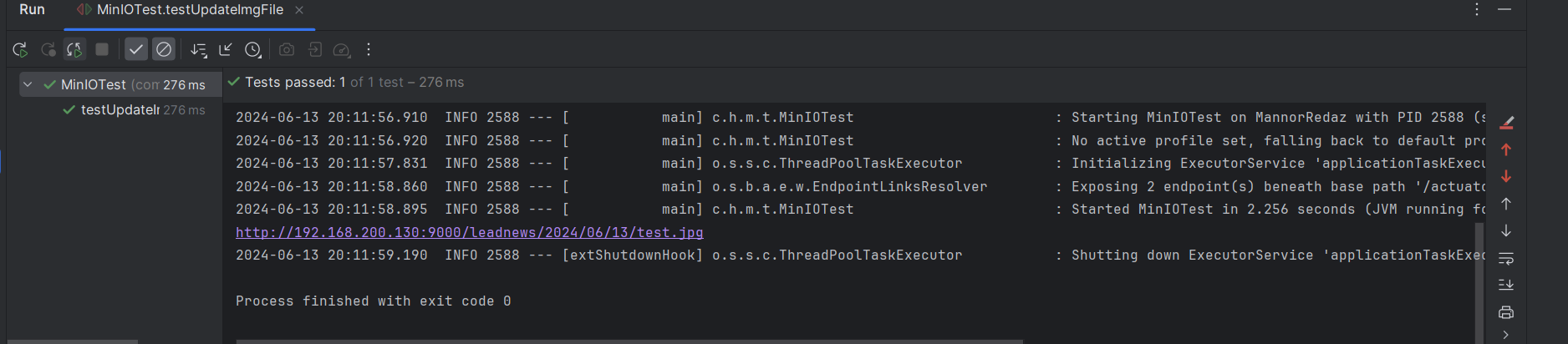
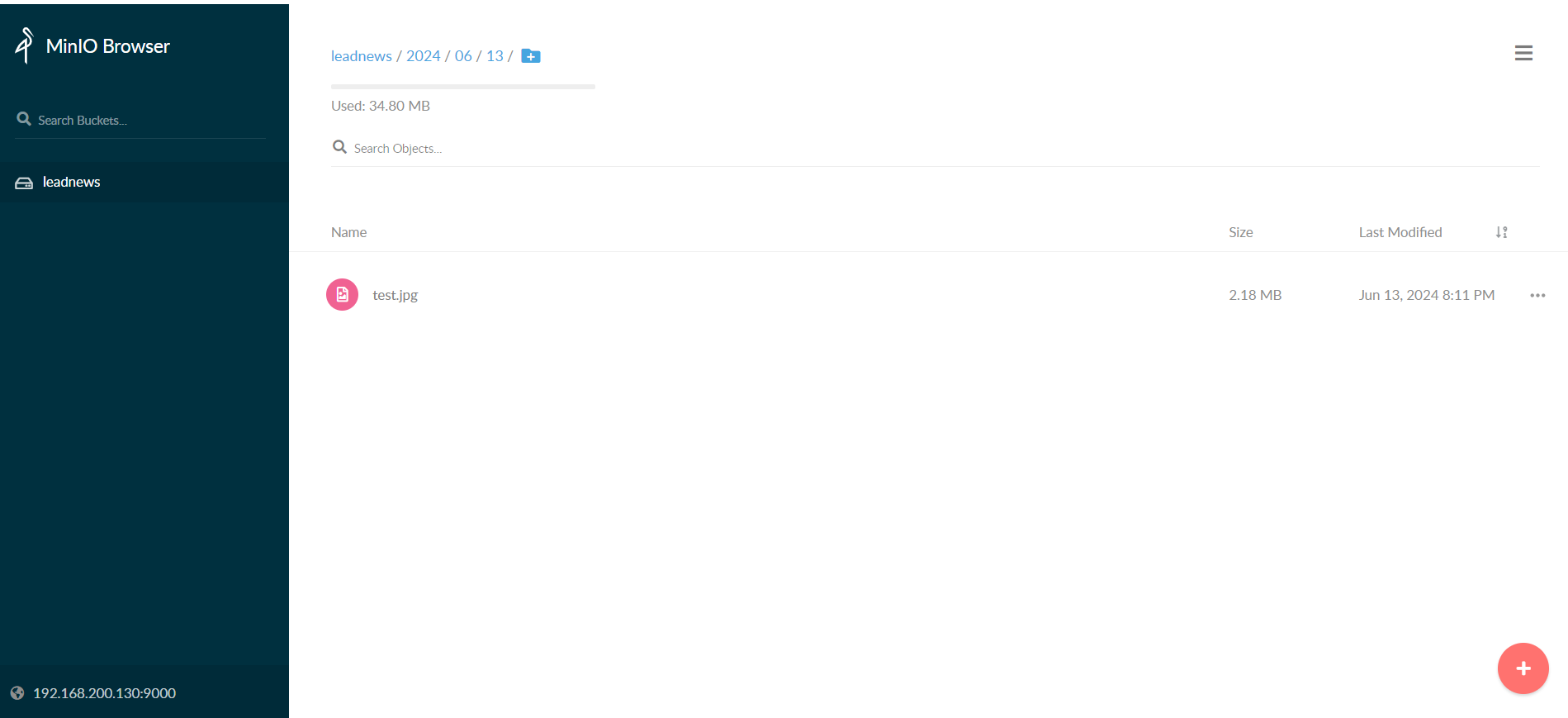
查看上传
到此这篇关于MinIO分布式文件存储(从入门到飞翔)的文章就介绍到这了,更多相关MinIO文件存储内容请搜索脚本之家以前的文章或继续浏览下面的相关文章希望大家以后多多支持脚本之家!
相关文章

Rainbond云原生快捷部署生产可用的Gitlab步骤详解
这篇文章主要为大家介绍了Rainbond云原生快捷部署生产可用的Gitlab步骤详解,有需要的朋友可以借鉴参考下,希望能够有所帮助,祝大家多多进步,早日升职加薪2022-04-04 这篇文章主要为大家介绍了Kubernetes Ingress实现细粒度IP访问控制,有需要的朋友可以借鉴参考下,希望能够有所帮助,祝大家多多进步,早日升职加薪2023-04-04
 这篇文章主要介绍了kubernetes pod的编排和生命周期的相关资料,帮助大家更好的理解和学习使用K8S,感兴趣的朋友可以了解下2021-04-04
 这篇文章主要为大家介绍了k8s设置非强一致反亲和性示例详解,有需要的朋友可以借鉴参考下,希望能够有所帮助,祝大家多多进步,早日升职加薪2023-10-10
 这篇文章主要为大家介绍了从小饭馆客流量变大来讨论云原生负载均衡,为大家做出更生动易懂的云原生解释说明有需要的朋友可以借鉴参考下2022-03-03
 本文详细介绍了如何在Jenkins环境下配置和启动Jenkins服务,以及如何使用Jenkins进行自动化部署Nginx应用到Kubernetes集群,文章涵盖了从环境准备、项目配置、代码上传到部署和回滚的全过程,提供了一个完整的自动化部署解决方案2026-03-03
 在k8s集群中当某个pod资源需要重启时,我们只会对其进行删除,由其pod控制器进行重新构建,下面这篇文章主要给大家介绍了关于K8S中Pod重启策略及重启可能原因的相关资料,需要的朋友可以参考下2023-05-05
 K8s作为当前最流行的容器编排平台,在企业生产环境中的部署需要综合考虑高可用性、安全性、性能优化等多方面因素,这篇文章主要介绍了K8s生产环境那些文档不会告诉你的坑及解决办法的相关资料,需要的朋友可以参考下2026-05-05
 云原生架构是一种现代软件开发方法,旨在通过充分利用云计算的优势,提高应用程序的灵活性、可扩展性和维护性,这篇文章主要介绍了云原生环境中容器安全的相关资料,文中通过代码介绍的非常详细,需要的朋友可以参考下2026-04-04
 这篇文章主要介绍了云原生技术kubernetes调度单位pod的使用详解,帮助大家更好的理解和学习使用K8S,感兴趣的朋友可以了解下2021-03-03
最新评论