

docker安装OpenWebUI报错500的原因及解决方法
更新时间:2025年07月08日 09:22:51 作者:黑蛋同志
Open WebUI是一个可扩展、功能丰富且用户友好的自托管WebUI,旨在完全离线操作,这篇文章主要介绍了docker安装OpenWebUI报错500的原因及解决方法,需要的朋友可以参考下
你在访问 Web UI 时遇到 500 错误,可能是由于以下几个原因导致的:
1. OpenAI 配置冲突
从配置中可以看到:
json
"openai": {
  "enable": true,   // 开启
  "api_base_urls": ["https://api.openai.com/v1"],
  "api_keys": [""],  // 密钥为空
  "api_configs": {"0":{}}
}
当 openai.enable=true 时,系统会尝试调用 OpenAI 的接口,但你的 api_keys 为空,会导致服务端认证失败。
如果服务端没有正确处理空密钥的情况,会直接抛出 500 错误。
2.解决方案:
如果不需要 OpenAI 功能,保持 enable: false。
"openai": {
  "enable": false,   // 已被你禁用
  "api_base_urls": ["https://api.openai.com/v1"],
  "api_keys": [""],  // 密钥为空
  "api_configs": {"0":{}}
}
如果需要 OpenAI,需填写有效的 API 密钥:
json
"openai": {
  "enable": true,
  "api_keys": ["sk-your-api-key-here"]  // 替换为有效密钥
}
3.关闭OpenAI 功能解决办法
1. 查看容器挂载详情
[root@koji-builder ~]# docker inspect open-webui | grep -A 10 "Mounts"
        "Mounts": [
            {
                "Type": "volume",
                "Name": "open-webui",
                "Source": "/var/lib/docker/volumes/open-webui/_data",
                "Destination": "/app/backend/data",
                "Driver": "local",
                "Mode": "z",
                "RW": true,
                "Propagation": ""
            }
[root@koji-builder ~]#
2.定位文件位置
[root@koji-builder ~]# cd /var/lib/docker/volumes/open-webui/_data
[root@koji-builder _data]# ls
cache  uploads  vector_db  webui.db
[root@koji-builder _data]#
2. 修改修改 config 表中 openai.enable 字段
如果不修改的话,会报500,因为openwebui使用了openai的api,如果不能访问外网的情况下,需要修改数据库表的openai.enable 字段
1.安装sqlite
yum install sqlite
2.备份数据库和停止 Open WebUI 容器
sudo cp webui.db webui.db.bak #停止 Open WebUI 容器 docker stop open-webui
3. 进入 SQLite 交互模式
[root@koji-builder _data]# sqlite3  webui.db
SQLite version 3.26.0 2018-12-01 12:34:55
Enter ".help" for usage hints.
sqlite>
4. 查看所有表,是否有config 表
sqlite> .tables
alembic_version   config            group             model
auth              document          knowledge         prompt
channel           feedback          memory            tag
channel_member    file              message           tool
chat              folder            message_reaction  user
chatidtag         function          migratehistory
sqlite>
5. 修改config 表"openai":{"enable"是的修改true
#修改
sqlite> UPDATE config
   ...> SET data = json_set(
   ...>   data,
   ...>   '$.openai.enable',
   ...>   json('false')
   ...> )
   ...> WHERE id = 1;
#-- 验证结果
sqlite> SELECT json_extract(data, '$.openai.enable') FROM config WHERE id = 1;
0
6. 查看config 表中的"openai":{"enable"是的修改false
sqlite> select * from config;
1|{"version":0,"ui":{"default_locale":"","prompt_suggestions":[{"title":["Help me study","vocabulary for a college entrance exam"],"content":"Help me study vocabulary: write a sentence for me to fill in the blank, and I'll try to pick the correct option."},{"title":["Give me ideas","for what to do with my kids' art"],"content":"What are 5 creative things I could do with my kids' art? I don't want to throw them away, but it's also so much clutter."},{"title":["Tell me a fun fact","about the Roman Empire"],"content":"Tell me a random fun fact about the Roman Empire"},{"title":["Show me a code snippet","of a website's sticky header"],"content":"Show me a code snippet of a website's sticky header in CSS and JavaScript."},{"title":["Explain options trading","if I'm familiar with buying and selling stocks"],"content":"Explain options trading in simple terms if I'm familiar with buying and selling stocks."},{"title":["Overcome procrastination","give me tips"],"content":"Could you start by asking me about instances when I procrastinate the most and then give me some suggestions to overcome it?"},{"title":["Grammar check","rewrite it for better readability "],"content":"Check the following sentence for grammar and clarity: \"[sentence]\". Rewrite it for better readability while maintaining its original meaning."}],"enable_signup":false},"ollama":{"enable":true,"base_urls":["http://172.16.104.203:11434"],"api_configs":{"0":{}}},"openai":{"enable":false,"api_base_urls":["https://api.openai.com/v1"],"api_keys":[""],"api_configs":{"0":{}}}}|0|2025-04-14 08:07:08|2025-04-14 08:50:11.453672
sqlite>
#-- 退出
sqlite> .quit
7. 重启open-webui容器
[root@koji-builder _data]# docker start  open-webui
open-webui
如果启动后没有反应需要进容器里启动
[root@koji-builder _data]# docker  exec -it open-webui /bin/bash
root@69d9b2ad6b44:/app/backend# ls
data  dev.sh  open_webui  requirements.txt  start.sh  start_windows.bat
root@69d9b2ad6b44:/app/backend# ./start.sh
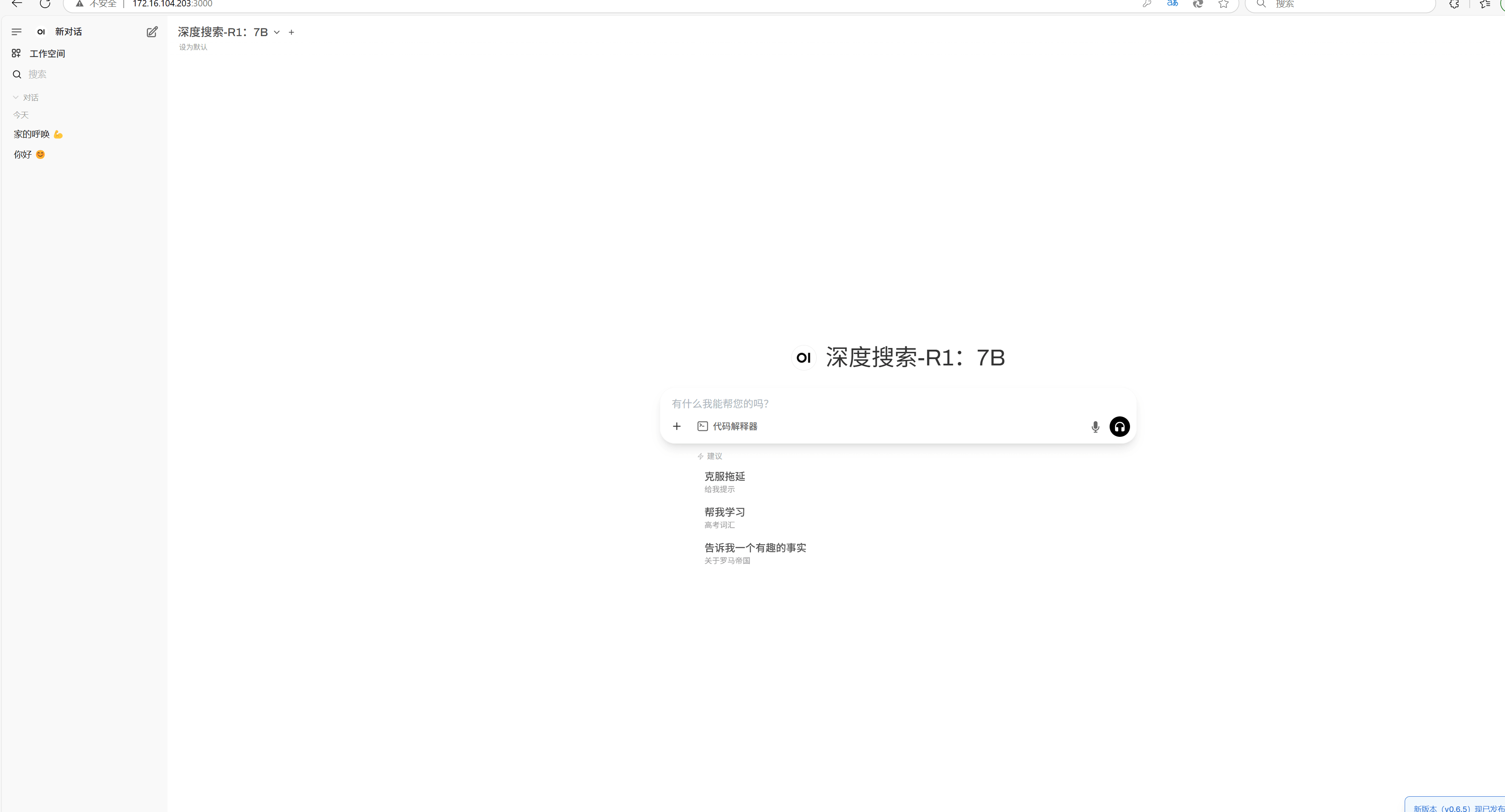
3. 访问open-webui
http://ip:3000
总结
到此这篇关于docker安装OpenWebUI报错500的原因及解决方法的文章就介绍到这了,更多相关docker安装OpenWebUI报错500内容请搜索脚本之家以前的文章或继续浏览下面的相关文章希望大家以后多多支持脚本之家!
您可能感兴趣的文章:
相关文章
 docker network create命令用于创建一个新的网络连接,本文就来详细的介绍一下docker network create命令的具体使用,具有一定的参考价值,感兴趣的可以了解一下2023-10-10
利用Docker容器化部署springboot应用(过程详解)
docker可以帮助我们下载应用镜像,创建并运行镜像的容器,从而快速部署应用,本文给大家介绍利用docker容器化部署springboot应用的过程,感兴趣的朋友跟随小编一起看看吧2025-10-10
解读Dockerfile中CMD和ENTRYPOINT是否可以混着用
在Dockerfile中,CMD和ENTRYPOINT可以混着用,CMD指定默认命令,ENTRYPOINT指定启动命令,CMD可以被docker run命令的参数覆盖2025-03-03
docker在linux系统上边下载镜像速度缓慢的问题及解决
这篇文章主要介绍了docker在linux系统上边下载镜像速度缓慢的问题及解决,具有很好的参考价值,希望对大家有所帮助,如有错误或未考虑完全的地方,望不吝赐教2024-04-04
docker build运行报错source: not found解决分析
这篇文章主要为大家介绍了docker build运行报错source: not found解决分析,有需要的朋友可以借鉴参考下,希望能够有所帮助,祝大家多多进步,早日升职加薪2023-09-09 这篇文章主要介绍了Docker如何批量删除images问题,具有很好的参考价值,希望对大家有所帮助,如有错误或未考虑完全的地方,望不吝赐教2023-11-11
 这篇文章主要给大家介绍了使用Docker快速搭建Oracle开发环境的方法教程,文中给出了详细的解决方法,对大家具有一定的参考学习价值,需要的朋友们下面来一起看看吧。2017-06-06
docker安装Jenkins配置Gitee SSH密钥踩坑解决
这篇文章主要为大家介绍了docker安装Jenkins配置Gitee SSH密钥踩坑解决,有需要的朋友可以借鉴参考下,希望能够有所帮助,祝大家多多进步,早日升职加薪2023-08-08 Docker与Kubernetes是当今云原生应用开发与运维体系中最为关键的两大基础设施技术,尤其对Java开发者而言,这篇文章主要介绍了Docker与Kubernetes部署实战之云原生应用交付的相关资料,需要的朋友可以参考下2026-04-04
 zabbix由2部分构成,zabbix server与可选组件zabbix agent,要想搭建一个Zabbix的工作环境,主要有三个方面(界面、服务器和数据库)可以安装在同一台服务器上,也可以不在同一个服务器,本次使用Docker开源的应用容器来快速搭建zabbix,需要的朋友可以参考下2024-03-03
最新评论