

MyBatis-Generator的配置说明和使用
更新时间:2017年02月04日 09:56:10 作者:hnlictmso
本文主要介绍了MyBatis-Generator的配置说明和使用的相关知识。具有很好的参考价值,下面跟着小编一起来看下吧
关于MyBatis:
MyBatis Generator (MBG) 是一个Mybatis的代码生成器 MyBatis 和 iBATIS. 他可以生成Mybatis各个版本的代码,和iBATIS 2.2.0版本以后的代码。 他可以内省数据库的表(或多个表)然后生成可以用来访问(多个)表的基础对象。 这样和数据库表进行交互时不需要创建对象和配置文件。 MBG的解决了对数据库操作有最大影响的一些简单的CRUD(插入,查询,更新,删除)操作。
准备工作:
下载MyBatis-Generator 点击此处下载
下载成功以后 如下图
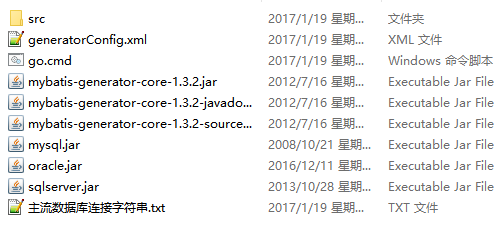
generatorConfig.xml是核心配置文件,主要内容与解释如下
<?xml version="1.0" encoding="UTF-8"?>
<!DOCTYPE generatorConfiguration
 PUBLIC "-//mybatis.org//DTD MyBatis Generator Configuration 1.0//EN"
 "http://mybatis.org/dtd/mybatis-generator-config_1_0.dtd">
<generatorConfiguration>
 <!--
  在此处修改数据库的驱动包 必须提前将驱动包放到本配置文件的同级目录下 笔者已提前放好
  如使用Oracle数据库时 <classPathEntry location="oracle.jar" />
 -->
 <classPathEntry location="mysql.jar" />
 <context id="DB2Tables" targetRuntime="MyBatis3">
  <commentGenerator>
   <property name="suppressAllComments" value="true" />   <!-- 是否取消注释 -->
   <property name="suppressDate" value="true" />    <!-- 是否生成注释代时间戳 -->
  </commentGenerator>
  <!-- 此处修改数据库的连接信息 -->
  <jdbcConnection driverClass="com.mysql.jdbc.Driver"   connectionURL="jdbc:mysql://localhost:3306/easybuy" userId="root"
   password="pengxiongpengdi" />
  <javaTypeResolver>
   <property name="forceBigDecimals" value="false" />
  </javaTypeResolver>
  <!--
   要生成的实体类
   每个项目包的命名 都不一样 可以通过修改 该属性 实现
   targetPackage="com.buy.entity"
   -->
  <javaModelGenerator targetPackage="com.buy.entity"
   targetProject="src">
   <property name="enableSubPackages" value="true" />
   <property name="trimStrings" value="true" />
  </javaModelGenerator>
  <!-- 要生成的接口 -->
  <sqlMapGenerator targetPackage="com.buy.dao"
   targetProject="src">
   <property name="enableSubPackages" value="true" />
  </sqlMapGenerator>
  <!-- 要生成的映射文件 -->
  <javaClientGenerator type="XMLMAPPER"
   targetPackage="com.buy.dao" targetProject="src">
   <property name="enableSubPackages" value="true" />
  </javaClientGenerator>
  <!--
   配置要映射的表
   数据库中对应的表:  tableName="EASYBUY_PRODUCT"
   项目中实体类的名字: domainObjectName="ProductEntity"
   其他属性默认即可
  -->
  <table tableName="EASYBUY_PRODUCT" domainObjectName="ProductEntity"
   enableCountByExample="false" enableUpdateByExample="false"
   enableDeleteByExample="false" enableSelectByExample="false"
   selectByExampleQueryId="false"></table>
  <table tableName="EASYBUY_PRODUCT_CATEGORY" domainObjectName="CategoryEntity"
   enableCountByExample="false" enableUpdateByExample="false"
   enableDeleteByExample="false" enableSelectByExample="false"
   selectByExampleQueryId="false"></table>
  <table tableName="EASYBUY_USER" domainObjectName="UserEntity"
   enableCountByExample="false" enableUpdateByExample="false"
   enableDeleteByExample="false" enableSelectByExample="false"
   selectByExampleQueryId="false"></table>
 </context>
</generatorConfiguration>
配置好以后运行go.cmd src目录下就会生成 对应的接口、映射文件和实体类

此时就生成完毕了可以在此基础上添加其他功能
以上就是本文的全部内容,希望本文的内容对大家的学习或者工作能带来一定的帮助,同时也希望多多支持脚本之家!
相关文章

Java线程并发工具类CountDownLatch原理及用法
这篇文章主要介绍了Java线程并发工具类CountDownLatch原理及用法,文中通过示例代码介绍的非常详细,对大家的学习或者工作具有一定的参考学习价值,需要的朋友可以参考下2019-10-10
Spring Security OAuth2 实现登录互踢的示例代码
这篇文章主要介绍了Spring Security OAuth2实现登录互踢的示例代码,文中通过示例代码介绍的非常详细,对大家的学习或者工作具有一定的参考学习价值,需要的朋友们下面随着小编来一起学习学习吧2020-04-04 Thymeleaf显然是一个开发页面的技术,现在各种前端技术层出不穷,比如现在主流的Vue、React、AngularJS等。这篇文章主要介绍了springboot配合Thymeleaf完美实现遍历,需要的朋友可以参考下2021-09-09
Java class文件格式之属性_动力节点Java学院整理
在本文中, 主要讲解了class文件中的一些属性。 这些属性可以出现在class文件中的对个地方, 用来描述一些其他信息2017-06-06
@JsonProperty和@JSONField注解的区别解析(最新)
Jackson是一款优秀的JSON解析库,添加了依赖之后就可以使用对应的注解,让我们能够自由的将Java对象和JSON做转换,这篇文章主要介绍了@JsonProperty和@JSONField注解的区别,需要的朋友可以参考下2024-04-04 今天小编就为大家分享一篇关于JVM:早期(编译期)优化的深入理解,小编觉得内容挺不错的,现在分享给大家,具有很好的参考价值,需要的朋友一起跟随小编来看看吧2019-02-02
 这篇文章主要介绍了解决IDEA克隆代码后在右下角没有git分支的问题,具有很好的参考价值,希望对大家有所帮助。一起跟随小编过来看看吧2021-02-02
SpringBoot学习系列之MyBatis Plus整合封装的实例详解
MyBatis-Plus是一款MyBatis的增强工具(简称MP),为简化开发、提高效率,这篇文章给大家介绍MyBatis Plus整合封装的实例详解,感兴趣的朋友跟随小编一起看看吧2020-08-08 Runtime类封装了运行时的环境。每个 Java 应用程序都有一个 Runtime 类实例,使应用程序能够与其运行的环境相连接。下面通过本文给大家分享Java Runtime类详解,需要的朋友参考下吧2017-04-04
 多线程与任务调度是java开发中必须掌握的技能,本文主要介绍了SpringBoot多线程与任务调度总结,具有一定的参考价值,感兴趣的可以了解一下2023-12-12
最新评论