

Android之TextView自适应大小
更新时间:2017年03月03日 10:05:10 作者:听着music睡
对于设置TextView的字体默认大小对于UI界面的好看程度是很重要的,小屏幕设置的文字过大或者大屏幕设置的文字过小都造成UI的不美观。现在就让我们学习自适应大小的TextView控件。下面跟着小编一起来看下吧
对于设置TextView的字体默认大小对于UI界面的好看程度是很重要的,小屏幕设置的文字过大或者大屏幕设置的文字过小都造成UI的不美观
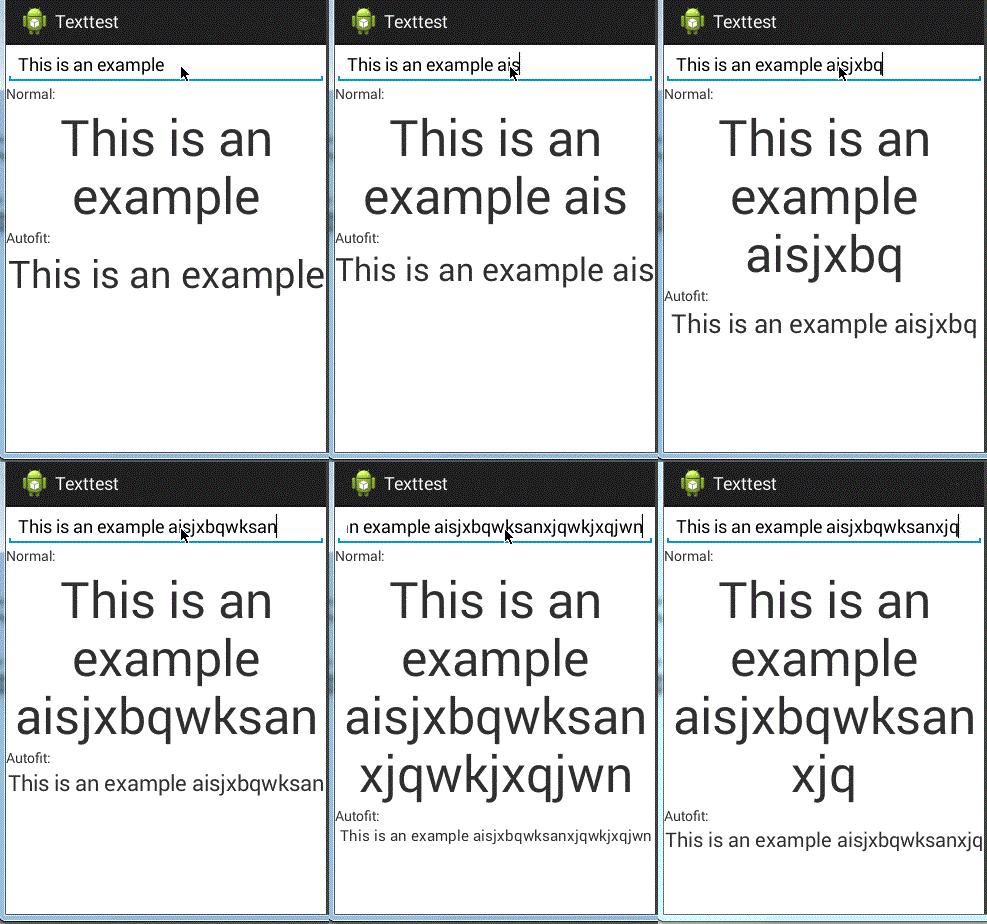
现在就让我们学习自适应大小的TextView控件,即当文字长度变化时,文字的大小会相应的变化,保证显示在一行当中
实现依靠于第三方类库
第三方类来源:
https://github.com/grantland/android-autofittextview
和正常的使用TextView一样,只需要将要自适应的TextView标签设置为<me.grantland.widget.AutofitTextView/>
注意:一定要设置为单行,否定无法显示效果
android:singleLine="true"
<me.grantland.widget.AutofitTextView
   android:id="@+id/output_autofit"
   android:layout_width="match_parent"
   android:layout_height="wrap_content"
   android:text="@string/example"
   android:textSize="50sp"
   android:gravity="center"
   android:singleLine="true"
   autofit:minTextSize="8sp"
   />
布局文件:
<?xml version="1.0" encoding="utf-8"?>
<ScrollView xmlns:android="http://schemas.android.com/apk/res/android"   xmlns:autofit="http://schemas.android.com/apk/res-auto"
 android:layout_width="match_parent"
 android:layout_height="match_parent">
 <LinearLayout
  android:layout_width="match_parent"
  android:layout_height="wrap_content"
  android:orientation="vertical"
  >
  <EditText
   android:id="@+id/input"
   android:layout_width="match_parent"
   android:layout_height="wrap_content"
   android:singleLine="true"
   android:hint="@string/input_hint"
   android:text="@string/example"/>
  <TextView
   android:layout_width="match_parent"
   android:layout_height="wrap_content"
   android:text="@string/label_normal"
   />
  <TextView
   android:id="@+id/output"
   android:layout_width="match_parent"
   android:layout_height="wrap_content"
   android:text="@string/example"
   android:textSize="50sp"
   android:gravity="center"
   />
  <TextView
   android:layout_width="match_parent"
   android:layout_height="wrap_content"
   android:text="@string/label_autofit"
   />
  <me.grantland.widget.AutofitTextView
   android:id="@+id/output_autofit"
   android:layout_width="match_parent"
   android:layout_height="wrap_content"
   android:text="@string/example"
   android:textSize="50sp"
   android:gravity="center"
   android:singleLine="true"
   autofit:minTextSize="8sp"
   />
 </LinearLayout>
</ScrollView>

activity_main.xml
string.xml
<?xml version="1.0" encoding="utf-8"?>
<resources>
 <string name="app_name">Texttest</string>
 <string name="action_settings">Settings</string>
 <string name="hello_world">Hello world!</string>
 <string name="input_hint">text</string>
 <string name="label_normal">Normal:</string>
 <string name="label_autofit">Autofit:</string>
 <string name="example">This is an example</string>
</resources>
activity
package com.example.texttest;
import android.app.Activity;
import android.os.Bundle;
import android.text.Editable;
import android.text.TextWatcher;
import android.view.Menu;
import android.widget.EditText;
import android.widget.TextView;
public class MainActivity extends Activity {
 private TextView mOutput;
 private TextView mAutofitOutput;
 @Override
 protected void onCreate(Bundle savedInstanceState) {
  super.onCreate(savedInstanceState);
  setContentView(R.layout.activity_main);
  mOutput = (TextView)findViewById(R.id.output);
  mAutofitOutput = (TextView)findViewById(R.id.output_autofit);
  ((EditText)findViewById(R.id.input)).addTextChangedListener(new TextWatcher() {
   @Override
   public void beforeTextChanged(CharSequence charSequence, int i, int i2, int i3) {
    // do nothing
   }
   @Override
   public void onTextChanged(CharSequence charSequence, int i, int i2, int i3) {
    mOutput.setText(charSequence);
    mAutofitOutput.setText(charSequence);
   }
   @Override
   public void afterTextChanged(Editable editable) {
    // do nothing
   }
  });
 }
 @Override
 public boolean onCreateOptionsMenu(Menu menu) {
  // Inflate the menu; this adds items to the action bar if it is present.
  getMenuInflater().inflate(R.menu.main, menu);
  return true;
 }
}

MainActivity.java
效果:
以上就是本文的全部内容,希望本文的内容对大家的学习或者工作能带来一定的帮助,同时也希望多多支持脚本之家!
相关文章
 这篇文章主要介绍了Android通过Service实现简单的音乐播放,小编觉得挺不错的,现在分享给大家,也给大家做个参考。一起跟随小编过来看看吧2018-05-05
 现在的项目开发,调用第三方登录,几乎是必须的,这篇文章主要介绍了Android调用第三方QQ登录代码分享2016-05-05
 主要的设计核心是依赖于传感器对手机晃动的监听(重力感应监听器),对每层图片进行不同的移动,实现仿3D效果。本文通过实例代码给大家介绍的非常详细,需要的朋友参考下吧2021-08-08
 这篇文章主要为大家介绍了Android如何自定义视图属性,三个步骤自定义视图属性,感兴趣的小伙伴们可以参考一下2016-08-08
 这篇文章主要介绍了android开发中需要的toast工具类,需要的朋友可以参考下2014-05-05
 项目中经常会使用到第三方的 git 库, 将三方库整合到项目中最简单的办法就是复制粘贴, 但是如果这个库升级了一个很酷炫的功能, 你要怎么整合进来呢?(其实就是 git 版的包管理器)这就是本次要介绍的 git-submodule 操作, 直接把第三方的版本库合并到自己的库中2021-11-11
Android 通过cmake的方式接入opencv的方法步骤
这篇文章主要介绍了Android 通过cmake的方式接入opencv的方法步骤,文中通过示例代码介绍的非常详细,对大家的学习或者工作具有一定的参考学习价值,需要的朋友们下面随着小编来一起学习学习吧2020-04-04 这篇文章主要介绍了android 监听SD卡文件变化的实现代码,需要的朋友可以参考下2017-11-11
Android Compose自定义TextField实现自定义的输入框
众所周知Compose中默认的TextField和OutlineTextField样式并不能满足所有的使用场景,所以自定义TextField就成了必备技能。本文将自定义TextField实现自定义的输入框,感兴趣的可以了解一下2022-03-03 这篇文章主要介绍了Android编程实现获取多媒体库视频、音频、图片的方法,涉及Android针对多媒体视频、音频及相关专辑图片、缩略图等获取操作实现技巧,需要的朋友可以参考下2018-01-01
最新评论