

Android Tab 控件详解及实例
更新时间:2017年03月25日 14:39:29 作者:feng1456
这篇文章主要介绍了Android Tab 控件详解及实例的相关资料,需要的朋友可以参考下
Android Tab 控件详解及实例
在桌面应用中Tab控件使用得非常普遍,那么我们经常在Android中也见到以Tab进行布局的客户端。那么Android中的Tab是如何使用的呢?
1.Activity
package com.wicresoft.activity;

import com.wicresoft.myandroid.R;

import android.app.TabActivity;
import android.os.Bundle;
import android.util.Log;
import android.widget.TabHost;
import android.widget.TabHost.OnTabChangeListener;

@SuppressWarnings("deprecation")
public class mainActivity extends TabActivity {
  private TabHost tabhost;
  @Override
  protected void onCreate(Bundle savedInstanceState){
    super.onCreate(savedInstanceState);
    setContentView(R.layout.main_activity);
    //从TabActivity上面获取放置Tab的TabHost
    tabhost = getTabHost();
    tabhost.addTab(tabhost
         //创建新标签one
        .newTabSpec("one")
        //设置标签标题
        .setIndicator("红色")
        //设置该标签的布局内容
        .setContent(R.id.widget_layout_red));
    tabhost.addTab(tabhost
        .newTabSpec("two")
        .setIndicator("黄色")
        .setContent(R.id.widget_layout_yellow));
    tabhost.addTab(tabhost
        .newTabSpec("three")
        .setIndicator("蓝色")
        .setContent(R.id.widget_layout_blue));
    tabhost.setOnTabChangedListener(listener);
  }

  private OnTabChangeListener listener = new OnTabChangeListener(){
    @Override
    public void onTabChanged(String arg0) {
      // TODO Auto-generated method stub
      Log.i("TabChange", arg0);
    }
  };
}
2.布局文件
<?xml version="1.0" encoding="utf-8"?>
<TabHost xmlns:android="http://schemas.android.com/apk/res/android"
  android:layout_width="match_parent"
  android:layout_height="match_parent"
  android:id="@android:id/tabhost">

<LinearLayout
  android:layout_width="match_parent"
  android:layout_height="match_parent"
  android:orientation="vertical">

  <TabWidget
    android:layout_width="match_parent"
    android:layout_height="wrap_content"
    android:id="@android:id/tabs">
  </TabWidget>

  <FrameLayout
    android:layout_width="match_parent"
    android:layout_height="0dp"
    android:layout_weight="1"
    android:id="@android:id/tabcontent">
    <LinearLayout
      android:layout_width="match_parent"
      android:layout_height="match_parent"
      android:id="@+id/widget_layout_red"
      android:background="#ff0000"
      android:orientation="vertical">
    </LinearLayout>

     <LinearLayout
      android:layout_width="match_parent"
      android:layout_height="match_parent"
      android:id="@+id/widget_layout_yellow"
      android:background="#FCD209"
      android:orientation="vertical">
     </LinearLayout>
     <LinearLayout
      android:layout_width="match_parent"
      android:layout_height="match_parent"
      android:id="@+id/widget_layout_blue"
      android:background="#0000E3"
      android:orientation="vertical">
     </LinearLayout>
  </FrameLayout>
 </LinearLayout>
</TabHost>
3.Manifest文件
<manifest xmlns:android="http://schemas.android.com/apk/res/android"
  package="com.wicresoft.myandroid"
  android:versionCode="1"
  android:versionName="1.0" >

  <uses-sdk
    android:minSdkVersion="8"
    android:targetSdkVersion="19" />

  <application
    android:allowBackup="true"
    android:icon="@drawable/ic_launcher"
    android:label="@string/app_name"
    android:theme="@style/AppTheme" >
    <activity
      android:name="com.wicresoft.activity.mainActivity"
      android:label="@string/app_name">
      <intent-filter>
        <action android:name="android.intent.action.MAIN"/>
        <category android:name="android.intent.category.LAUNCHER"/>
      </intent-filter>
    </activity>
  </application>

</manifest>
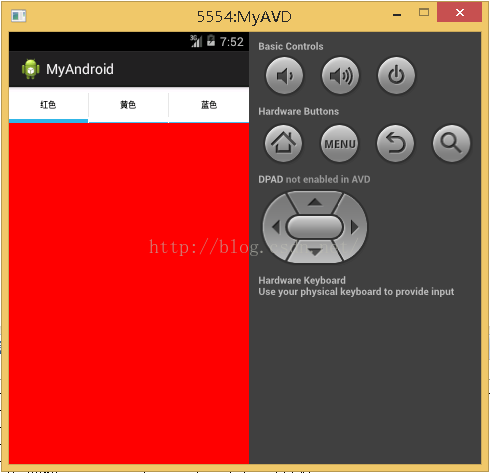
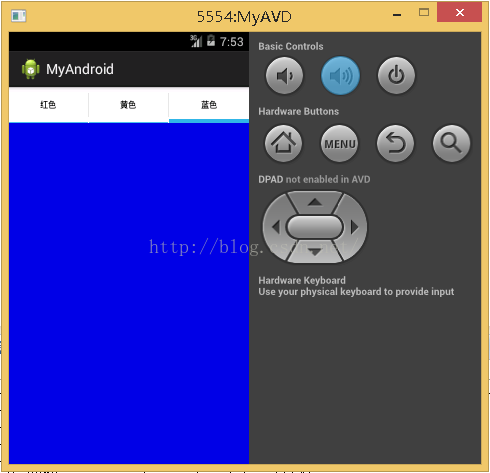
4.效果

感谢阅读,希望能帮助到大家,谢谢大家对本站的支持!
相关文章
 这篇文章主要介绍了Android Messenger跨进程通的相关资料,非常简单容易理解,对android messenger 进程通讯的相关知识感兴趣的朋友一起学习吧2016-08-08
 本文主要介绍 Android 注解这里提供了详细的资料及示例代码,有需要的小伙伴可以参考下2016-08-08
Android Studio 实现将support库改成Androidx
这篇文章主要介绍了Android Studio 实现将support库改成Androidx,具有很好的参考价值,希望对大家有所帮助。一起跟随小编过来看看吧2020-04-04
OpenGL关于glStencilFuncSeparate()和glStencilFunc()函数的区别讲解
今天小编就为大家分享一篇OpenGL关于glStencilFuncSeparate()和glStencilFunc()函数的区别讲解,小编觉得内容挺不错的,现在分享给大家,具有很好的参考价值,需要的朋友一起跟随小编来看看吧2019-04-04 在进行Android系统开发的时候,有些特定的情况需要设置系统永不锁屏,永不休眠。本篇文章给大家介绍Android 永不锁屏,开机不锁屏,删除设置中休眠时间选项,需要的朋友一起学习吧2016-03-03
 这篇文章主要介绍了Android 去掉状态栏的方法汇总的相关资料,需要的朋友可以参考下2016-01-01
详解Android应用中preference首选项的编写方法
这篇文章主要介绍了Android应用中preference首选项的编写方法,或许Apple将其翻译为'偏好设置'更直观些,即用户对应用的一些个性化调整菜单,需要的朋友可以参考下2016-04-04
Android App中的多个LinearLayout嵌套布局实例解析
这篇文章主要介绍了Android App中的多个LinearLayout嵌套布局实例,利用线性布局来排列按钮是安卓应用布局中的常用做法,需要的朋友可以参考下2016-04-04 当我们回忆起小时候的经典电脑游戏,扫雷一定是其中之一。本文将通过Flutter实现一个能在多端运行的扫雷游戏,感兴趣的可以了解一下2023-03-03
 本文介绍了Android中点击隐藏软键盘最佳方法。具有很好的参考价值,下面跟着小编一起来看下吧2017-01-01
最新评论