

Android实现登录界面记住密码的存储
更新时间:2022年04月23日 14:23:17 作者:ly1012053441
这篇文章主要为大家详细介绍了Android SharedPreferrences实现登录界面记住密码的存储,具有一定的参考价值,感兴趣的小伙伴们可以参考一下
Android存储方式有很多种,在这里所用的存储方式是SharedPreferrences,其采用了Map数据结构来存储数据,以键值的方式存储,可以简单的读取与写入。所以比较适合我们今天做的这个项目。我们来看一下运行图:
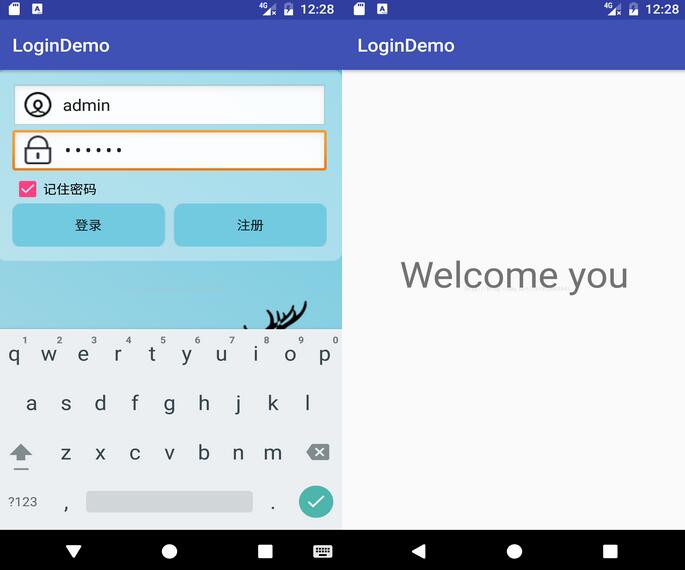
一.布局界面
1.login_top.xml
 <?xml version="1.0" encoding="utf-8"?>
<RelativeLayout xmlns:android="http://schemas.android.com/apk/res/android"
 android:orientation="vertical"
 android:layout_width="match_parent"
 android:layout_height="wrap_content"
 android:padding="@dimen/activity_horizontal_margin"
 android:background="@drawable/logintop_roundbg">
 <EditText
  android:id="@+id/etName"
  android:layout_width="match_parent"
  android:layout_height="wrap_content"
  android:ems="10"
  android:drawablePadding="10dp"
  android:background="@android:drawable/edit_text"
  android:drawableLeft="@drawable/icon_user"
  android:hint="@string/etName">
  <requestFocus></requestFocus>
 </EditText>
 <EditText
  android:id="@+id/etPassword"
  android:layout_width="match_parent"
  android:layout_height="wrap_content"
  android:layout_below="@id/etName"
  android:inputType="textPassword"
  android:ems="10"
  android:drawablePadding="10dp"
  android:background="@android:drawable/edit_text"
  android:drawableLeft="@drawable/icon_pass"
  android:hint="@string/etpassword">
  <requestFocus></requestFocus>
 </EditText>
 <CheckBox
  android:id="@+id/cbremenber"
  android:layout_width="wrap_content"
  android:layout_height="wrap_content"
  android:layout_below="@id/etPassword"
  android:text="@string/cbpass"/>
 <LinearLayout
  android:layout_width="match_parent"
  android:layout_height="wrap_content"
  android:layout_below="@id/cbremenber">
  <Button
   android:id="@+id/btnlogin"
   android:layout_width="0dp"
   android:layout_height="wrap_content"
   android:layout_weight="1"
   android:background="@drawable/btnselect"
   android:text="@string/btnlogin"
   android:onClick="login"/>
  <Button
   android:id="@+id/btnRegister"
   android:layout_width="0dp"
   android:layout_height="wrap_content"
   android:layout_weight="1"
   android:background="@drawable/btnselect"
   android:text="@string/btnRegister"
   android:layout_marginLeft="10dp"/>
 </LinearLayout>
</RelativeLayout>
2.activity_main.xml
 <?xml version="1.0" encoding="utf-8"?>
<RelativeLayout xmlns:android="http://schemas.android.com/apk/res/android"
 xmlns:tools="http://schemas.android.com/tools"
 android:id="@+id/activity_main"
 android:layout_width="match_parent"
 android:layout_height="match_parent"
 android:background="@drawable/loginbg"
 tools:context="cn.edu.bzu.logindemo.MainActivity">

 <include layout="@layout/login_top"></include>

 <ImageView
  android:layout_width="wrap_content"
  android:layout_height="wrap_content"
  android:background="@drawable/deer"
  android:layout_alignParentBottom="true"
  android:layout_alignParentRight="true"
  android:layout_alignParentEnd="true" />
</RelativeLayout>
3.activity_welcome.xml
 <?xml version="1.0" encoding="utf-8"?>
<RelativeLayout xmlns:android="http://schemas.android.com/apk/res/android"
 xmlns:tools="http://schemas.android.com/tools"
 android:id="@+id/activity_welcome"
 android:layout_width="match_parent"
 android:layout_height="match_parent"
 tools:context="cn.edu.bzu.logindemo.WelcomeActivity">

 <TextView
  android:id="@+id/tvwelcome"
  android:text="Welcome you"
  android:layout_width="wrap_content"
  android:layout_height="wrap_content"
  android:layout_alignParentTop="true"
  android:layout_centerHorizontal="true"
  android:layout_marginTop="200dp"
  android:textSize="40sp"
   />
</RelativeLayout>
二.MainActivity
 public class MainActivity extends AppCompatActivity {
 private EditText etName;
 private EditText etPassword;
 private SharedPreferences sharedPreferences;
 private CheckBox cbremenber;
 @Override
 protected void onCreate(Bundle savedInstanceState) {
  super.onCreate(savedInstanceState);
  setContentView(R.layout.activity_main);
  initViews();
  sharedPreferences=getSharedPreferences("remenberpassword", Context.MODE_PRIVATE);
  boolean isRemember=sharedPreferences.getBoolean("remenberpassword",false);
  if(isRemember) {
   String name = sharedPreferences.getString("name", "");
   String password = sharedPreferences.getString("password", "");
   etName.setText(name);
   etPassword.setText(password);
   cbremenber.setChecked(true);
  }
 }

 private void initViews() {
  etName=(EditText) findViewById(R.id.etName);
  etPassword=(EditText) findViewById(R.id.etPassword);
  cbremenber=(CheckBox)findViewById(R.id.cbremenber);
 }

 public void login(View view){
  String name=etName.getText().toString();
  String password=etPassword.getText().toString();
  if("admin".equals(name)&&"123456".equals(password)){
   SharedPreferences.Editor editor= sharedPreferences.edit();
   if(cbremenber.isChecked()){
    editor.putBoolean("remenberpassword",true);
    editor.putString("name",name);
    editor.putString("password",password);
   }else {
    editor.clear();
   }
   editor.commit();
   Intent intent=new Intent(this,WelcomeActivity.class);
   startActivity(intent);
   finish();
  }else {
   Toast.makeText(this,"账号或密码有误",Toast.LENGTH_LONG).show();

  }
 }
}
三.WelcomeActivity
 public class WelcomeActivity extends AppCompatActivity {

 @Override
 protected void onCreate(Bundle savedInstanceState) {
  super.onCreate(savedInstanceState);
  setContentView(R.layout.activity_welcome);
 }
}
以上就是本文的全部内容,希望对大家的学习有所帮助,也希望大家多多支持脚本之家。
您可能感兴趣的文章:
相关文章
 这篇文章主要介绍了flutter 自定义websocket路由的实现,文中通过示例代码介绍的非常详细,对大家的学习或者工作具有一定的参考学习价值,需要的朋友们下面随着小编来一起学习学习吧2019-12-12
 今天小编就为大家分享一篇关于Android样式和主题之选择器的实例讲解,小编觉得内容挺不错的,现在分享给大家,具有很好的参考价值,需要的朋友一起跟随小编来看看吧2019-03-03
Android SwipeRefreshLayout下拉刷新组件示例
SwipeRefrshLayout是Google官方更新的一个Widget,可以实现下拉刷新的效果。本文主要介绍了Android之SwipeRefreshLayout下拉刷新组件示例,有兴趣的可以了解一下。2017-02-02 这篇文章主要介绍了Android获取SD卡路径及SDCard内存的方法,较为详细的分析了Android针对SD卡操作所涉及的类及其具体函数功能,非常具有实用价值,需要的朋友可以参考下2015-02-02
Android之使用Android-query框架开发实战(二)
这篇文章主要介绍了Android之使用Android-query框架开发实战(二)的相关资料,需要的朋友可以参考下2015-10-10
Androd自定义对话框Dialog视图及参数传递的实现方法
这篇文章主要介绍了Androd自定义对话框Dialog视图及参数传递的实现方法,非常不错,具有参考借鉴价值,需要的朋友可以参考下2017-01-01
Android开发 -- UI界面之threme和style
做Java的人一般都做过CSS,我们都知道它也有一个样式,Android中的样式也可以进行类比。2016-06-06
Android中的sqlite查询数据时去掉重复值的方法实例
今天小编就为大家分享一篇关于Android中的sqlite查询数据时去掉重复值的方法实例,小编觉得内容挺不错的,现在分享给大家,具有很好的参考价值,需要的朋友一起跟随小编来看看吧2019-01-01
Android应用中使用Fragment组件的一些问题及解决方案总结
这里我们讲的Fragment主要探讨的是support库中的Fragment,包括Fragment常遇到的crash崩溃问题,嵌套Fragment收不到onActivityResult()回调以及一些常用tips等,需要的朋友可以参考下2016-05-05 Android顶部工具栏和底部工具栏的简单实现代码,需要的朋友可以参考一下2013-05-05
最新评论