

Angular directive递归实现目录树结构代码实例
更新时间:2017年05月05日 10:38:01 作者:老王今天没吃药
本篇文章主要介绍了Angular directive递归实现目录树结构代码实例,具有一定的参考价值,感兴趣的小伙伴们可以参考一下
整理文档,搜刮出一个Angular directive递归实现目录树结构代码实例代码,稍微整理精简一下做下分享。
效果图:
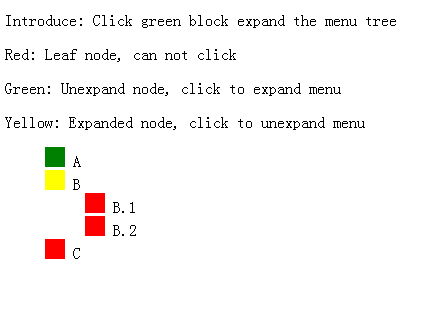
重点:
1. 整棵目录树的实现,通过嵌套完成,主要在于对treeItem.html的递归使用
  <script type="text/ng-template" id="treeView.html">

    <ul>

      <li ng-repeat="item in treeData.children" ng-include="'treeItem.html'"></li>

    </ul>

  </script>


  <script type="text/ng-template" id="treeItem.html">

    <span class="color-indictor" ng-class="{'leaf-node': isLeaf(item), 'expand-node': !isLeaf(item) && item.isExpand, 'unexpand-node': !isLeaf(item) && !item.isExpand}" ng-click="toggleExpandStatus(item)"></span>

    <span>{{item.name}}</span>

    <ul ng-if="!isLeaf(item)" ng-show="item.isExpand">

      <li ng-repeat="item in item.children" ng-include="'treeItem.html'"></li>

    </ul>

  </script>
2. 点击展开/关闭目录树
通过ng-show对item.expand进行判断,点击item时切换其expand参数,完成目录树的打开与关闭
3. 源码
<script src="https://cdnjs.cloudflare.com/ajax/libs/angular.js/1.5.9/angular.js"></script>
<script>
angular.module("treeApp", [])
.controller("treeController", function($scope){
  $scope.jsonData = {
    name: 'menu',
    children: [{
      name: 'A',
      children: [{
        name: 'A.1',
        children: [{
          name: 'A.1.1',
          children: []
        }]
      },{
        name: 'A.2',
        children: [{
          name: 'A.2.1',
          children: [{
            name: 'A.2.1.1',
            children: []
          }]
        },{
          name: 'A.2.2',
          children: []
        }]
      }]
    },{
      name: 'B',
      children: [{
        name: 'B.1',
        children: []
      },{
        name: 'B.2',
        children: []
      }]
    },{
      name: 'C',
      children: []
    }]
  };
}).directive('treeView', function(){
  return {
    restrict: 'E',
    templateUrl: 'treeView.html',
    scope: {
      treeData: '='
    },
    controller: function($scope){
      $scope.isLeaf = function(item){
        return !item.children || !item.children.length;
      };
      $scope.toggleExpandStatus = function(item){
        item.isExpand = !item.isExpand;
      };
    }
  };
});
</script>
<style>
ul{
  list-style: none;
}
.color-indictor{
  display: inline-block;
  width: 20px;
  height: 20px;
  cursor: pointer;
}
.color-indictor.leaf-node{
  background: red;
}
.color-indictor.unexpand-node{
  background: green;
}
.color-indictor.expand-node{
  background-color: yellow;
}
</style>
<body ng-app="treeApp" ng-controller="treeController">
  <div>
  <p>Introduce: Click green block expand the menu tree</p>
  <p>Red: Leaf node, can not click</p>
  <p>Green: Unexpand node, click to expand menu</p>
  <p>Yellow: Expanded node, click to unexpand menu</p>
  </div>
  <tree-view tree-data="jsonData"></tree-view>
</body>

<script type="text/ng-template" id="treeView.html">
  <ul>
    <li ng-repeat="item in treeData.children" ng-include="'treeItem.html'"></li>
  </ul>
</script>
<script type="text/ng-template" id="treeItem.html">
  <span class="color-indictor" ng-class="{'leaf-node': isLeaf(item), 'expand-node': !isLeaf(item) && item.isExpand, 'unexpand-node': !isLeaf(item) && !item.isExpand}" ng-click="toggleExpandStatus(item)"></span>
  <span>{{item.name}}</span>
  <ul ng-if="!isLeaf(item)" ng-show="item.isExpand">
    <li ng-repeat="item in item.children" ng-include="'treeItem.html'"></li>
  </ul>
</script>
以上就是本文的全部内容,希望对大家的学习有所帮助,也希望大家多多支持脚本之家。
相关文章
 这篇文章主要介绍了Angularjs CURD 详解及实例代码的相关资料,需要的朋友可以参考下2016-09-09
AngularJS出现$http异步后台无法获取请求参数问题的解决方法
这篇文章主要介绍了AngularJS出现$http异步后台无法获取请求参数问题的解决方法,较为详细的分析了AngularJS出现异步请求后台无法解析的原因与相应的解决方法,需要的朋友可以参考下2016-11-11 这篇文章主要介绍了浅谈angular2路由预加载策略,小编觉得挺不错的,现在分享给大家,也给大家做个参考。一起跟随小编过来看看吧2017-10-10
 本篇文章给大家分享了angularJS开发注意事项以及相关知识点,对此有兴趣的朋友参考学习下。2018-05-05
 这篇文章主要介绍了AngularJS 实现按需异步加载实例代码的相关资料,需要的朋友可以参考下2015-10-10
详解Angular.js数据绑定时自动转义html标签及内容
本篇文章主要介绍了详解Angular.js数据绑定时自动转义html标签及内容 ,具有一定的参考价值,感兴趣的小伙伴们可以参考一下。2017-03-03
简介AngularJS中使用factory和service的方法
这篇文章主要简单介绍了AngularJS中使用factory和service的方法,主要针对自定义工厂和服务的创建来讲,需要的朋友可以参考下2015-06-06
AngularJs篇:使用AngularJs打造一个简易权限系统的实现代码
本篇文章主要介绍了AngularJs篇:使用AngularJs打造一个简易权限系统的实现代码,具有一定的参考价值,有兴趣的可以了解一下。2016-12-12 本文主要介绍AngularJS ng-blur 指令,这里对ng-blur 指令的知识详细介绍给大家,并给大家一个实例作为参考,有需要的小伙伴可以参考下2016-07-07
 这篇文章主要介绍了Angular使用Md5加密的解决方法,需要的朋友可以参考下2017-09-09
最新评论