

利用iOS开发实现翻转扑克牌动画的方法
更新时间:2017年07月17日 10:18:20 作者:斌Jonas
这篇文章主要给大家介绍了关于利用iOS开发实现翻扑克牌动画的方法,文中通过示例代码介绍的非常详细,对大家具有一定的参考学习价值,需要的朋友们下面来跟着小编一起学习学习吧。
前言
本文主要给大家介绍的关于利用iOS开发实现翻转扑克牌动画的方法,分享出来供大家参考学习,下面话不多说,来一起看看详细的介绍吧。
动画效果
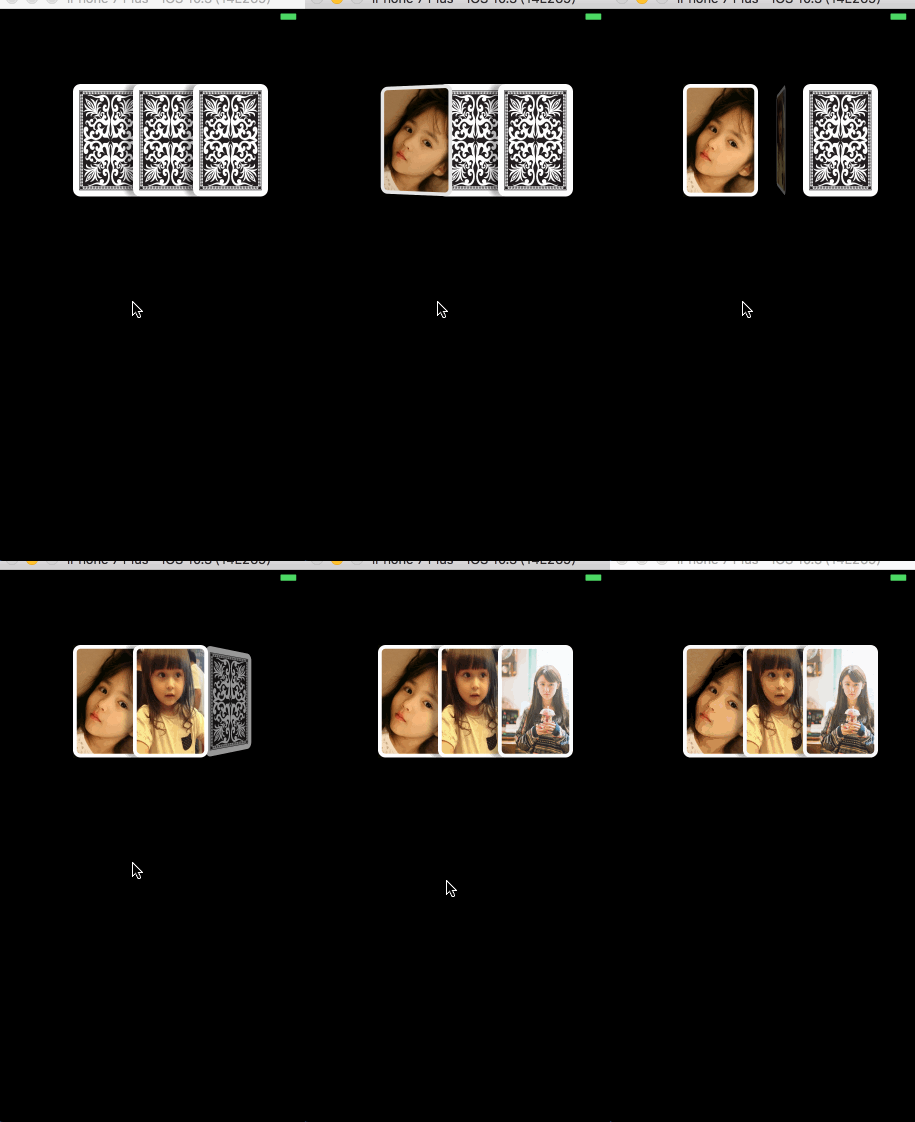
实现原理
实现原理就是创建三个扑克牌pockerView , 先在扑克牌上添加一个imageview,作为牌的背面。然后实现翻转动画,在翻转的时候将imageview移除,添加另一个imageview作为正面。
核心代码:
方法一: 翻转动画,内部实现还是方法二
+ (void)transitionWithView:(UIView *)view duration:(NSTimeInterval)duration options:(UIViewAnimationOptions)options animations:(void (^ __nullable)(void))animations completion:(void (^ __nullable)(BOOL finished))completion NS_AVAILABLE_IOS(4_0);
方法二 :UIView动画
[UIView beginAnimations:@"aa" context:nil];
 [UIView setAnimationDuration:_duration];
 [UIView setAnimationCurve:UIViewAnimationCurveLinear];
 [view.imgview1 removeFromSuperview];
 [view addSubview:view.imgview2];
 [UIView setAnimationTransition:UIViewAnimationTransitionFlipFromLeft forView:view cache:NO];
 [UIView commitAnimations];
完整代码:
ViewController.m文件代码
#import "ViewController.h"
#import "PockerView.h"
@interface ViewController ()
// 记录翻第几张牌
@property(nonatomic,assign)NSInteger index;
// 动画时间
@property(nonatomic,assign)CGFloat duration;
@end

@implementation ViewController


- (void)viewDidLoad {
 [super viewDidLoad];

 self.view.backgroundColor = [UIColor blackColor];
 _duration = 0.5;
 _index = 0;
 NSArray *arr = @[@"2.jpg",@"3.jpg",@"4.jpg"];
 // 循环创建3张扑克牌
 for (int i = 0; i < 3; i++) {
  PockerView *pocker = [[PockerView alloc]initWithFrame:CGRectMake(100 + 80 * i, 100, 100, 150) imageName:arr[i]];
  pocker.tag = 1000 + i;
  [self.view addSubview:pocker];
 }
}


// 点击空白处触发
- (void)touchesBegan:(NSSet<UITouch *> *)touches withEvent:(UIEvent *)event{
 // 执行动画
 [self executeAnimation];
}


// 执行动画
- (void)executeAnimation{
 // 根据tag值取到扑克牌
 PockerView *pocker = [self.view viewWithTag:1000+ _index];
 // 方法一
 [self animationWithView:pocker];
 // 方法二
// [self rotateWithView:pocker];
}

// 翻牌动画方法一(内部实现还是方法二)
- (void)animationWithView:(PockerView *)view{
 // 延时方法 正在翻转的牌翻转一半的时候把它移到视图最上面来
 [self performSelector:@selector(delayAction:) withObject:view afterDelay:_duration / 2];

 // 翻转动画
 UIViewAnimationOptions option = UIViewAnimationOptionTransitionFlipFromLeft;
 [UIView transitionWithView:view      duration:_duration
      options:option
     animations:^ {
      [view.imgview1 removeFromSuperview];
      [view addSubview:view.imgview2];
     }
     completion:^(BOOL finished){
      _index++;
      if (_index < 3) {
       [self executeAnimation];
      }
 }];
}

// 延时方法
- (void)delayAction:(UIView *)view{
 [self.view bringSubviewToFront:view];
}


- (void)delayAction2{
 _index++;
 if (_index < 3) {
  [self executeAnimation];
 }
}


// 方法二
- (void)rotateWithView:(PockerView *)view{

 [self performSelector:@selector(delayAction:) withObject:view afterDelay:_duration / 2];
 [self performSelector:@selector(delayAction2) withObject:nil afterDelay:_duration];
 [UIView beginAnimations:@"aa" context:nil];
 [UIView setAnimationDuration:_duration];
 [UIView setAnimationCurve:UIViewAnimationCurveLinear];
 [view.imgview1 removeFromSuperview];
 [view addSubview:view.imgview2];
 [UIView setAnimationTransition:UIViewAnimationTransitionFlipFromLeft forView:view cache:NO];
 [UIView commitAnimations];
}
@end
PockerView.h文件代码
//
// PockerView.h
// 翻牌
//
// Created by 斌 on 2017/4/20.
// Copyright © 2017年 斌. All rights reserved.
//

#import <UIKit/UIKit.h>

@interface PockerView : UIView

@property(nonatomic,strong)UIImageView *imgview1;
@property(nonatomic,strong)UIImageView *imgview2;

- (instancetype)initWithFrame:(CGRect)frame imageName:(NSString *)imageName;

@end
PockerView.m文件代码
//
// PockerView.m
// 翻牌
//
// Created by 斌 on 2017/4/20.
// Copyright © 2017年 斌. All rights reserved.
//

#import "PockerView.h"

@implementation PockerView

- (instancetype)initWithFrame:(CGRect)frame imageName:(NSString *)imageName{
 self = [super initWithFrame:frame];
 if (self) {

  // 设置阴影
  self.layer.shadowColor = [UIColor blackColor].CGColor;
  self.layer.shadowOffset = CGSizeMake(-10, 0);
  self.layer.shadowOpacity = 0.3;

  // 牌的背面
  self.imgview1 = [[UIImageView alloc] initWithFrame:CGRectMake(0, 0, frame.size.width, frame.size.height)];
  _imgview1.backgroundColor = [UIColor redColor];
  _imgview1.image = [UIImage imageNamed:@"1.jpeg"];
  [self addSubview:_imgview1];
  self.imgview1.layer.cornerRadius = 10;
  self.imgview1.clipsToBounds = YES;
  self.imgview1.layer.borderWidth = 5;
  self.imgview1.layer.borderColor = [[UIColor whiteColor] CGColor];

  // 牌的正面
  self.imgview2 = [[UIImageView alloc] initWithFrame:CGRectMake(0, 0, frame.size.width, frame.size.height)];
  _imgview2.backgroundColor = [UIColor redColor];
  _imgview2.image = [UIImage imageNamed:imageName];
  self.imgview2.layer.cornerRadius = 10;
  self.imgview2.clipsToBounds = YES;
  self.imgview2.layer.borderWidth = 5;
  self.imgview2.layer.borderColor = [[UIColor whiteColor] CGColor];
 }
 return self;
}
@end
github链接地址:https://github.com/jiangbin1993/pockerRotateAnimation.git
本地下载地址:http://xiazai.jb51.net/201707/yuanma/pockerRotateAnimation(jb51.net).rar
总结
以上就是这篇文章的全部内容,希望本文的内容对大家的学习或者工作能带来一定的帮助,如果有疑问大家可以留言交流,谢谢大家对脚本之家的支持。
相关文章
 这篇文章主要介绍了IOS 实现一个死锁导致 UI 假死的例子的相关资料,需要的朋友可以参考下2016-12-12
 这篇文章主要为大家详细介绍了iOS自定义日期和数据源选择控件,具有一定的参考价值,感兴趣的小伙伴们可以参考一下2019-04-04
 这篇文章主要介绍了一行代码实现 UIView 镂空效果,这是一种实现 UIView 镂空效果的方案,可以快速实现任意形状的镂空、文字的镂空、带镂空的毛玻璃效果等。需要的朋友可以参考下2018-11-11
 直播的采集由采集的设备(摄像头、话筒)不同分为视频采集和音频采集,本篇文章会分别介绍,需要的朋友一起来看下吧2016-12-12
 这篇文章主要介绍了设计模式中的原型模式在iOS应用开发中的作用,示例代码为传统的Objective-C,需要的朋友可以参考下2016-04-04
 这篇文章主要为大家介绍了移动web开发技能之touch事件详解,有需要的朋友可以借鉴参考下,希望能够有所帮助,祝大家多多进步,早日升职加薪2022-09-09
 这篇文章主要介绍了iOS开发中的几个手势操作实例分享,编写代码为传统的Objective-C,需要的朋友可以参考下2015-09-09
 这篇文章主要介绍了iOS开发之手动布局子视图,从入门到精通帮助大家更好的开发iOS项目,感兴趣的小伙伴们可以参考一下2016-08-08
 在编码过程中,数据的处理是必要的。众多数据中,NSString、NSData、NSArray、 NSDictionary等数据类型是常用的,对付它们容易,但是在多个数据类型之间转换就需要技巧了。本文主要给大家介绍ios中基础数据类型的转换,有需要的下面来一起看看吧。2016-11-11
 这篇文章主要为大家详细介绍了iOS键盘自适应弹出效果,具有一定的参考价值,感兴趣的小伙伴们可以参考一下2017-06-06
最新评论