

Java 小游戏开发之俄罗斯方块
更新时间:2017年07月22日 10:13:35 投稿:lqh
这篇文章主要介绍了Java 小游戏开发之俄罗斯方块的相关资料,这里实现俄罗斯方块的实例和实现效果给大家看下,学习java基础的朋友的好资料,需要的朋友可以参考下
Java项目 俄罗斯方块
一、心得
二、游戏实例
游戏截图
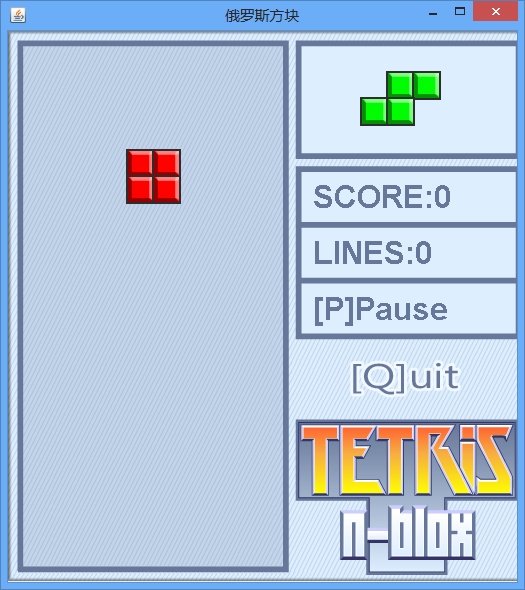
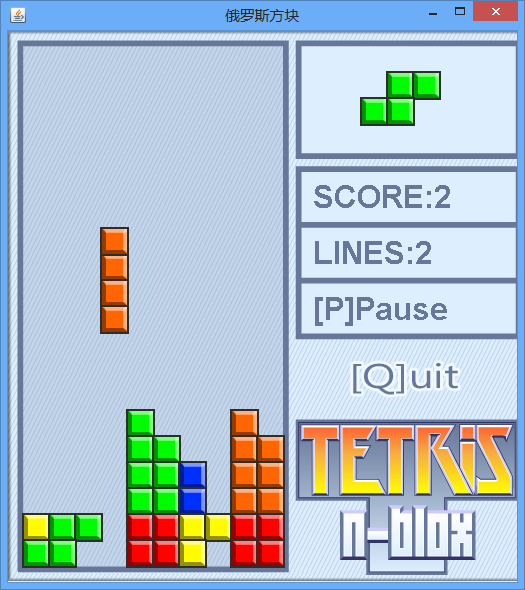
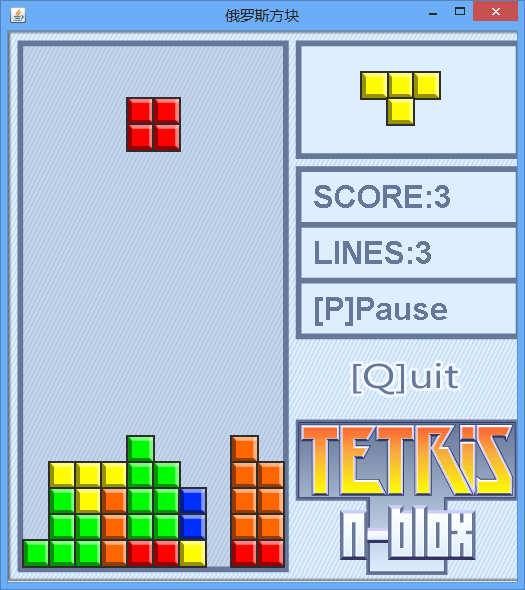
目录结构
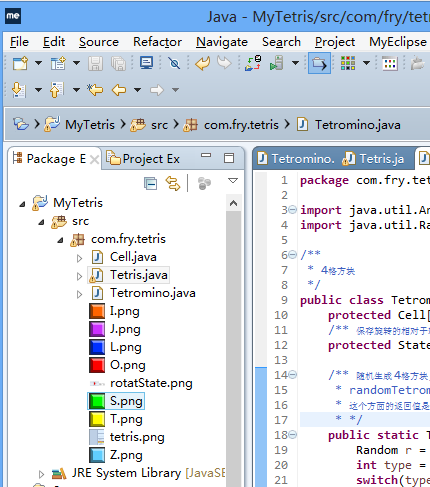
三、代码
1、主界面 Tetris.java
package com.fry.tetris;

import java.util.Arrays;
import java.util.Random;

/**
 * 4格方块
 */
public class Tetromino {
  protected Cell[] cells = new Cell[4];
  /** 保存旋转的相对于轴位置状态 */
  protected State[] states;

  /** 随机生成 4格方块, 使用简单工厂方法模式!
   * randomTetromino 随机生成一个四格方块
   * 这个方面的返回值是多态的!
   * */
  public static Tetromino randomTetromino(){
    Random r = new Random();
    int type = r.nextInt(7);
    switch(type){
    case 0: return new T();
    case 1: return new I();
    case 2: return new J();
    case 3: return new L();
    case 4: return new O();
    case 5: return new S();
    case 6: return new Z();
    }
    return null;
  }

  public Cell[] getCells() {
    return cells;
  }

  /** 下落 */
  public void softDrop(){
    for(int i=0; i<cells.length; i++){
      cells[i].moveDown();
    }
  }
  public void moveRight(){
    //System.out.println("moveRight()");
    for(int i=0; i<cells.length; i++){
      this.cells[i].moveRight();
    }
  }
  public void moveLeft(){
    for(int i=0; i<cells.length; i++){
      cells[i].moveLeft();
    }
  }
  private int index = 100000;
  /** 在 Tetromino 上添加方法 */
  public void rotateRight() {
    index++;//index = 10001
    // index % states.length = 10001 % 4 = 1
    State s = states[index%states.length];//s1
    // [0] + s1 = [1]
    Cell o = cells[0];//获取当前的轴
    //轴与相对位置的和作为旋转以后的格子位置
    cells[1].setRow(o.getRow()+s.row1);
    cells[1].setCol(o.getCol()+s.col1);
    cells[2].setRow(o.getRow()+s.row2);
    cells[2].setCol(o.getCol()+s.col2);
    cells[3].setRow(o.getRow()+s.row3);
    cells[3].setCol(o.getCol()+s.col3);
  }
  /** 在 Tetromino 上添加方法 */
  public void rotateLeft() {
    index--;//index = 10001
    // index % states.length = 10001 % 4 = 1
    State s = states[index%states.length];//s1
    // [0] + s1 = [1]
    Cell o = cells[0];//获取当前的轴
    cells[1].setRow(o.getRow()+s.row1);
    cells[1].setCol(o.getCol()+s.col1);
    cells[2].setRow(o.getRow()+s.row2);
    cells[2].setCol(o.getCol()+s.col2);
    cells[3].setRow(o.getRow()+s.row3);
    cells[3].setCol(o.getCol()+s.col3);
  }

  @Override
  public String toString() {
    return Arrays.toString(cells);
  }

  /** Tetromino 类中添加的 内部类 用于记录旋转状态 */
  protected class State{
    int row0,col0,row1,col1,row2,col2,row3,col3;

    public State(int row0, int col0, int row1, int col1,
        int row2, int col2,
        int row3, int col3) {
      this.row0 = row0;
      this.col0 = col0;
      this.row1 = row1;
      this.col1 = col1;
      this.row2 = row2;
      this.col2 = col2;
      this.row3 = row3;
      this.col3 = col3;
    }
  }

}//Tetromino 类的结束
class T extends Tetromino{
  public T() {
    cells[0] = new Cell(0, 4, Tetris.T);
    cells[1] = new Cell(0, 3, Tetris.T);
    cells[2] = new Cell(0, 5, Tetris.T);
    cells[3] = new Cell(1, 4, Tetris.T);
    states = new State[]{
        new State(0,0, 0,-1, 0,1, 1, 0),
        new State(0,0, -1,0, 1,0, 0,-1),
        new State(0,0, 0,1, 0,-1, -1,0),
        new State(0,0, 1,0, -1,0, 0,1)};
  }
}
class I extends Tetromino{
  public I() {
    cells[0] = new Cell(0, 4, Tetris.I);
    cells[1] = new Cell(0, 3, Tetris.I);
    cells[2] = new Cell(0, 5, Tetris.I);
    cells[3] = new Cell(0, 6, Tetris.I);
    states = new State[]{
        new State(0,0, 0,1, 0,-1, 0,-2),
        new State(0,0, -1,0, 1,0,2,0)};
  }
}
class L extends Tetromino {
  public L() {
    cells[0] = new Cell(0, 4, Tetris.L);
    cells[1] = new Cell(0, 3, Tetris.L);
    cells[2] = new Cell(0, 5, Tetris.L);
    cells[3] = new Cell(1, 3, Tetris.L);
    states = new State[]{
        new State(0,0, 0,-1, 0,1, 1,-1 ),
        new State(0,0, -1,0, 1,0, -1,-1),
        new State(0,0, 0,1, 0,-1, -1,1),
        new State(0,0, 1,0, -1,0, 1,1)};
  }
}

class J extends Tetromino {
  public J() {
    cells[0] = new Cell(0, 4, Tetris.J);
    cells[1] = new Cell(0, 3, Tetris.J);
    cells[2] = new Cell(0, 5, Tetris.J);
    cells[3] = new Cell(1, 5, Tetris.J);
    states = new State[]{
        new State(0,0, 0,-1, 0,1, 1,1),
        new State(0,0, -1,0, 1,0, 1,-1),
        new State(0,0, 0,1, 0,-1, -1,-1),
        new State(0,0, 1,0, -1,0, -1,1 )};
  }
}

class S extends Tetromino {
  public S() {
    cells[0] = new Cell(0, 4, Tetris.S);
    cells[1] = new Cell(0, 5, Tetris.S);
    cells[2] = new Cell(1, 3, Tetris.S);
    cells[3] = new Cell(1, 4, Tetris.S);
    states = new State[]{
      new State(0,0, 0,1, 1,-1, 1,0 ),
      new State(0,0, -1,0, 1,1, 0,1 )};
  }
}

class Z extends Tetromino {
  public Z() {
    cells[0] = new Cell(1, 4, Tetris.Z);
    cells[1] = new Cell(0, 3, Tetris.Z);
    cells[2] = new Cell(0, 4, Tetris.Z);
    cells[3] = new Cell(1, 5, Tetris.Z);
    states = new State[]{
        new State(0,0, -1,-1, -1,0, 0,1 ),
        new State(0,0, -1,1, 0,1, 1,0 )};
  }
}

class O extends Tetromino {
  public O() {
    cells[0] = new Cell(0, 4, Tetris.O);
    cells[1] = new Cell(0, 5, Tetris.O);
    cells[2] = new Cell(1, 4, Tetris.O);
    cells[3] = new Cell(1, 5, Tetris.O);
    states = new State[]{
        new State(0,0, 0,1, 1,0, 1,1 ),
        new State(0,0, 0,1, 1,0, 1,1 )};
  }
}
二、Cell.java
package com.fry.tetris;

import java.awt.Image;

/**
 * 格子
 * 每一个小格子,就有所在的行 列 和图片
 */
public class Cell {
  private int row;
  private int col;
  //private int color;
  private Image image;//格子的贴图

  public Cell() {
  }

  public Cell(int row, int col, Image image) {
    super();
    this.row = row;
    this.col = col;
    this.image = image;
  }

  public int getRow() {
    return row;
  }

  public void setRow(int row) {
    this.row = row;
  }

  public int getCol() {
    return col;
  }

  public void setCol(int col) {
    this.col = col;
  }


  public Image getImage() {
    return image;
  }

  public void setImage(Image image) {
    this.image = image;
  }

  public void moveRight(){
    col++;
    //System.out.println("Cell moveRight()" + col);
  }

  public void moveLeft(){
    col--;
  }

  public void moveDown(){
    row++;
  }

  @Override
  public String toString() {
    return "["+row+","+col+"]";
  }
}
三、功能实现 Tetromino.java
package com.fry.tetris;

import java.util.Arrays;
import java.util.Random;

/**
 * 4格方块
 */
public class Tetromino {
  protected Cell[] cells = new Cell[4];
  /** 保存旋转的相对于轴位置状态 */
  protected State[] states;

  /** 随机生成 4格方块, 使用简单工厂方法模式!
   * randomTetromino 随机生成一个四格方块
   * 这个方面的返回值是多态的!
   * */
  public static Tetromino randomTetromino(){
    Random r = new Random();
    int type = r.nextInt(7);
    switch(type){
    case 0: return new T();
    case 1: return new I();
    case 2: return new J();
    case 3: return new L();
    case 4: return new O();
    case 5: return new S();
    case 6: return new Z();
    }
    return null;
  }

  public Cell[] getCells() {
    return cells;
  }

  /** 下落 */
  public void softDrop(){
    for(int i=0; i<cells.length; i++){
      cells[i].moveDown();
    }
  }
  public void moveRight(){
    //System.out.println("moveRight()");
    for(int i=0; i<cells.length; i++){
      this.cells[i].moveRight();
    }
  }
  public void moveLeft(){
    for(int i=0; i<cells.length; i++){
      cells[i].moveLeft();
    }
  }
  private int index = 100000;
  /** 在 Tetromino 上添加方法 */
  public void rotateRight() {
    index++;//index = 10001
    // index % states.length = 10001 % 4 = 1
    State s = states[index%states.length];//s1
    // [0] + s1 = [1]
    Cell o = cells[0];//获取当前的轴
    //轴与相对位置的和作为旋转以后的格子位置
    cells[1].setRow(o.getRow()+s.row1);
    cells[1].setCol(o.getCol()+s.col1);
    cells[2].setRow(o.getRow()+s.row2);
    cells[2].setCol(o.getCol()+s.col2);
    cells[3].setRow(o.getRow()+s.row3);
    cells[3].setCol(o.getCol()+s.col3);
  }
  /** 在 Tetromino 上添加方法 */
  public void rotateLeft() {
    index--;//index = 10001
    // index % states.length = 10001 % 4 = 1
    State s = states[index%states.length];//s1
    // [0] + s1 = [1]
    Cell o = cells[0];//获取当前的轴
    cells[1].setRow(o.getRow()+s.row1);
    cells[1].setCol(o.getCol()+s.col1);
    cells[2].setRow(o.getRow()+s.row2);
    cells[2].setCol(o.getCol()+s.col2);
    cells[3].setRow(o.getRow()+s.row3);
    cells[3].setCol(o.getCol()+s.col3);
  }

  @Override
  public String toString() {
    return Arrays.toString(cells);
  }

  /** Tetromino 类中添加的 内部类 用于记录旋转状态 */
  protected class State{
    int row0,col0,row1,col1,row2,col2,row3,col3;

    public State(int row0, int col0, int row1, int col1,
        int row2, int col2,
        int row3, int col3) {
      this.row0 = row0;
      this.col0 = col0;
      this.row1 = row1;
      this.col1 = col1;
      this.row2 = row2;
      this.col2 = col2;
      this.row3 = row3;
      this.col3 = col3;
    }
  }

}//Tetromino 类的结束
class T extends Tetromino{
  public T() {
    cells[0] = new Cell(0, 4, Tetris.T);
    cells[1] = new Cell(0, 3, Tetris.T);
    cells[2] = new Cell(0, 5, Tetris.T);
    cells[3] = new Cell(1, 4, Tetris.T);
    states = new State[]{
        new State(0,0, 0,-1, 0,1, 1, 0),
        new State(0,0, -1,0, 1,0, 0,-1),
        new State(0,0, 0,1, 0,-1, -1,0),
        new State(0,0, 1,0, -1,0, 0,1)};
  }
}
class I extends Tetromino{
  public I() {
    cells[0] = new Cell(0, 4, Tetris.I);
    cells[1] = new Cell(0, 3, Tetris.I);
    cells[2] = new Cell(0, 5, Tetris.I);
    cells[3] = new Cell(0, 6, Tetris.I);
    states = new State[]{
        new State(0,0, 0,1, 0,-1, 0,-2),
        new State(0,0, -1,0, 1,0,2,0)};
  }
}
class L extends Tetromino {
  public L() {
    cells[0] = new Cell(0, 4, Tetris.L);
    cells[1] = new Cell(0, 3, Tetris.L);
    cells[2] = new Cell(0, 5, Tetris.L);
    cells[3] = new Cell(1, 3, Tetris.L);
    states = new State[]{
        new State(0,0, 0,-1, 0,1, 1,-1 ),
        new State(0,0, -1,0, 1,0, -1,-1),
        new State(0,0, 0,1, 0,-1, -1,1),
        new State(0,0, 1,0, -1,0, 1,1)};
  }
}

class J extends Tetromino {
  public J() {
    cells[0] = new Cell(0, 4, Tetris.J);
    cells[1] = new Cell(0, 3, Tetris.J);
    cells[2] = new Cell(0, 5, Tetris.J);
    cells[3] = new Cell(1, 5, Tetris.J);
    states = new State[]{
        new State(0,0, 0,-1, 0,1, 1,1),
        new State(0,0, -1,0, 1,0, 1,-1),
        new State(0,0, 0,1, 0,-1, -1,-1),
        new State(0,0, 1,0, -1,0, -1,1 )};
  }
}

class S extends Tetromino {
  public S() {
    cells[0] = new Cell(0, 4, Tetris.S);
    cells[1] = new Cell(0, 5, Tetris.S);
    cells[2] = new Cell(1, 3, Tetris.S);
    cells[3] = new Cell(1, 4, Tetris.S);
    states = new State[]{
      new State(0,0, 0,1, 1,-1, 1,0 ),
      new State(0,0, -1,0, 1,1, 0,1 )};
  }
}

class Z extends Tetromino {
  public Z() {
    cells[0] = new Cell(1, 4, Tetris.Z);
    cells[1] = new Cell(0, 3, Tetris.Z);
    cells[2] = new Cell(0, 4, Tetris.Z);
    cells[3] = new Cell(1, 5, Tetris.Z);
    states = new State[]{
        new State(0,0, -1,-1, -1,0, 0,1 ),
        new State(0,0, -1,1, 0,1, 1,0 )};
  }
}

class O extends Tetromino {
  public O() {
    cells[0] = new Cell(0, 4, Tetris.O);
    cells[1] = new Cell(0, 5, Tetris.O);
    cells[2] = new Cell(1, 4, Tetris.O);
    cells[3] = new Cell(1, 5, Tetris.O);
    states = new State[]{
        new State(0,0, 0,1, 1,0, 1,1 ),
        new State(0,0, 0,1, 1,0, 1,1 )};
  }
}
以上就是java实现俄罗斯方块的实例,如有疑问请留言或者到本站社区讨论,感谢阅读,希望能帮助到大家,谢谢大家对本站的支持!
相关文章
 这篇文章主要介绍了java 教你如何给你的头像添加一个好看的国旗,文中通过示例代码介绍的非常详细,对大家的学习或者工作具有一定的参考学习价值,需要的朋友们下面随着小编来一起学习学习吧2019-09-09
 在微服务架构中,服务间的调用是不可或缺的环节,本文主要介绍了Spring Boot调用外部接口的几种方式,具有一定的参考价值,感兴趣的可以了解一下2024-05-05
 本文主要介绍了SpringBoot集成slf4j2日志配置的实现示例,文中通过示例代码介绍的非常详细,对大家的学习或者工作具有一定的参考学习价值,需要的朋友们下面随着小编来一起学习学习吧2024-08-08
 下面小编就为大家带来一篇浅析Java编程中类和对象的定义。小编觉得挺不错的,现在分享给大家,也给大家做个参考。一起跟随小编过来看看吧,祝大家游戏愉快哦2016-05-05
阿里的Easyexcel读取Excel文件的方法(最新版本)
这篇文章主要介绍了阿里的Easyexcel读取Excel文件(最新版本)的方法,本文通过示例代码给大家介绍的非常详细,对大家的学习或工作具有一定的参考借鉴价值,需要的朋友可以参考下2022-12-12 这篇文章主要为大家详细介绍了Java如何使用定时器监听数据变化,当满足某个条件时(例如没有数据更新)自动执行某项任务,有兴趣的可以了解下2023-11-11
 在使用ireport的过程中,因为各种功能都要百度,但是大家使用的例子又千差万别让人很苦恼,所以用一个简单例子贯穿的展示一下ireport的常见功能2021-10-10
网关Spring Cloud Gateway HTTP超时配置问题
这篇文章主要介绍了网关Spring Cloud Gateway HTTP超时配置问题,具有很好的参考价值,希望对大家有所帮助,如有错误或未考虑完全的地方,望不吝赐教2024-01-01
spring boot常见get 、post请求参数处理、参数注解校验、参数自定义注解校验问题解析
这篇文章主要介绍了spring boot常见get 、post请求参数处理、参数注解校验、参数自定义注解校验,本文通过示例代码给大家介绍的非常详细,对大家的学习或工作具有一定的参考借鉴价值,需要的朋友可以参考下2023-09-09 这篇文章主要介绍了Java 爬虫服务器被屏蔽的解决方案,文中通过示例代码介绍的非常详细,对大家的学习或者工作具有一定的参考学习价值,需要的朋友可以参考下2019-10-10
最新评论