

Android中CheckBox复选框控件使用方法详解
CheckBox复选框控件使用方法,具体内容如下
一、简介
1、

2、类结构图

二、CheckBox复选框控件使用方法
这里是使用java代码在LinearLayout里面添加控件
1、新建LinearLayout布局
2、建立CheckBox的XML的Layout文件
3、通过View.inflate()方法创建CheckBox
CheckBox checkBox=(CheckBox) View.inflate(this, R.layout.checkbox, null);
4、通过LinearLayout的addView方法添加CheckBox
ll_checkBoxList.addView(checkBox);
5、通过List<CheckBox>完成输出功能
for(CheckBox checkBox:checkBoxList)
三、代码实例
1、效果图:
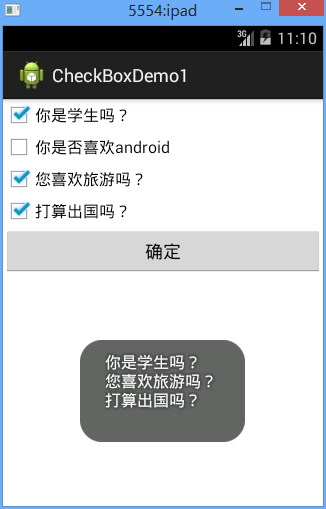
2、代码
fry.Activity01
package fry;

import java.util.ArrayList;
import java.util.List;

import com.example.CheckBoxDemo1.R;

import android.app.Activity;
import android.os.Bundle;
import android.view.View;
import android.view.View.OnClickListener;
import android.widget.Button;
import android.widget.CheckBox;
import android.widget.LinearLayout;
import android.widget.Toast;

public class Activity01 extends Activity implements OnClickListener{
  private List<CheckBox> checkBoxList=new ArrayList<CheckBox>();
  private LinearLayout ll_checkBoxList;
  private Button btn_ok;
//  CheckBox复选框控件使用方法
//  这里是使用java代码在LinearLayout里面添加控件
//  1、新建LinearLayout布局
//  2、建立CheckBox的XML的Layout文件
//  3、通过View.inflate()方法创建CheckBox
//  4、通过LinearLayout的addView方法添加CheckBox
//  5、通过List<CheckBox>完成输出功能
  @Override
  protected void onCreate(Bundle savedInstanceState) {
    // TODO Auto-generated method stub
    super.onCreate(savedInstanceState);
    setContentView(R.layout.activity01);
    ll_checkBoxList=(LinearLayout) findViewById(R.id.ll_CheckBoxList);
    btn_ok=(Button) findViewById(R.id.btn_ok);
    String[] strArr={"你是学生吗?","你是否喜欢android","您喜欢旅游吗?","打算出国吗?"};
    for(String str:strArr){
      CheckBox checkBox=(CheckBox) View.inflate(this, R.layout.checkbox, null);
      checkBox.setText(str);
      ll_checkBoxList.addView(checkBox);
      checkBoxList.add(checkBox);
    }
    btn_ok.setOnClickListener(this);
  }
  @Override
  public void onClick(View v) {
    // TODO Auto-generated method stub
    String str="";
    for(CheckBox checkBox:checkBoxList){
      if(checkBox.isChecked()){
        str+=checkBox.getText().toString()+"\n";
      }
    }
    Toast.makeText(this, str, Toast.LENGTH_SHORT).show();
  }
}
/CheckBoxDemo1/res/layout/activity01.xml
<?xml version="1.0" encoding="utf-8"?>
<LinearLayout xmlns:android="http://schemas.android.com/apk/res/android"
  android:layout_width="match_parent"
  android:layout_height="match_parent"
  android:orientation="vertical" >

  <LinearLayout
    android:id="@+id/ll_CheckBoxList"
    android:layout_width="match_parent"
    android:layout_height="wrap_content"
    android:orientation="vertical"
    >


  </LinearLayout>

  <Button
    android:id="@+id/btn_ok"
    android:layout_width="match_parent"
    android:layout_height="wrap_content"
    android:text="确定"
    />


</LinearLayout>
/CheckBoxDemo1/res/layout/checkbox.xml
<?xml version="1.0" encoding="utf-8"?>
<CheckBox xmlns:android="http://schemas.android.com/apk/res/android"
  android:layout_width="match_parent"
  android:layout_height="match_parent"
  android:orientation="vertical" >


</CheckBox>
四、收获
1、 View.inflate(this, R.layout.checkbox, null)方法里面的checkbox的XML
<?xml version="1.0" encoding="utf-8"?>
<CheckBox xmlns:android="http://schemas.android.com/apk/res/android"
  android:layout_width="match_parent"
  android:layout_height="match_parent"
  android:orientation="vertical" >
</CheckBox>
2、用代码在LinearLayout中添加CheckBox方法
1)通过View.inflate()方法创建CheckBox
CheckBox checkBox=(CheckBox) View.inflate(this, R.layout.checkbox, null);
2)通过LinearLayout的addView方法添加CheckBox
ll_checkBoxList.addView(checkBox);
3、List<CheckBox>的创建
private List<CheckBox> checkBoxList=new ArrayList<CheckBox>();
4、for(CheckBox checkBox:checkBoxList)
遍历
5、list类结构图

以上就是本文的全部内容,希望对大家的学习有所帮助,也希望大家多多支持脚本之家。
相关文章
 这篇文章主要为大家详细介绍了android事件总线EventBus3.0使用方法,具有一定的参考价值,感兴趣的小伙伴们可以参考一下2017-11-11
Android笔记之:在ScrollView中嵌套ListView的方法
本篇文章是对Android中在ScrollView中嵌套ListView的方法进行了详细的分析介绍,需要的朋友参考下2013-05-05
Android Studio设置颜色拾色器工具Color Picker教程
这篇文章主要介绍了Android Studio设置颜色拾色器工具Color Picker教程,具有很好的参考价值,希望对大家有所帮助。一起跟随小编过来看看吧2020-03-03 大家好,本篇文章主要讲的是Android中ListView使用示例介绍,感兴趣的同学赶快来看一看吧,对你有帮助的话记得收藏一下,方便下次浏览2022-01-01
 今天小编就为大家分享一篇解决android 显示内容被底部导航栏遮挡的问题,具有很好的参考价值,希望对大家有所帮助。一起跟随小编过来看看吧2018-07-07
Android uses-permission权限列表中文注释版
Android有一个精心设计的安全模型。每一个应用都有其自己Linux用户和群组,在单独的进程和VM上运行,不能影响到其他应用2014-05-05 这篇文章主要为大家详细介绍了Android使用AlertDialog创建对话框的方法料,具有一定的参考价值,感兴趣的小伙伴们可以参考一下2017-12-12
 本文我们将一起复习一下ViewGroup的测量布局方式。然后会以入门级的 FlowLayout 为例,来看看流式布局是如何测量与布局的,感兴趣的可以了解一下2022-12-12
 从5月27日开始,谷歌(Google)在华的几乎所有的服务都处于无法使用的状态,除了搜索引擎遭到屏蔽之外,谷歌的邮箱(Gmail)、日历(Calendar)、翻译(Translate)、地图(Maps)、分析(Analytics)和Google AdSense等产品也受到了影响。同时安装安卓环境的时候同样容易出现问题2014-06-06
kotlin android extensions 插件实现示例详解
这篇文章主要为大家介绍了kotlin android extensions 插件实现示例详解,有需要的朋友可以借鉴参考下,希望能够有所帮助,祝大家多多进步,早日升职加薪2022-10-10
最新评论