

ExpandableListView实现手风琴效果
本文实例为大家分享了ExpandableListView实现手风琴效果的具体代码,供大家参考,具体内容如下
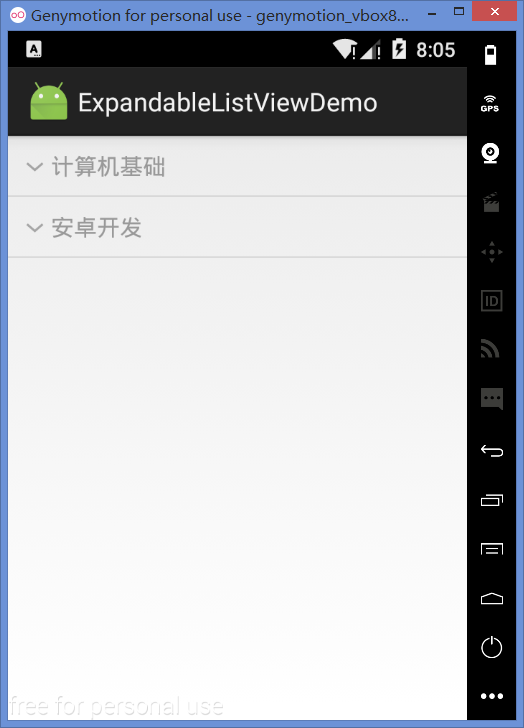
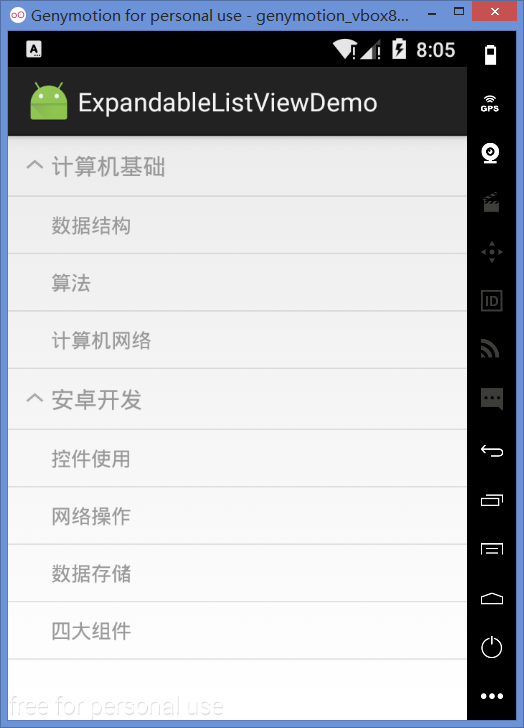
1. 效果示例图

2. 创建方法
(1)第一种方法与ListView等普通控件一样,直接在布局文件中添加ExpandableListView控件即可。
(2)第二种方法则是创建一个Activity继承自ExpandableListActivity,而后通过getExpandableListView()方法可获得一个ExpandableListView对象。
第二种方法仅适用于一个页面中只有一个ExpandableListView的情况。继承的Activity不需要再调用setContentView()方法,在ExpandableListActivity中已经关联了一个系统定义的布局文件。
3. 部分属性和点击事件
android:groupIndicator、android:childIndicator:组条目和子条目前面的图标,默认值为箭头,可设置自定义图片资源。若不显示该图标,则设置为@null。
android:divider、android:childDivider:组和子条目的分隔线。
ExpandableListView的点击事件有两个,分别对应组和子条目的点击事件:
设置组的点击事件:setOnGroupClickListener(OnGroupClickListener listener)
设置子条目的点击事件:setOnChildClickListener(OnChildClickListener listener)
5. 适配器
根据数据源的不同,可使用的适配器有两个:BaseExpandableListAdapter和CursorTreeAdapter,其中,CursorTreeAdapter用于数据源为Cursor对象的情况下,其它情况则使用BaseExpandableListAdapter。
(1)BaseExpandableListAdapter需要重写的方法:
getGroup():从数据源中获取组的数据内容。
getGroupCount():获取组的总数。
getGroupId():获取组的ID。
getGroupView():获取组的视图。
getChild():从数据源中获取子条目的内容。
getChildCount():获取指定组中的子条目总数,并非全部的子条目。
getChildId():获取子条目的ID。
getChildView():获取子条目的视图
hasStableIds():判断id对应的条目是否已经绘制,用于优化列表。
isChildSelectable():子条目是否允许点击,若返回false,则子条目点击事件无效。
(2)CursorTreeAdapter需要重写的方法:
CursorTreeAdapter():构造方法传入组的Cursor对象。
getChildrenCursor():传入组的Cursor对象,获取相应的组的子条目的Cursor对象。
newGroupView():创建组的视图,返回一个新的视图。
bindGroupView():在这里绑定组视图的数据内容,第一个参数即newGroupView()方法的返回值。
newChildView():创建子条目的视图。
bindChildView():绑定子条目视图的数据内容。
6. 简单范例
实现效果图中的例子。
布局:
<?xml version="1.0" encoding="utf-8"?>
<LinearLayout xmlns:android="http://schemas.android.com/apk/res/android"
  xmlns:tools="http://schemas.android.com/tools"
  android:layout_width="match_parent"
  android:layout_height="match_parent"
  tools:context="com.studying.expandablelistviewdemo.MainActivity">

  <ExpandableListView
    android:id="@+id/elv_local_data"
    android:layout_width="match_parent"
    android:layout_height="match_parent" />

</LinearLayout>
Activity:
public class MainActivity extends Activity {

  private ExpandableListView elv;

  @Override
  protected void onCreate(Bundle savedInstanceState) {
    super.onCreate(savedInstanceState);
    setContentView(R.layout.activity_main);

    elv = (ExpandableListView) findViewById(R.id.elv_local_data);
    MyBaseExpandableListAdapter adapter = new MyBaseExpandableListAdapter(this, LoadData.getGroupData(), LoadData.getChildData());
    elv.setAdapter(adapter);
  }
}
加载测试数据用的工具类:
public class LoadData {

  // 组的数据内容
  public static List<String> getGroupData() {
    List<String> groupDataList = new ArrayList<>();
    groupDataList.add("计算机基础");
    groupDataList.add("安卓开发");
    return groupDataList;
  }

  // 子条目的数据内容
  public static List<List<String>> getChildData() {
    List<List<String>> childDataList = new ArrayList<>();

    List<String> group1 = new ArrayList<>();
    group1.add("数据结构");
    group1.add("算法");
    group1.add("计算机网络");
    childDataList.add(group1);

    List<String> group2 = new ArrayList<>();
    group2.add("控件使用");
    group2.add("网络操作");
    group2.add("数据存储");
    group2.add("四大组件");
    childDataList.add(group2);

    return childDataList;
  }
}
适配器:
public class MyBaseExpandableListAdapter extends BaseExpandableListAdapter {

  private Context mContext;

  private List<String> groupName;
  private List<List<String>> childName;

  public MyBaseExpandableListAdapter(Context mContext, List<String> groupName, List<List<String>> childName) {
    this.mContext = mContext;
    this.groupName = groupName;
    this.childName = childName;
  }

  @Override
  public int getGroupCount() {
    return groupName.size();
  }

  @Override
  public long getGroupId(int groupPosition) {
    return groupPosition;
  }

  @Override
  public String getGroup(int groupPosition) {
    return groupName.get(groupPosition);
  }

  @Override
  public View getGroupView(int groupPosition, boolean isExpanded, View convertView, ViewGroup parent) {

    convertView = View.inflate(mContext, R.layout.item_group_name, null);

    TextView groupName = (TextView) convertView.findViewById(R.id.group_name);
    groupName.setText(getGroup(groupPosition));

    return convertView;
  }

  @Override
  public int getChildrenCount(int groupPosition) {
    return childName.get(groupPosition).size();
  }

  @Override
  public long getChildId(int groupPosition, int childPosition) {
    return childPosition;
  }

  @Override
  public String getChild(int groupPosition, int childPosition) {
    return childName.get(groupPosition).get(childPosition);
  }

  @Override
  public View getChildView(int groupPosition, int childPosition, boolean isLastChild, View convertView, ViewGroup parent) {

    convertView = View.inflate(mContext, R.layout.item_child_name, null);

    TextView childName = (TextView) convertView.findViewById(R.id.child_name);
    childName.setText(getChild(groupPosition, childPosition));

    return convertView;
  }

  @Override
  public boolean hasStableIds() {
    return false;
  }

  @Override
  public boolean isChildSelectable(int groupPosition, int childPosition) {
    return true;
  }
}
以上就是本文的全部内容,希望对大家的学习有所帮助,也希望大家多多支持脚本之家。
- Android之带group指示器的ExpandableListView(自写)
- Android ExpandableListView展开列表控件使用实例
- Android ExpandableListView长按事件的完美解决办法
- Android之IphoneTreeView带组指示器的ExpandableListView效果
- Android UI控件ExpandableListView基本用法详解
- Android中ExpandableListView的用法实例
- Android 关于ExpandableListView刷新问题的解决方法
- android使用ExpandableListView控件实现小说目录效果的例子
- Android改变ExpandableListView的indicator图标实现方法
- Android 关于ExpandableListView去掉里头分割线的方法
相关文章
 这篇文章主要为大家详细介绍了Android获取照片、裁剪图片、压缩图片,文中示例代码介绍的非常详细,具有一定的参考价值,感兴趣的小伙伴们可以参考一下2017-05-05
解决EditText、ListView以及GridView同时使用,输入法自动跳出来的方法
本篇文章是对在Android中EditText、ListView以及GridView同时使用,输入法自动跳出来的解决方法进行了详细的分析介绍,需要的朋友参考下2013-05-05 对于Android手机通常有很多不必要的预置软件,但是又无法卸载,占用桌面有很难受,所以本次使用adb工具来实现从电脑命令来卸载或停用软件,下面这篇文章主要给大家介绍了关于如何利用adb卸载手机预装软件(系统软件)的相关资料,需要的朋友可以参考下2022-09-09
 这篇文章主要介绍了Android中自定义一个View的方法,结合实例形式较为详细的分析了Android中自定义View的具体步骤与相关注意事项,需要的朋友可以参考下2016-07-07
解决Android Studio Design界面不显示layout控件的问题
这篇文章主要介绍了解决Android Studio Design界面不显示layout控件的问题,具有很好的参考价值,希望对大家有所帮助。一起跟随小编过来看看吧2020-03-03 这篇文章主要介绍了Kotlin多语言支持实现方法,在Android开发中,我们如何支持多语言APP呢,文中通过示例代码介绍的非常详细,对大家的学习或者工作具有一定的参考学习价值2023-02-02
 这篇文章要给大家分享的是Android原生绘图工具Paint,android中提供了类似的工具Canvas和Paint,分别对应画布和画笔,本文就来介绍Androi中的Paint,感兴趣的小伙伴一起来学习下面文章内容2021-09-09
Android利用RecyclerView实现全选、置顶和拖拽功能示例
列表控件可以说是我们绝大部分App中都会使用的,为了提升交互乐趣,我们经常需要在列表中加入置顶、拖拽等操作,下面这篇文章主要介绍了Android利用RecyclerView如何实现全选、置顶和拖拽功能的相关资料,需要的朋友可以参考借鉴,下面来一起看看吧。2017-04-04
Android神兵利器之Image Asset Studio的实现
这篇文章主要介绍了Android神兵利器之Image Asset Studio的实现,文中通过示例代码介绍的非常详细,对大家的学习或者工作具有一定的参考学习价值,需要的朋友们下面随着小编来一起学习学习吧2020-06-06 这篇文章主要为大家详细介绍了一个简单的toolabar结合drawlayout的使用方法,具有一定的参考价值,感兴趣的小伙伴们可以参考一下2017-10-10
最新评论