

Vue实现typeahead组件功能(非常靠谱)
更新时间:2017年08月26日 16:18:42 作者:crper
本文给大家分享通过Vue写一个挺靠谱的typeahead组件功能,非常不错,具有参考借鉴价值,需要的的朋友参考下吧
前言
之前那个typeahead写的太早,不满足当前的业务需求。
而且有些瑕疵,还有也不方便传入数据和响应数据..
于是就推倒了重来,写了个V2的版本
看图,多了一些细节的考虑;精简了实现的逻辑代码
效果图
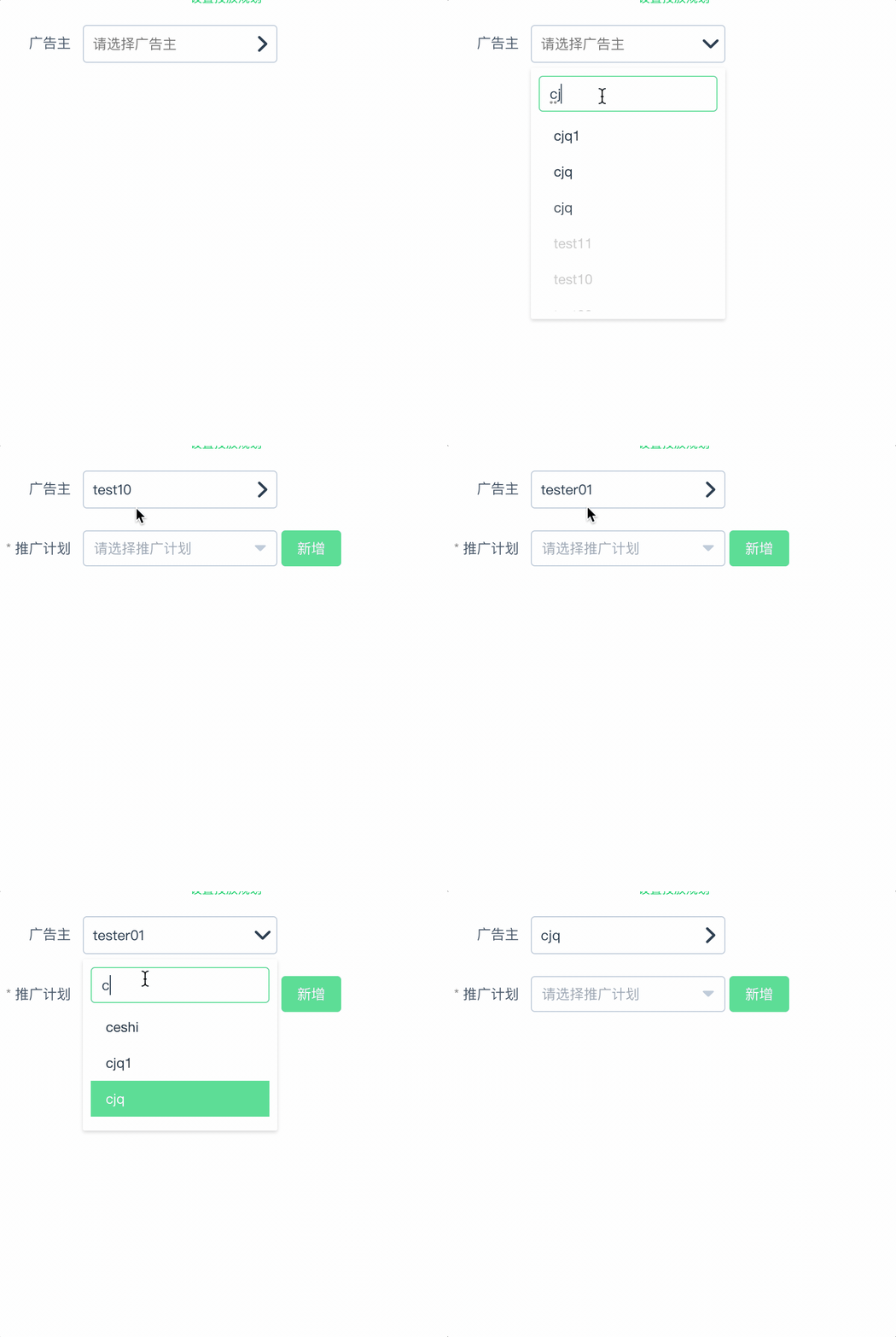
实现的功能
1: 鼠标点击下拉框之外的区域关闭下拉框
2: 支持键盘上下键选择,支持鼠标选择
3: 支持列表过滤搜索
4: 支持外部传入列表JSON格式的映射
5: 支持placeholder的传入
6: 选中对象的响应(.sync vue2.3的组件通讯的语法糖)
7: 箭头icon的映射,感觉作用不大,移除了
用法
<select-search
style="max-width:195px"
placeholder="请选择广告主"
:asyncData.sync="adHostData"
:mapData="adHostDataList"
:mapDataFormat="{label:'userName',value:'userId'}">
</select-search>
- asyncData:响应的数据,也就是选中的..回来是一个对象
- mapData : 搜索的列表数据,肯定是外部传入了…
- mapData : 列表值映射
代码
selectSearch.vue
<template>
 <div class="select-search" v-if="typeaheadData" ref="selectSearch" @click.native="showHideMenu($event)">
  <div class="select-header">
   <input type="text" autocomplete="off" readonly :placeholder="placeholder" :value="placeholderValue" @keydown.down.prevent="selectChildWidthArrowDown" @keydown.up.prevent="selectChildWidthArrowUp" @keydown.enter="selectChildWidthEnter">
   <i class="fzicon " :class="isExpand?'fz-ad-jiantou1':'fz-ad-jiantou'"></i>
  </div>
  <div class="select-body" v-if="isExpand && typeaheadData">
   <input type="text" placeholder="关键字" v-model="searchVal" autocomplete="off" @keydown.esc="resetDefaultStatus" @keydown.down.prevent="selectChildWidthArrowDown" @keydown.up.prevent="selectChildWidthArrowUp" @keydown.enter="selectChildWidthEnter">
   <transition name="el-fade-in-linear" mode="out-in">
    <div class="typeahead-filter">
     <transition-group tag="ul" name="el-fade-in-linear" v-show="typeaheadData.length>0">
      <li v-for="(item,index) in typeaheadData" :key="index" :class="item.active ? 'active':''" @mouseenter="setActiveClass(index)" @mouseleave="setActiveClass(index)" @click="selectChild(index)">
       <a href="javascript:;" rel="external nofollow" >
        {{item[mapDataFormat.label]}}
       </a>
      </li>
     </transition-group>
     <p class="noFound" v-show="typeaheadData && typeaheadData.length === 0">未能查询到,请重新输入!</p>
    </div>
   </transition>
  </div>
 </div>
</template>
<script>
 export default {
  name: 'selectSearch',
  data: function () {
   return {
    placeholderValue: '',// 给看到选择内容的
    isExpand: false,
    searchVal: '', // 搜索关键字
    resultVal: '', // 保存搜索到的值
    searchList: [], //保存过滤的结果集
    currentIndex: -1, // 当前默认选中的index,
   }
  },
  computed: {
   mapFormatData () { // 外部有传入格式的时候映射mapData
    return this.mapData.map(item => {
     item[this.mapDataFormat.value] = item[this.mapDataFormat.value];
     return item;
    });
   },
   typeaheadData () {
    let temp = [];
    if (this.searchVal && this.searchVal === '') {
     return this.mapFormatData;
    } else {
     this.currentIndex = -1; // 重置特殊情况下的索引
     this.mapFormatData.map(item => {
      if (item[this.mapDataFormat.label].indexOf(this.searchVal.toLowerCase().trim()) !== -1) {
       temp.push(item)
      }
      return item;
     })
     return temp;
    }
   }
  },
  props: {
   placeholder: {
    type: String,
    default: '--请选择--'
   },
   emptyText: {
    type: String,
    default: '暂无数据'
   },
   mapData: { // 外部传入的列表数据
    type: Array,
    default: function () {
     return []
    }
   },
   mapDataFormat: { // 映射传入数据的格式
    type: Object,
    default: function () {
     return {
      label: 'text',
      value: 'value',
      extraText: 'extraText'
     }
    }
   },
   asyncData: { // 实时响应的值
    type: [Object, String],
    default: function () {
     return {}
    }
   }
  },
  methods: {
   showHideMenu (e) { // 点击其他区域关闭下拉列表
    if (e) {
     if (this.$refs.selectSearch && this.$refs.selectSearch.contains(e.target)) {
      this.isExpand = true;
     } else {
      this.isExpand = false;
     }
    }
   },
   resetDefaultStatus () { // 清除所有选中状态
    this.searchVal = '';
    this.currentIndex = -1;
    this.typeaheadData.map(item => {
     this.$delete(item, 'active');
    })
   },
   setActiveClass (index) { // 设置样式活动类
    this.typeaheadData.map((item, innerIndex) => {
     if (index === innerIndex) {
      this.$set(item, 'active', true);
      this.currentIndex = index; // 这句话是用来修正index,就是键盘上下键的索引,不然会跳位
     } else {
      this.$set(item, 'active', false)
     }
    })
   },
   selectChildWidthArrowDown () {
    // 判断index选中子项
    if (this.currentIndex < this.typeaheadData.length) {
     this.currentIndex++;
     this.typeaheadData.map((item, index) => {
      this.currentIndex === index ? this.$set(item, 'active', true) : this.$set(item, 'active', false);
     })
    }
   },
   selectChildWidthArrowUp () {
    // 判断index选中子项
    if (this.currentIndex > 0) {
     this.currentIndex--;
     this.typeaheadData.map((item, index) => {
      this.currentIndex === index ? this.$set(item, 'active', true) : this.$set(item, 'active', false);
     })
    }
   },
   selectChildWidthEnter () {
    // 若是结果集只有一个,则默认选中
    if (this.typeaheadData.length === 1) {
     this.$emit('update:asyncData', this.typeaheadData[0]); // emit响应的值
     this.placeholderValue = this.typeaheadData[0][this.mapDataFormat.label];
    } else {
     // 若是搜索的内容完全匹配到项内的内容,则默认选中
     this.typeaheadData.map(item => {
      if (this.searchVal === item[this.mapDataFormat.label] || item.active === true) {
       this.$emit('update:asyncData', item); // emit响应的值
       this.placeholderValue = item[this.mapDataFormat.label];
      }
     })
    }
    this.isExpand = false;
   },
   selectChild (index) {
    // 鼠标点击选择子项
    this.typeaheadData.map((item, innerIndex) => {
     if (index === innerIndex || item.active) {
      this.placeholderValue = item[this.mapDataFormat.label];
      this.$emit('update:asyncData', item); // emit响应的值
     }
    });
    this.isExpand = false;
   },
  },
  mounted () {
   window.addEventListener('click', this.showHideMenu);
  },
  beforeDestroy () {
   window.removeEventListener('click', this.showHideMenu);
  },
  watch: {
   'isExpand' (newValue) {
    if (newValue === false) {
     this.resetDefaultStatus();
    }
   }
  }
 }
</script>
<style scoped lang="scss">
 .el-fade-in-linear-enter-active,
 .el-fade-in-linear-leave-active,
 .fade-in-linear-enter-active,
 .fade-in-linear-leave-active {
  transition: opacity .2s linear;
 }
 .el-fade-in-enter,
 .el-fade-in-leave-active,
 .el-fade-in-linear-enter,
 .el-fade-in-linear-leave,
 .el-fade-in-linear-leave-active,
 .fade-in-linear-enter,
 .fade-in-linear-leave,
 .fade-in-linear-leave-active {
  opacity: 0;
 }
 .noFound {
  text-align: center;
 }
 .select-search {
  position: relative;
  z-index: 1000;
  a {
   color: #333;
   text-decoration: none;
   padding: 5px;
  }
  ul {
   list-style: none;
   padding: 6px 0;
   margin: 0;
   max-height: 200px;
   overflow-x: hidden;
   overflow-y: auto;
   li {
    display: block;
    width: 100%;
    padding: 5px;
    font-size: 14px;
    padding: 8px 10px;
    position: relative;
    white-space: nowrap;
    overflow: hidden;
    text-overflow: ellipsis;
    color: #48576a;
    height: 36px;
    line-height: 1.5;
    box-sizing: border-box;
    cursor: pointer;
    &.active {
     background-color: #20a0ff;
     a {
      color: #fff;
     }
    }
   }
  }
  .select-header {
   position: relative;
   border-radius: 4px;
   border: 1px solid #bfcbd9;
   outline: 0;
   padding: 0 8px;
   >input {
    border: none;
    -webkit-appearance: none;
    -moz-appearance: none;
    appearance: none;
    width: 100%;
    outline: 0;
    box-sizing: border-box;
    color: #1f2d3d;
    font-size: inherit;
    height: 36px;
    line-height: 1;
   }
   >i {
    transition: all .3s linear;
    display: inline-block;
    position: absolute;
    right: 3%;
    top: 50%;
    transform: translateY(-50%);
   }
  }
  .select-body {
   position: absolute;
   border-radius: 2px;
   background-color: #fff;
   box-sizing: border-box;
   margin: 5px 0;
   padding: 8px;
   width: 100%;
   box-shadow: 0 2px 4px rgba(0, 0, 0, .12), 0 0 6px rgba(0, 0, 0, .04);
   >input {
    -webkit-appearance: none;
    -moz-appearance: none;
    appearance: none;
    background-color: #fff;
    background-image: none;
    border-radius: 4px;
    border: 1px solid #bfcbd9;
    box-sizing: border-box;
    color: #1f2d3d;
    font-size: inherit;
    height: 36px;
    line-height: 1;
    outline: 0;
    padding: 3px 10px;
    transition: border-color .2s cubic-bezier(.645, .045, .355, 1);
    width: 100%;
    display: inline-block;
    &:focus {
     outline: 0;
     border-color: #20a0ff;
    }
   }
  }
 }
</style>
总结
以上所述是小编给大家介绍的Vue实现typeahead组件功能(非常靠谱),希望对大家有所帮助,如果大家有任何疑问请给我留言,小编会及时回复大家的。在此也非常感谢大家对脚本之家网站的支持!
相关文章
 这篇文章主要介绍了Vue+ElementUI容器无法铺满网页的问题解决,文章通过图文结合的方式给大家讲解的非常详细,对大家的学习或工作有一定的帮助,需要的朋友可以参考下2024-08-08
 本篇文章主要介绍了基于vue实现swipe轮播组件实例代码,小编觉得挺不错的,现在分享给大家,也给大家做个参考。一起跟随小编过来看看吧2017-05-05
 这篇文章主要介绍了vue中push()和splice()的使用,具有很好的参考价值,希望对大家有所帮助。如有错误或未考虑完全的地方,望不吝赐教2022-09-09
 相信大部分兄弟都体验过Vite了,都知道它很快,在学习的时候,官网上的各种配置也是看的眼花缭乱,不知道哪些是必要掌握的,下面这篇文章主要给大家介绍了关于Vite常见配置选项的相关资料,需要的朋友可以参考下2024-09-09
 vue2.0里,不再有自带的过滤器,需要自己定义过滤器。下面通过实例代码给大家介绍vue2中filter()的相关知识,感兴趣的朋友一起看看吧2017-07-07
 这篇文章主要介绍了如何在vue中使用HTML 5 拖放API,帮助大家更好的理解和使用vue框架,感兴趣的朋友可以了解下2021-01-01
 在实际的应用开发中,涉及用户登录验证、密码重置等场景时,通常需要前端实现发送短信验证码的功能,以提升用户体验和安全性,以下是一个简单的前端实现,演示了如何在用户点击发送验证码按钮时触发短信验证码的发送,并开始一个倒计时2024-04-04
vue3+elementplus前端生成图片验证码完整代码举例
在开发过程中有时候需要使用图片验证码进行增加安全强度,在点击图片时更新新的图片验证码,记录此功能,以便后期使用,这篇文章主要给大家介绍了关于vue3+elementplus前端生成图片验证码的相关资料,需要的朋友可以参考下2024-03-03 这篇文章主要给大家介绍了vue通过vue-lazyload实现图片懒加载,文中通过代码示例给大家介绍的非常详细,对大家的学习或工作有一定的帮助,需要的朋友可以参考下2024-02-02
 本篇文章给大家详细分析了vue组件开发脚手架的相关内容以及知识点,对此有兴趣的朋友可以学习参考下。2018-06-06
最新评论