

java 实现音乐播放器的简单实例
更新时间:2017年09月21日 15:32:42 作者:海那边的小萌男
这篇文章主要介绍了java 实现音乐播放器的简单实例的相关资料,希望通过本文能帮助到大家,实现这样的功能,需要的朋友可以参考下
java 实现音乐播放器的简单实例
实现效果图:
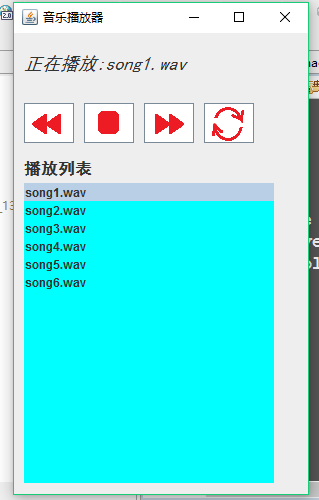
代码如下
package cn.hncu.games;

import java.applet.Applet;
import java.applet.AudioClip;
import java.awt.Color;
import java.awt.Font;
import java.awt.event.MouseAdapter;
import java.awt.event.MouseEvent;
import java.awt.event.MouseListener;
import java.io.File;
import java.net.URL;

import javax.swing.DefaultListModel;
import javax.swing.ImageIcon;
import javax.swing.JButton;
import javax.swing.JFrame;
import javax.swing.JLabel;
import javax.swing.JList;
import javax.swing.ListModel;
import javax.swing.event.ListSelectionEvent;
import javax.swing.event.ListSelectionListener;

public class MusicPlayer extends JFrame{
  //显示(歌曲名称)播放状态的标签
  JLabel songNameLabel = null;

  //四个播放功能键按钮
  JButton btnLast = null; //上一曲
  JButton btnPlay = null; //播放/停止
  JButton btnNext = null; //下一曲
  JButton btnLoop = null; //循环

  //歌曲列表
  JList songsList = null;
  AudioClip songs[] = null;
  AudioClip currentSong = null;
  int index=0; //当前歌曲在JList中的位置(序号)
  //歌曲文件名数组---String
  String[] strSongNames={ "song1.wav","song2.wav","song3.wav","song4.wav","song5.wav","song6.wav" };
  final String DIR="songs\\";

  //播放音乐的线程
  Thread playerThread=null;
  boolean isPlayOrStop = true;//true代表播放状态
  boolean isLoop = false; //是否为循环状态

  public MusicPlayer() {
    super("音乐播放器");
    setBounds(300, 50, 310, 500);
    setDefaultCloseOperation(EXIT_ON_CLOSE);
    setLayout(null);
    //hello();

    //显示(歌曲名称)播放状态的标签
    songNameLabel = new JLabel();
    Font songNameFont = new Font("黑体",Font.ITALIC,18);
    songNameLabel.setFont(songNameFont);
    songNameLabel.setText("我的音乐播放器");
    songNameLabel.setBounds(10, 10, 300, 40);
    getContentPane().add(songNameLabel);

    //四个播放功能键按钮
    btnLast = new JButton();
    btnPlay = new JButton();
    btnNext = new JButton();
    btnLoop = new JButton();
    //位置大小
    btnLast.setBounds(10, 70, 50, 40);
    btnPlay.setBounds(70, 70, 50, 40);
    btnNext.setBounds(130, 70, 50, 40);
    btnLoop.setBounds(190, 70, 50, 40);
    //设置图片
    btnLast.setIcon( new ImageIcon("images2/1.png"));
    btnPlay.setIcon( new ImageIcon("images2/2.png"));
    btnNext.setIcon( new ImageIcon("images2/3.png"));
    btnLoop.setIcon( new ImageIcon("images2/4.png"));
    //添加到框架
    getContentPane().add(btnLast);
    getContentPane().add(btnPlay);
    getContentPane().add(btnNext);
    getContentPane().add(btnLoop);
    //添加监听
    MyMouseListener mml = new MyMouseListener();
    btnLast.addMouseListener(mml);
    btnPlay.addMouseListener(mml);
    btnNext.addMouseListener(mml);
    btnLoop.addMouseListener(mml);


    //歌曲列表的标题
    JLabel listLabel = new JLabel("播放列表");
    listLabel.setBounds(10, 120, 100, 30);
    Font listLabelFont = new Font("黑体",Font.BOLD,16);
    listLabel.setFont(listLabelFont);
    getContentPane().add(listLabel);

    //歌曲列表
    /*
    songsList = new JList();
    songsList.setBounds(10, 150, 250, 300);
    songsList.setBackground(Color.CYAN);
    //把所有歌曲名逐个添加到List中
    //songsList.setListData(strSongNames);
    for(int i=0;i<strSongNames.length;i++){
      DefaultListModel dm = (DefaultListModel)songsList.getModel();
      dm.add(i,strSongNames[i]);
    }
    getContentPane().add(songsList);
    */

    DefaultListModel lm = new DefaultListModel();
    songsList = new JList(lm);
    songsList.setBounds(10, 150, 250, 300);
    songsList.setBackground(Color.CYAN);
    //把所有歌曲名逐个添加到List中
    //songsList.setListData(strSongNames);
    songs = new AudioClip[strSongNames.length];
    for(int i=0;i<strSongNames.length;i++){
      lm.add(i,strSongNames[i]);
      songs[i] = loadSound(strSongNames[i]);
    }
    getContentPane().add(songsList);
    //lm.remove(3);

    //对JList控件的监听技术实现
    songsList.addListSelectionListener(new ListSelectionListener() {
      @Override
      public void valueChanged(ListSelectionEvent e) {
        currentSong.stop();
        index = songsList.getSelectedIndex();
        isPlayOrStop = true;
        playerThread = new Thread( new MusicRun() );
        playerThread.start();
      }
    });


    //单开一个线程,专用于播放音乐
    playerThread = new Thread( new MusicRun() );
    playerThread.start();


    setVisible(true);
  }


  private AudioClip loadSound(String fileName) {
    try {
      URL url = new URL("file:songs\\"+fileName);
      AudioClip au = Applet.newAudioClip(url);
      return au;
    } catch (Exception e) {
      e.printStackTrace();
    }
    return null;
  }


  //讲解音乐播放的基本技术
  private void hello() {
    try {
      File f = new File("songs\\song1.wav");
      URL url = f.toURI().toURL();
      //URL url = new URL("file:songs\\song1.wav");
      AudioClip au = Applet.newAudioClip(url);
      au.play();
      //au.loop();
      //au.stop();
    } catch (Exception e) {
      e.printStackTrace();
    }
  }

  private class MyMouseListener extends MouseAdapter{
    @Override
    public void mouseClicked(MouseEvent e) {
      JButton btn = (JButton) e.getSource();
      currentSong.stop();
      if(btn==btnPlay){
        isPlayOrStop = !isPlayOrStop;
      }else if(btn==btnLast){
        index--;
        if(index<0){
          index = strSongNames.length-1;
        }
        //isPlayOrStop=true;
      }else if(btn==btnNext){
        index++;
        index = index%strSongNames.length;

      }else if(btn==btnLoop){
        isLoop = !isLoop;
      }

      if(isPlayOrStop){//播放
        playerThread = new Thread( new MusicRun() );
        playerThread.start();
      }else{//停止
        songsList.setSelectedIndex(index);
        songNameLabel.setText("停止播放:"+strSongNames[index]);
        btnPlay.setIcon( new ImageIcon("images2/2.png"));
      }
    }
  }

  private class MusicRun implements Runnable{
    @Override
    public void run() {
      currentSong = songs[index];
      if(isLoop){
        currentSong.loop();
        songNameLabel.setText("循环播放:"+strSongNames[index]);
      }
      if (isPlayOrStop) {
        currentSong.play();
      }
      //在播放列表中选定当前歌曲
      songsList.setSelectedIndex(index);
      //把播放按钮的图标切换成“停止”
      btnPlay.setIcon( new ImageIcon("images2/5.png"));

      if(!isLoop){
        songNameLabel.setText("正在播放:"+strSongNames[index]);
      }
    }
  }


  public static void main(String[] args) {
    new MusicPlayer();
  }

}
如有疑问请留言或者到本站社区交流讨论,感谢阅读,希望通过本文能帮助到大家,谢谢大家对本站的支持!
相关文章
 synchronized 是 Java 语言中处理并发问题的一种常用手段,本文主要介绍了synchronized加锁this和class的区别,具有一定的参考价值,感兴趣的可以了解一下2021-11-11
Java 中的 @SneakyThrows 注解的使用方法(简化异常处理的利与弊)
@SneakyThrows是Lombok提供的一个注解,用于简化Java方法中的异常处理,特别是对于检查型异常,它允许方法抛出异常而不必显式声明或捕获这些异常,本文介绍Java 中的 @SneakyThrows 注解的使用方法,感兴趣的朋友一起看看吧2025-03-03
spring boot与redis 实现session共享教程
这篇文章主要介绍了spring boot与redis 实现session共享教程,非常不错,具有参考借鉴价值,需要的朋友可以参考下2017-04-04 本篇文章主要介绍了详解使用Spring Security进行自动登录验证,非常具有实用价值,需要的朋友可以参考下2017-09-09
 项目当中,我们经常会涉及到对时间的处理,Date类最主要的作用就是获得当前时间,同时这个类里面也具有设置时间以及一些其他的功能,但更推荐使用 Calendar 类进行时间和日期的处理,这篇文章主要给大家介绍了关于Java中Calendar类的一些常用方法,需要的朋友可以参考下2021-11-11
 本文详细介绍了使用SpringBoot框架接入微信支付的全流程,包括导入依赖、配置微信公众号信息、设置配置文件、编写支付相关实体类和API地址常量、实现支付服务以及Controller层的编写,感兴趣的朋友跟随小编一起看看吧2024-09-09
 分页查询在很多地方都可以使用到,本文就详细的介绍了一下TK-MyBatis 分页查询的具体使用,文中通过示例代码介绍的非常详细,具有一定的参考价值,感兴趣的小伙伴们可以参考一下2021-12-12
Spring Boot和Thymeleaf整合结合JPA实现分页效果(实例代码)
这篇文章主要介绍了Spring Boot和Thymeleaf整合结合JPA实现分页效果,本文通过实例代码给大家介绍的非常详细,对大家的学习或工作具有一定的参考借鉴价值,需要的朋友可以参考下2021-02-02 这篇文章主要介绍了Springboot中依赖注入的三种方式详解,Setter Injection需要依赖@Autowired注解,使用方式与Field Injection有所不同,Field Injection时@Autowired是用在成员变量上,需要的朋友可以参考下2023-09-09
 单元测试就是针对最小的功能单元编写测试代码,Junit是使用Java语言实现的单元测试框架,它是开源的,Java开发者都应当学习并使用Junit编写单元测试。本文就来讲讲Junit框架的使用教程,需要的可以参考一下2023-02-02
最新评论