

Android布局之表格布局TableLayout详解
更新时间:2017年10月12日 09:17:14 作者:海向_起源
这篇文章主要为大家详细介绍了Android布局之表格布局TableLayout,具有一定的参考价值,感兴趣的小伙伴们可以参考一下
本文实例为大家分享了Android表格布局TableLayout的具体代码,供大家参考,具体内容如下
1.TableLayout
TableLayout表格布局模型以行列的形式管理子控件,每一行为一个TableRow的对象, 当然也可以使一个View的对象
2.TableLayout的属性(全局属性)
android:collapseColumns=”1,2”
隐藏从0开始的索引列,列之间必须用逗号隔开1,2
android:shrinkColumns=”1,2”
收缩从0开始的索引列,当可收缩的列太宽(内容太多时)不会被挤出屏幕,列之间
用逗号隔开1,2,你可以通过”*”代替收缩所有列,注意一列能同时表示收缩和拉伸
android:stretchColumns=”1,2”
拉伸从0开始的索引列,以填满剩下的多余空白空间,列之间必须用逗号隔开,1,2,
你可以通过”*”代替收缩所有列,注意一列能同时表示收缩和拉伸
3.TableLayout的局部属性(内部控件所用属性)
android:layout_column=”1” 该控件显示在第1列
android:layout_span=”2” 该控件占据两列
<?xml version="1.0" encoding="utf-8"?>
<TableLayout xmlns:android="http://schemas.android.com/apk/res/android"
 android:layout_width="match_parent" android:layout_height="match_parent"
 android:collapseColumns="0"
 android:shrinkColumns="4">

 <TableRow
  android:id="@+id/tablerow1"
  android:layout_width="wrap_content"
  android:layout_height="wrap_content" >

  <Button
   android:id="@+id/button4"
   android:layout_width="wrap_content"
   android:layout_height="wrap_content"
   android:text="Button1" />

  <Button
   android:id="@+id/button5"
   android:layout_width="wrap_content"
   android:layout_height="wrap_content"
   android:text="Button2" />

  <Button
   android:id="@+id/button6"
   android:layout_width="wrap_content"
   android:layout_height="wrap_content"
   android:text="Button3" />

  <Button
   android:id="@+id/button7"
   android:layout_width="wrap_content"
   android:layout_height="wrap_content"
   android:text="Button4" />

  <Button
   android:id="@+id/button8"
   android:layout_width="wrap_content"
   android:layout_height="wrap_content"
   android:text="Button555555555555555555555555" />
 </TableRow>
</TableLayout>
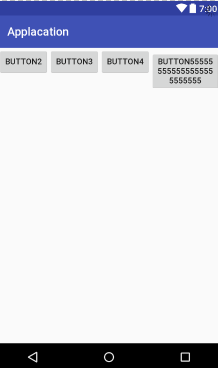
<?xml version="1.0" encoding="utf-8"?>
<TableLayout xmlns:android="http://schemas.android.com/apk/res/android"
 android:layout_width="match_parent"
 android:layout_height="match_parent"
 android:stretchColumns="*">

 <TableRow
  android:id="@+id/tablerow1"
  android:layout_width="match_parent"
  android:layout_height="match_parent">

  <Button
   android:id="@+id/button4"
   android:layout_width="wrap_content"
   android:layout_height="wrap_content"
   android:text="Button1" />

  <Button
   android:id="@+id/button5"
   android:layout_width="wrap_content"
   android:layout_height="wrap_content"
   android:text="Button2" />

  <Button
   android:id="@+id/button6"
   android:layout_width="wrap_content"
   android:layout_height="wrap_content"
   android:text="Button3" />

 </TableRow>
</TableLayout>
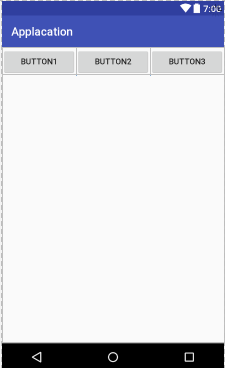
以上就是本文的全部内容,希望对大家的学习有所帮助,也希望大家多多支持脚本之家。
相关文章
 这篇文章主要介绍了Android如何定制自己的EditText,如何轻松改变底线颜色,感兴趣的小伙伴们可以参考一下2015-12-12
Android 使用FragmentTabhost代替Tabhost
这篇文章主要介绍了Android 使用FragmentTabhost代替Tabhost的相关资料,需要的朋友可以参考下2017-05-05 android的UDP编程实例和注意事项。2013-11-11
 这篇文章主要为大家详细介绍了Android仿微博加载长图滚动查看效果,具有一定的参考价值,感兴趣的小伙伴们可以参考一下2017-12-12
 这篇文章主要介绍了轻松实现Android仿淘宝地区选择功能的相关资料,文中示例代码介绍的非常详细,具有一定的参考价值,感兴趣的小伙伴们可以参考一下2016-06-06
RxJava+Retrofit+OkHttp实现多文件下载之断点续传
本篇文章主要介绍了RxJava+Retrofit+OkHttp实现多文件下载之断点续传,小编觉得挺不错的,现在分享给大家,也给大家做个参考。一起跟随小编过来看看吧2017-11-11
Android布局中gravity与layout_gravity属性说明
这篇文章主要介绍了Android布局中gravity与layout_gravity属性说明,具有很好的参考价值,希望对大家有所帮助。如有错误或未考虑完全的地方,望不吝赐教2023-01-01 这篇文章主要介绍了Android编程之监听器用法,结合实例形式较为详细的分析了Android监听器的功能及针对短信的监听与响应操作技巧,需要的朋友可以参考下2016-01-01
Android 用RxBinding与RxJava2实现短信验证码倒计时功能
这篇文章主要介绍了Android 用RxBinding与RxJava2实现短信倒计时功能示例,具有一定的参考价值,感兴趣的小伙伴们可以参考一下2017-10-10 本篇文章主要介绍了Android studio 如何删除项目module的相关知识,具有很好的参考价值。下面跟着小编一起来看下吧2017-05-05
最新评论