

使用JQuery实现图片轮播效果的实例(推荐)
更新时间:2017年10月24日 08:26:55 作者:WORSHIP亚萨
下面小编就为大家带来一篇使用JQuery实现图片轮播效果的实例(推荐)。小编觉得挺不错的,现在就分享给大家,也给大家做个参考。一起跟随小编过来看看吧
【效果如图】


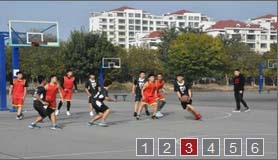

【原理简述】
这里大概说一下整个流程:
1,将除了第一张以外的图片全部隐藏,
2,获取第一张图片的alt信息显示在信息栏,并添加点击事件
3,为4个按钮添加点击侦听,点击相应的按钮,用fadeOut,fadeIn方法显示图片
4,设置setInterval,定时执行切换函数
【代码说明】
filter(":visible") :获取所有可见的元素
unbind():从匹配的元素中删除绑定的事件
siblings:取得一个包含匹配的元素集合中每一个元素的所有唯一同辈元素的元素集合
【程序源码】
首先引入JS文件:
  <script src="bootstrap/js/jquery-1.11.2.min.js"></script>
    <script src="bootstrap/js/bootstrap.min.js"></script>
    <link href="bootstrap/css/bootstrap.min.css" rel="external nofollow" rel="stylesheet" type="text/css"/>
HTML部分:
<div id="banner">
   <ul>
    <li class="on"><a href="">1</a></li>
    <li><a href="">2</a></li>
    <li><a href="">3</a></li>
    <li><a href="">4</a></li>
    <li><a href="">5</a></li>
    <li><a href="">6</a></li>
   </ul>
   <div id="banner_list">
    <a href="#" rel="external nofollow" rel="external nofollow" rel="external nofollow" rel="external nofollow" rel="external nofollow" rel="external nofollow" target="_self"><img src="img/a1.jpg" width="280" height="160" /></a>
    <a href="#" rel="external nofollow" rel="external nofollow" rel="external nofollow" rel="external nofollow" rel="external nofollow" rel="external nofollow" target="_self"><img src="img/a2.jpg" width="280" height="160" /></a>
    <a href="#" rel="external nofollow" rel="external nofollow" rel="external nofollow" rel="external nofollow" rel="external nofollow" rel="external nofollow" target="_self"><img src="img/a3.jpg" width="280" height="160" /></a>
    <a href="#" rel="external nofollow" rel="external nofollow" rel="external nofollow" rel="external nofollow" rel="external nofollow" rel="external nofollow" target="_self"><img src="img/a4.jpg" width="280" height="160" /></a>
    <a href="#" rel="external nofollow" rel="external nofollow" rel="external nofollow" rel="external nofollow" rel="external nofollow" rel="external nofollow" target="_self"><img src="img/a5.jpg" width="280" height="160" /></a>
    <a href="#" rel="external nofollow" rel="external nofollow" rel="external nofollow" rel="external nofollow" rel="external nofollow" rel="external nofollow" target="_self"><img src="img/a6.jpg" width="280" height="160" /></a>
   </div>
  </div>
CSS部分:
<style type="text/css">
 #banner {position:relative; width:280px; height:160px; border:1px solid #666; overflow:hidden;}
 #banner ul { width:138px; height:18px;position:absolute;list-style-type:none;filter: Alpha(Opacity=80);opacity:0.8;z-index:1002;
    margin:0; padding:0; bottom:3px; right:5px; line-height: 18px; text-align: center;}
 #banner ul li { width: 18px; height: 18px; margin:0px 2px;float:left;display:block;color:#FFF;
           border:#e5eaff 1px solid;background:#6C6D6E;cursor:pointer}
 #banner ul li.on { background:#900}
 #banner ul li a { color: white;}
 #banner ul li a:hover{text-decoration: none;}
 #banner_list a{position:absolute;} <!-- 让六张图片都可以重叠在一起-->
 #banner_list{position:absolute; right: 5px; bottom: 5px;}
 </style>
JS部分:
<script type="text/javascript">
 var t = n =0, count;
 $(document).ready(function(){
  count=$("#banner_list a").length;
  $("#banner_list a:not(:first-child)").hide();
  $("#banner_info").html($("#banner_list a:first-child").find("img").attr('alt'));
  $("#banner_info").click(function(){window.open($("#banner_list a:first-child").attr('href'), "_blank")});
  $("#banner li").click(function() {
   var i = $(this).text() -1;//获取Li元素内的值,即1,2,3,4
   n = i;
   if (i >= count) return;
   $("#banner_info").html($("#banner_list a").eq(i).find("img").attr('alt'));
   $("#banner_info").unbind().click(function(){window.open($("#banner_list a").eq(i).attr('href'), "_blank")})
   $("#banner_list a").filter(":visible").fadeOut(500).parent().children().eq(i).fadeIn(1000);
   document.getElementById("banner").style.background="";
   $(this).toggleClass("on");
   $(this).siblings().removeAttr("class");
  });
  t = setInterval("showAuto()", 4000);
  $("#banner").hover(function(){clearInterval(t)}, function(){t = setInterval("showAuto()", 4000);});
 })

 function showAuto()
 {
  n = n >=(count -1) ?0 : ++n;
  $("#banner li").eq(n).trigger('click');
 }
 </script>
以上这篇使用JQuery实现图片轮播效果的实例(推荐)就是小编分享给大家的全部内容了,希望能给大家一个参考,也希望大家多多支持脚本之家。
相关文章
 在高版本的jquery引入prop方法后,什么时候该用prop?什么时候用attr?它们两个之间有什么区别?这些问题就出现了。下面这篇文章主要给大家介绍了Jquery中attr与prop区别的相关资料,需要的朋友可以参考借鉴,下面来一起看看吧。2017-05-05
 本文是小编给大家带来的jquery卸载全部事件的思路,非常不错,具有参考借鉴价值,需要的朋友一起看看吧!2017-04-04
 jQuery 1.5 源码有8068行。很多想读 jQuery 源码的童鞋在读了一半不到就不敢往下读了,jQuery是一个 封装良好、代码紧凑 的框架。2011-04-04
 本文主要介绍利用jquery实现图片列表鼠标移入微动的实例。代码清晰,需要的朋友来看下吧2016-12-12
 基于jquery封装的一个js分页代码,需要的朋友可以参考下。2011-11-11
 这篇文章主要为大家详细介绍了jQuery实现购物车功能,文中示例代码介绍的非常详细,具有一定的参考价值,感兴趣的小伙伴们可以参考一下2022-06-06
 这篇文章主要介绍了jQuery中remove()方法用法,以三个不同的实例形式分别演示了remove()方法删除元素的使用技巧,具有一定的参考借鉴价值,需要的朋友可以参考下2014-12-12
 在对class属性的操作中,实际上已经改变元素样式了,但这些都是根据已设定的CSS规则间接生效的。因此我们有必要使用更为直接的方式来改变原先设定好了的CSS规则2012-09-09
 这篇文章主要给大家介绍了关于jquery动态赋值id与动态取id的相关资料,文中通过示例代码介绍的非常详细,对大家的学习或者工作具有一定的参考学习价值,需要的朋友们下面跟着小编来一起学习学习吧。2017-08-08
 从jQuery1.7开始,jQuery引入了全新的事件绑定机制,on()和off()两个函数统一处理事件绑定,下面通过示例为大家介绍下2014-07-07
最新评论