

React Native 通告消息竖向轮播组件的封装
更新时间:2020年08月25日 11:15:05 作者:七月_代码君
这篇文章主要介绍了React Native 通告消息竖向轮播组件的封装,文中示例代码介绍的非常详细,具有一定的参考价值,感兴趣的小伙伴们可以参考一下
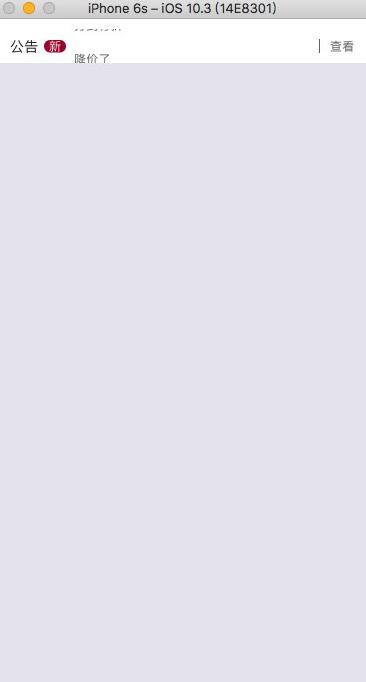
本文实例为大家分享了React Native通告消息竖向轮播组件的封装代码,供大家参考,具体内容如下
import React, {Component} from 'react'
import {
 Text,
 View,
 Animated,
 Easing,
 StyleSheet,
} from 'react-native'

export default class ScrollVertical extends Component {
 static defaultProps = {
  enableAnimation: true,
 };

 constructor(props) {
  super(props)
  let translateValue= new Animated.ValueXY({x: 0, y: 0})
  translateValue.addListener(({x,y})=>{
   // Log('value',x,y)
  })
  this.state = {
   translateValue: translateValue,
   // 滚屏高度
   scrollHeight: this.props.scrollHeight || 32,
   // 滚屏内容
   kb_content: [],
   // Animated.View 滚动到的 y轴坐标
   kb_tempValue: 0,
   // 最大偏移量
   kb_contentOffsetY: 0,
   // 每一次滚动切换之前延迟的时间
   delay: this.props.delay || 500,
   // 每一次滚动切换的持续时间
   duration: this.props.duration || 500,
   enableAnimation: true,
  }
 }

 render() {
  return (
   <View style={[styles.kbContainer, {height: this.state.scrollHeight}, this.props.kbContainer]}>
    {
     this.state.kb_content.length !== 0 ?
      <Animated.View
       style={[
        {flexDirection: 'column'},
        {
         transform: [
          {translateY: this.state.translateValue.y}
         ]
        }
       ]}>
       {this.state.kb_content.map(this._createKbItem.bind(this))}
      </Animated.View> : null
    }
   </View>
  )
 }

 componentWillReceiveProps(nextProps) {
  Log('componentWillReceiveProps', nextProps)
   this.setState({
     enableAnimation: nextProps.enableAnimation?true:false
    }, () => {
     this.startAnimation();
    }
   )
 }

 componentDidMount() {
  Log('componentDidMount')
  let content = this.props.data || []
  if (content.length !== 0) {
   let h = (content.length + 1) * this.state.scrollHeight
   this.setState({
    kb_content: content.concat(content[0]),
    kb_contentOffsetY: h
   })

   // 开始动画
   // this._startAnimation()
   this.startAnimation();
  }
 }


 _createKbItem(kbItem, index) {
  return (
   <View key={index}
     style={[{justifyContent: 'center', height: this.state.scrollHeight}, this.props.scrollStyle]}>
    <Text style={[styles.kb_text_c, this.props.textStyle]}>{kbItem.content}</Text>
   </View>
  )
 }

 startAnimation = () => {
  if (this.state.enableAnimation) {
   if(!this.animation){
    this.animation = setTimeout(() => {
     this.animation=null;
     this._startAnimation();
    }, this.state.delay);
   }

  }

 }

 componentWillUnmount() {
  if (this.animation) {
   clearTimeout(this.animation);
  }
  if(this.state.translateValue){
   this.state.translateValue.removeAllListeners();
  }
 }

 _startAnimation = () => {
  this.state.kb_tempValue -= this.state.scrollHeight;
  if (this.props.onChange) {
   let index = Math.abs(this.state.kb_tempValue) / (this.state.scrollHeight);
   this.props.onChange(index<this.state.kb_content.length-1?index:0);
  }
  Animated.sequence([

   // Animated.delay(this.state.delay),
   Animated.timing(
    this.state.translateValue,
    {
     isInteraction: false,
     toValue: {x: 0, y: this.state.kb_tempValue},
     duration: this.state.duration, // 动画持续的时间(单位是毫秒),默认为500
     easing: Easing.linear
    }
   ),
  ])
   .start(() => {
    // 无缝切换
    // Log('end')
    if (this.state.kb_tempValue - this.state.scrollHeight === -this.state.kb_contentOffsetY) {
     // 快速拉回到初始状态
     this.state.translateValue.setValue({x: 0, y: 0});
     this.state.kb_tempValue = 0;
    }
    this.startAnimation();


   })
 }
}

const styles = StyleSheet.create({
 kbContainer: {
  // 必须要有一个背景或者一个border,否则本身高度将不起作用
  backgroundColor: 'transparent',
  overflow: 'hidden'
 },
 kb_text_c: {
  fontSize: 18,
  color: '#181818',
 }
使用
import React, {Component} from 'react';
import {
 StyleSheet,
 View,
 TouchableOpacity,
 Alert,
 ScrollView,
 ART,
 TouchableHighlight,
 ListView,
 Dimensions,
 Text
} from 'react-native';

import ScrollVertical from '../../app-widget/scroll-vertical'


const dataArray = [
 {
  title: '降价了',
 },
 {
  title: '全场五折',
 },
 {
  title: '打到骨折',
 }
]
export default class extends React.Component {

 render() {
  let array = [{ content: '' }];
  if (dataArray && dataArray.length > 0) {
   array = [];
   for (let item of dataArray) {
    array.push({ content: item.title});
   }
  }
  return (
   <View style={{ padding: Constant.sizeMarginDefault, paddingBottom: 0, backgroundColor: '#FFFFFF' }}>
    <TouchableOpacity onPress={() => {
     if (dataArray && dataArray.length > 0) {
      Log(dataArray[this.index].title)
     }
    }} style={{ flexDirection: 'row', backgroundColor: "#FFFFFF", alignItems: 'center', borderRadius: 8, paddingLeft: 5, paddingRight: 5 }}>
     <Text style={{ fontSize: Constant.scaleFontSize(14) }} fontWeight={'bold'}>公告</Text>
     <View style={{ marginLeft: 5, marginRight: 8, backgroundColor: '#b01638', borderRadius: 8, width: 22, alignItems: 'center', }}>
      <Text style={{ color: 'white', fontSize: Constant.fontSizeSmall }}>新</Text>
     </View>
     <View style={{ flexDirection: 'row', flex: 1 }}>
      <ScrollVertical
       onChange={(index => {
        this.index = index;
       })}
       enableAnimation={true}
       data={array}
       delay={2500}
       duration={1000}
       scrollHeight={34}
       scrollStyle={{ alignItems: 'flex-start' }}
       textStyle={{ color: Constant.colorTxtContent, fontSize: Constant.fontSizeSmall }} />
     </View>
     <View style={{ height: 14, width: 1, backgroundColor: Constant.colorTxtContent }} />
     <Text style={{ color: Constant.colorTxtContent, paddingLeft: Constant.sizeMarginDefault, fontSize: Constant.fontSizeSmall }}>查看</Text>
    </TouchableOpacity>
   </View>
  );

 }
};
以上就是本文的全部内容,希望对大家的学习有所帮助,也希望大家多多支持脚本之家。
相关文章
 这篇文章主要介绍了React 首页加载慢问题性能优化案例详解,本篇文章通过简要的案例,讲解了该项技术的了解与使用,以下就是详细内容,需要的朋友可以参考下2021-09-09
 本篇文章主要介绍了使用ES6语法重构React代码详解,小编觉得挺不错的,现在分享给大家,也给大家做个参考。一起跟随小编过来看看吧2017-05-05
 这篇文章主要介绍了react同构实践之实现自己的同构模板,文中通过示例代码介绍的非常详细,对大家的学习或者工作具有一定的参考学习价值,需要的朋友们下面随着小编来一起学习学习吧2019-03-03
 在现代单页应用(SPA)中,路由管理是至关重要的一部分,它不仅决定了用户如何在页面间切换,还直接影响到整个应用的性能和用户体验,这些看似不起眼的问题,往往会导致功能错乱和性能下降,本篇文章将深入探讨在 React 中如何高效监听路由变化,需要的朋友可以参考下2025-01-01
React工作流程及Error Boundaries实现过程讲解
这篇文章主要介绍了React工作流程及Error Boundaries实现过程讲解,有需要的朋友可以借鉴参考下,希望能够有所帮助,祝大家多多进步,早日升职加薪2022-02-02 本篇文章主要介绍了ReactNative中使用Redux架构总结,小编觉得挺不错的,现在分享给大家,也给大家做个参考。一起跟随小编过来看看吧2017-12-12
 这篇文章主要为大家详细介绍了React实现分页效果,文中示例代码介绍的非常详细,具有一定的参考价值,感兴趣的小伙伴们可以参考一下2021-06-06
 React中并没有vue中的 slot 插槽概念 不过 可以通过props.children 实现类似功能,本文为大家整理了实现的具体方,需要的可以参考一下2023-07-07
React中useEffect与生命周期钩子函数的对应关系说明
这篇文章主要介绍了React中useEffect与生命周期钩子函数的对应关系说明,具有很好的参考价值,希望对大家有所帮助。如有错误或未考虑完全的地方,望不吝赐教2022-09-09
解决React报错Encountered two children with the same key
这篇文章主要为大家介绍了React报错Encountered two children with the same key解决方法,有需要的朋友可以借鉴参考下,希望能够有所帮助,祝大家多多进步,早日升职加薪2022-12-12
最新评论