

android实现多图文分享朋友圈功能
更新时间:2017年11月16日 14:33:11 投稿:laozhang
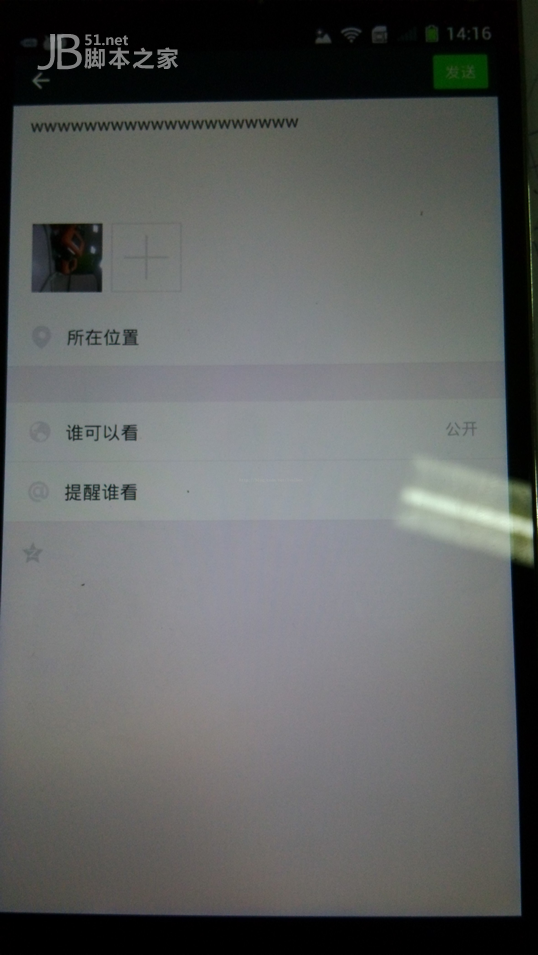
本文主要介绍android调用系统分享实现朋友圈同时分享文字和图片,图片还可以多图添加分享的功能。
很多安卓程序员都在寻找如何调用系统分享可以实现朋友圈多图加文字分享的功能,小编经过测试入坑后,为你整理以下内容:
private void shareMultiplePictureToTimeLine(File... files) {
  Intent intent = new Intent();
  ComponentName comp = new ComponentName("com.tencent.mm",
    "com.tencent.mm.ui.tools.ShareToTimeLineUI");
  intent.setComponent(comp);
  intent.setAction(Intent.ACTION_SEND_MULTIPLE);
  intent.setType("image/*");

  ArrayList<Uri> imageUris = new ArrayList<Uri>();
  for (File f : files) {
   imageUris.add(Uri.fromFile(f));
  }
  intent.putParcelableArrayListExtra(Intent.EXTRA_STREAM, imageUris);
  intent.putExtra("Kdescription", "wwwwwwwwwwwwwwwwwwww");
  startActivity(intent);
}
localIntent = new Intent("android.intent.action.SEND");
  localIntent.putExtra("android.intent.extra.TEXT", paramString1);
  localIntent.putExtra("sms_body", paramString1);
  localIntent.putExtra("Kdescription", paramString1);
  if (localUri1 == null)
  break;
  localIntent.putExtra("android.intent.extra.STREAM", localUri1);
  localIntent.setType("image/*");
  context.startActivity(Intent.createChooser(localIntent, "Share"));
其中最关键的就是:
intent.putExtra("Kdescription", text);
文字部分一直分享失败,搞了很久都分享失败后来才发现是需要加上这一句了·····坑!
原来Kdescription是微信描述信息的键。
原因是:微信的代码已经做了代码混淆,因此看起来有些困难,但是仔细观察还是有很多东西可以看出来的。在此类中我们寻找Intent传递的有关key的名称,找到了好几个,因此我们可以一个个来测试,最终发现就是Kdescription这个键来传递描述信息。
相关文章

Android bindService的使用与Service生命周期案例详解
这篇文章主要介绍了Android bindService的使用与Service生命周期案例详解,本篇文章通过简要的案例,讲解了该项技术的了解与使用,以下就是详细内容,需要的朋友可以参考下2021-09-09 这篇文章主要给大家介绍了关于Flutter中如何获取屏幕及Widget的宽高的相关资料,文中通过示例代码介绍的非常详细,对大家的学习或者使用Flutter具有一定的参考学习价值,需要的朋友们下面来一起学习学习吧2019-03-03
 这篇文章主要介绍了Activity实例详解之启动activity并返回结果 的相关资料,非常不错,具有参考借鉴价值,需要的朋友可以参考下2016-09-09
 这篇文章主要介绍了Android动画之小球拟合动画实例的相关资料,需要的朋友可以参考下2017-07-07
 这篇文章主要为大家详细介绍了Android实现长图展开与收起效果,具有一定的参考价值,感兴趣的小伙伴们可以参考一下2018-09-09
 这篇文章主要介绍了Android网络状态实时监听实例代码(2)的相关资料,需要的朋友可以参考下2016-03-03
Android 自定义LineLayout实现满屏任意拖动功能的示例代码
这篇文章主要介绍了Android 自定义LineLayout实现满屏任意拖动,本文通过实例代码给大家介绍的非常详细,对大家的学习或工作具有一定的参考借鉴价值,需要的朋友可以参考下2020-06-06 本次主要介绍Android中底部弹出框的使用,使用两个案例来说明,首先是时间选择器,然后是自定义底部弹出框的选择器,以下来一一说明他们的使用方法2022-09-09
 本篇文章主要介绍了rxjava+retrofit实现多图上传实例代码,小编觉得挺不错的,现在分享给大家,也给大家做个参考。一起跟随小编过来看看吧2017-06-06
 这篇文章主要介绍了android设计模式中的单例模式详解,需要的朋友可以参考下2014-04-04
最新评论