

android仿支付宝密码输入框效果
更新时间:2017年12月04日 09:07:16 作者:zhoushenxian
这篇文章主要为大家详细介绍了android仿支付宝密码输入框效果,具有一定的参考价值,感兴趣的小伙伴们可以参考一下
本文实例为大家分享了android仿支付宝密码输入框展示的具体代码,供大家参考,具体内容如下
这个没什么好分析的,就是一些基本的绘制什么线,矩形什么的,看代码更具体
布局文件:
<?xml version="1.0" encoding="utf-8"?>
<RelativeLayout xmlns:android="http://schemas.android.com/apk/res/android"
 android:layout_width="match_parent"
 android:layout_height="match_parent"
 >
 <com.example.custompasswordview.PasswordView
  android:id="@+id/passwordview"
  android:layout_width="match_parent"
  android:layout_height="105px"
  android:layout_marginTop="100px"
  android:layout_marginLeft="20px"
  android:layout_marginRight="20px"
  android:inputType="number"
  android:cursorVisible="false"
  android:focusable="true"
  android:focusableInTouchMode="true"
  android:enabled="true"
  android:clickable="true"
   />
 <Button
  android:id="@+id/btn_pass_reset"
  android:layout_width="250px"
  android:layout_height="90px"
  android:text="重置"
  android:layout_below="@id/passwordview"
  android:layout_marginTop="20px"
  android:layout_marginLeft="40px"
  android:gravity="center"
  />
</RelativeLayout>
MainActivity.java
package com.example.custompasswordview;
import android.app.Activity;
import android.os.Bundle;
import android.view.View;
import android.widget.Button;
public class MainActivity extends Activity {
 private Button btn_pass_reset;
 private PasswordView passwordview;
 @Override
 protected void onCreate(Bundle savedInstanceState) {
  super.onCreate(savedInstanceState);
  setContentView(R.layout.activity_main);
  btn_pass_reset = (Button) findViewById(R.id.btn_pass_reset);
  passwordview = (PasswordView) findViewById(R.id.passwordview);
  btn_pass_reset.setOnClickListener(new View.OnClickListener() {
   @Override
   public void onClick(View v) {
    passwordview.setEmpeyText();
   }
  });
 }
}
自定义EditText输入框
package com.example.custompasswordview;
import android.content.Context;
import android.graphics.Canvas;
import android.graphics.Color;
import android.graphics.Paint;
import android.util.AttributeSet;
import android.util.Log;
import android.widget.EditText;
import android.widget.Toast;

/**
 * Created by Adminis on 2016/8/7.
 */
public class PasswordView extends EditText {
 private static final String TAG ="PasswordView" ;
 private Paint bordPaint;//外框画笔
 private Paint linePaint;//线 的画笔
 private Paint passTextPaint;//密码画笔
 private int width;
 private int height;
 private int passwordLength = 6;//代码的长度
 private int textLength;
 private int radius = 15;
 public PasswordView(Context context) {
  this(context,null);
 }
 public PasswordView(Context context, AttributeSet attrs) {
  this(context, attrs,0);
 }

 public PasswordView(Context context, AttributeSet attrs, int defStyleAttr) {
  super(context, attrs, defStyleAttr);
  initPaint();
 }

 /**
  * 初始化画笔
  */
 private void initPaint() {
  setFocusable(true);
  bordPaint = new Paint();
  bordPaint.setStrokeWidth(8);
  bordPaint.setColor(Color.WHITE);
  bordPaint.setStyle(Paint.Style.FILL);

  linePaint = new Paint();
  linePaint.setColor(Color.parseColor("#838B8B"));
  linePaint.setStrokeWidth(4);

  passTextPaint = new Paint();
  passTextPaint.setColor(Color.parseColor("#000000"));
  passTextPaint.setStrokeWidth(12);

 }

 @Override
 protected void onDraw(Canvas canvas) {
  super.onDraw(canvas);
  height = getMeasuredHeight();
  width = getMeasuredWidth();
  drawRoundRect(canvas);
  drawLine(canvas);
  drawTextPass(canvas);
 }

 /**
  * 绘制密码
  * @param canvas
  */
 private void drawTextPass(Canvas canvas) {
  float cx, cy = height/ 2;
  float half = width / passwordLength / 2;
  for(int i = 0; i < textLength; i++) {
   cx = width * i / passwordLength + half;
   canvas.drawCircle(cx, cy, radius, passTextPaint);
  }
 }

 /**
  * 绘制线
  * @param canvas
  */
 private void drawLine(Canvas canvas) {
  for (int i = 1; i < passwordLength; i++) {
   float x = width * i / passwordLength;
   canvas.drawLine(x, 12, x, height-12, linePaint);
  }
 }
 /**
  * 绘制背景
  * @param canvas
  */
 private void drawRoundRect(Canvas canvas) {
   canvas.drawRoundRect(0,0,width,height,12,12,bordPaint);
 }
 @Override
 protected void onTextChanged(CharSequence text, int start, int lengthBefore, int lengthAfter) {
  super.onTextChanged(text, start, lengthBefore, lengthAfter);
  this.textLength = text.toString().length();
  if(textLength==6){
   Toast.makeText(getContext(),"您设置的密码为"+text,Toast.LENGTH_SHORT).show();
  }
  invalidate();
 }
 public void setEmpeyText(){
  setText("");
  invalidate();
 }
}
效果:
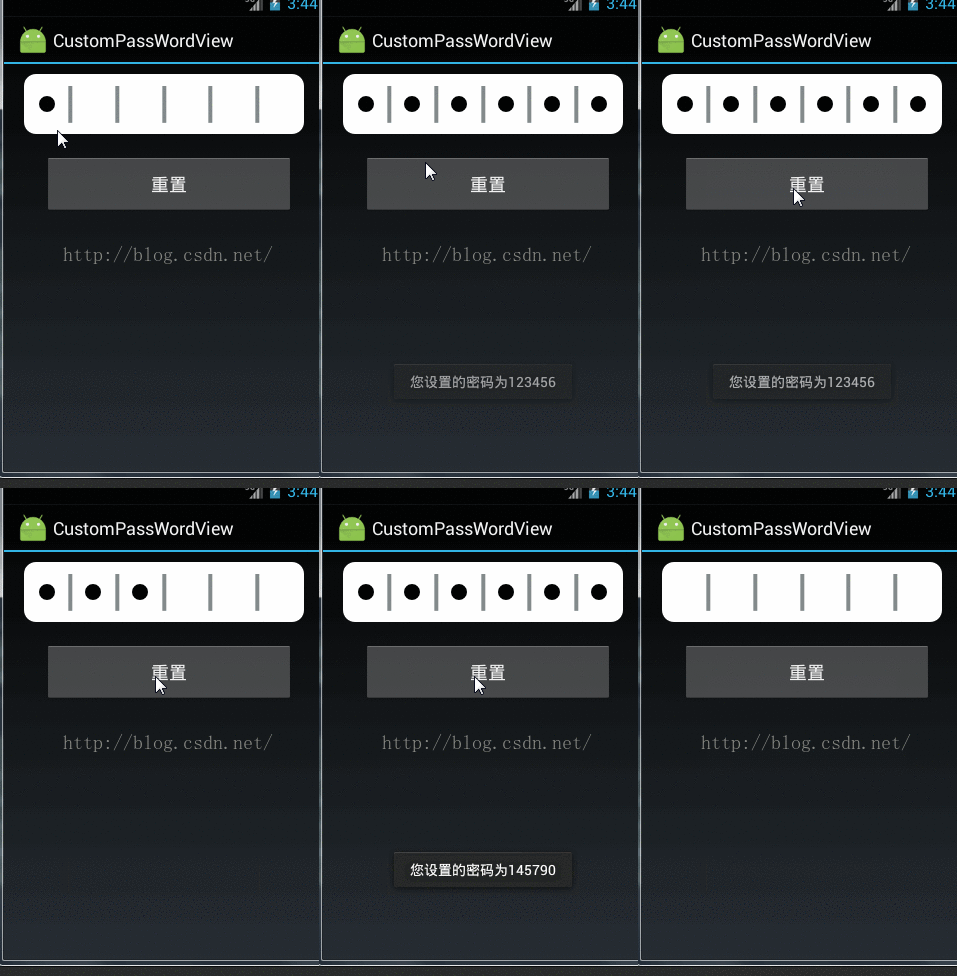
github:https://github.com/zhouguizhi/ZhiFuBaoPwdView
以上就是本文的全部内容,希望对大家的学习有所帮助,也希望大家多多支持脚本之家。
您可能感兴趣的文章:
相关文章

Kotlin StateFlow单数据更新热流设计与使用介绍
StateFlow当值发生变化,就会将值发送出去,下流就可以接收到新值。在某些场景下,StateFlow比LiveData更适用,文中通过示例代码介绍的非常详细,对大家的学习或者工作具有一定的参考学习价值,需要的朋友们下面随着小编来一起学习吧2022-09-09 这篇文章主要介绍了Android ViewPager动态加载问题,需要的朋友可以参考下2017-03-03
 本篇文章是对在Android中实现渐显按钮的左右滑动效果进行了详细的分析介绍,需要的朋友参考下2013-06-06
 这篇文章主要介绍了Android DialogFragment使用之基类封装示例详解,有需要的朋友可以借鉴参考下,希望能够有所帮助,祝大家多多进步,早日升职加薪2023-09-09
利用Jetpack Compose复刻游戏Flappy Bird
Flappy Bird是13年红极一时的小游戏,其简单有趣的玩法和变态的难度形成了强烈反差,引发全球玩家竞相把玩!本文将通过Jetpack Compose复刻这一游戏,感兴趣的小伙伴可以了解一下2022-02-02 这篇文章主要介绍了Android布局实现圆角边框效果,具有一定的参考价值,感兴趣的小伙伴们可以参考一下2016-08-08
 这篇文章主要为大家详细介绍了Android自定义控件打造绚丽平行空间引导页,文中示例代码介绍的非常详细,具有一定的参考价值,感兴趣的小伙伴们可以参考一下2017-12-12
 这篇文章主要介绍了Android 定时器实现图片的变换的相关资料,利用到定时器和handler,message的结合实现改功能,需要的朋友可以参考下2017-08-08
 这篇文章主要介绍了使用Retrofit下载文件并实现进度监听的示例,小编觉得挺不错的,现在分享给大家,也给大家做个参考。一起跟随小编过来看看吧2018-08-08
 这篇文章主要为大家详细介绍了Android实现音乐视频播放,文中示例代码介绍的非常详细,具有一定的参考价值,感兴趣的小伙伴们可以参考一下2021-05-05
最新评论