

iOS Swift UICollectionView横向分页滚动,cell左右排版问题详解
更新时间:2017年12月15日 15:40:22 作者:LinXunFeng
UICollectionView是iOS中比较常见的一个控件,这篇文章主要给大家介绍了关于iOS Swift UICollectionView横向分页滚动,cell左右排版问题的相关资料,文中通过示例代码介绍的非常详细,需要的朋友可以参考借鉴,下面随小编来一起学习学习吧。
情况
Swift对于一门新的iOS编程语言,他的崛起是必然的,我们这群老程序员们学习新的技能也是必然的,不接受新技能将被这大群体无情的淘汰。
最近因为工作的需求,在做表情键盘时遇到一个问题,我用UICollectionView来布局表情,使用横向分页滚动,但在最后一页出现了如图所示的情况
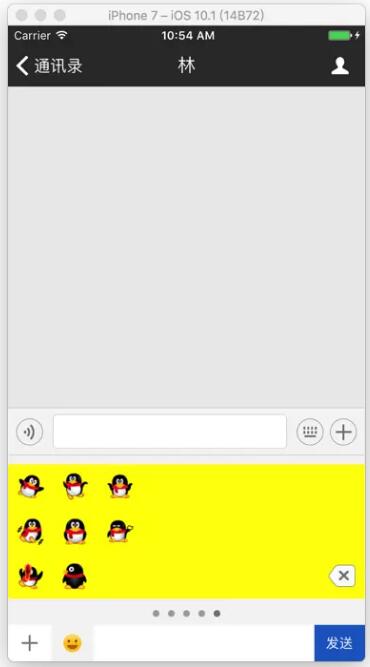
情况分析图
是的,现在的item分布就是这个鬼样子
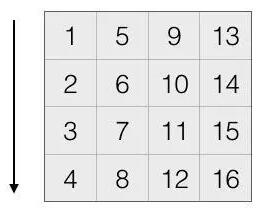
现在想要做的,就是将现在这个鬼样子变成另外一种样子,如图
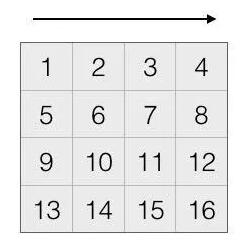
那怎么办?只好重新布局item了
解决方案
我是自定了一个Layout(LXFChatEmotionCollectionLayout) ,让UICollectionView在创建的时候使用了它
在 LXFChatEmotionCollectionLayout.swift 中
添加一个属性来保存所有item的attributes
// 保存所有item的attributes
fileprivate var attributesArr: [UICollectionViewLayoutAttributes] = []
重新布局
// MARK:- 重新布局
override func prepare() {
 super.prepare()
 let itemWH: CGFloat = kScreenW / CGFloat(kEmotionCellNumberOfOneRow)
 // 设置itemSize
 itemSize = CGSize(width: itemWH, height: itemWH)
 minimumLineSpacing = 0
 minimumInteritemSpacing = 0
 scrollDirection = .horizontal
 // 设置collectionView属性
 collectionView?.isPagingEnabled = true
 collectionView?.showsHorizontalScrollIndicator = false
 collectionView?.showsVerticalScrollIndicator = true
 let insertMargin = (collectionView!.bounds.height - 3 * itemWH) * 0.5
 collectionView?.contentInset = UIEdgeInsetsMake(insertMargin, 0, insertMargin, 0)
 /// 重点在这里
 var page = 0
 let itemsCount = collectionView?.numberOfItems(inSection: 0) ?? 0
 for itemIndex in 0..<itemsCount {
  let indexPath = IndexPath(item: itemIndex, section: 0)
  let attributes = UICollectionViewLayoutAttributes(forCellWith: indexPath)
  page = itemIndex / (kEmotionCellNumberOfOneRow * kEmotionCellRow)
  // 通过一系列计算, 得到x, y值
  let x = itemSize.width * CGFloat(itemIndex % Int(kEmotionCellNumberOfOneRow)) + (CGFloat(page) * kScreenW)
  let y = itemSize.height * CGFloat((itemIndex - page * kEmotionCellRow * kEmotionCellNumberOfOneRow) / kEmotionCellNumberOfOneRow)
  attributes.frame = CGRect(x: x, y: y, width: itemSize.width, height: itemSize.height)
  // 把每一个新的属性保存起来
  attributesArr.append(attributes)
 }
}
返回所有当前可见的Attributes
override func layoutAttributesForElements(in rect: CGRect) -> [UICollectionViewLayoutAttributes]? {
 var rectAttributes: [UICollectionViewLayoutAttributes] = []
 _ = attributesArr.map({
  if rect.contains($0.frame) {
   rectAttributes.append($0)
  }
 })
 return rectAttributes
}
大功告成
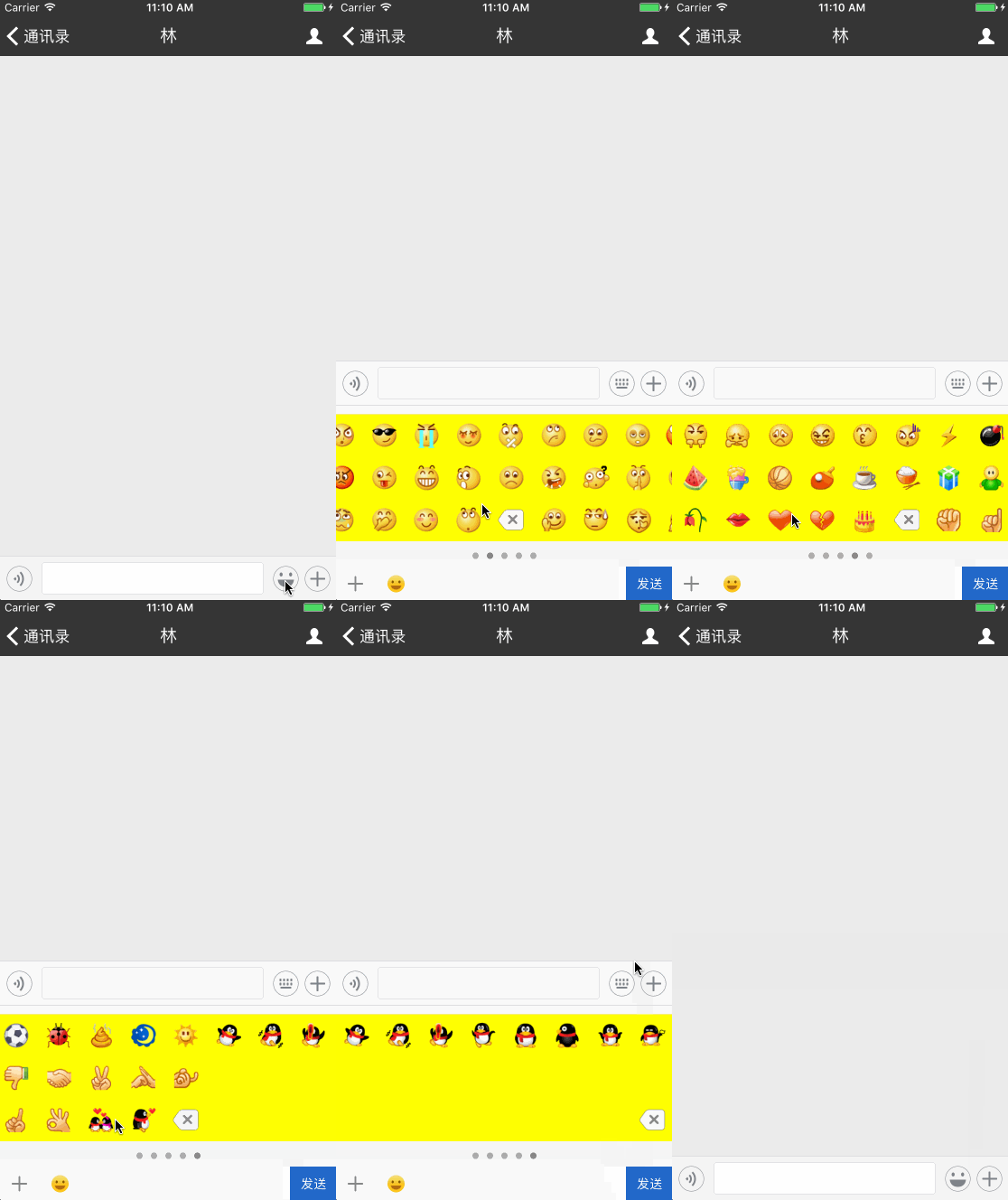
完整代码
import UIKit
let kEmotionCellNumberOfOneRow = 8
let kEmotionCellRow = 3
class LXFChatEmotionCollectionLayout: UICollectionViewFlowLayout {
 // 保存所有item
 fileprivate var attributesArr: [UICollectionViewLayoutAttributes] = []
 // MARK:- 重新布局
 override func prepare() {
  super.prepare()
  let itemWH: CGFloat = kScreenW / CGFloat(kEmotionCellNumberOfOneRow)
  // 设置itemSize
  itemSize = CGSize(width: itemWH, height: itemWH)
  minimumLineSpacing = 0
  minimumInteritemSpacing = 0
  scrollDirection = .horizontal
  // 设置collectionView属性
  collectionView?.isPagingEnabled = true  collectionView?.showsHorizontalScrollIndicator = false
  collectionView?.showsVerticalScrollIndicator = true
  let insertMargin = (collectionView!.bounds.height - 3 * itemWH) * 0.5
  collectionView?.contentInset = UIEdgeInsetsMake(insertMargin, 0, insertMargin, 0)
  var page = 0
  let itemsCount = collectionView?.numberOfItems(inSection: 0) ?? 0
  for itemIndex in 0..<itemsCount {
   let indexPath = IndexPath(item: itemIndex, section: 0)
   let attributes = UICollectionViewLayoutAttributes(forCellWith: indexPath)
   page = itemIndex / (kEmotionCellNumberOfOneRow * kEmotionCellRow)
   // 通过一系列计算, 得到x, y值
   let x = itemSize.width * CGFloat(itemIndex % Int(kEmotionCellNumberOfOneRow)) + (CGFloat(page) * kScreenW)
   let y = itemSize.height * CGFloat((itemIndex - page * kEmotionCellRow * kEmotionCellNumberOfOneRow) / kEmotionCellNumberOfOneRow)
   attributes.frame = CGRect(x: x, y: y, width: itemSize.width, height: itemSize.height)
   // 把每一个新的属性保存起来
   attributesArr.append(attributes)
  }
 }
 override func layoutAttributesForElements(in rect: CGRect) -> [UICollectionViewLayoutAttributes]? {
  var rectAttributes: [UICollectionViewLayoutAttributes] = []
  _ = attributesArr.map({
   if rect.contains($0.frame) {
    rectAttributes.append($0)
   }
  })
  return rectAttributes
 }
}
附上相关项目:Swift 3.0 高仿微信
总结
以上就是这篇文章的全部内容了,希望本文的内容对大家的学习或者工作具有一定的参考学习价值,如果有疑问大家可以留言交流,谢谢大家对脚本之家的支持。
相关文章
 这篇文章主要介绍了Swift中Optional值的链式调用学习笔记,Optional链是Swift入门学习中的基础知识,需要的朋友可以参考下2016-07-07
 函数是执行特定任务的代码自包含块。通过给定一个函数名称标识它是什么,并在需要的时候使用该名称来调用函数以执行任务。今天我们就来探讨下swift中的函数问题。2015-04-04
 这篇文章主要介绍了Swift读取App的版本信息与PCH文件的相关资料,文中通过图文介绍的非常详细,对大家具有一定的参考价值,需要的朋友们下面来一起看看吧。2017-03-03
Swift Sequence Collection使用示例学习
这篇文章主要为大家介绍了Swift Sequence Collection使用示例学习,有需要的朋友可以借鉴参考下,希望能够有所帮助,祝大家多多进步,早日升职加薪2023-07-07 这篇文章主要介绍了Swift类型创建之自定义一个类型详解,本文讲解了自定义原型、实现默认值、支持基本布尔型初始化、支持Bool类型判断、支持兼容各们各派的类型、完善OCBool的布尔基因体系等内容,需要的朋友可以参考下2015-05-05
 最近学完了swift想着实践下,就通过一些简单的算法进行学习研究,下面这篇文章主要介绍了Swift算法实现字符串转数字的方法,需要的朋友可以参考借鉴,下面来一起看看吧。2017-03-03
 这篇文章主要介绍了Swift data范围截取问题解决方案,本文给大家介绍的非常详细,对大家的学习或工作具有一定的参考借鉴价值,需要的朋友可以参考下2023-09-09
 swift通常都是通过对应的signal来捕获crash,下面这篇文章主要给大家介绍了关于Swift踩坑实战之一个字符引发的Crash的相关资料,文中通过实例代码介绍的非常详细,需要的朋友可以参考下2022-02-02
 这篇文章主要为大家详细介绍了Swift4.0 Array数组的相关资料,具有一定的参考价值,感兴趣的小伙伴们可以参考一下2017-09-09
 Swift 字符串是一系列字符的集合。例如 "Hello, World!" 这样的有序的字符类型的值的集合,它的数据类型为 String,接下来文章将详细探讨2021-11-11
最新评论