

jQuery 实现左右两侧菜单添加、移除功能
更新时间:2018年01月02日 16:30:14 作者:plming
本文通过实例代码给大家分享了jQuery 实现左右两侧菜单添加、移除功能,需要的朋友参考下吧
效果图:
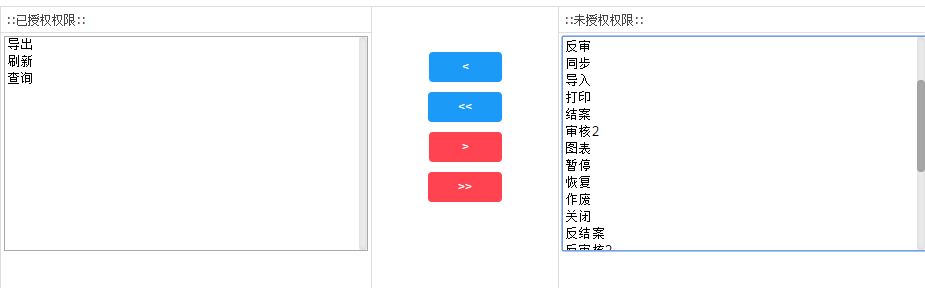
JS代码
 function toRight(l, r, v) {
   $("#" + l + " option:selected").appendTo("#" + r);
   $("#" + l + " option:selected").remove();
   var str = $("#" + l + " option").map(function () { return $(this).val(); }).get().join(", ")
   $("#" + v).val(str);
  }
  function allToRight(l, r, v) {
   $("#" + l + " option").appendTo("#" + r);
   $("#" + l + " option").remove();
   var str = $("#" + l + " option").map(function () { return $(this).val(); }).get().join(", ")
   $("#" + v).val(str);
  }
  function toLeft(l, r, v) {
   $("#" + r + " option:selected").appendTo("#" + l);
   $("#" + r + " option:selected").remove();
   var str = $("#" + l + " option").map(function () { return $(this).val(); }).get().join(", ")
   $("#" + v).val(str);
  }
  function allToLeft(l, r, v) {
   $("#" + r + " option").appendTo("#" + l);
   $("#" + r + " option").remove();
   var str = $("#" + l + " option").map(function () { return $(this).val(); }).get().join(", ")
   $("#" + v).val(str);
  }
html代码
<div class="easyui-layout" data-options="fit:true">
<div data-options="region:'west',split:false" style="width:40%;padding:0px">
<h3 style="padding:5px; border-bottom:1px solid #DDDDDD;">::已授权权限::</h3>
<div data-options="region:'center'" style="padding:3px; height:215px;" border="false">
<select multiple="multiple" id="menuFunc" style="width:100%;height:100%">
</select>
<input type="hidden" name="func" id="func" value="" />
</div>
</div>
<div data-options="region:'east'" style="width:40%;padding:0px">
<h3 style="padding:5px;border-bottom:1px solid #DDDDDD;">::未授权权限::</h3>
<div data-options="region:'center'" style="padding:3px; height:215px;" border="false">
<select multiple="multiple" id="menuFuncBase" style="width:100%;height:100%">
</select>
</div>
</div>
<div data-options="region:'center'" style="padding:40px; width: 197px; height:230px;line-height:40px; text-align:center;">
<a href="javascript:;" rel="external nofollow" rel="external nofollow" rel="external nofollow" rel="external nofollow" class="button button-primary button-rounded button-small" onclick="toLeft('menuFunc','menuFuncBase','func')" > < </a><br />
<a href="javascript:;" rel="external nofollow" rel="external nofollow" rel="external nofollow" rel="external nofollow" class="button button-primary button-rounded button-small" onclick="allToLeft('menuFunc','menuFuncBase','func')" ><<</a><br />
<a href="javascript:;" rel="external nofollow" rel="external nofollow" rel="external nofollow" rel="external nofollow" class="button button-caution button-rounded button-small" onclick="toRight('menuFunc','menuFuncBase','func')" > > </a><br />
<a href="javascript:;" rel="external nofollow" rel="external nofollow" rel="external nofollow" rel="external nofollow" class="button button-caution button-rounded button-small" onclick="allToRight('menuFunc','menuFuncBase','func')">>></a><br />
</div>
</div>
总结
以上所述是小编给大家介绍的jQuery 实现左右两侧菜单添加、移除功能,希望对大家有所帮助,如果大家有任何疑问请给我留言,小编会及时回复大家的。在此也非常感谢大家对脚本之家网站的支持!
相关文章

ASP.NET jQuery 实例3 (在TextBox里面阻止复制、剪切和粘贴事件)
在这讲里,让我们看下如何在ASP.NET Textbox里禁止复制、剪切和粘贴行为2012-01-01
使用jquery/js获取iframe父子级、同级获取元素的方法
下面小编就为大家带来一篇使用jquery/js获取iframe父子级、同级获取元素的方法。小编觉得挺不错的,现在就分享给大家,也给大家做个参考。一起跟随小编过来看看吧2016-08-08 这篇文章主要为大家详细介绍了jQuery树插件zTree的使用方法,具有一定的参考价值,感兴趣的小伙伴们可以参考一下2017-05-05
 JQuery对数组的处理非常便捷并且功能强大齐全,一步到位的封装了很多原生js数组不能企及的功能。下面来看看JQuery数组的强大之处在哪。2014-03-03
 这篇文章主要介绍了jQuery实现的移动端图片缩放功能组件,结合实例形式详细分析了jQuery基于移动端的图片缩放功能组件实现原理、步骤、核心代码及使用技巧,需要的朋友可以参考下2020-05-05
 这篇文章主要介绍了JQuery异步提交表单与文件上传功能,结合实例形式分析了jQuery表单提交及文件传输操作的相关实现技巧,需要的朋友可以参考下2017-01-01
 本文主要介绍了jquery实现折叠菜单效果的实例,具有很好的参考价值。下面跟着小编一起来看下吧2017-03-03
jquery3和layui冲突导致使用layui.layer.full弹出全屏iframe窗口时高度152px问题
这篇文章主要介绍了解决jquery3和layui冲突导致使用layui.layer.full弹出全屏iframe窗口时高度152px问题,需要的朋友可以参考下2019-05-05 本篇文章主要对jQuery实现倒计时进行了实例分析。并附上实例源码,有兴趣的朋友可以下载源码调试运行试试看,希望对大家有所帮助2016-12-12
 使用jQuery删除事件(或称解除事件绑定)有三个函数:unbind、die和undelegate。这三个方法都依赖于未公开的jQuery.event.remove(后续使用.remove简写)。此为删除事件的核心方法。2011-07-07
最新评论