

vue2.0+vue-dplayer实现hls播放的示例
更新时间:2018年03月02日 10:23:16 作者:Fei___
这篇文章主要介绍了vue2.0+vue-dplayer实现hls播放的示例,小编觉得挺不错的,现在分享给大家,也给大家做个参考。一起跟随小编过来看看吧
起因
之前写了一篇《 vue2.0+vue-video-player实现hls播放》,里边有提到在用vue-video-player之前,我尝试着使用vue-dplayer实现hls播放,但是当时时间紧迫,还没有完成,就换方案了。现在抽时间把它补齐吧。
开始
安装依赖
npm install vue-dplayer -S
编写组件HelloWorld.vue
<template>
 <div class="hello">
  <d-player ref="player" @play="play" :video="video" :contextmenu="contextmenu"></d-player>
 </div>
</template>

<script>
import VueDPlayer from './VueDPlayerHls';
export default {
 name: 'HelloWorld',
 data () {
  return {
   msg: 'Welcome to Your Vue.js App',
   video: {
     url: 'https://logos-channel.scaleengine.net/logos-channel/live/biblescreen-ad-free/chunklist_w630020335.m3u8',
     pic: 'http://static.smartisanos.cn/pr/img/video/video_03_cc87ce5bdb.jpg',
     type: 'hls'
    },
    autoplay: false,
    player: null,
    contextmenu: [
      {
        text: 'GitHub',
        link: 'https://github.com/MoePlayer/vue-dplayer'
      }
    ]
  }
 },
 components: {
  'd-player': VueDPlayer
 },
 methods: {
  play() {
    console.log('play callback')
   }
 },
 mounted() {
  this.player = this.$refs.player.dp;
  // console.log(this.player);
  var hls = new Hls();
  hls.loadSource('https://logos-channel.scaleengine.net/logos-channel/live/biblescreen-ad-free/chunklist_w630020335.m3u8');
  hls.attachMedia(this.player);
 }
}
</script>

<!-- Add "scoped" attribute to limit CSS to this component only -->
<style scoped>
</style>
引入hls.js
本来是使用import引入,可是执行报错。所以就先在index.html内用script标签引入进来。
<!DOCTYPE html>
<html>
 <head>
  <meta charset="utf-8">
  <meta name="viewport" content="width=device-width,initial-scale=1.0">
  <title>vue-dplayer-hls</title>
 </head>
 <body>
  <div id="app"></div>
  <!-- built files will be auto injected -->
  <script src="https://cdn.jsdelivr.net/npm/hls.js@latest"></script>
 </body>
</html>
注意:
根据DPlayer Demo页面代码,想支持hls,需要将video.type 设置为”hls”,但是我修改之后发现无法播放。于是去看了源码,发现源码内有这样一处:
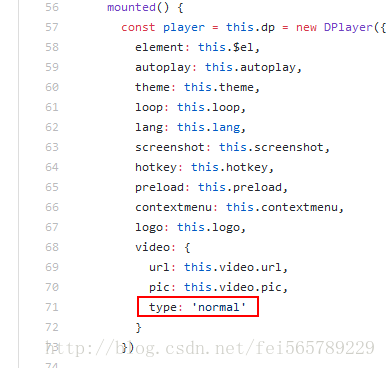
也就是说不论你在自己的组件内填写的是什么,其实都是使用的'normal'来new的Dplayer实例。
修改源码
自定义一个组件VueDPlayerHls.vue,然后copy源代码,问题处修改为: type: this.video.type
<template>
 <div class="dplayer"></div>
</template>

<script>
 require('../../node_modules/dplayer/dist/DPlayer.min.css');
 import DPlayer from 'DPlayer'
 export default {
  props: {
   autoplay: {
    type: Boolean,
    default: false
   },
   theme: {
    type: String,
    default: '#FADFA3'
   },
   loop: {
    type: Boolean,
    default: true
   },
   lang: {
    type: String,
    default: 'zh'
   },
   screenshot: {
    type: Boolean,
    default: false
   },
   hotkey: {
    type: Boolean,
    default: true
   },
   preload: {
    type: String,
    default: 'auto'
   },
   contextmenu: {
    type: Array
   },
   logo: {
    type: String
   },
   video: {
    type: Object,
    required: true,
    validator(value) {
     return typeof value.url === 'string'
    }
   }
  },
  data() {
   return {
    dp: null
   }
  },
  mounted() {
   const player = this.dp = new DPlayer({
    element: this.$el,
    autoplay: this.autoplay,
    theme: this.theme,
    loop: this.loop,
    lang: this.lang,
    screenshot: this.screenshot,
    hotkey: this.hotkey,
    preload: this.preload,
    contextmenu: this.contextmenu,
    logo: this.logo,
    video: {
     url: this.video.url,
     pic: this.video.pic,
     type: this.video.type
    }
   })
   player.on('play', () => {
    this.$emit('play')
   })
   player.on('pause', () => {
    this.$emit('pause')
   })
   player.on('canplay', () => {
    this.$emit('canplay')
   })
   player.on('playing', () => {
    this.$emit('playing')
   })
   player.on('ended', () => {
    this.$emit('ended')
   })
   player.on('error', () => {
    this.$emit('error')
   })
  }
 }
</script>
在原组件(HelloWorld.vue)内import新组件
import VueDPlayer from './VueDPlayerHls';
实现播放
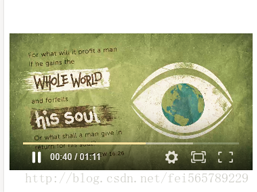
最后
github地址:https://github.com/PhillCheng/vue-dplayer-hls
以上就是本文的全部内容,希望对大家的学习有所帮助,也希望大家多多支持脚本之家。
相关文章
 这篇文章主要介绍了rollup打包vue组件并发布到npm,本文给大家介绍的非常详细,对大家的学习或工作具有一定的参考借鉴价值,需要的朋友可以参考下2023-05-05
 这篇文章主要介绍了Vue.js 响应接口的相关资料,文中实例代码非常详细,帮助大家更好的理解和学习,感兴趣的朋友可以了解下2020-07-07
 这篇文章主要介绍了Vue项目部署的实现(阿里云+Nginx代理+PM2),小编觉得挺不错的,现在分享给大家,也给大家做个参考。一起跟随小编过来看看吧2019-03-03
 本文介绍了如何以Vue引入antDesignUI,主要包括下载安装、配置和引入组件等步骤,通过本文,读者可以快速了解antDesignUI在Vue中的应用,感兴趣的可以了解一下2023-08-08
 本文主要介绍了Vue3中使用styled-components的实现,文中通过示例代码介绍的非常详细,对大家的学习或者工作具有一定的参考学习价值,需要的朋友们下面随着小编来一起学习学习吧2024-05-05
 这篇文章主要为大家详细介绍了vue滚动tab跟随切换效果,文中示例代码介绍的非常详细,具有一定的参考价值,感兴趣的小伙伴们可以参考一下2019-07-07
 这篇文章主要介绍了vue组件中使用props传递数据的实例详解,非常不错,具有参考借鉴价值,需要的朋友可以参考下2018-04-04
 在我们使用vue的时候,当数据发生了改变,界面也会跟着更新,但这并不是理所当然的,我们修改数据的时候vue是如何监听数据的改变以及当数据发生改变的时候vue如何让界面刷新的,所以本文就给大家讲讲Vue.js 数据双向绑定是如何实现的2023-07-07
 在vue开发中,会涉及到很多接口的处理,当项目足够大时,就需要定义规范统一的接口,本文就来介绍一下vue 项目接口管理,具有一定的参考价值,感兴趣的小伙伴可以一起来了解一下2019-01-01
 这篇文章主要介绍了Vue 刷新当前路由的实现代码,文中通过示例代码介绍的非常详细,对大家的学习或者工作具有一定的参考学习价值,需要的朋友们下面随着小编来一起学习学习吧2019-09-09
最新评论