

使用ViewPage+Fragment仿微信界面
更新时间:2018年04月14日 13:25:12 作者:壁花的花与树獭的獭
这篇文章主要为大家详细介绍了使用ViewPage+Fragment仿微信界面,具有一定的参考价值,感兴趣的小伙伴们可以参考一下
本文实例为大家分享了ViewPage+Fragment仿微信界面的具体代码,供大家参考,具体内容如下
实现效果:
左右滑动可切换界面,点击也可以实现
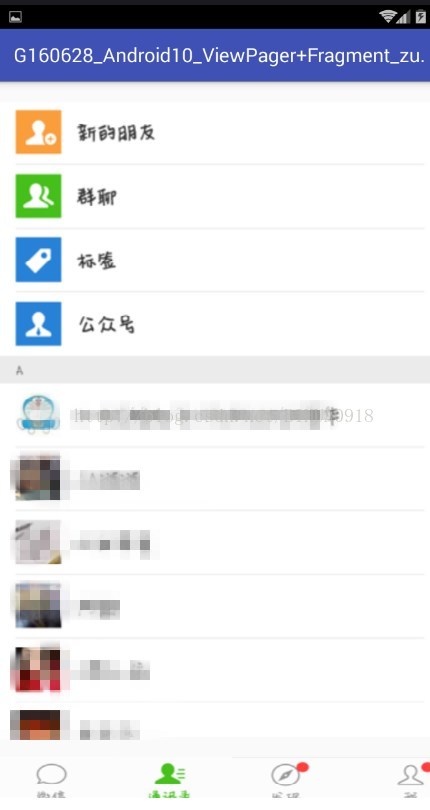

界面与碎片:
主界面:
<?xml version="1.0" encoding="utf-8"?>
<LinearLayout
 xmlns:android="http://schemas.android.com/apk/res/android"
 xmlns:app="http://schemas.android.com/apk/res-auto"
 xmlns:tools="http://schemas.android.com/tools" android:layout_width="match_parent"
 android:layout_height="match_parent"
 android:orientation="vertical"
 tools:context="com.example.g160628_android10_viewpagerfragment_zuoye.MainActivity">
 <!--设置ViewPager与单选组-->
 <android.support.v4.view.ViewPager
  android:layout_width="match_parent"
  android:layout_height="wrap_content"
  android:id="@+id/vp_main_view"
  android:layout_weight="1"
  ></android.support.v4.view.ViewPager>
 <RadioGroup
  android:layout_width="match_parent"
  android:layout_height="wrap_content"
  android:orientation="horizontal"
  android:id="@+id/rg_main_group"
  >
  <RadioButton
   android:layout_width="wrap_content"
   android:layout_height="wrap_content"
   android:layout_weight="1"
   android:button="@null"
   android:background="@drawable/button_selector"
   android:id="@+id/rb_main_bu1"
   />
  <RadioButton
   android:layout_width="wrap_content"
   android:layout_height="wrap_content"
   android:layout_weight="1"
   android:button="@null"
   android:background="@drawable/button2_selector"
   android:id="@+id/rb_main_bu2"
   />
  <RadioButton
   android:layout_width="wrap_content"
   android:layout_height="wrap_content"
   android:layout_weight="1"
   android:button="@null"
   android:background="@drawable/button3_selector"
   android:id="@+id/rb_main_bu3"
   />
  <RadioButton
   android:layout_width="wrap_content"
   android:layout_height="wrap_content"
   android:layout_weight="1"
   android:button="@null"
   android:background="@drawable/button4_selector"
   android:id="@+id/rb_main_bu4"
   />
 </RadioGroup>

</LinearLayout>
在drawable中创建四个选择器
button_selector.xml
<?xml version="1.0" encoding="utf-8"?>
<selector xmlns:android="http://schemas.android.com/apk/res/android">
 <item android:state_checked="false" android:drawable="@drawable/small_weixin"></item>
 <item android:state_checked="true" android:drawable="@drawable/small_weixin2"></item>
</selector>
button2_selector.xml
<?xml version="1.0" encoding="utf-8"?>
<selector xmlns:android="http://schemas.android.com/apk/res/android">
 <item android:state_checked="false" android:drawable="@drawable/small_contact"></item>
 <item android:state_checked="true" android:drawable="@drawable/small_contact2"></item>
</selector>
button3_selector.xml
<?xml version="1.0" encoding="utf-8"?>
<selector xmlns:android="http://schemas.android.com/apk/res/android">
 <item android:state_checked="false" android:drawable="@drawable/small_find"></item>
 <item android:state_checked="true" android:drawable="@drawable/small_find2"></item>
</selector>
button4_selector.xml
<?xml version="1.0" encoding="utf-8"?>
<selector xmlns:android="http://schemas.android.com/apk/res/android">
 <item android:state_checked="false" android:drawable="@drawable/small_mine"></item>
 <item android:state_checked="true" android:drawable="@drawable/small_mine2"></item>
</selector>
四个碎片:
fragment_weixin.xml
<?xml version="1.0" encoding="utf-8"?>
<LinearLayout xmlns:android="http://schemas.android.com/apk/res/android"
 android:orientation="vertical" android:layout_width="match_parent"
 android:layout_height="match_parent">
 <ImageView
  android:layout_width="470dp"
  android:layout_height="720dp"
  android:src="@drawable/weixin"
  />
</LinearLayout>
fragment_contact.xml
<?xml version="1.0" encoding="utf-8"?>
<LinearLayout xmlns:android="http://schemas.android.com/apk/res/android"
 android:orientation="vertical" android:layout_width="match_parent"
 android:layout_height="match_parent">
 <ImageView
  android:layout_width="470dp"
  android:layout_height="720dp"
  android:src="@drawable/contact"
  />
</LinearLayout>
fragment_find.xml
<?xml version="1.0" encoding="utf-8"?>
<LinearLayout xmlns:android="http://schemas.android.com/apk/res/android"
 android:orientation="vertical" android:layout_width="match_parent"
 android:layout_height="match_parent">
 <ImageView
  android:layout_width="470dp"
  android:layout_height="720dp"
  android:src="@drawable/find"
  />
</LinearLayout>
fragment_mine.xml
<?xml version="1.0" encoding="utf-8"?>
<LinearLayout xmlns:android="http://schemas.android.com/apk/res/android"
 android:orientation="vertical" android:layout_width="match_parent"
 android:layout_height="match_parent">
 <ImageView
  android:layout_width="470dp"
  android:layout_height="720dp"
  android:src="@drawable/mine"
  />
</LinearLayout>
Java代码
主Activity:
package com.example.g160628_android10_viewpagerfragment_zuoye;

import android.content.res.Resources;
import android.support.annotation.IdRes;
import android.support.v4.app.Fragment;
import android.support.v4.app.FragmentManager;
import android.support.v4.app.FragmentPagerAdapter;
import android.support.v4.view.ViewPager;
import android.support.v7.app.AppCompatActivity;
import android.os.Bundle;
import android.view.View;
import android.widget.RadioButton;
import android.widget.RadioGroup;

import java.util.ArrayList;
import java.util.List;

public class MainActivity extends AppCompatActivity {
 private List<Fragment> fragments=new ArrayList<>();
 private ViewPager vp_main_view;
 private RadioGroup rg_main_group;
 private List<View> views;


 @Override
 protected void onCreate(Bundle savedInstanceState) {
  super.onCreate(savedInstanceState);
  setContentView(R.layout.activity_main);
  //把碎片加入到碎片集合中
  fragments.add(new WeiXinFragment());
  fragments.add(new ContactFragment());
  fragments.add(new FindFragment());
  fragments.add(new MineFragment());

  //找到自己的ViewPager
  vp_main_view = (ViewPager) findViewById(R.id.vp_main_view);
  vp_main_view.setAdapter(new MyAdapter(getSupportFragmentManager()));
  //设置当前的碎片为1
  vp_main_view.setCurrentItem(1);

  //获得单选按钮组
  rg_main_group = (RadioGroup) findViewById(R.id.rg_main_group);
  //设置单选按钮组的选择事件
  rg_main_group.setOnCheckedChangeListener(new RadioGroup.OnCheckedChangeListener() {
   @Override
   public void onCheckedChanged(RadioGroup group, @IdRes int checkedId) {
    Resources res=MainActivity.this.getResources();
    switch (checkedId) {
     case R.id.rb_main_bu1:
      vp_main_view.setCurrentItem(0);
      break;
     case R.id.rb_main_bu2:
      vp_main_view.setCurrentItem(1);
      break;
     case R.id.rb_main_bu3:
      vp_main_view.setCurrentItem(2);
      break;
     case R.id.rb_main_bu4:
      vp_main_view.setCurrentItem(3);
      break;
    }
   }
  });

  //获得所有的单选框
  views=rg_main_group.getTouchables();


  //设置单选框事件
  vp_main_view.setOnPageChangeListener(new ViewPager.OnPageChangeListener() {
   @Override
   public void onPageScrolled(int position, float positionOffset, int positionOffsetPixels) {

   }

   @Override
   public void onPageSelected(int position) {
    //设置选中
    RadioButton button= (RadioButton) views.get(position);
    button.setChecked(true);
   }

   @Override
   public void onPageScrollStateChanged(int state) {

   }
  });


 }

 //定义属于自己的适配器
 class MyAdapter extends FragmentPagerAdapter{

  public MyAdapter(FragmentManager fm) {
   super(fm);
  }

  //获得碎片的所有
  @Override
  public Fragment getItem(int position) {
   return fragments.get(position);
  }

  //返回碎片的长度
  @Override
  public int getCount() {
   return fragments.size();
  }
 }

}
四个碎片对应的Fragment
WeiXinFragment
package com.example.g160628_android10_viewpagerfragment_zuoye;

import android.os.Bundle;
import android.support.annotation.Nullable;
import android.support.v4.app.Fragment;
import android.view.LayoutInflater;
import android.view.View;
import android.view.ViewGroup;

/**
 * Created by Administrator on 2017/6/15.
 */

public class WeiXinFragment extends Fragment {
 @Nullable
 @Override
 public View onCreateView(LayoutInflater inflater, @Nullable ViewGroup container, @Nullable Bundle savedInstanceState) {
  //返回对应的fragment_weixin
  return inflater.inflate(R.layout.fragment_weixin,null);
 }
}
ContactFragment
package com.example.g160628_android10_viewpagerfragment_zuoye;

import android.os.Bundle;
import android.support.annotation.Nullable;
import android.support.v4.app.Fragment;
import android.view.LayoutInflater;
import android.view.View;
import android.view.ViewGroup;

/**
 * Created by Administrator on 2017/6/15.
 */

public class ContactFragment extends Fragment {
 @Nullable
 @Override
 public View onCreateView(LayoutInflater inflater, @Nullable ViewGroup container, @Nullable Bundle savedInstanceState) {
  //返回对应的fragment_contact
  return inflater.inflate(R.layout.fragment_contact,null);
 }
}
FindFragment
package com.example.g160628_android10_viewpagerfragment_zuoye;

import android.os.Bundle;
import android.support.annotation.Nullable;
import android.support.v4.app.Fragment;
import android.view.LayoutInflater;
import android.view.View;
import android.view.ViewGroup;

/**
 * Created by Administrator on 2017/6/15.
 */

public class FindFragment extends Fragment {
 @Nullable
 @Override
 public View onCreateView(LayoutInflater inflater, @Nullable ViewGroup container, @Nullable Bundle savedInstanceState) {
  //返回对应的fragment_find
  return inflater.inflate(R.layout.fragment_find,null);
 }
}
MineFragment
package com.example.g160628_android10_viewpagerfragment_zuoye;

import android.os.Bundle;
import android.support.annotation.Nullable;
import android.support.v4.app.Fragment;
import android.view.LayoutInflater;
import android.view.View;
import android.view.ViewGroup;

/**
 * Created by Administrator on 2017/6/15.
 */

public class MineFragment extends Fragment {
 @Nullable
 @Override
 public View onCreateView(LayoutInflater inflater, @Nullable ViewGroup container, @Nullable Bundle savedInstanceState) {
  //返回对应的fragment_mine
  return inflater.inflate(R.layout.fragment_mine,null);
 }
}
需要的图片
small_weixin small_contact small_find small_mine


剩下的自己去截了,就不一一展示了。
以上就是本文的全部内容,希望对大家的学习有所帮助,也希望大家多多支持脚本之家。
相关文章
 这篇文章主要为大家详细介绍了android自定义控件ImageView实现圆形图片,适用于用户头像,具有一定的参考价值,感兴趣的小伙伴们可以参考一下2017-12-12
 这篇文章主要为大家详细介绍了Android登录代码MVP架构的相关资料,具有一定的参考价值,感兴趣的小伙伴们可以参考一下2018-11-11
 这篇文章主要介绍了Android使用Intent传递组件大数据,文章围绕主题展开详细的内容详情,感兴趣的朋友可以参考一下2022-07-07
Android14原生PackageInstaller安装某些apk报错问题
本文主要介绍了在Android 14上安装大型应用时遇到的java.lang.RuntimeException: Could not copy bitmap to parcel blob错误,下面就一起来介绍一下解决方法,感兴趣的可以了解一下2025-03-03 最近做了一个web app的项目,要求分享web页还要带有图片功能,怎么实现呢?今天小编给大家分享android实现微信分享带有缩略图的网页功能,需要的朋友参考下2017-02-02
 这篇文章主要为大家详细介绍了Android使用ViewFlipper实现图片切换功能,具有一定的参考价值,感兴趣的小伙伴们可以参考一下2017-07-07
 这篇文章主要为大家详细介绍了android自定义Camera拍照并查看图片,具有一定的参考价值,感兴趣的小伙伴们可以参考一下2017-06-06
 这篇文章主要为大家详细介绍了Android控件ViewPager实现带有动画的引导页,文中示例代码介绍的非常详细,具有一定的参考价值,感兴趣的小伙伴们可以参考一下2017-05-05
 本篇文章主要介绍了Android之图片加载框架Fresco基本使用,可以实现进度条和图片缩放等内容,有兴趣的可以了解一下。2016-12-12
Android Jetpack库剖析之Lifecycle组件篇
本章也是带来了Jetpack中我认为最重要的架构组件Lifecycle的原理探索,至于为什么觉得它是最重要是因为像ViewModel,LiveData这些组件也依赖于Lifecycle来感知宿主的生命周期,那么本章我们带着几个问题来探索一下这个组件2022-07-07
最新评论