

Android实现京东秒杀界面
更新时间:2018年04月18日 14:17:10 作者:l6666_6666
这篇文章主要为大家详细介绍了Android实现京东秒杀界面,具有一定的参考价值,感兴趣的小伙伴们可以参考一下
本文实例为大家分享了Android实现京东秒杀界面展示的具体代码,供大家参考,具体内容如下
效果图:
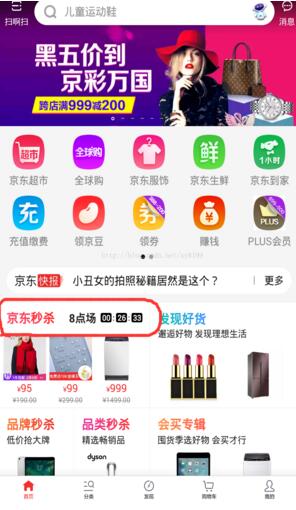
京东秒杀是两个小时一个场次,判断本机的时间进行场次定时,然后在这两个小时里面进行倒计时。
MainActivity
package com.bwie.com.myapplication;

import android.os.Handler;
import android.os.Message;
import android.support.v7.app.AppCompatActivity;
import android.os.Bundle;
import android.util.Log;
import android.widget.TextView;

import java.sql.Date;
import java.text.ParseException;
import java.text.SimpleDateFormat;
import java.util.Calendar;

public class MainActivity extends AppCompatActivity {

  private TextView miaosha_time;
  private TextView miaosha_shi;
  private TextView miaosha_minter;
  private TextView miaosha_second;
  private Handler handler = new Handler() {
    @Override
    public void handleMessage(Message msg) {
      super.handleMessage(msg);
      setTime();
      sendEmptyMessageDelayed(0, 1000);
    }
  };
  @Override
  protected void onCreate(Bundle savedInstanceState) {
    super.onCreate(savedInstanceState);
    setContentView(R.layout.activity_main);
    initView();
    handler.sendEmptyMessage(0);

  }
  public void initView(){
    miaosha_time = (TextView) findViewById(R.id.tv_miaosha_time);
    miaosha_shi = (TextView) findViewById(R.id.tv_miaosha_shi);
    miaosha_minter = (TextView) findViewById(R.id.tv_miaosha_minter);
    miaosha_second = (TextView) findViewById(R.id.tv_miaosha_second);
  }

  //秒杀倒计时
  public void setTime() {
    SimpleDateFormat df = new SimpleDateFormat("yyyy-MM-dd HH:mm:ss");
    Date curDate = new Date(System.currentTimeMillis());
    String format = df.format(curDate);
    StringBuffer buffer = new StringBuffer();
    String substring = format.substring(0, 11);
    buffer.append(substring);
    Log.d("ccc", substring);
    Calendar calendar = Calendar.getInstance();
    int hour = calendar.get(Calendar.HOUR_OF_DAY);
    if (hour % 2 == 0) {
      miaosha_time.setText(hour + "点场");
      buffer.append((hour + 2));
      buffer.append(":00:00");
    } else {
      miaosha_time.setText((hour - 1) + "点场");
      buffer.append((hour + 1));
      buffer.append(":00:00");
    }
    String totime = buffer.toString();
    try {
      java.util.Date date = df.parse(totime);
      java.util.Date date1 = df.parse(format);
      long defferenttime = date.getTime() - date1.getTime();
      long days = defferenttime / (1000 * 60 * 60 * 24);
      long hours = (defferenttime - days * (1000 * 60 * 60 * 24)) / (1000 * 60 * 60);
      long minute = (defferenttime - days * (1000 * 60 * 60 * 24) - hours * (1000 * 60 * 60)) / (1000 * 60);
      long seconds = defferenttime % 60000;
      long second = Math.round((float) seconds / 1000);
      miaosha_shi.setText("0" + hours + "");
      if (minute >= 10) {
        miaosha_minter.setText(minute + "");
      } else {
        miaosha_minter.setText("0" + minute + "");
      }
      if (second >= 10) {
        miaosha_second.setText(second + "");
      } else {
        miaosha_second.setText("0" + second + "");
      }


    } catch (ParseException e) {
      e.printStackTrace();
    }
  }
}
布局文件:
activity_main.xml
<?xml version="1.0" encoding="utf-8"?>
<RelativeLayout xmlns:android="http://schemas.android.com/apk/res/android"
  xmlns:app="http://schemas.android.com/apk/res-auto"
  xmlns:tools="http://schemas.android.com/tools"
  android:layout_width="match_parent"
  android:layout_height="match_parent"
  android:orientation="vertical"
  tools:context="com.bwie.com.myapplication.MainActivity">

  <LinearLayout
    android:layout_width="match_parent"
    android:layout_height="40dp"
    android:gravity="center_vertical">

    <TextView

      android:id="@+id/tv_miaosha"
      android:layout_width="wrap_content"
      android:layout_height="wrap_content"
      android:layout_marginLeft="10dp"
      android:text="京东秒杀"
      android:textColor="#f00" />

    <TextView
      android:id="@+id/tv_miaosha_time"
      android:layout_width="wrap_content"
      android:layout_height="wrap_content"
      android:padding="5dp"
      android:text="10点场" />

    <LinearLayout
      android:layout_width="wrap_content"
      android:layout_height="wrap_content">


      <TextView
        android:id="@+id/tv_miaosha_shi"
        android:layout_width="15dp"
        android:layout_height="15dp"
        android:background="@drawable/shape_miaosha_time"
        android:gravity="center"
        android:text="1"
        android:textColor="#fff"
        android:textSize="10sp" />

      <TextView
        android:layout_width="wrap_content"
        android:layout_height="wrap_content"
        android:padding="3dp"

        android:text=":" />

      <TextView
        android:id="@+id/tv_miaosha_minter"
        android:layout_width="15dp"
        android:layout_height="15dp"
        android:background="@drawable/shape_miaosha_time"
        android:gravity="center"
        android:text="1"
        android:textColor="#fff"
        android:textSize="10sp" />

      <TextView
        android:layout_width="wrap_content"
        android:layout_height="wrap_content"
        android:padding="3dp"

        android:text=":" />

      <TextView
        android:id="@+id/tv_miaosha_second"
        android:layout_width="15dp"
        android:layout_height="15dp"
        android:background="@drawable/shape_miaosha_time"
        android:gravity="center"
        android:text="1"
        android:textColor="#fff"
        android:textSize="10sp" />
    </LinearLayout>
  </LinearLayout>
</RelativeLayout>
shape_miaosha_time.xml(对倒计时小黑框圆角的实现)
<?xml version="1.0" encoding="utf-8"?>
<shape android:shape="rectangle"
  xmlns:android="http://schemas.android.com/apk/res/android">
  <solid android:color="#000"></solid>
  <corners android:radius="3dp"></corners>

</shape>
以上就是本文的全部内容,希望对大家的学习有所帮助,也希望大家多多支持脚本之家。
相关文章
 这篇文章主要为大家详细介绍了Android仿微信主界面的实现方法,具有一定的参考价值,感兴趣的小伙伴们可以参考一下2018-04-04
 这篇文章主要为大家介绍了Compose 的 Navigation组件使用示例详解,有需要的朋友可以借鉴参考下,希望能够有所帮助,祝大家多多进步,早日升职加薪2022-10-10
详解Android中PopupWindow在7.0后适配的解决
本篇文章主要介绍了详解Android中PopupWindow在7.0后适配的解决,小编觉得挺不错的,现在分享给大家,也给大家做个参考。一起跟随小编过来看看吧2018-05-05 这篇文章主要介绍了android仿微信好友列表功能,本文通过实例代码给大家介绍的非常详细,需要的朋友可以参考下2018-04-04
 这篇文章主要介绍了Android的搜索框架实例详解的相关资料,非常不错,具有参考借鉴价值,感兴趣的朋友一起看看吧2016-10-10
 这篇文章主要为大家介绍了如何利用Flutter制作一个心碎动画特效,文中的示例代码讲解详细,对我们学习Flutter有一定帮助,感兴趣的可以了解一下2022-04-04
 本篇文章小编为大家介绍,Android 新手入门体验。需要的朋友参考下2013-04-04
 在App开发过程中,选择交互是非常常见的,今天主要介绍下关于选择的三个组件的使用:开关、单选和复选,感兴趣的小伙伴可以了解一下2022-04-04
 点击获取验证码按钮,收到短信,当前应用不需要退出程序就可以获取到短信中的验证码,并自动填充,这篇文章主要介绍了Android短信验证码自动填充功能,感兴趣的小伙伴们可以参考一下2016-08-08
 这篇文章主要介绍了Android Studio 实现九宫格,本文通过实例代码给大家介绍的非常详细,对大家的学习或工作具有一定的参考借鉴价值,需要的朋友可以参考下2020-04-04
最新评论