

父组件中vuex方法更新state子组件不能及时更新并渲染的完美解决方法
更新时间:2018年04月25日 09:02:24 作者:蓓蕾心晴
这篇文章主要介绍了父组件中vuex方法更新state子组件不能及时更新并渲染的完美解决方法,需要的朋友可以参考下
场景:
我实际用到的是这样的,我父组件引用子组件related,父组件调用获取页面详情的方法,更新了state值related,子组件根据该related来渲染相关新闻内容,但是页面打开的时候总是先加载子组件,子组件在渲染的时候还没有获取到更新之后的related值,即使在子组件中watch该值的变化依然不能渲染出来子组件的相关新闻内容。
我的解决办法:
父组件像子组件传值,当父组件执行了获取页面详情的方法之后,state值related更新,然后传给子组件,子组件再进行渲染,可以正常获取到。
父组件代码:
<template>
 <div id="newsDetails">
  <mt-header title="详情">
   <router-link to="/" slot="left">
    <mt-button icon="back"></mt-button>
   </router-link>
  </mt-header>
  <div class="details clearfloat">
   <h1 class="titleFont">
    {{ title }}
   </h1>
   <div class="clearfloat sourceWrap">
    <ul class="sourceFont">
     <li v-if="(pubNews==true)">
      <span class="source">{{pubName}}</span>
     </li>
     <li>
      <span class="authorName">{{authorName}}</span>
      <span class="time">{{createAt|formatTime}}</span>
     </li>
    </ul>
    <span v-if="(pubNews==true)" class='btnFollow' @click="follow">关注</span>
   </div>
   <div class="bodyFont clearfloat" id="bodyFont" ref="bodyFont" :class="{bodyHeight:contentStatus}">
    <div v-html="content"></div>
    <div class="editor" v-if="editorName">责任编辑:{{editorName}}</div>
   </div>
   <div class="contentToggle" @click="contentStatus=!contentStatus" v-if="contentStatus">阅读全文</div>
   <Related :related="related"></Related>
    <!--重点是这里 父组件向子组件传值-->
 </div> </div> </template>

import { Toast } from 'mint-ui';
 import {mapState} from 'vuex'
 import Related from './Related.vue'
 import moment from 'moment';
 export default{
  name:"NewsDetails",
  components:{
   Related,
  },
  data(){
   return {
    id:this.$route.params.id,
    topicType:"news",
    contentStatus:false,
    curHeight:0,
    bodyHeight:5000,
    hotCommentScrollTop:0
   }
  },
  created(){
   this.id=this.$route.params.id;
   this.fetchData();
   moment.locale('zh-cn');
  },
  mounted(){
   setTimeout(()=>{
    this.contentToggle();
   },500)
  },
  watch: {
   '$route'(to,from){
    this.id=this.$route.params.id;
    this.fetchData();
   }
  },
  computed: {
   ...mapState({
    title: state => state.newsDetails.title,
    authorName: state => state.newsDetails.authorName,
    pubNews: state => state.newsDetails.pubNews,
    pubName: state => state.newsDetails.pubName,
    editorName: state => state.newsDetails.editorName,
    createAt: state => state.newsDetails.createAt,
    content: state => state.newsDetails.content,
    myFavourite: state => state.newsDetails.myFavourite,
    related: state => state.newsDetails.related,
   })
  },
  filters:{
   formatTime(time){
    return moment(time).fromNow();
   },
  },
  methods:{
   fetchData(){
    this.$store.dispatch('getDetails',this.id);
   },
   follow(){
    Toast('登录后进行关注');
    this.$router.push("/login");
   },
   contentToggle(){
    this.curHeight=this.$refs.bodyFont.offsetHeight;
    if(parseFloat(this.curHeight)>parseFloat(this.bodyHeight)){
     this.contentStatus=true;
    }else{
     this.contentStatus=false;
    }
//    this.hotCommentScrollTop=this.$refs.hotComment.height;
    console.log(this.hotCommentScrollTop);
   },
  }
 }
子组件related.vue
<template>
  <div v-if="lists.length>0">
    <div class="tagTitle"><span>相关新闻</span></div>
    <div class="listItem" v-if="(item.type=='little')" v-for="(item,index) in lists" :to="{name:'details',params:{id:item.id}}" :key="index" @click="browserDetection()">
     <div class="listImg1">
      <!--<img :src="{lazy==loaded?item.thumb[0]:lazy==loading?'../../assets/images/little_loading.png':lazy==error?'../../assets/images/little_loading.png'}" alt="" v-lazy="item.thumb[0]">-->
      <img :src="item.thumb[0]" alt="" v-lazy="item.thumb[0]">
     </div>
     <div class='titleBox1'>
      <p class="listTitle">{{item.title}}</p>
      <div class="titleInfo">
       <span class="openApp">打开唐人家</span>
       <span v-if="item.top==true" class="toTop">置顶</span>
       <!--<svg class="icon" aria-hidden="true">
        <use xlink:href="#icon-dianzan" rel="external nofollow" ></use>
       </svg>-->
       <span class="like">阅读 {{item.read}}</span>
       <span class="time">{{item.createAt|formatTime}}</span>
      </div>
    </div>
   </div>
  </div>
</template>
<script>
 import {mapActions, mapState, mapGetters} from 'vuex'
 import moment from 'moment'
 export default{
  data(){
   return {
    lists: [],
    id:this.$route.params.id,
   }
  },
  props:{
    related:Array  //重点是这里
  },
  created(){
   moment.locale('zh-cn');
  },
  /*computed: {
   ...mapState({
    related: state => state.newsDetails.related,
   })
  },*/
  filters:{
   formatTime(time){
    return moment(time).fromNow();
   },
  },
  methods:{
  },
  watch: {
   related (val) {
    this.lists = val;
   },
   '$route'(to,from){
    this.id=this.$route.params.id
   }
  }
 }
</script>
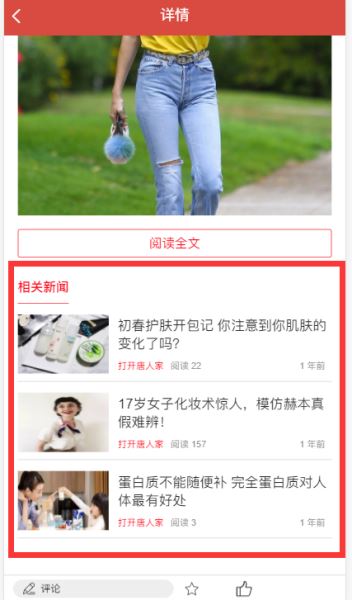
效果如图:
总结
以上所述是小编给大家介绍的父组件中vuex方法更新state子组件不能及时更新并渲染的完美解决方法,希望对大家有所帮助,如果大家有任何疑问请给我留言,小编会及时回复大家的。在此也非常感谢大家对脚本之家网站的支持!
相关文章
 这篇文章主要为大家详细介绍了Vue分页组件的实例代码,文中示例代码介绍的非常详细,具有一定的参考价值,感兴趣的小伙伴们可以参考一下2017-04-04
 最近项目需要将原vue项目结合ts的使用进行改造,这个后面应该是中大型项目的发展趋势,下面这篇文章主要给大家介绍了关于vue3项目中引入ts的相关资料,需要的朋友可以参考下2022-09-09
 Tree shaking 是一种通过清除多余代码方式来优化项目打包体积的技术,就是在保持代码运行结果不变的前提下,去除无用的代码,本文给大家介绍Vue 3.0中Treeshaking特性是什么,感兴趣的朋友一起看看吧2023-10-10
 这篇文章主要介绍了使用canvas实现一个vue弹幕组件功能,非常不错,具有一定的参考借鉴价值,需要的朋友可以参考下2018-11-11
 这篇文章主要介绍了Vue如何下载本地静态资源static文件夹,具有很好的参考价值,希望对大家有所帮助。如有错误或未考虑完全的地方,望不吝赐教2022-09-09
 这篇文章主要介绍了Thymeleaf + Vue组件化开发方式,具有很好的参考价值,希望对大家有所帮助,如有错误或未考虑完全的地方,望不吝赐教2023-11-11
Vue 通过this.$emit()方法子组件向父组件传值(步骤分享)
这篇文章主要介绍了Vue this.$emit()方法通过子组件向父组件传值,第一步在父组件中引入子组件,第二步子组件向父组件传值,本文通过需要的朋友可以参考下2022-11-11 v-model 是 Vue 内置的指令作为属性接收一个变量(不能是常量)绑定到普通组件和自定义组件中,本文给大家介绍Vue3的v-model示例代码,感兴趣的朋友跟随小编一起看看吧2023-02-02
 这篇文章主要介绍了Vue中对iframe实现keep alive无刷新的方法,文中通过示例代码介绍的非常详细,对大家的学习或者工作具有一定的参考学习价值,需要的朋友们下面随着小编来一起学习学习吧2019-07-07
electron-vue+electron-updater实现自动更新(步骤源码)
这篇文章主要介绍了electron-vue+electron-updater实现自动更新,步骤源码包括autoUpdater.js操控更新js文件,main.js也就是package.json内的main指向的js文件,代码简单易懂,对大家的学习或工作具有一定的参考借鉴价值,需要的朋友可以参考下2022-10-10
最新评论