

基于popupWindow实现悬浮半透明效果
更新时间:2018年04月28日 11:41:52 作者:zhuyouleixuexi
这篇文章主要为大家详细介绍了基于popupWindow实现悬浮半透明效果,具有一定的参考价值,感兴趣的小伙伴们可以参考一下
本文实例为大家分享了popupWindow实现悬浮半透明效果的具体代码,供大家参考,具体内容如下
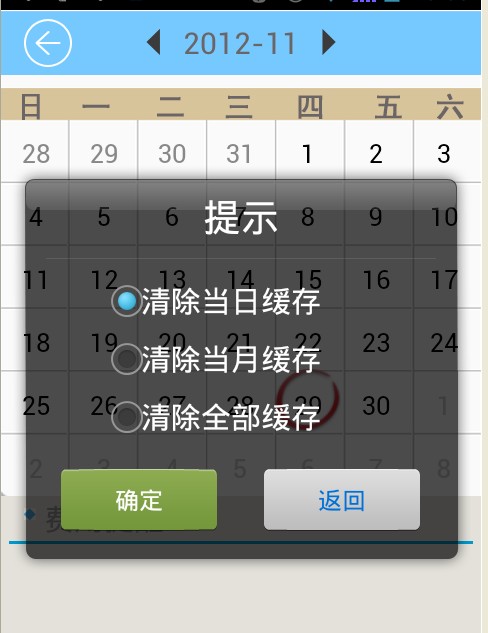
如上图显示弹出一个半透明框
java代码:
//清空数据
  private void ShowPopup() {
    LayoutInflater mLayoutInflater = (LayoutInflater) getSystemService(LAYOUT_INFLATER_SERVICE);
    ViewGroup mView = (ViewGroup) mLayoutInflater.inflate(
        R.layout.soft_calendar_popup, null, true);
    final PopupWindow popupWindow = new PopupWindow(mView,
        LayoutParams.WRAP_CONTENT, LayoutParams.WRAP_CONTENT, true);
    final RadioButton radio1 = (RadioButton) mView
        .findViewById(R.id.radio0);
    final RadioButton radio2 = (RadioButton) mView
        .findViewById(R.id.radio1);
    final RadioButton radio3 = (RadioButton) mView
        .findViewById(R.id.radio2);

    Button btn1 = (Button) mView.findViewById(R.id.button1);
    btn1.setOnClickListener(new OnClickListener() {

      @Override
      public void onClick(View v) {
        //确定按钮实现的操作
        popupWindow.dismiss();
      }
    });
    Button btn2 = (Button) mView.findViewById(R.id.button2);
    btn2.setOnClickListener(new OnClickListener() {

      @Override
      public void onClick(View v) {
        // 取消按钮实现的操作
        popupWindow.dismiss();
      }
    });

    popupWindow.setBackgroundDrawable(new BitmapDrawable());
    popupWindow.showAtLocation(findViewById(R.id.RelativeLayout1),
        Gravity.CENTER | Gravity.CENTER, 0, 0);//在屏幕的中间位置显示
    popupWindow.update();
  }
soft_calendar_popup.xml的内容:
<?xml version="1.0" encoding="utf-8"?>
<LinearLayout xmlns:android="http://schemas.android.com/apk/res/android"
  android:layout_width="460px"
  android:layout_height="423px"
  android:background="@drawable/soft_calendar_popup_bg"
  android:orientation="vertical" >

  <TextView
    android:id="@+id/textView1"
    android:layout_width="match_parent"
    android:layout_height="wrap_content"
    android:layout_marginTop="30px"
    android:gravity="center"
    android:text="提示"
    android:textColor="@android:color/white"
    android:textSize="25dip" />

  <RadioGroup
    android:id="@+id/radioGroup1"
    android:layout_width="match_parent"
    android:layout_height="wrap_content"
    android:layout_marginLeft="100px"
    android:layout_marginRight="100px"
    android:layout_marginTop="30px" >

    <RadioButton
      android:id="@+id/radio0"
      android:layout_width="match_parent"
      android:layout_height="wrap_content"
      android:checked="true"
      android:text="清除当日缓存"
      android:textSize="20dip"
      android:textColor="@android:color/white" />

    <RadioButton
      android:id="@+id/radio1"
      android:textSize="20dip"
      android:layout_width="match_parent"
      android:layout_height="wrap_content"
      android:text="清除当月缓存"
      android:textColor="@android:color/white" />

    <RadioButton
      android:id="@+id/radio2"
      android:textSize="20dip"
      android:layout_width="match_parent"
      android:layout_height="wrap_content"
      android:text="清除全部缓存"
      android:textColor="@android:color/white" />
  </RadioGroup>

  <LinearLayout
    android:layout_width="match_parent"
    android:layout_height="wrap_content"
    android:layout_marginTop="15dip"
    android:gravity="center_horizontal" >

    <Button
      android:id="@+id/button1"
      android:layout_width="158px"
      android:layout_height="wrap_content"
      android:layout_marginRight="30dip"
      android:background="@drawable/btn2"
      android:gravity="center"
      android:text="确定"
      android:textColor="@android:color/white" />

    <Button
      android:id="@+id/button2"
      android:layout_width="158px"
      android:layout_height="wrap_content"
      android:background="@drawable/btn1"
      android:gravity="center"
      android:text="返回"
      android:textColor="#0072D7" />
  </LinearLayout>

</LinearLayout>
以上就是本文的全部内容,希望对大家的学习有所帮助,也希望大家多多支持脚本之家。
您可能感兴趣的文章:
- android PopupWindow 和 Activity弹出窗口实现方式
- android popwindow实现左侧弹出菜单层及PopupWindow主要方法介绍
- Android Animation实战之屏幕底部弹出PopupWindow
- Android编程实现popupwindow弹出后屏幕背景变成半透明效果
- Android入门之PopupWindow用法实例解析
- Android之用PopupWindow实现弹出菜单的方法详解
- Android实现底部弹出PopupWindow背景逐渐变暗效果
- Android中PopupWindow响应返回键并关闭的2种方法
- android使用PopupWindow实现页面点击顶部弹出下拉菜单
- Android中自定义PopupWindow实现弹出框并带有动画效果
相关文章
 这篇文章主要为大家详细介绍了使用Messenger实现Service的双向通信,文中示例代码介绍的非常详细,具有一定的参考价值,感兴趣的小伙伴们可以参考一下2021-05-05
 这篇文章主要给大家介绍了关于Flutter开发中Widget自定义的相关资料,文中通过示例代码介绍的非常详细,对大家学习或者使用Flutter具有一定的参考学习价值,需要的朋友们下面来一起学习学习吧2019-04-04
Android中点击按钮启动另一个Activity及Activity之间传值问题
这篇文章主要介绍了Android中点击按钮启动另一个Activity及Activity之间传值问题,本文通过实例代码给大家介绍的非常详细,具有一定的参考借鉴价值,需要的朋友可以参考下2020-01-01 本文详细介绍了android的外部存储和私有存储。大家在有保存文件的需求的时候,根据自己的需要,选择到底是存在哪里比较合适。内部存储相对较小,不介意把一些大文件存在其中。应该存在外部存储会更好。对于可以给其他文件访问的,可以存在外部存储的公有文件里面2021-06-06
 这篇文章主要介绍了Android编程获取图片和视频缩略图的方法,结合实例形式分析了Android图形图像处理所涉及的常用函数与使用技巧,需要的朋友可以参考下2016-04-04
 这篇文章主要为大家详细介绍了Android实现带指示点的自动轮播无限循环效果,具有一定的参考价值,感兴趣的小伙伴们可以参考一下2016-11-11
 这篇文章主要介绍了Android 解决游戏发行切包资源ID的一些问题,帮助大家更好的理解和学习使用Android,感兴趣的朋友可以了解下2023-05-05
 在Flutter开发时,有时为了优化用户输入体验,往往会需要输入框支持在移动光标过程中可以出现放大镜功能。本文将为大家介绍实现的方法,需要的可以参考一下2022-02-02
Android中父View和子view的点击事件处理问题探讨
当屏幕中包含一个ViewGroup,而这个ViewGroup又包含一个子view,这个时候android系统如何处理Touch事件呢,接下来将对此问题进行深入了解,感兴趣的朋友可以了解参考下,或许对你有所帮助2013-01-01 下面小编就为大家分享一篇Android实现pdf在线预览或本地预览的方法,具有很好的参考价值,希望对大家有所帮助。一起跟随小编过来看看吧2018-01-01
最新评论