

Android Internet应用实现获取天气预报的示例代码
更新时间:2018年05月03日 10:01:37 作者:光仔December
这篇文章主要介绍了Android网络编程及Internet应用-获取天气,小编觉得挺不错的,一起跟随小编过来看看吧
在Eclipse中创建Android项目,利用之前学过的WebView控件和中国天气网提供的天气数据接口,实现获取指定城市的天气预报。
布局文件:
res/layout/main.xml:
<?xml version="1.0" encoding="utf-8"?>
<LinearLayout xmlns:android="http://schemas.android.com/apk/res/android"
 xmlns:tools="http://schemas.android.com/tools"
 android:id="@+id/ll1"
 android:layout_width="fill_parent"
 android:layout_height="fill_parent"
 android:orientation="vertical" >

 <LinearLayout
 android:layout_width="fill_parent"
 android:layout_height="fill_parent"
 android:layout_weight="4"
 android:gravity="center"
 android:orientation="horizontal" >
 <Button
 android:id="@+id/beijing"
 android:layout_width="wrap_content"
 android:layout_height="wrap_content"
 android:text="北京"/>
 <Button
 android:id="@+id/shanghai"
 android:layout_width="wrap_content"
 android:layout_height="wrap_content"
 android:text="上海"/>
 <Button
 android:id="@+id/haerbin"
 android:layout_width="wrap_content"
 android:layout_height="wrap_content"
 android:text="哈尔滨"/>
 <Button
 android:id="@+id/changchun"
 android:layout_width="wrap_content"
 android:layout_height="wrap_content"
 android:text="长春"/>
 <Button
 android:id="@+id/shenyang"
 android:layout_width="wrap_content"
 android:layout_height="wrap_content"
 android:text="沈阳"/>
 <Button
 android:id="@+id/guangzhou"
 android:layout_width="wrap_content"
 android:layout_height="wrap_content"
 android:text="广州"/>
 </LinearLayout>

 <LinearLayout
 android:layout_width="fill_parent"
 android:layout_height="fill_parent"
 android:layout_weight="1"
 android:orientation="horizontal" >

 <WebView android:id="@+id/webview1"
 android:layout_width="match_parent"
 android:layout_height="match_parent"/>

 </LinearLayout>
</LinearLayout>
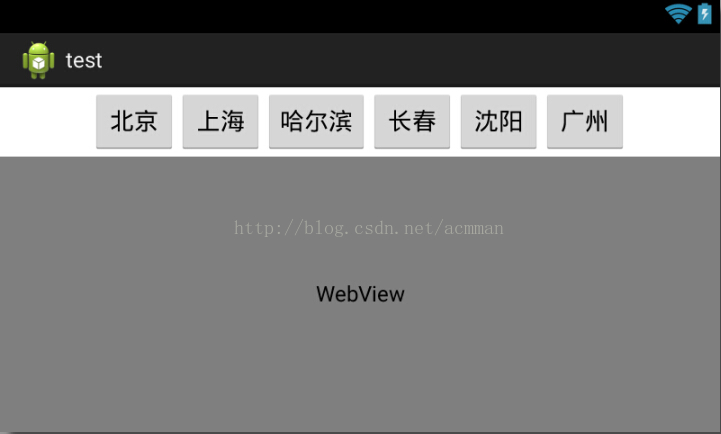
布局效果如图
要在AndroidManifest.xml中设置强制横屏(android:screenOrientation="landscape"):
<activity
 android:name=".MainActivity"
 android:screenOrientation="landscape"
 android:label="@string/app_name" >
 <intent-filter>
 <action android:name="android.intent.action.MAIN" />
 <category android:name="android.intent.category.LAUNCHER" />
 </intent-filter>
</activity>
MainActivity:
package com.example.test;

import android.app.Activity;
import android.os.Bundle;
import android.view.View;
import android.view.View.OnClickListener;
import android.webkit.WebChromeClient;
import android.webkit.WebView;
import android.webkit.WebViewClient;
import android.widget.Button;

public class MainActivity extends Activity implements OnClickListener{
 private WebView webview;
 @Override
 public void onCreate(Bundle savedInstanceState) {
 super.onCreate(savedInstanceState);
 setContentView(R.layout.main);

 webview=(WebView)findViewById(R.id.webview1);
 //处理各种通知请求和事件,如果不使用该句代码,将使用内置浏览器访问网页
 webview.setWebViewClient(new WebViewClient());
 webview.getSettings().setJavaScriptEnabled(true);//设置兼容JavaScript
 webview.setWebChromeClient(new WebChromeClient());//处理JavaScript对话框
 //设置默认显示的天气预报信息
 webview.loadUrl("http://m.weather.com.cn/m/pn12/weather.htm");
 webview.setInitialScale(57*4);//将网页内容放大四倍

 Button bj=(Button)findViewById(R.id.beijing);
 bj.setOnClickListener(this);
 Button sh=(Button)findViewById(R.id.shanghai);
 sh.setOnClickListener(this);
 Button hrb=(Button)findViewById(R.id.haerbin);
 hrb.setOnClickListener(this);
 Button cc=(Button)findViewById(R.id.changchun);
 cc.setOnClickListener(this);
 Button sy=(Button)findViewById(R.id.shenyang);
 sy.setOnClickListener(this);
 Button gz=(Button)findViewById(R.id.guangzhou);
 gz.setOnClickListener(this);
 }

 @Override
 public void onClick(View v) {
 switch (v.getId()) {
 case R.id.beijing: //单击的是"北京"按钮
 openUrl("101010100T");
 break;
 case R.id.shanghai: //单击的是"上海"按钮
 openUrl("101020100T");
 break;
 case R.id.haerbin: //单击的是"哈尔滨"按钮
 openUrl("101050101T");
 break;
 case R.id.changchun: //单击的是"长春"按钮
 openUrl("101060101T");
 break;
 case R.id.shenyang: //单击的是"沈阳"按钮
 openUrl("101070101T");
 break;
 case R.id.guangzhou: //单击的是"广州"按钮
 openUrl("101280101T");
 break;


 default:
 break;
 }
 }
 private void openUrl(String id) {
 //获取并显示天气预报信息
 webview.loadUrl("http://m.weather.com.cn/m/pn12/weather.htm?id="+id+"");
 }
}
别忘记在AndroidManifest.xml中加入访问网络的权限:
<!-- 添加链接网络的权限 -->
uses-permissionandroid:name="android.permission.INTERNET
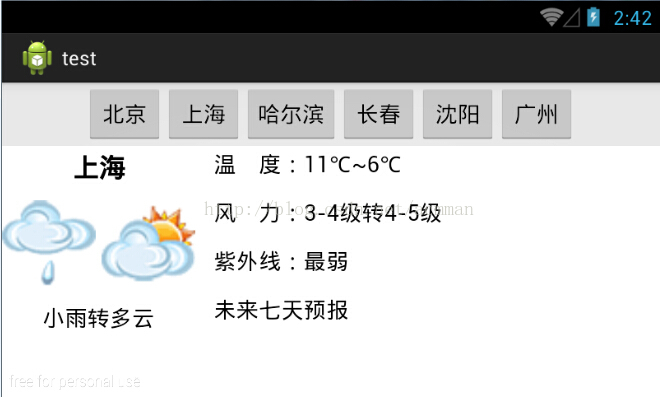
运行结果如图
以上就是这篇文章的全部内容了,希望本文的内容对大家的学习或者工作具有一定的参考学习价值,如果有疑问大家可以留言交流,谢谢大家对脚本之家的支持。
相关文章
 这篇文章主要介绍了Android开发实现Gallery画廊效果的方法,结合具体实例形式分析了Android使用Gallery实现画廊功能的具体操作技巧与相关注意事项,需要的朋友可以参考下2017-06-06
 这篇文章主要为大家详细介绍了改进版的Android天气预报app,内容更加充实,具有一定的参考价值,感兴趣的小伙伴们可以参考一下2016-07-07
 这篇文章主要为大家介绍了Android 十六进制状态管理实例详解,有需要的朋友可以借鉴参考下,希望能够有所帮助,祝大家多多进步,早日升职加薪2022-09-09
 这篇文章主要为大家详细介绍了Android自带API实现分享功能,实现文字和图片的分享,具有一定的参考价值,感兴趣的小伙伴们可以参考一下2018-04-04
解决android Listview的item中最外层Margin失效的问题
下面小编就为大家带来一篇解决android Listview的item中最外层Margin失效的问题。小编觉得挺不错的,现在就分享给大家,也给大家做个参考。一起跟随小编过来看看吧2017-04-04 这篇文章主要介绍了Retrofit2日志拦截器的使用,小编觉得挺不错的,现在分享给大家,也给大家做个参考。一起跟随小编过来看看吧2018-11-11
 这篇文章主要为大家介绍线条类图形的绘制(正弦曲线、折线图),并且结合 Animation 实现了常见的波浪动效,感兴趣的小伙伴可以了解一下2022-03-03
 这篇文章主要为大家详细介绍了Android自定义View实现圆形加载进度条,文中示例代码介绍的非常详细,具有一定的参考价值,感兴趣的小伙伴们可以参考一下2022-06-06
 进度条在Android中教程使用到,本文章向大家介绍一下Android自定义圆形进度条实现代码,需要的朋友可以参考一下。2016-11-11
 这篇文章主要为大家详细介绍了Android网络通信的实现方式,四种实现网络通信的方式供大家学习,感兴趣的小伙伴们可以参考一下2016-06-06
最新评论