

JGroups实现聊天小程序
更新时间:2018年07月23日 15:50:20 作者:java_派大星
这篇文章主要为大家详细介绍了JGroups实现聊天小程序,具有一定的参考价值,感兴趣的小伙伴们可以参考一下
本文实例为大家分享了JGroups实现聊天小程序的具体代码,供大家参考,具体内容如下
效果图:
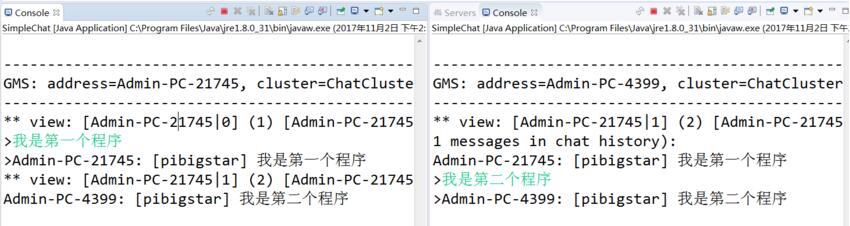
代码部分:
package com.lei.jgoups;

import java.io.BufferedReader;
import java.io.DataInputStream;
import java.io.DataOutputStream;
import java.io.InputStream;
import java.io.InputStreamReader;
import java.io.OutputStream;
import java.util.LinkedList;
import java.util.List;

import org.jgroups.JChannel;
import org.jgroups.Message;
import org.jgroups.ReceiverAdapter;
import org.jgroups.View;
import org.jgroups.util.Util;

public class SimpleChat extends ReceiverAdapter{
 JChannel channel;
 String user_name=System.getProperty("user.name", "n/a");
 final List<String> state=new LinkedList<String>();
 public static void main(String[] args) throws Exception {
 new SimpleChat().start();
 }
 private void start() throws Exception {
 channel=new JChannel();// 使用默认的配置, udp.xml【YBXIANG:】该文件位于jgroups-x.y.z.Final.jar中。
 channel.setReceiver(this);//注册一个 Receiver 来接收消息并查看变化
 channel.connect("ChatCluster");
 channel.getState(null, 10000);
 eventLoop();
 channel.close();
 }

 private void eventLoop() {
 BufferedReader in = new BufferedReader(new InputStreamReader(System.in));
 while(true) {
 try {
 System.out.print(">");
 System.out.flush();
 String line=in.readLine().toLowerCase();
 if(line.startsWith("quit") || line.startsWith("exit"))
  break;
 line="[" + user_name + "] " + line;
 Message msg=new Message(null, line);
 channel.send(msg);
 }
 catch(Exception e) {
 }
 }
 }

 //如果有节点加入后会回调此函数
 public void viewAccepted(View new_view) {
 System.out.println("** view: " + new_view);
 }

 //接收到消息后会调用此函数
 public void receive(Message msg) {
 String line=msg.getSrc() + ": " + msg.getObject();
 System.out.println(line);
 synchronized(state) {//同步调用
 state.add(line);
 }
 }

 //getState回调方法
 public void getState(OutputStream output) throws Exception {
 synchronized(state) {
 Util.objectToStream(state, new DataOutputStream(output));
 }
 }

 // 从input stream中读取状态,然后做相应的设置:
 public void setState(InputStream input) throws Exception {
 List<String> list;
 list=(List<String>)Util.objectFromStream(new DataInputStream(input));
 synchronized(state) {
 state.clear();
 state.addAll(list);
 }
 System.out.println(list.size() + " messages in chat history):");
 for(String str: list) {
 System.out.println(str);
 }
 }
}
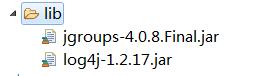
架包:
以上就是本文的全部内容,希望对大家的学习有所帮助,也希望大家多多支持脚本之家。
相关文章
 这篇文章主要介绍了Java8如何从一个list中获取某一元素集合,具有很好的参考价值,希望对大家有所帮助。如有错误或未考虑完全的地方,望不吝赐教2022-07-07
Apache Calcite进行SQL解析(java代码实例)
Calcite是一款开源SQL解析工具, 可以将各种SQL语句解析成抽象语法树AST(Abstract Syntax Tree), 之后通过操作AST就可以把SQL中所要表达的算法与关系体现在具体代码之中,今天通过代码实例给大家介绍Apache Calcite进行SQL解析问题,感兴趣的朋友一起看看吧2022-01-01 本篇文章主要介绍了Java解析Excel文件并把数据存入数据库 ,具有一定的参考价值,感兴趣的小伙伴们可以参考一下2017-05-05
 这篇文章主要给大家介绍了关于java如何获取redis日志信息与动态监控信息的方法,文中介绍的非常详细,对大家具有一定的参考价值,需要的朋友们下面来一起看看吧。2017-04-04
 这篇文章主要介绍了Java计算字符串公式的方式解读,具有很好的参考价值,希望对大家有所帮助。如有错误或未考虑完全的地方,望不吝赐教2022-12-12
 这篇文章主要为大家介绍了Autowired的注入过程源码解析,有需要的朋友可以借鉴参考下,希望能够有所帮助,祝大家多多进步,早日升职加薪2022-09-09
 这篇文章主要给大家介绍了关于Java中如何获取当前服务器的IP地址的相关资料,我们可以使用Java中的InetAddress类来获取Linux服务器的IP地址,需要的朋友可以参考下2023-07-07
解决idea中Springboot找不到BASE64Encoder或Decoder的jar包
这篇文章主要介绍了解决idea中Springboot找不到BASE64Encoder或Decoder的jar包,文中通过示例代码介绍的非常详细,对大家的学习或者工作具有一定的参考学习价值,需要的朋友们下面随着小编来一起学习学习吧2019-12-12 这篇文章主要介绍了Java 生成任意长度的验证码过程解析,文中通过示例代码介绍的非常详细,对大家的学习或者工作具有一定的参考学习价值,需要的朋友可以参考下2019-10-10
 这篇文章主要介绍了浅谈Mybatis乐观锁插件,小编觉得挺不错的,现在分享给大家,也给大家做个参考。一起跟随小编过来看看吧2017-12-12
最新评论