

详解fedora 开启 apache 并 开启目录浏览模式
更新时间:2018年07月25日 11:28:00 作者:xuyaowen
这篇文章主要介绍了fedora 开启 apache 并 开启目录浏览模式的相关资料,非常不错,具有一定的参考借鉴价值,需要的朋友可以参考下
在内网中 暂时需要一台 文件 服务器,所以准备安装一台 http服务器并开启目录访问权限。这次使用 apache 在 fedora 28 机器上:
因为 fedora 28 已经包含 httpd 软件,使用systemctl start httpd 就能进行启动。
启动时 默认开启 目录访问权限,但是首次访问网站根目录的时候,会显示test page.
进入如下文件夹:
[root@dhcp-65-15 conf.d]# pwd
/etc/httpd/conf.d
[root@dhcp-65-15 conf.d]# cat welcome.conf
#
# This configuration file enables the default "Welcome" page if there
# is no default index page present for the root URL. To disable the
# Welcome page, comment out all the lines below.
#
# NOTE: if this file is removed, it will be restored on upgrades.
#
<LocationMatch "^/+$">
  Options -Indexes
  ErrorDocument 403 /.noindex.html
</LocationMatch>
<Directory /usr/share/httpd/noindex>
  AllowOverride None
  Require all granted
</Directory>
进行注释上述文件:
[root@dhcp-65-15 conf.d]# cat welcome.conf
#
# This configuration file enables the default "Welcome" page if there
# is no default index page present for the root URL. To disable the
# Welcome page, comment out all the lines below.
#
# NOTE: if this file is removed, it will be restored on upgrades.
#
#<LocationMatch "^/+$">
#  Options -Indexes
#  ErrorDocument 403 /.noindex.html
#</LocationMatch>
#<Directory /usr/share/httpd/noindex>
#  AllowOverride None
#  Require all granted
#</Directory>
#Alias /.noindex.html /usr/share/httpd/noindex/index.html
httpd 文件配置如下所示:
<Directory "/var/www/html">
  #
  # Possible values for the Options directive are "None", "All",
  # or any combination of:
  #  Indexes Includes FollowSymLinks SymLinksifOwnerMatch ExecCGI MultiViews
  #
  # Note that "MultiViews" must be named *explicitly* --- "Options All"
  # doesn't give it to you.
  #
  # The Options directive is both complicated and important. Please see
  # http://httpd.apache.org/docs/2.4/mod/core.html#options
  # for more information.
  #
  Options indexes FollowSymLinks
  #
  # AllowOverride controls what directives may be placed in .htaccess files.
  # It can be "All", "None", or any combination of the keywords:
  #  Options FileInfo AuthConfig Limit
  #
  AllowOverride None
  #
  # Controls who can get stuff from this server.
  #
  Require all granted
</Directory>
Options indexes FollowSymLinks
这个配置表明为 开启目录权限
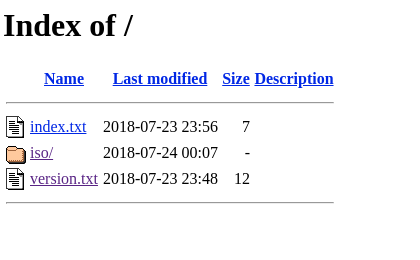
结束后,你会看到如下所示画面:
总结
以上所述是小编给大家介绍的fedora 开启 apache 并 开启目录浏览模式,希望对大家有所帮助,如果大家有任何疑问请给我留言,小编会及时回复大家的。在此也非常感谢大家对脚本之家网站的支持!
相关文章
 这篇文章主要介绍了CentOS7.5安装配置Harbor1.7的全过程,非常不错,具有一定的参考借鉴价值,需要的朋友可以参考下2019-11-11
 本文通过一段简易的代码给大家介绍Jdk1.8的安装(Linux和windows),非常不错,具有一定的参考借鉴价值,需要的朋友参考下吧2018-08-08
电脑意外关机后VMware中linux不能联网问题的解决方法
这篇文章主要为大家解决电脑意外关机后,再次开机启动VMware时发现linux不能联网的问题,具有一定的参考价值,感兴趣的小伙伴们可以参考一下2019-03-03 这篇文章主要给大家介绍了关于Linux字符终端如何用鼠标移动一个红色矩形的相关资料,文中通过示例代码介绍的非常详细,对大家学习或者使用Linux具有一定的参考学习价值,需要的朋友们下面来一起学习学习吧2019-05-05
 这篇文章主要介绍了如何使用linux启动Nacos,本文通过代码示例给大家介绍的非常详细,对大家的学习或工作具有一定的参考借鉴价值,需要的朋友可以参考下2024-03-03
 主服务器群,然后在利用Squid逆向缓存web80端口来加速自己的网站.各大门户网站象163,sina,chinaitlab之类基本都是使用的这种技术,好处是大大的有.比如加速了网络和可以防黑客(因为他们见到的都是CDN的主机)2013-04-04
 这篇文章主要介绍了Linux搭建DNS服务器,文中通过示例代码介绍的非常详细,对大家的学习或者工作具有一定的参考学习价值,需要的朋友们下面随着小编来一起学习学习吧2019-04-04
 这篇文章主要介绍了教你一步一步在linux中正确的安装Xcache加速php,需要的朋友可以参考下2017-04-04
 这篇文章主要介绍了Linux Nginx 配置SSL访问实例详解的相关资料,需要的朋友可以参考下2017-04-04
 今天小编就为大家分享一篇Linux部署python爬虫脚本,并设置定时任务的方法,具有很好的参考价值,希望对大家有所帮助。一起跟随小编过来看看吧2019-06-06
最新评论