

vue.js中toast用法及使用toast弹框的实例代码
更新时间:2018年08月27日 10:59:09 作者:新叶之扉之丹儿
这篇文章主要介绍了vue.js中toast用法及使用toast弹框的实例代码,本文给大家介绍的非常详细,具有一定的参考借鉴加载,需要的朋友可以参考下
1.首先引入
import { Toast } from 'vant'
写个小列子
绑定一个click事件

2.写事件
在methods写方法
showToast() {
    this.$toast({
     message: "今日签到+3",
     })
  },
3.效果图如下
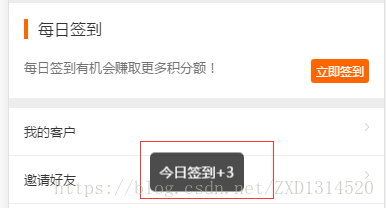
一个简单的toast提示成就好了
下面通过实例代码看下vue 中使用 Toast弹框
import { ToastPlugin,ConfirmPlugin,AlertPlugin} from 'vux'
Vue.use(ToastPlugin)
Vue.use(ConfirmPlugin)
Vue.use(AlertPlugin)
//公用的弹窗(全局变量)
Vue.prototype.showToast = function( showPositionValue,type,text,width="10em"){
 this.$vux.toast.show({
 showPositionValue: false,
 text: text,
 type: type,
 width: width,
 position: 'middle'
 })
}
//公用alert confirm
const Message = {};
Message.install = () => {
 const msg = {
   alert: config => {
   let def = {
    title:'提示',
    content:'系统异常,请重新登录后再试!',
    buttonText:'确定'
   }
   if(typeof config === 'string' || typeof config === 'number'){
  Vue.$vux.alert.show(Object.assign(def,{content:config}));
 }else{
  Vue.$vux.alert.show(Object.assign(def,config));
 }
},
 confirm: config => {
  let isConfirm = false;
  let def = {
    title:'提示',
    content:'系统异常,请重新登录后再试!',
    confirmText:'确定',
    cancelText:'取消',
    onConfirm:() =>{
    isConfirm = true;
 }
 }
  if(typeof config === 'string' || typeof config === 'number'){
   Vue.$vux.confirm.show(Object.assign(def,{content:config}));
  }else{
   Vue.$vux.confirm.show(Object.assign(def,config));
  }
 /*return new Promise((resolve,reject) => {
  if(isConfirm){
  resolve();
  }
  })*/
 },
}
 Object.entries(msg).forEach(([method,fn]) => {
  Vue.prototype[method] = fn;
})
}
Vue.use(Message)
//使用例子
_this.confirm({
 title:'提示',
 content: '确定要关闭订单',
 onConfirm() {
  console.log('取消订单了');
 }
});
总结
以上所述是小编给大家介绍的vue.js中toast用法及使用toast弹框的实例代码,希望对大家有所帮助,如果大家有任何疑问请给我留言,小编会及时回复大家的。在此也非常感谢大家对脚本之家网站的支持!
相关文章

基于Vue+element-ui 的Table二次封装的实现
这篇文章主要介绍了基于Vue+element-ui 的Table二次封装的实现,小编觉得挺不错的,现在分享给大家,也给大家做个参考。一起跟随小编过来看看吧2018-07-07
浅谈angular4.0中路由传递参数、获取参数最nice的写法
下面小编就为大家分享一篇浅谈angular4.0中路由传递参数、获取参数最nice的写法,具有很好的参考价值,希望对大家有所帮助。一起跟随小编过来看看吧2018-03-03 在Electron环境下,截屏功能相对强大,可以通过desktopCapturer获取应用视频流,实现对整个应用的截屏,而在非Electron环境下,截屏功能受限,只能截取浏览器内容,且存在iframe或base64图片加载问题2024-10-10
 Vuex是一个专为Vue.js应用程序开发的状态管理模式,它采用集中式存储管理应用的所有组件的状态,并以相应的规则保证状态以一种可预测的方式发生变化,下面这篇文章主要给大家介绍了关于vuex模块获取数据及方法的相关资料,需要的朋友可以参考下2023-03-03
 这篇文章主要介绍了vue3关于ref和reactive的区别分析,文中通过示例代码介绍的非常详细,具有一定的参考学习价值,需要的朋友们下面随着小编来一起学习吧2023-06-06
 Echarts,它是一个与框架无关的 JS 图表库,但是它基于Js,这样很多框架都能使用它,例如Vue,估计IONIC也能用,文中通过示例代码介绍的非常详细,对大家的学习或者工作具有一定的参考学习价值,需要的朋友们下面随着小编来一起学习学习吧2022-08-08
如何基于uniapp开发android播放webrtc流详解
这篇文章主要介绍了在uniapp中播放RTSP和WebRTC协议流的区别,以及如何封装WebrtcVideo组件和音视频实时通讯的实现,文中通过代码介绍的非常详细,需要的朋友可以参考下2025-02-02 这篇文章主要介绍了Vue中Quill富文本编辑器的使用教程,包括自定义工具栏、自定义字体选项、图片拖拽上传、图片改变大小等使用方法,具有一定的参考价值,感兴趣的小伙伴们可以参考一下2018-09-09
vue3+Element Plus实现自定义穿梭框的详细代码
找到一个好用的vue树形穿梭框组件都很难,又不想仅仅因为一个穿梭框在element-ui之外其他重量级插件,本文给大家分享vue3+Element Plus实现自定义穿梭框的示例代码,感兴趣的朋友一起看看吧2024-01-01 这篇文章主要为大家详细介绍了vue+F2生成折线图的方法,文中示例代码介绍的非常详细,具有一定的参考价值,感兴趣的小伙伴们可以参考一下2022-04-04
最新评论